
This entry is part 3 of 9 in the User Submitted Image Galleries Series
- User Submitting Gallery Images – Part 1
- User Submitted Gallery Images – Part 2
- User Submitted Image Gallery – Part 3
- User Submitted Image Gallery – Part 4
- User Submitted Image Gallery – Part 5
- User Submitted Image Gallery – Part 6
- User Submitted Image Gallery – Part 7
- User Submitted Image Gallery – Part 8
- User Submitted Image Gallery – Final Overview
In part three of the User Submitted Image Galleries series, we’re going to look at automatically creating our “guest” user account, and process the image uploads from the submission form. This is where our plugin really begins to take shape. After this section, we will get into actually displaying our images on the “gallery” page.
Create the Guest User Account
Our gallery is going to accept submissions from guests and logged-in users. Anytime a logged-in user submits an image, the image will be attributed to their user ID, but when a guest submits an image, the submission will need to be attributed to a “guest” user account. In order to do this, we’re going to have our plugin create a “guest” user account upon activation.
To do this, the first thing we need to do is add one more constant to our main plugin file, so open “user-image-gallery.php” and add this:
// plugin base file if(!defined('UIG_PLUGIN_BASE_FILE')) { define('UIG_PLUGIN_BASE_FILE', __FILE__); } |
This is a constant that refers to the main plugin file. You should put this below our other constants.
Now, create a new file called “setup.php” and place it in the “includes” folder. This is going to be the file that contains all functions that must fun when the plugin is activated.
For the time being, our “setup.php” file will contain just one function (the one to create the guest user), and it looks like this:
function uig_setup() { if(!username_exists('guest')) { // create the default "Guest" user wp_create_user( 'guest', wp_generate_password( 12, false) ); } } register_activation_hook(UIG_PLUGIN_BASE_FILE, 'uig_setup'); |
This function first checks to see if the username “guest” exists, and then proceeds to create it with a random password if it does not exist.
The uig_setup() function is attached to the “register_activation_hook” hook because we want this function to run when the plugin is activated, but no other time. The constant we defined a few moments ago is used as the first parameter of the hook. The second parameter is the name of our setup function, uig_setup.
Now we need to “pull” this file into the main plugin file by including it, just as we have done several times before. So once again in “user-image-gallery.php”, place this in the includes section:
include(UIG_PLUGIN_DIR . '/includes/setup.php'); |
When we activate the plugin now, the “guest” user will be created, if it does not already exist. Note, if you have activated the plugin before adding this function, then you should deactivate and activate again, otherwise the user will not be created.
Process the Image Uploads
It is now time to write the functions that will process our uploaded images from the submission form we created in the previous section.
All of the functions for this section are going to be stored in a file called “upload-image.php”, so go ahead and create it at this time and save it inside the “includes/” folder as before. Once you have done that, also include it into the main plugin file, just as we have done several times already:
include(UIG_PLUGIN_DIR . '/includes/upload-image.php'); |
We will start by creating the function that interprets the form submission. This function will require several other functions (for error checking, saving attachments, etc), but we will write those after this one.
So the shell of our function, which is added to “upload-image.php”, looks like this:
function uig_upload_image_submission() { // process image here } add_action('init', 'uig_upload_image_submission'); |
Our function is attached to the “init” hook because it allows the function to read the $_POST variables that are submitted from the upload form. If you’re not at least a little bit familiar with $_POST variables, I highly recommend you do some research into them. The PHP manual’s page on them would be a good place to start.
The first thing we need to do in the function is check whether our image upload form has been submitted, and that it has been submitted from the correct location. To do that we check for two things:
1. The “uig_action” field, which must be set to “upload”. This was one of our hidden fields on the upload form.
2. The “uig_upload_nonce” field. This is the nonce that we use for security purposes. If you’re not familiar with nonces, then read my quick tutorial on them.
We only process the image upload if both of these fields validate.
function uig_upload_image_submission() { // check to see if an image is being uploaded if(isset($_POST['uig_action']) && $_POST['uig_action'] == 'upload' && wp_verify_nonce($_POST['uig_upload_nonce'], 'uig-upload-nonce') ) { // process images here } } add_action('init', 'uig_upload_image_submission'); |
Everything below will be placed where the “// process images here” comment is. To make it easier to follow, I’m going to break the function up into sections. At the end I will combine it all together.
So once we have verified that an image is being uploaded, we want to setup some variables to make the $_POST data easier to access.
/* setup the variables */ if(isset($_POST['uig_user_email'])) { $user_email = strip_tags(stripslashes($_POST['uig_user_email'])); // set $user_id to the ID of our "guest" user $guest_user_data = get_userdatabylogin('guest'); $user_id = $guest_user_data->ID; } else { $user_id = intval(strip_tags(stripslashes($_POST['uig_user_id']))); } $name = strip_tags(stripslashes($_POST['uig_image_name'])); $url = strip_tags($_POST['uig_referrer']); $desc = strip_tags(stripslashes($_POST['uig_image_desc'])); $cat = strip_tags(stripslashes($_POST['uig_image_cat'])); $tags = strip_tags(stripslashes($_POST['uig_image_tags'])); $image = $_FILES['uig_image_file']['name']; $size = $_FILES['uig_image_file']['size']; $ext = uig_get_extension($image); |
The first we do is check where the “uig_user_email” field has been posted. If it has, then our submission is coming from a guest account, which means we need to get the user data of the “guest” user so that we can attribute this image to the “guest” account. If the “uig_user_email” field has not been posted, then we are processing an image from a logged in user, and we can get their user ID from the “uig_user_id” field.
After we have setup the $user_id variable, we store each of the image fields (name, description, categories, etc), into their own separate variables. Each of the fields is sanitized when we setup the variables.
The extension (file type) of the image is determined using the uig_get_extension() function, which will be written later.
Once we have setup each of the fields in their own variables, we need to check that each field is valid.
if(!$image) { uig_errors()->add('no_image', __('Please upload an image', 'uig')); } if($ext != 'jpg' || $ext != 'png' || $ext != 'gif') { uig_errors()->add('wrong_format', __('Please only upload jpg, png, or gif images.', 'uig')); } // max is 1.10 mb if($size > 1100000 ) { uig_errors()->add('exceeded_filesize', __('Your file is too large', 'uig')); } if(isset($_POST['uig_user_email']) && !is_email($_POST['uig_user_email'])) { // this is only checked for if submitting as a guest uig_errors()->add('invalid_email', __('Enter a valid email address', 'uig')); } if(strlen(trim($name)) < 1) { uig_errors()->add('image_name', __('Please enter a name for the image', 'uig')); } if($desc == 'Describe your image' || $desc == '') { uig_errors()->add('image_description', __('Please describe your image', 'uig')); } if($tags == '') { uig_errors()->add('image_tags', __('Please include at least one tag', 'uig')); } |
We check each field, one by one. Anytime a field doesn’t match the requirements, we use the uig_errors() function to record the error. We will write this function in a little bit, but for the moment let it suffice to say that the function stores the error and allows us to display it to the user on the submission page after they attempt to upload the image.
You can adjust each of the conditionals to match your specific requires, but the ones I have setup should be pretty standard.
Next we need to check and see whether any errors were recorded. If errors are present, then we redirect back to the submission page and show the errors to the user. If there are no errors present, then we process the image.
// retrieve all error messages, if any $errors = uig_errors()->get_error_messages(); // everything ok if(empty($errors)) { // no errors, upload the image } |
If the $errors variable is not empty, then the submit gallery page is simply reloaded and the error messages are displayed.
So now to process the image upload when there are no errors:
// everything ok if(empty($errors)) { $image_data = array( 'post_title' => $name, 'post_content' => $desc, 'post_status' => 'pending', 'post_author' => $user_id, 'post_type' => 'uig_image', 'tax_input' => array( 'uig_image_category' => array( $cat ) ) ); // create the pending IMAGE post $image_id = wp_insert_post($image_data); // the IMAGE post was created okay if($image_id) { $tags = str_replace(' ', '', explode(',', $tags)); wp_set_object_terms($image_id, $tags, 'uig_image_tag'); // process the image upload and set it as a thumbnail if ($_FILES) { foreach ($_FILES as $file => $array) { $thumbnail = uig_insert_attachment($file, $image_id, true); } } /********************************* * setup and send the email *********************************/ $user = get_userdata($user_id); $image_message .= '<html><body><div>'; $image_message .= '<h3>' . __('New image submitted', 'uig') . '</h3>'; $image_message .= '<strong>' . __('Submitted by', 'uig') . '</strong>: ' . $user->display_name . '<br/>'; $image_message .= '<strong>' . __('Image Name', 'uig') . '</strong>: ' . $name . '<br/>'; $image_message .= '<strong>' . __('Image Description', 'uig') . '</strong>: ' . $desc . '<br/>'; $image_message .= '<strong><a href="' . home_url() . '/wp-admin/post.php?post=' . $image_id . '&action=edit">' . __('View Image', 'uig') . '</a></strong><br/>'; $image_message .= '</div>'; $image_message .= '</body></html>'; $headers .= "From:" . $user->display_name . "<" . get_bloginfo('admin_email') . ">\r\n"; $headers .= "MIME-Version: 1.0\r\n"; $headers .= "Content-Type: text/html; charset=ISO-8859-1\r\n"; wp_mail(get_bloginfo('admin_email'), __('New Image Submitted', 'uig'), $image_message, $headers); $url = add_query_arg('image-submitted', '1', $url); wp_redirect($url); exit; } else { $url = add_query_arg('image-submitted', '0', $url); wp_redirect($url); exit; } } |
There is a lot that happens in this section. First we setup the $image_data variable, which is an array of all the information we wish to insert into the image post object. This array is pretty sel explanatory. The only part that is a little difficult is the “tax_input” parameter. This allows us to set our image to the category selected on the upload form.
Once the $image_data array is setup, we use the wp_insert_post() to create the image post for us. If the image post is successfully created, the ID of the image is returned. We then use the $image_id variable to check that the image was successfully created. If it wasn’t, we redirect back to the submission page and display an error message.
If the image is successfully created, we proceed to the final processing steps. The first one of these is to set the image tags, which is done with this:
$tags = explode(',', str_replace(', ', ',', $tags)); wp_set_object_terms($image_id, $tags, 'uig_image_tag'); |
The $tags variable contains a comma delimitated list of tags, so we use the explode() function to break them up into an array, and to ensure that all tags get inserted correctly, we get rid of all spaces that immediately follow commas.
Next, the uploaded image file is attached to the image post we have created, and is set as the Featured Image:
// process the image upload and set it as a thumbnail if ($_FILES) { foreach ($_FILES as $file => $array) { $thumbnail = uig_insert_attachment($file, $image_id, true); } } |
The uig_insert_attachment() function will be written in a few moments.
Once the featured image has been set, we need to setup the email that is sent to the site administrator, alerting them that a new image has been submitted for review.
/********************************* * setup and send the email *********************************/ $user = get_userdata($user_id); $image_message .= '<html><body><div>'; $image_message .= '<h3>' . __('New image submitted', 'uig') . '</h3>'; $image_message .= '<strong>' . __('Submitted by', 'uig') . '</strong>: ' . $user->display_name . '<br/>'; $image_message .= '<strong>' . __('Image Name', 'uig') . '</strong>: ' . $name . '<br/>'; $image_message .= '<strong>' . __('Image Description', 'uig') . '</strong>: ' . $desc . '<br/>'; $image_message .= '<strong><a href="' . admin_url('post.php?post=' . $image_id . '&action=edit') . '">' . __('View Image', 'uig') . '</a></strong><br/>'; $image_message .= '</div>'; $image_message .= '</body></html>'; $headers .= "From:" . $user->display_name . "<" . get_bloginfo('admin_email') . ">\r\n"; $headers .= "MIME-Version: 1.0\r\n"; $headers .= "Content-Type: text/html; charset=ISO-8859-1\r\n"; wp_mail(get_bloginfo('admin_email'), __('New Image Submitted', 'uig'), $image_message, $headers); |
There’s not much to this section. We’re just setting up an HTML email and adding the image information to it. At the bottom, we use the wp_mail() function to send the “New Image Submitted” message to the admin email.
And lastly, once the email has been sent, we redirect the user back to the submission page:
$url = add_query_arg('image-submitted', '1', $url); wp_redirect($url); exit; |
We attach an extra $_GET variable so that our submission page can know to display the “success” message.
So now, with everything combined, our processing function looks like this:
function uig_upload_image_submission() { // check to see if an image is being uploaded if(isset($_POST['uig_action']) && $_POST['uig_action'] == 'upload' && wp_verify_nonce($_POST['uig_upload_nonce'], 'uig-upload-nonce') ) { /* setup the variables */ if(isset($_POST['uig_user_email'])) { $user_email = strip_tags(stripslashes($_POST['uig_user_email'])); // set $user_id to the ID of our "guest" user $guest_user_data = get_userdatabylogin('guest'); $user_id = $guest_user_data->ID; } else { $user_id = intval(strip_tags(stripslashes($_POST['uig_user_id']))); } $name = strip_tags(stripslashes($_POST['uig_image_name'])); $url = strip_tags($_POST['uig_referrer']); $desc = strip_tags(stripslashes($_POST['uig_image_desc'])); $cat = strip_tags(stripslashes($_POST['uig_image_cat'])); $tags = strip_tags(stripslashes($_POST['uig_image_tags'])); $image = $_FILES['uig_image_file']['name']; $size = $_FILES['uig_image_file']['size']; $ext = uig_get_extension($image); if(!$image) { uig_errors()->add('no_image', __('Please upload an image', 'uig')); } if($ext != 'jpg' || $ext != 'png' || $ext != 'gif') { uig_errors()->add('wrong_format', __('Please only upload jpg, png, or gif images.', 'uig')); } // max is 1.10 mb if($size > 1100000 ) { uig_errors()->add('exceeded_filesize', __('Your file is too large', 'uig')); } if(isset($_POST['uig_user_email']) && !is_email($_POST['uig_user_email'])) { // this is only checked for if submitting as a guest uig_errors()->add('invalid_email', __('Enter a valid email address', 'uig')); } if(strlen(trim($name)) < 1) { uig_errors()->add('image_name', __('Please enter a name for the image', 'uig')); } if($desc == 'Describe your image' || $desc == '') { uig_errors()->add('image_description', __('Please describe your image', 'uig')); } if($tags == '') { uig_errors()->add('image_tags', __('Please include at least one tag', 'uig')); } // retrieve all error messages, if any $errors = uig_errors()->get_error_messages(); // everything ok if(empty($errors)) { $image_data = array( 'post_title' => $name, 'post_content' => $desc, 'post_status' => 'pending', 'post_author' => $user_id, 'post_type' => 'uig_image', 'tax_input' => array( 'uig_image_category' => array( $cat ) ) ); // create the pending IMAGE post $image_id = wp_insert_post($image_data); // the IMAGE post was created okay if($image_id) { $tags = explode(',', str_replace(', ', ',', $tags)); wp_set_object_terms($image_id, $tags, 'uig_image_tag'); // process the image upload and set it as a thumbnail if ($_FILES) { foreach ($_FILES as $file => $array) { $thumbnail = uig_insert_attachment($file, $image_id, true); } } /********************************* * setup and send the email *********************************/ $user = get_userdata($user_id); $image_message .= '<html><body><div>'; $image_message .= '<h3>' . __('New image submitted', 'uig') . '</h3>'; $image_message .= '<strong>' . __('Submitted by', 'uig') . '</strong>: ' . $user->display_name . '<br/>'; $image_message .= '<strong>' . __('Image Name', 'uig') . '</strong>: ' . $name . '<br/>'; $image_message .= '<strong>' . __('Image Description', 'uig') . '</strong>: ' . $desc . '<br/>'; $image_message .= '<strong><a href="' . admin_url('post.php?post=' . $image_id . '&action=edit') . '">' . __('View Image', 'uig') . '</a></strong><br/>'; $image_message .= '</div>'; $image_message .= '</body></html>'; $headers .= "From:" . $user->display_name . "<" . get_bloginfo('admin_email') . ">\r\n"; $headers .= "MIME-Version: 1.0\r\n"; $headers .= "Content-Type: text/html; charset=ISO-8859-1\r\n"; wp_mail(get_bloginfo('admin_email'), __('New Image Submitted', 'uig'), $image_message, $headers); $url = add_query_arg('image-submitted', '1', $url); wp_redirect($url); exit; } else { $url = add_query_arg('image-submitted', '0', $url); wp_redirect($url); exit; } } } } add_action('init', 'uig_upload_image_submission'); |
We now have just four more functions to write to complete our image processing file. The first is uig_get_extension(), which will determine the extension of our uploaded file. It’s very simple:
function uig_get_extension($str) { $parts = explode('.', $str); return end($parts); } |
If our uploaded image is a JPG, the function will return “jpg”. Note the lack of a “.” in the returned extension.
The second of our four final functions is uig_insert_attachment(), which will save our uploaded file to the /uploads/ directory, generate all of the image sizes, and attach the file to the image post.
// processes the uploaded images and attaches them to the post as a thumbnail function uig_insert_attachment($file_handler, $post_id, $setthumb = false) { // check to make sure its a successful upload if ($_FILES[$file_handler]['error'] !== UPLOAD_ERR_OK) return false; require_once(ABSPATH . "wp-admin" . '/includes/image.php'); require_once(ABSPATH . "wp-admin" . '/includes/file.php'); require_once(ABSPATH . "wp-admin" . '/includes/media.php'); $attach_id = media_handle_upload( $file_handler, $post_id ); // set this image as the Featured Image if ($setthumb) update_post_meta($post_id, '_thumbnail_id', $attach_id); return $attach_id; } |
This function uses the core media_handle_upload() function to save the image and generate all of the available image sizes. It returns the ID of the attachment, which we then use with the update_post_meta() function to set the image as the Featured Image.
Now there are just two functions left, one to handle the storing of error messages, and one to display the error messages after submitting an image with invalid data.
We’ll write the uig_errors() function first:
function uig_errors(){ static $wp_error; // Will hold global variable safely return isset($wp_error) ? $wp_error : ($wp_error = new WP_Error(null, null, null)); } |
This function uses the WP_Error class, which you can read more about here. The class is rather complex, so I’m not going to explain it here.
Lastly we need to write the function that displays any error messages present after submission:
// displays error messages from form submissions function uig_show_error_messages() { if($codes = uig_errors()->get_error_codes()) { echo '<div class="uig_message error">'; // Loop error codes and display errors foreach($codes as $code){ $message = uig_errors()->get_error_message($code); echo '<p class="rcp_error"><span><strong>' . __('Error', 'uig') . '</strong>: ' . $message . '</span></p>'; } echo '</div>'; } } |
This checks to see if any errors have been recorded with uig_errors(), and then displays each error if there are any. Remember that this function was used in Part Two in the submission form.
That is it. We can now upload images via our submission form. When you upload an image, an email will be sent to the admin, notifying them that an image needs to be reviewed, and the image will be saved in the dashboard with a status of “pending”. See the screenshot below for an idea of what submitted images will look like.
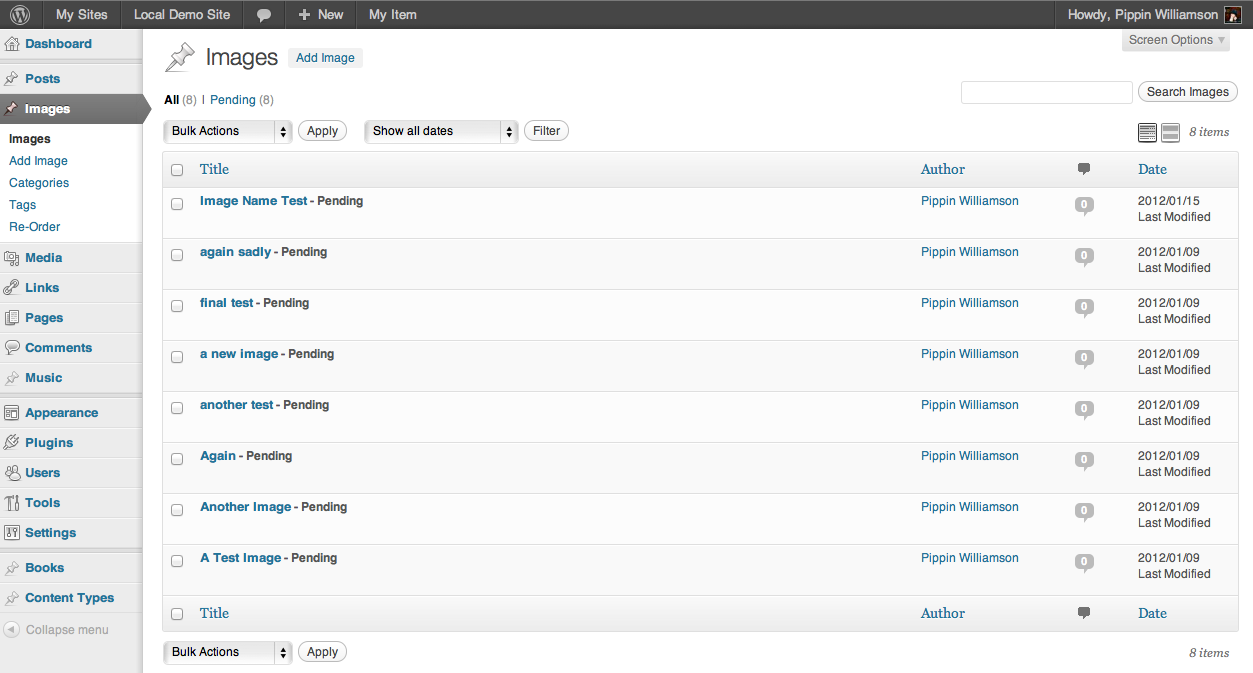
In the next couple of parts in this series, we will be adding a lot more to this plugin:
- we will create a short code to display the user submitted images on a gallery page
- we’ll make a dashboard widget to display pending images
- a sidebar widget to display recently approved images will be added
- we will modify the dashboard columns on in the images screen to include image categories, tags, and thumbnails
So see you soon in part three!
Can you make this a plug in? I would purchase it NOW!
Once complete, it will be made into a plugin ready to download / purchase. There are a couple of parts left to the series though before the plugin will be ready.
Your plug in support is rock solid! Do you have and idea when it will be available? My site launch will depend on it.
Not yet sure. There is quite a bit of work left to do on the plugin. I’m hoping to finish Part 4 sometime in the next three days. Once that’s done, the bulk of the plugin will be done.
OK, no problem. Keep it up!
I’m really interested in a plugin doing this, hope you will launch it soon!
I’m working on a client website and he wants this feature.
Thank you!
I hope to get it done soon too 🙂
Not sure if you were planning on it — but a voting option would really help as no other plugin does it very well.
A voting option for the images will not be included with this plugin, but maybe I will do a tutorial on creating a voting plugin in general, for all post types.
Hi Pippin,
very useful plug in! Need help with changing guest with part that user have to login to upload image. can you help?
As a matter a fact this one from http://cgcookie.com/gallery/ is exactly what I need. can you list what plugins I have to add in order to make all of this that you have done here?
regards
St.
The CG Cookie one is extremely heavily modified version of this. It’s all custom work.
ok. Can you help with changing guest with part that user have to login to upload image?
Thanks in advanced
St
You seem to have an error when you are checking extensions. Your code has “||”. It should use “&&”. Otherwise, it always produces an error.
Also, when the $ext variable is set from the POST, I wrapped it in strtolower() to make sure that capitalization alone wouldn’t generate an error.
Which line are you seeing the error on?
The error is in the line that reads:
if($ext != ‘jpg’ || $ext != ‘png’ || $ext != ‘gif’) {
Hi, I’ve been working on your plugins, but I cannot get the categories to be attached to the image. I’ve checked that on this line,
$cat = strip_tags(stripslashes($_POST[‘uig_image_cat’]));
the $cat value is correct.
However, the user submits, the category is not attached.
Can you help on this?
Hi Pippin,
I’ve been trying your plugins. However, I couldn’t get the category input to be attached to the post. Up until this line,
$cat = strip_tags(stripslashes($_POST[‘uig_image_cat’]));
the value of $cat is still correct. However, the value is not attached to the post. When I check at the dashboard, the category is not selected. Can you help on this?
Thanks.
Have you modified the plugin at all?
No, I didn’t.
However, I tested on different machine, it worked. But on my machine, it’s not.
Hi,
I noticed that the problem only happens if the uploader is not the admin. If the uploaded is the admin, the category works fine.
And also I have found the solution.
I ditched this line
‘tax_input’ => array( ‘uig_image_category’ => array( $cat ) )
and use wp_set_object_terms to set the category.
If I wanted to save all user images in a different folder (such as /uploads/user_images/) what would be the best way to handle that?
Thanks,
Chris