
Front end registration and login forms (meaning placed within your site’s pages, and not the default wp-login.php) are one of the elements that really take a site out of the “standard WordPress” zone. With forms that allow your users to signup and login without ever leaving your main site, you provide a much more consistent and comfortable environment. They can provide that next level of integration that really makes your site zing. They also provide you (the developer/designer) a much higher level of control, especially in regards to styling and functionality. So it’s time to learn how to create them from scratch.
Check out the plugin I’ve released that was inspired by this tutorial.
This is one of the most advanced, and in depth, tutorials that has yet to be written on this site. I’m going to walk you through creating the plugin one function at a time. If you’re not familiar with how to write plugins yet, I highly advise that you go through my Writing Your First WordPress Plugin series.
The finished plugin that you will create with this tutorial will provide two short codes: one that displays a a regular login form, and one that shows a registration form that includes the following fields:
- Username
- First Name
- Last Name
- Password
Both forms will be fully equipped with error messages that alert the user of problems with their registration or login attempts.
If you are a registered member, you will have access to download the complete plugin at the bottom of the page. The plugin I have put together for this tutorial is minimal in features and styling, as it is used primarily as an example, but there will be a full-featured version of this plugin released some time in the coming weeks.
Enough chatter, on to the good stuff!
Set Up The Plugin Structure
This plugin is relatively simple, in terms of folder/file structure. There are only a couple of files, as illustrated in the following screenshot:

Once you have created each of the necessary files, open “front-end-registration-login.php”. All of the functions that we’re going to write will be placed in this file.
Now, at the top of the file, enter all of the plugin details, like so:
<?php /* Plugin Name: Front End Registration and Login Plugin URI: https://pippinsplugins.com/creating-custom-front-end-registration-and-login-forms Description: Provides simple front end registration and login forms Version: 1.0 Author: Pippin Williamson Author URI: https://pippinsplugins.com */ |
As you should know, assuming you’ve written at least one plugin, this makes our plugin available to WordPress. Now onto the bulk of the plugin.
Create the Form Display Short Codes
As mentioned above, the plugin will have two short codes: one for the login form, and one for the registration form. We will write a function for each.
So first, the function that displays our registration form looks like this:
// user registration login form function pippin_registration_form() { // only show the registration form to non-logged-in members if(!is_user_logged_in()) { global $pippin_load_css; // set this to true so the CSS is loaded $pippin_load_css = true; // check to make sure user registration is enabled $registration_enabled = get_option('users_can_register'); // only show the registration form if allowed if($registration_enabled) { $output = pippin_registration_form_fields(); } else { $output = __('User registration is not enabled'); } return $output; } } add_shortcode('register_form', 'pippin_registration_form'); |
This function is pretty straight forward. First, we check to see if the current user is already logged in, and only show the registration form if they are NOT logged in. Next, we load a global variable called $pippin_load_css, and then we set that variable to TRUE. This is used later on when we load the form CSS.
Next, we load an option that checks whether user registration is enabled. Obviously, we can’t show the registration form if WordPress doesn’t allow users to register themselves. If user registration is enabled, we setup an $output variable that contains the actual registration form, which is loaded with the pippin_registration_form_fields() function (we’ll get to this in a bit). If user registration is not enabled, we show a message alerting the user of that fact.
Finally, we return the $output variable, which contains the complete registration form HTML.
After the closing }, we use the add_shortcode() function to connect our form function with the [register_form] short code.
Now let’s create the function and short code for our login form. It looks very, very similar so I will not explain nearly as much of the code.
// user login form function pippin_login_form() { if(!is_user_logged_in()) { global $pippin_load_css; // set this to true so the CSS is loaded $pippin_load_css = true; $output = pippin_login_form_fields(); } else { // could show some logged in user info here // $output = 'user info here'; } return $output; } add_shortcode('login_form', 'pippin_login_form'); |
Aside from being a bit slimmer, the only real difference in this code, as compared to the registration form short code, is the function that we use to retrieve the login form HTML: pippin_login_form_fields().
Create the Registration and Login Form HTML
We have created the two short codes used to display or forms, now we need to create the forms themselves. We will start with the registration form.
The forms themselves are pretty simple, just plain HTML forms, but there are a couple of elements that make them special, primarily the error message displays.
// registration form fields
function pippin_registration_form_fields() {

	ob_start(); ?>
		<h3 class="pippin_header"><?php _e('Register New Account'); ?></h3>

		<?php
		// show any error messages after form submission
		pippin_show_error_messages(); ?>

		<form id="pippin_registration_form" class="pippin_form" action="" method="POST">
			<fieldset>
				<p>
					<label for="pippin_user_Login"><?php _e('Username'); ?></label>
					<input name="pippin_user_login" id="pippin_user_login" class="required" type="text"/>
				</p>
				<p>
					<label for="pippin_user_email"><?php _e('Email'); ?></label>
					<input name="pippin_user_email" id="pippin_user_email" class="required" type="email"/>
				</p>
				<p>
					<label for="pippin_user_first"><?php _e('First Name'); ?></label>
					<input name="pippin_user_first" id="pippin_user_first" type="text"/>
				</p>
				<p>
					<label for="pippin_user_last"><?php _e('Last Name'); ?></label>
					<input name="pippin_user_last" id="pippin_user_last" type="text"/>
				</p>
				<p>
					<label for="password"><?php _e('Password'); ?></label>
					<input name="pippin_user_pass" id="password" class="required" type="password"/>
				</p>
				<p>
					<label for="password_again"><?php _e('Password Again'); ?></label>
					<input name="pippin_user_pass_confirm" id="password_again" class="required" type="password"/>
				</p>
				<p>
					<input type="hidden" name="pippin_register_nonce" value="<?php echo wp_create_nonce('pippin-register-nonce'); ?>"/>
					<input type="submit" value="<?php _e('Register Your Account'); ?>"/>
				</p>
			</fieldset>
		</form>
	<?php
	return ob_get_clean();
} |
Note that the function is the same as was used on line 17 of pippin_registration_form().
At the very top of this function definition we start the output buffer with ob_start(). This allows us to easily (and safely) write out the complete HTML of the form, without having to worry about using echo functions or anything like that.
The __() and _e() functions are used for localization. If you’re not familiar with this, then read / watch my extensive tutorial on localizing plugins.
Just before the start of the HTML form, there is a function called pippin_show_error_messages(). This is used to show any error messages that are logged after a user tries to submit the form. This function will be explained later.
As stated in the introduction, this form includes fields for:
- Username
- First Name
- Last Name
- Password
- Password (confirmation)
At the bottom of the form there is also a nonce field. This is used for security purposes and will allow us to verify that the form was submitted from this page (the page with the short code), and not anywhere else, such as an external site.
Now we write a very similar function for the login form HTML:
// login form fields
function pippin_login_form_fields() {

	ob_start(); ?>
		<h3 class="pippin_header"><?php _e('Login'); ?></h3>

		<?php
		// show any error messages after form submission
		pippin_show_error_messages(); ?>

		<form id="pippin_login_form"  class="pippin_form"action="" method="post">
			<fieldset>
				<p>
					<label for="pippin_user_Login">Username</label>
					<input name="pippin_user_login" id="pippin_user_login" class="required" type="text"/>
				</p>
				<p>
					<label for="pippin_user_pass">Password</label>
					<input name="pippin_user_pass" id="pippin_user_pass" class="required" type="password"/>
				</p>
				<p>
					<input type="hidden" name="pippin_login_nonce" value="<?php echo wp_create_nonce('pippin-login-nonce'); ?>"/>
					<input id="pippin_login_submit" type="submit" value="Login"/>
				</p>
			</fieldset>
		</form>
	<?php
	return ob_get_clean();
} |
Both the registration and login form short codes will now display their complete forms, though they won’t function at all yet. So it’s time to begin writing the data processing functions.
Processing the Login Form Data
We will start with the login form because it is simpler. Basically what we’re going to do is this:
1. Check that a username has been entered and that the form nonce (for security) verifies.
2. Check that the username entered matches one that is registered with WordPress.
3. Verify that the correct password has been entered.
4. Record an error if any of these conditions are not met.
5. Log the user in if there are no errors.
So, here’s the complete function that handles the login form data:
// logs a member in after submitting a form function pippin_login_member() { if(isset($_POST['pippin_user_login']) && wp_verify_nonce($_POST['pippin_login_nonce'], 'pippin-login-nonce')) { // this returns the user ID and other info from the user name $user = get_userdatabylogin($_POST['pippin_user_login']); if(!$user) { // if the user name doesn't exist pippin_errors()->add('empty_username', __('Invalid username')); } if(!isset($_POST['pippin_user_pass']) || $_POST['pippin_user_pass'] == '') { // if no password was entered pippin_errors()->add('empty_password', __('Please enter a password')); } // check the user's login with their password if(!wp_check_password($_POST['pippin_user_pass'], $user->user_pass, $user->ID)) { // if the password is incorrect for the specified user pippin_errors()->add('empty_password', __('Incorrect password')); } // retrieve all error messages $errors = pippin_errors()->get_error_messages(); // only log the user in if there are no errors if(empty($errors)) { wp_setcookie($_POST['pippin_user_login'], $_POST['pippin_user_pass'], true); wp_set_current_user($user->ID, $_POST['pippin_user_login']); do_action('wp_login', $_POST['pippin_user_login']); wp_redirect(home_url()); exit; } } } add_action('init', 'pippin_login_member'); |
Since I’ve already explained the logic to you, please read through the comments in the code to see exactly what each piece does.
Note, the pippin_errors() function has not been written yet, we’ll get to that in a moment.
Once we get through all of the validation checks, and assuming there were no errors (this is checked on line 29 with the empty() function), we have to do a couple of things to actually the log the user in. First we set the browser cookie for the user. Second we tell WordPress who the (now) current user is. Third, we perform the actual “login” function with do_action(‘wp_login’,$_POST[‘pippin_user_login’]). And lastly, we redirect the now logged in user to the home page.
The user is now completely logged in.
After the closing }, we use the add_action() function, along with the “init” hook to attach our processing function to the WordPress load process. Without this, our function would sit idle and would not interpret any of the data sent from our login form.
Processing Our Registration Form Data
Just like with the login form data processing function, we are going to write a function that will interpret the data sent from the registration form, except this one is a little more complex.
The function will go through a variety of validation checks, and if everything checks out, the new user will be created and logged in. So the function will:
1. Make sure that a username has been entered and that the nonce verifies, to confirm the form has been submitted from the correct location.
2. Each of the posted variables (username, email, password, etc) will be assigned to a variable.
3. The core registration.php file will be loaded into our function. Without it, we cannot perform many of the validation checks needed.
4. The entered username will be compared against the database to make sure it has not already been registered by a different user.
5. The entered username will be checked to make sure it is valid, in terms of characters used, length, etc.
6. The entered username is checked to make sure it is not blank.
7. The entered email is checked to ensure it is a valid email.
8. The entered email is checked against the database to ensure it is not already registered.
9. The entered password is checked to ensure it is now blank.
10. The entered password is checked against the confirm password to ensure the user has entered their password correctly.
11. Errors are logged for any of the above checks that failed.
12. If there are no errors, the new user is added to the database.
12 (a). If the new user was successfully added, an email is sent to the new user, and also to the site admin, alerting them of the user registration.
12 (b). The new user is logged in (with the same process as the process login function) and redirected back to the home page.
There are a lot of checks, but they are all needed to ensure that everything works correctly. So the entire function is:
// register a new user function pippin_add_new_member() { if (isset( $_POST["pippin_user_login"] ) && wp_verify_nonce($_POST['pippin_register_nonce'], 'pippin-register-nonce')) { $user_login = $_POST["pippin_user_login"]; $user_email = $_POST["pippin_user_email"]; $user_first = $_POST["pippin_user_first"]; $user_last = $_POST["pippin_user_last"]; $user_pass = $_POST["pippin_user_pass"]; $pass_confirm = $_POST["pippin_user_pass_confirm"]; // this is required for username checks require_once(ABSPATH . WPINC . '/registration.php'); if(username_exists($user_login)) { // Username already registered pippin_errors()->add('username_unavailable', __('Username already taken')); } if(!validate_username($user_login)) { // invalid username pippin_errors()->add('username_invalid', __('Invalid username')); } if($user_login == '') { // empty username pippin_errors()->add('username_empty', __('Please enter a username')); } if(!is_email($user_email)) { //invalid email pippin_errors()->add('email_invalid', __('Invalid email')); } if(email_exists($user_email)) { //Email address already registered pippin_errors()->add('email_used', __('Email already registered')); } if($user_pass == '') { // passwords do not match pippin_errors()->add('password_empty', __('Please enter a password')); } if($user_pass != $pass_confirm) { // passwords do not match pippin_errors()->add('password_mismatch', __('Passwords do not match')); } $errors = pippin_errors()->get_error_messages(); // only create the user in if there are no errors if(empty($errors)) { $new_user_id = wp_insert_user(array( 'user_login' => $user_login, 'user_pass' => $user_pass, 'user_email' => $user_email, 'first_name' => $user_first, 'last_name' => $user_last, 'user_registered' => date('Y-m-d H:i:s'), 'role' => 'subscriber' ) ); if($new_user_id) { // send an email to the admin alerting them of the registration wp_new_user_notification($new_user_id); // log the new user in wp_setcookie($user_login, $user_pass, true); wp_set_current_user($new_user_id, $user_login); do_action('wp_login', $user_login); // send the newly created user to the home page after logging them in wp_redirect(home_url()); exit; } } } } add_action('init', 'pippin_add_new_member'); |
Again, just after the closing }, we use the “init” hook to tie our function to the loading process of WordPress, so that the form fields can be interpreted after posting.
The Error Logging and Display Functions
It is now time to write two more functions; one that will log the error messages, and one that will display them.
First, for logging error messages:
// used for tracking error messages function pippin_errors(){ static $wp_error; // Will hold global variable safely return isset($wp_error) ? $wp_error : ($wp_error = new WP_Error(null, null, null)); } |
This function does nothing more than setup an instance of the WP_Error class. The way this error class works is beyond the scope of this tutorial, so I’ll leave that investigation up to you. This is the function that is used anytime we need to log an error message because a form field did not validate.
Now, to display the error messages. You may remember a function from our short code function definitions called pippin_show_error_messages(). Well, here it is:
// displays error messages from form submissions function pippin_show_error_messages() { if($codes = pippin_errors()->get_error_codes()) { echo '<div class="pippin_errors">'; // Loop error codes and display errors foreach($codes as $code){ $message = pippin_errors()->get_error_message($code); echo '<span class="error"><strong>' . __('Error') . '</strong>: ' . $message . '</span><br/>'; } echo '</div>'; } } |
This function checks whether there are any error codes/messages logged, and then displays them if there are. The errors are returned as an array, so a simply foreach() loop shows them all, with just a little bit of HTML formatting.
At this point your registration and login forms are fully functional! They are most certainly lacking some styling, but they do work, error message display included.
To round this tutorial out, I’m going to include some very basic styling.
Loading the Forms CSS
In our best Jedi Master lightsaber WordPress skills, we’re going to only load our CSS files onto the site IF, and only if, one of the form short codes is placed on the currently displayed page. This requires two functions, and the help of the global $pippin_load_css variable, which you should remember from earlier.
The first function registers our CSS file.
// register our form css function pippin_register_css() { wp_register_style('pippin-form-css', plugin_dir_url( __FILE__ ) . '/css/forms.css'); } add_action('init', 'pippin_register_css'); |
The CSS file (recall the file/folder structure diagram?) resides inside the CSS folder, which is in our main plugin folder.
Now, with the section function, we print our stylesheet into the page, but only if the short code is present.
// load our form css function pippin_print_css() { global $pippin_load_css; // this variable is set to TRUE if the short code is used on a page/post if ( ! $pippin_load_css ) return; // this means that neither short code is present, so we get out of here wp_print_styles('pippin-form-css'); } add_action('wp_footer', 'pippin_print_css'); |
By only loading the stylesheet when it is needed, we help to do our part in reducing load times on our site.
Now, for some very basic CSS:
.pippin_form label { display: block; float: left; width: 130px; } .pippin_form input[type="text"], .pippin_form input[type="password"], .pippin_form input[type="email"] { padding: 4px 8px; background: #f0f0f0; border: 1px solid #ccc; } .pippin_form input[type="text"]:focus, .pippin_form input[type="password"]:focus, .pippin_form input[type="email"]:focus { border-color: #aaa; } .pippin_errors { padding: 8px; border: 1px solid #f50; margin: 0 0 15px; } |
This will cause our forms to render about like this:
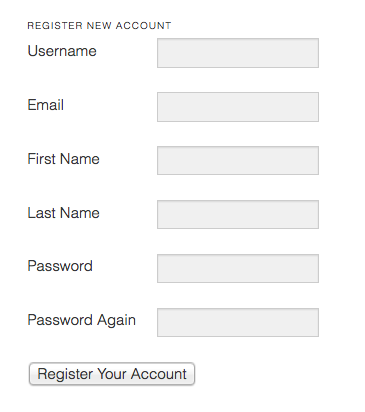
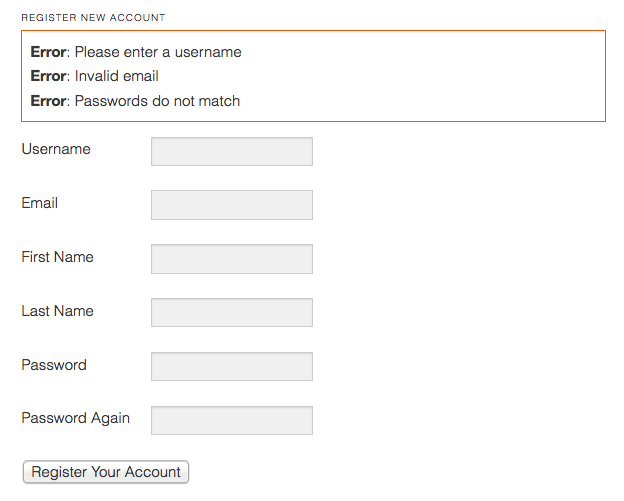
Our errors (if present) will look like this:
That’s it! Our plugin is finished. Now it’s time for you to include your own embellishments, such as improved styling.
You can download the complete plugin below to try it out for yourself, if you don’t feel like copying all of the code.
Download PluginThere is also a more complete (including beautiful designs) version of the plugin available here.
That’s true, i have same opinion with you about this. We should together figure this out
What’s up, for all time i used to check weblog posts
here early in the break of day, as i love to
gain knowledge of more and more.
I’m really loving the theme/design of your website.
Do you ever run into any browser compatibility problems?
A number of my blog visitors have complained about my site not working correctly in Explorer but looks great
in Safari. Do you have any tips to help fix this issue?
Nice content, thanks for share this article.
Hi there to every one, it’s really a pleasant
for me to go to see this site, it contains helpful Information.
Kate confessed to me during the break that she used to have a massive crush
on this guy when you were growing up,’ Andy revealed in the second half
of the show. Now in order to better understand my story, it’s important to understand why we break plates.
In these cases, the Autosexual Male deprives his wife or girlfriend of sexual response in order to punish her for something.
Look at the male heroes we choose: The Man of Steel, Robocop,
Iron Man, The Incredible Hulk, The Terminator: all creatures literally made not of
flesh and blood and certainly not, horror of horrors, feelings.
I am by no means making fun of the waves
of violence riddling our world, but somehow, we do need
to look at the possible connections between those horrifying scenarios and the alienation, overwhelm, violence and
appalling ignorance regarding the high levels of autonomic nervous-system arousal with which millions of people are struggling.
Nazi-looking blond hair- blue eye- skinny female, therefore
they are incapable of being attracted and courting a black woman respectfully.
Im a black woman. I remember very clearly thinking about and questioning
the benefits and after-effects of “orgasms” when I was a young woman and
deciding that I did not want to pursue that experience as a
main focus of love-making, no matter how entrancing it would seem at the time.
Though i have learned about it but after read your articles, i just realized the amount of knowledge that i missed. Thank for your shared.
Thank you and thank for your shared, i will introduce to my friend to visit your website more often
I’m impressed, I have to admit. Rarely do I come across a blog that’s both equally educative and entertaining, and without a doubt, you
have hit the nail on the head. The problem is something that tooo feew men and women are speaking intelligently about.
Now i’m very hppy I stumbled across this in my search for something relatingg to this.
Hello thanks for the code it really helped me on my project.
Although my form is unable to send email to the newly registered users on the site. I’ve tried $wp_new_user_notification and $wp_new_user_notification_email yet nothing,
Am using version 5.4.1 of wordPress on a hosted site.
Please someone should help with the solution to this if there is any.
Cheers and Happy coding.
I am genuinely happy to glance at this weblog posts which consists of lots of useful information, thanks for providing these kinds of statistics.
I am actually grateful to the holder of this website who has shared this enormous post at this time.
All of us know all relating to the lively medium you render both useful and interesting items via the blog and even inspire participation from people on that issue while our simple princess is starting to learn a lot.