Pippins Plugins
  • Email
  • Facebook
  • Feedburner
  • Github
  • Google
  • Twitter
  • Vimeo
  • Youtube
  • Rss
  • About
  • News
  • Join the Site
    • Member Benefits
    • Member Plugins
    • Email Notifications
  • Plugin Store
    • Affiliate Area
    • Checkout
  • Plugins
    • Plugin Portfolio
      • Plugin Portfolio – List View
    • Free
    • Premium
    • Member Plugins
    • Coding Standards
    • Get Plugin Support
  • Tutorials
    • Series
      • Plugin Development 101
      • Creating a User Follow System Plugin
      • Customizing Restrict Content Pro
      • Displaying Content with Easy Content Types
      • Writing Your First WordPress Plugins, Basic to Advanced
      • Working with Widgets
      • User Submitted Image Galleries
      • Plugin Thoughts
      • Integrating Stripe.com with WordPress
      • WordPress Rewrite API
    • Member Exclusive
      • Free Members
      • Subscriber Only
    • Difficulty
      • Beginner
      • Intermediate
      • Advanced
    • Action and Filter Hooks
    • Ajax
    • Custom Post Types
    • External APIs
    • Short Codes
    • Taxonomies
    • Video Tutorials
    • Widget Tutorials
    • WordPress Admin / Dashboard
    • Working with jQuery
    • WordPress Database
    • Writing Plugins
    • Tag Index
  • Reviews
  • Support Forum
  • Contact
    • Support the Site
    • Request Code Review
    • Plugin Support

bbPress – Private Replies Extension

Posted on November 22, 2012 by Pippin in Add Ons, Free, Plugins, Utilities 15 Comments
Home» Plugins » Add Ons » bbPress – Private Replies Extension
Tweet
Love It - 2

I run several support forums on the bbPress plugin and one of the issues I have constantly run into is how to provide a good way for users to post private information in their support threads, without having to email it or open a private ticket in a separate system. In order to solve this, I decided to write a plugin that gives users the option to mark their forum replies as private.

Rémi Corson works as part of my support team and also as an independent developer who runs his own support forum on bbPress, so I asked him to help me write the plugin.

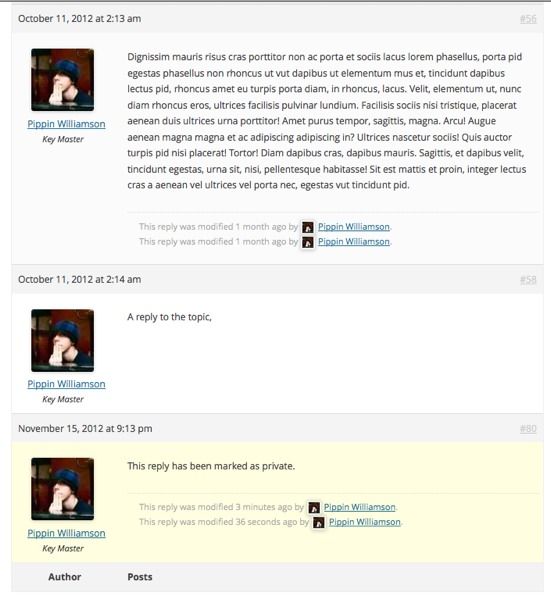
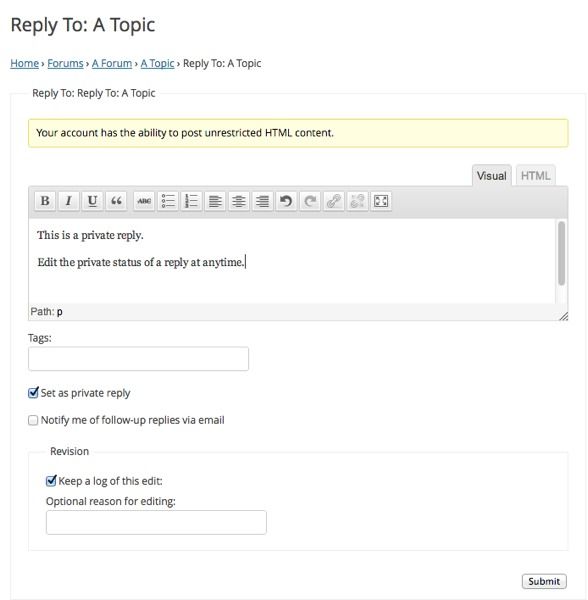
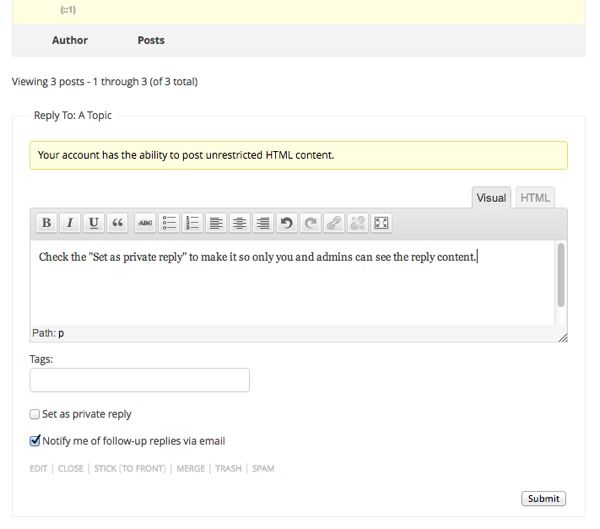
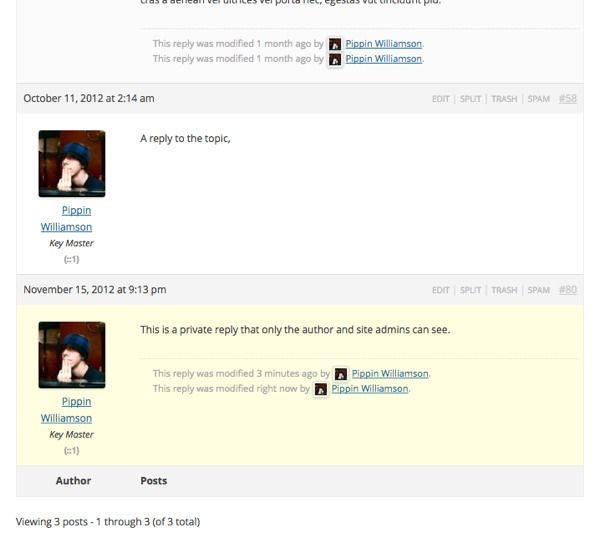
The plugin is really simple and just provides a single checkbox at the bottom of the new reply form that allows the user posting the reply to decide if the reply should be private. If a reply is marked as private, only the reply author and the forum moderators will be able to see it; all other users will see “This reply has been marked as private”.

Users and moderators have the option to mark or unmark a reply as private at any time.

This feature is extremely useful for cases where you need users / customers to provide private URLs, login information, or any other kind of data they don’t wish to make publicly available.
1353604125.jpg
1353604214.jpg
1353604226.jpg
1353604239.jpg

If you have suggestions or bug reports for this plugin, feel free to report them on Github.

Download Plugin
 

Tweet Follow @pippinsplugins
bbpress, Rémi Corson

15 comments on “bbPress – Private Replies Extension”

  1. corsonr says:
    November 22, 2012 at 12:35 pm

    It’s an add-on so useful! i don’t know why there was no alternative to this plugin before!

    Reply
  2. Shane Gowland says:
    November 22, 2012 at 6:52 pm

    Very useful plugin, thank you very much for sharing.

    Reply
  3. Franklin says:
    December 10, 2012 at 11:29 am

    This is perfect. Been looking for something like this for a while. Thanks.

    Reply
  4. Dustin Zirkle says:
    December 14, 2012 at 2:18 pm

    Another great addition to this addon would be the ability to make specific forums default or force posts to be private outside of those who are supposed to be able to see it.

    Reply
    • Pippin says:
      December 14, 2012 at 2:47 pm

      I doubt we’ll ever force replies to private, but I do plan to add a feature to enable/disable private replies on a per-forum basis.

  5. Dustin Zirkle says:
    December 14, 2012 at 4:32 pm

    Also meant to add to that last post the ability to have private topics as well.

    I know that there is something similar to these for phpBB or vB, I can’t remember which, that came in quite useful in a few circumstances.

    I believe we used it for a game for recruitment purposes, someone could post a thread(topic) with their application and only certain level and higher of members could see and reply to it.

    Anyhow great work on this so far.

    Reply
    • Pippin says:
      December 14, 2012 at 4:55 pm

      Would a private topic mean that only moderators and the topic creator can post replies?

    • Dustin Zirkle says:
      December 15, 2012 at 1:48 pm

      It would mean only moderators and the author and view and/or post replies to the topic, yes.

    • Pippin says:
      December 15, 2012 at 6:48 pm

      I do really like that idea and will consider it.

  6. Kangs Passoubady says:
    January 12, 2013 at 10:01 pm

    After installing this plugin the entire blog went down, in the error_log, I’m only seeing the below error:
    PHP Fatal error: Call to undefined function bbp_get_reply_post_type() in /wp-content/plugins/bbpress-private-replies/bbp-private-replies.php on line 190

    Any help would be appreciated.

    Reply
  7. Kangs Passoubady says:
    January 12, 2013 at 10:20 pm

    Ok, I’m able to solve the problem.

    commented the lines 190 and 191, then still not able to see anything, but found the below error:
    PHP Fatal error: Call to undefined function bbp_get_reply()
    then commented the line#129.
    After that point I could able to see the pages working..

    Reply
    • Pippin says:
      January 14, 2013 at 11:36 am

      What version of bbPress are you using?

  8. Kangs Passoubady says:
    January 15, 2013 at 3:04 pm

    I was using your first version (0.01). The below post gives the details.
    http://www.kavinschool.com/qa_selenium_wp/2013/01/13/php-fatal-error-call-to-undefined-function-bbp_get_reply_post_type/

    However, the problem is resolved now, i have upgraded to the latest version.

    Thanks, now it is working

    Reply
  9. Haris says:
    March 9, 2013 at 7:44 pm

    Hey Pippin, thanks for the awesome plugin.

    In a recent version you fixed the thread subscribers email issue in which any user that was subscribed to the thread would get the private message in the inbox but after a lot of testing with multiple user accounts, it seems that the fix is not working. The hook seems to be not working at all.

    Please take a look and let me know if you can help!

    A hotfix would be appreciated. :)

    Reply
    • Pippin says:
      March 10, 2013 at 8:31 pm

      The fix has been pushed out. Thanks for letting me know!

Leave a Reply Cancel reply

Your email address will not be published. Required fields are marked *

You may use these HTML tags and attributes: <a href="" title=""> <abbr title=""> <acronym title=""> <b> <blockquote cite=""> <cite> <code> <del datetime=""> <em> <i> <q cite=""> <strike> <strong>

  • Login

Lost your password?

Please enter your username or e-mail address. You will receive a new password via e-mail.

  • Facebook Become a Fan Like

  • Twitter Subscribe on Twitter Follow

  • YouTube Follow my Videos Subscribe

  • RSS Feed Subscribe with RSS Subscribe

Easy Digital Downloads

Most Loved

  • Love It Pro for WordPress
  • Write a “Love It” Plugin with Ajax to Let Users Love Their Favorite Posts / Pages
  • Simple Notices Pro Plugin for WordPress
  • User Bookmarks for WordPress
  • Front End Registration and Login Forms Plugin

Similar Plugins and Posts

  • Restrict Content Pro – bbPress Extension
  • bbPress Custom Notification Emails
  • bbPress Mark as Read Plugin
  • bbPress – Do Short Codes Plugin
  • Rémi Corson Joins My Support Team

Latest Premium Content

  • Plugin Development 101 – Introduction to Adding Dashboard Menus
  • Plugin Development 101 – Intro to Loading Scripts and Styles
  • User Follow System – Part 5
  • Plugin Development 101 – Intro to Short Codes
  • Plugin Development 101 – Registering a Custom Post Type
  • Plugin Development 101 – Intro to Actions

Latest Tutorials

  • Submitting Your First Pull Request to a WordPress Plugin on Github (2)

    Github is an extremely popular tool for managing WordPress plugins, and one...

  • Plugin Development 101 – Introduction to Adding Dashboard Menus (1)

    Adding new menus, both top level and sub level, to the WordPress Dashboard is a really common task for plugins...

  • Plugin Development 101 – Intro to Loading Scripts and Styles (16)

    In this part of Plugin...

Enter your email to receive automated updates when new posts are published

Latest Tweets

  • @curtismchale @Krogsgard @wpengine yes! #blamekrogs
    May 22, 2013
  • RT @andrewspittle: The Rule of Awesome: http://t.co/P3v62eTtQx
    May 22, 2013
  • @curtismchale @wpengine haha, who do I get to blame?
    May 22, 2013

Topics

featured get_user_meta the_content shortcodes contextual help Sugar Event Calendar add_options_page campaign monitor meta box Rémi Corson add_shortcode register_setting wp_enqueue_script authors attachment image plugin forms login short codes do_action Related posts mail chimp apply_filters bbpress comments recent posts post types short code taxonomies custom post type gallery Ajax images Stripe taxonomy jquery users widgets add_filter easy content types add_action widget restrict content pro easy digital downloads

Weekly Newsletter

Useful Links

  • Join the Site
  • Plugin Store
  • Affiliate Area
  • Tag Index
  • Support the Site
  • Suggest a Tutorial
  • Random Post
  • Contact

Monthly Archives

(c) 2011 Pippin's Plugins