
This entry is part 1 of 7 in the Creating a User Follow System Plugin Series
In part one of the Creating a User Follow System tutorial series, we are going to take a quick look at how our final product may be implemented into a real live site, and the basic functionality it will contain.
Watch the video above for a demonstration of a live site utilizing the final product of this series.
Once complete, the plugin will give us the ability to follow and unfollow users, view content from the users we are following, view the total number of users we (or anyone) else is following, and the total number of users following any particular user. We will also be implementing ajax in the complete plugin so that everything works smoothly without page reloads.
File and Folder Structure
If you have watched or read any of my other extended tutorials about create complete plugins, you will know that I always advocate a good file/folder structure for your plugin files. Tom McFarlin recently wrote a great article on WP Tuts+ that covers the importance of file organization, and I’d highly recommend that you read it.
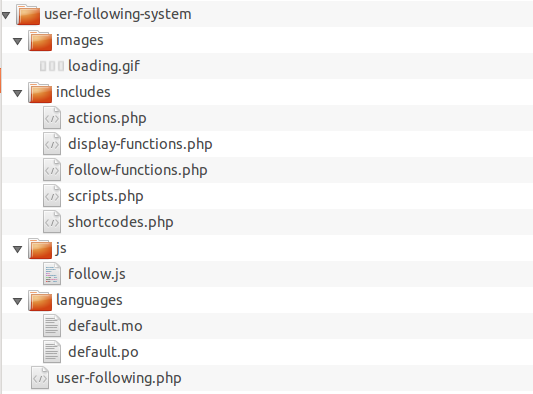
For this plugin, we will separate our code into meaningfully named files, just as we always should, and we will also have folders specifically for javascript, images, and language translation files. See the screenshot below for the final organization:
Main Plugin File
Every plugin has a “main” file, which is usually named the same thing as the plugin’s folder. In this case, our main plugin file will be called user-following.php. Inside of this file we will have our plugin headers (used to make WordPress recognize it as a plugin), a couple of constants, initialization for plugin translation, and also some file includes.
The complete contents of our file are below:
1 2 3 4 5 6 7 8 9 10 11 12 13 14 15 16 17 18 19 20 21 22 23 24 25 26 27 28 29 30 31 32 33 34 35 36 37 38 39 40 41 42 43 44 45 46 | <?php /* Plugin Name: User Following System Plugin URI: https://pippinsplugins.com Description: Allows users to follow other users and see updates from users they follow Version: 1.0 Author: Pippin Williamson Contributors: mordauk Author URI: https://pippinsplugins.com */ /* |-------------------------------------------------------------------------- | CONSTANTS |-------------------------------------------------------------------------- */ if(!defined('PWUF_FOLLOW_DIR')) define('PWUF_FOLLOW_DIR', dirname( __FILE__ ) ); if(!defined('PWUF_FOLLOW_URL')) define('PWUF_FOLLOW_URL', plugin_dir_url( __FILE__ ) ); /* |-------------------------------------------------------------------------- | INTERNATIONALIZATION |-------------------------------------------------------------------------- */ function pwuf_textdomain() { load_plugin_textdomain( 'pwuf', false, dirname( plugin_basename( __FILE__ ) ) . '/languages/' ); } add_action('init', 'pwuf_textdomain'); /* |-------------------------------------------------------------------------- | FILE INCLUDES |-------------------------------------------------------------------------- */ include_once( PWUF_FOLLOW_DIR . '/includes/actions.php' ); include_once( PWUF_FOLLOW_DIR . '/includes/scripts.php' ); include_once( PWUF_FOLLOW_DIR . '/includes/shortcodes.php' ); include_once( PWUF_FOLLOW_DIR . '/includes/follow-functions.php' ); include_once( PWUF_FOLLOW_DIR . '/includes/display-functions.php' ); |
We will be creating the contents of the other files in the follow parts of this series, so this is all for today!
Pippin – thanks for the mention here and for pushing for better file organization.
You and I obviously have slightly different approaches and for me, it’s never been about how it’s done as long as it’s done.
This pays absolute dividends when maintaining the product especially when you open source it.
Killer work here.
Definitely agree that it simply being done is extremely important, though the how (naming, placement, etc) is also really important in my mind. Really I don’t think the two can be separated.
I was looking through the source for one of the single most popular plugins out right now (I won’t call it out), and I was extremely disappointed that they didn’t have the code separated hardly at all. For a plugin that has well over 20-30K lines of code, it had just 4-5 files, and the most meaningful name was “{plugin name}-functions.php”. That doesn’t mean anything in terms of letting devs know what the file contains.
I didn’t mean to imply that there shouldn’t be some type of logic behind how the files organized, just that how you do yours may not be how I do mine may not be how John Doe does his. For me, clarity and cohesion are key.
For example, for some of the apps that I’m creating on top of WordPress, I’ve literally created
modeldirectories andviewdirectories to help clarify what each file in that directory (such asmodel/individual.php,model/company.php, etc. represents.Some may just use a
libdirectory orincdirectory, or whatever.For me, yes – totally import that it’s done and needs to be done in a cohesive way, but I don’t think there’s an absolute single way to do it.
Absolutely agree. There’s never one single method or scheme that works for all scenarios.
Great stuff!
Waiting anxiously for User Follow System – Part 2…
Bit of a slow start but should be out early next week.
part 2 is finally out! https://pippinsplugins.com/user-follow-system-part-2/
where i can get this plugin?
The plugin is being written through this tutorial series. Once the series is done, it will be available for download to paid members.
it available now if yes how can i pay for it?
It’s not available yet. Once it is available, you will have to be a paid subscriber to download it.
hey Pippin,
i paid for your site nice site but where i can find the plugin?
I’ll say it again, the plugin is NOT yet available. It will be available for download when the entire tutorial series is complete, which is at least a month away.
ohh, ok great!
Hi Pippin, I know you have mentioned that this plugin will be available when the tutorial is completed, but I wondered if you might give any hint when that might be? I have been watching the tutorials and originally subscribed for a month, but it has been over a year since this particular tutorial was started. I really need a plugin with this functionality but there is nothing out there (unless you want to use buddypress which I don’t). I’ve bought a few of your plugins and found them brilliant. Obviously you work at your own pace 🙂 but I’m feeling a little sad now that I still can’t get this…
I need to apologize for not getting this one finished. I will try and take care of the last part within in the next few weeks.
I’d be happy to consider doing this custom for you too if you want to email me.
I need main function follow system not plugin