Pippins Plugins
  • Email
  • Facebook
  • Feedburner
  • Github
  • Google
  • Twitter
  • Vimeo
  • Youtube
  • Rss
  • About
  • News
  • Join the Site
    • Member Benefits
    • Member Plugins
    • Email Notifications
  • Plugin Store
    • Affiliate Area
    • Checkout
  • Plugins
    • Plugin Portfolio
      • Plugin Portfolio – List View
    • Free
    • Premium
    • Member Plugins
    • Coding Standards
    • Get Plugin Support
  • Tutorials
    • Series
      • Plugin Development 101
      • Creating a User Follow System Plugin
      • Customizing Restrict Content Pro
      • Displaying Content with Easy Content Types
      • Writing Your First WordPress Plugins, Basic to Advanced
      • Working with Widgets
      • User Submitted Image Galleries
      • Plugin Thoughts
      • Integrating Stripe.com with WordPress
      • WordPress Rewrite API
    • Member Exclusive
      • Free Members
      • Subscriber Only
    • Difficulty
      • Beginner
      • Intermediate
      • Advanced
    • Action and Filter Hooks
    • Ajax
    • Custom Post Types
    • External APIs
    • Short Codes
    • Taxonomies
    • Video Tutorials
    • Widget Tutorials
    • WordPress Admin / Dashboard
    • Working with jQuery
    • WordPress Database
    • Writing Plugins
    • Tag Index
  • Reviews
  • Support Forum
  • Contact
    • Support the Site
    • Request Code Review
    • Plugin Support

Custom Post Type Calendar Widget

Posted on July 19, 2011 by Pippin in Advanced, Free, Plugins, Utilities, Widgets 26 Comments
Home» Tutorials » Advanced » Custom Post Type Calendar Widget
Tweet
Love It - 1

The other day a user posted a question on the WordPress Stack Exchange about how to display a calendar of your site’s custom post types, much like the default WP Calendar widget. After a quick google search, I found a function written by Jennifer Dodd that did exactly this. The user who asked the question was pleased with the result, so I thought I’d go ahead and take Jennifer’s work a step further and create a plugin out of the function so that you could have it available as a widget.

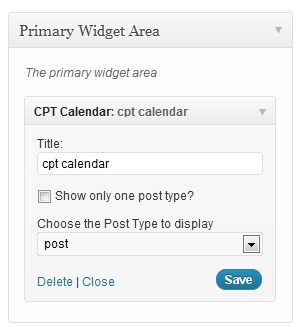
The widget is very simple with just three options:

  1. Widget Title
  2. Restrict to a single post type
  3. The post type to show

The second option allows you to turn on/off the option that causes the calendar to show only a specific post type. If you disable it, the calendar will show all public post types. If it is enabled, then you can choose the post type to display from the drop down below.

Please download the plugin for free below and let me know what you think!

Download
Tweet Follow @pippinsplugins
calendar, custom post type, widget, widgets

26 comments on “Custom Post Type Calendar Widget”

  1. Pepo says:
    August 2, 2011 at 8:37 am

    It doesn’t workd for me. I’m getting “Page Not Found” when i click on a day.

    Reply
    • pippin says:
      August 2, 2011 at 10:07 pm

      @Pepo – you may need to update your permalink structure

  2. Pepo says:
    August 3, 2011 at 3:45 am

    I’ve try to update, but it doesn’t works for me. The htaccess was correctly writed with the wordpress permalink menu. How I have to update my permalink structure?

    Reply
    • pippin says:
      August 3, 2011 at 10:05 am

      @Pepo – Go to Settings > Permalinks and click Save Changes

  3. Lizz says:
    August 13, 2011 at 7:43 am

    I am also keep getting “Page Not Found”. :( (

    Reply
    • Pippin says:
      August 15, 2011 at 8:39 am

      @Lizz – I will try to look into it.

  4. Mohammad Akif says:
    August 25, 2011 at 12:47 pm

    i was looking for archive calender plugin :(

    Reply
    • Pippin says:
      August 25, 2011 at 1:25 pm

      @Mohammad – Can you explain what you wanted?

  5. Pepo says:
    August 25, 2011 at 1:26 pm

    Pippin I am also keep getting “Page Not Found”

    Reply
  6. Pippin says:
    August 25, 2011 at 1:29 pm

    @Pepo – so are others. I’ll have to look into the code and see if I can find a fix.

    Reply
  7. Kunal says:
    September 10, 2011 at 6:03 am

    I was looking for such a plugin but with some additional features.

    I have created a post-type Events. Now, for this, events have custom fields like Event Start Date and Event End Date. What I want is that, the calendar should show posts only from Event post-type on the dates when an event is starting.

    Please let me know this can be done.

    Reply
    • Pippin says:
      September 10, 2011 at 12:48 pm

      Have you looked at the Events Calendar (pro version also avail)? It has all the features you need.

  8. Kunal says:
    September 10, 2011 at 2:00 pm

    Hi

    Does it (the free version) works for custom post type?

    Reply
  9. Kunal says:
    September 10, 2011 at 2:08 pm

    I have installed the CPT Calendar today and tried to make some changes to it like: I have a custom post-type Events and in Events there are custom fields like Event Start Date (data for which get stores in wp_postmeta table). So, in the CPT Calendar widget plugin I have made changes to SQL queries such that now the calendar shows post (Events) names on hovering for the events on those dates in the current calendar month.

    Though I haven’t created any plugin for WP yet. So, would request you to create this plugin (a minor tweak to CPT). Also, one more additional feature requested is that, we should also be able to see next month calendar and events. (could this be possible)?
    Thanks.

    Reply
    • Pippin says:
      September 10, 2011 at 6:36 pm

      If you want to hire me for custom plugin dev, you can email me

  10. elvis says:
    October 7, 2011 at 11:08 am

    The widget selection looks fine, the output of the calendar shows the correct dates that have posts, but the link to the archive page doesn’t include the post type, so just shows the archive which by default shows only Posts. The url needs to have ?post_type=CPT_name added to the end

    Reply
    • Pippin says:
      October 7, 2011 at 4:06 pm

      @elvis – yes, thanks for noticing that.

  11. elvis says:
    October 7, 2011 at 11:29 am

    Hiya
    I changed line 297 to this
    $calendar_output .= ‘$day“;

    This worked for me for a calendar with only 1 custom type that I want to show, but I did notice that It made a change to the built in wordpress calendar, which doesn’t work as it adds both post types to the url.

    Reply
    • Pippin says:
      October 7, 2011 at 4:07 pm

      @elvis – yes, this function over writes the default calendar widget

  12. Academc sonet says:
    January 31, 2012 at 11:03 pm

    Great plugin .works nicely as you describe in my udesign wordpress theme

    Reply
  13. Mike Payne says:
    June 26, 2012 at 3:50 pm

    Did anyone ever figure out the 404 error?

    Reply
    • Pippin says:
      June 26, 2012 at 11:20 pm

      I personally didn’t, sorry.

    • phpcore says:
      October 26, 2012 at 12:30 pm

      just update the permalinks in wordpress admin panel, just press update button (save)

  14. phpcore says:
    October 6, 2012 at 6:33 pm

    update the previous comment:

    $query_str = ”;
    } else {
    /* Trust but verify. */
    $my_post_types = array();
    $nb_post_types = 0;
    foreach ( $post_types as $post_type ) {
    if ( post_type_exists( $post_type ) ){
    $my_post_types[] = $post_type;
    $nb_post_types++;
    }
    }
    $post_types = $my_post_types;
    if($nb_post_types > 1) $query_str = ”;
    else {
    $postType = trim(implode(”,$post_types));
    if(isset($_SERVER['QUERY_STRING']) && trim($_SERVER['QUERY_STRING']) != ”)
    $queryString = str_replace(‘post_type=’.$postType, ”, trim($_SERVER['QUERY_STRING']));
    else
    $queryString = ”;
    if($queryString != ”) $start = ‘&’;
    else $start = ‘?’;
    $query_str = $start.’post_type=’.$postType;
    }
    }

    _____________________________________________
    Now put : $query_str at the end of each get_xxx_link

    Reply
    • Carlos says:
      March 13, 2013 at 9:15 am

      In RAW Code PLZ or order your code

      Thnx

  15. Rick van de Kamp says:
    January 31, 2013 at 4:22 am

    For the 404 error make sure Achrives.php includes posts from your custom post type. Place this snippit in you functions.php


    function namespace_add_custom_types( $query ) {
    if( is_category() || is_tag() && empty( $query->query_vars['suppress_filters'] ) ) {
    $query->set( 'post_type', array(
    'post', 'YOUR_CUSTOM_POST_TYPE'
    ));
    return $query;
    }
    }
    add_filter( 'pre_get_posts', 'namespace_add_custom_types' );

    Reply

Leave a Reply Cancel reply

Your email address will not be published. Required fields are marked *

You may use these HTML tags and attributes: <a href="" title=""> <abbr title=""> <acronym title=""> <b> <blockquote cite=""> <cite> <code> <del datetime=""> <em> <i> <q cite=""> <strike> <strong>

  • Login

Lost your password?

Please enter your username or e-mail address. You will receive a new password via e-mail.

  • Facebook Become a Fan Like

  • Twitter Subscribe on Twitter Follow

  • YouTube Follow my Videos Subscribe

  • RSS Feed Subscribe with RSS Subscribe

Easy Digital Downloads

Most Loved

  • Love It Pro for WordPress
  • Write a “Love It” Plugin with Ajax to Let Users Love Their Favorite Posts / Pages
  • Simple Notices Pro Plugin for WordPress
  • User Bookmarks for WordPress
  • Front End Registration and Login Forms Plugin

Similar Plugins and Posts

  • Featured Comments Plugin
  • Sugar Event Calendar
  • User Submitted Image Gallery – Part 7
  • Post Types Column Editor for WordPress
  • Displaying Custom Post Types in Widgetized Sidebars

Latest Premium Content

  • Plugin Development 101 – Introduction to Adding Dashboard Menus
  • Plugin Development 101 – Intro to Loading Scripts and Styles
  • User Follow System – Part 5
  • Plugin Development 101 – Intro to Short Codes
  • Plugin Development 101 – Registering a Custom Post Type
  • Plugin Development 101 – Intro to Actions

Latest Tutorials

  • Submitting Your First Pull Request to a WordPress Plugin on Github (1)

    Github is an extremely popular tool for managing WordPress plugins, and one...

  • Plugin Development 101 – Introduction to Adding Dashboard Menus (1)

    Adding new menus, both top level and sub level, to the WordPress Dashboard is a really common task for plugins...

  • Plugin Development 101 – Intro to Loading Scripts and Styles (16)

    In this part of Plugin...

Enter your email to receive automated updates when new posts are published

Latest Tweets

  • @jasonbobich hmm, interestinf
    May 19, 2013
  • @jasonbobich I haven&#039;t recently
    May 19, 2013
  • @strickland lol I passed out for two hours, so who knows
    May 19, 2013

Topics

add_options_page attachments featured register_setting contextual help hook meta box Sugar Event Calendar add_shortcode Tom McFarlin get_user_meta the_content wp_enqueue_script Related posts plugin do_action mail chimp image login forms authors short codes attachment apply_filters post types bbpress recent posts comments taxonomies short code custom post type images gallery Ajax Stripe taxonomy jquery widgets users add_filter easy content types add_action widget restrict content pro easy digital downloads

Weekly Newsletter

Useful Links

  • Join the Site
  • Plugin Store
  • Affiliate Area
  • Tag Index
  • Support the Site
  • Suggest a Tutorial
  • Random Post
  • Contact

Monthly Archives

(c) 2011 Pippin's Plugins