
A few weeks ago, AJ Clarke of WP Explorer released a really slick photography theme called Fotos. Aside from just being a great theme, it also has a great feature that allows users to password protect their photo foto galleries. While developing the theme, AJ, who is a good friend of mine, asked me for help on writing the functions that would allow him to give his users this password protection feature. Over a couple of days, with lots of tweaking, we came up with a pretty solid system that worked really well. It uses the taxonomy meta system built into WordPress, which I showed you how to use with Adding Custom Meta Fields to Taxonomies, and allows you to password protect every post inside of particular taxonomy terms by setting one single password on the taxonomy term page. Now, I’d like to show you how it works so you can build your own password protected taxonomies.
Due to the nature of how this system works, I’m going to show you how to password protect the regular Post Category taxonomy, but you could very easily adapt it to any custom taxonomy. AJ’s theme uses a custom taxonomy called “album_cats”.
Unlike many of my other tutorials, there will not be a simple plug-and-play plugin to use at the end, but rather a selection of snippets and functions that you will use in your theme’s template files. It would be possible to extend the results I give you here to a complete plugin that works out of the box, but it’s beyond the scope of this tutorial.
I walk you through the complete process rather quickly in the video. Read below for a very detailed explanation of each step.
Part One – Adding the Custom Meta Fields
So the first thing we’re going to is add some custom meta fields to our category creation and edit pages. If you read my tutorial on how to add custom meta fields to taxonomies then this should be very familiar to you. This will require three functions:
- a function to add the meta field HTML to the category “add new” page
- a function add the meta field HTML to the category “edit” page
- a function to save the values of both meta fields when clicking “save”
I would recommend that you set up a custom plugin for all of the functions I’m going to give you, but you can also just paste them into your theme’s functions.php.
The first function we will write is the one to add the meta field HTML to the category “add new” page. This is the page you see when you go to wp-admin/edit-tags.php?taxonomy=category
1 2 3 4 5 6 7 8 9 10 11 12 | // Add taxonomy page
function pippin_add_term_password_field( $term ) {
// Check for existing taxonomy meta for term ID.
$term_id = $term->term_id;
$term_meta = get_option( "taxonomy_$term_id" ); ?>
<div class="form-field">
<label for="term_pass"><?php _e( 'Password protect this album','pippin' ); ?></label>
<input type="text" name="term_meta[term_pass]" id="term_meta[term_pass]" value="<?php echo esc_attr( $term_meta['term_pass'] ) ? esc_attr( $term_meta['term_pass'] ) : ''; ?>">
<p class="description"><?php _e( 'Enter a password to restrict this term','pippin' ); ?></p>
</div>
<?php
} |
There is one parameter passed to the function, and it is the taxonomy term object (this contains all of the information for the term). At the beginning of the function, we set $term_id equal to the the term ID, which is accessible at $term->term_id. This is not completely necessary, but it does make things a little more clear. Next, we use the get_option() function to retrieve the options stored in the database for his term. Note, the term options are different than the term object. The term option contains all custom information, such as we are about to setup.
All term options are prefixed with “taxonomy_”, followed by the ID number of the term. Once we have retrieved the term option, we setup the HTML for the custom meta field. This is nothing more than a simple DIV wrapper and an input field, along with a label and a description. Take special note of the name=”” and the id=”” of the input field. They are both set to term_meta[‘term_pass’]. The “term_meta” portion is only important because it must be the same as the name that is used in our save function. The “term_pass” is the really important part. It is the name of our option, where the password for the term will be stored.
Now there is just one more thing we need to do to make our custom meta field show, and that is add in an action hook to connect our function to the “add new term” page.
1 | add_action( 'category_add_form_fields', 'pippin_add_term_password_field', 10); |
Note the “category_” part of the first parameter. This is the name of the taxonomy you are adding this meta field to. So if you wanted to add it to the post tags, you would use “post_tag_”.
The second parameter is the name of our function that contains the meta field.
Our final result should look like this:
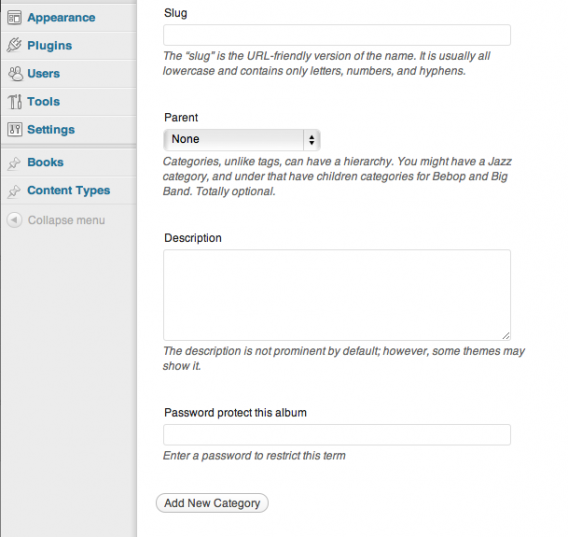
See the password field at the bottom?
That’s it for this function. Now we’re going to write an almost identical function that will display the meta field for the term edit screen.
1 2 3 4 5 6 7 8 9 10 11 12 13 14 | // Edit taxonomy page
function pippin_edit_term_password_field($term) {
// Check for existing taxonomy meta for term ID.
$term_id = $term->term_id;
$term_meta = get_option( "taxonomy_$term_id" ); ?>
<tr class="form-field">
<th scope="row" valign="top"><label for="term_pass"><?php _e( 'Password protect this album','pippin' ); ?></label></th>
<td>
<input type="text" name="term_meta[term_pass]" id="term_meta[term_pass]" value="<?php echo esc_attr( $term_meta['term_pass'] ) ? esc_attr( $term_meta['term_pass'] ) : ''; ?>">
<p class="description"><?php _e( 'Enter a password to restrict this term','pippin' ); ?></p>
</td>
</tr>
<?php
} |
The only thing that is different with this function is the HTML. Instead of having a DIV wrapper, this custom meta field is inside of a table row. This is simply because the “edit term” page has a different layout than the “add new” page.
Once again, we use an action hook to connect our function to the edit page.
1 | add_action( 'category_edit_form_fields', 'pippin_edit_term_password_field', 10); |
And once we have done that, our “edit term” page should look like this:
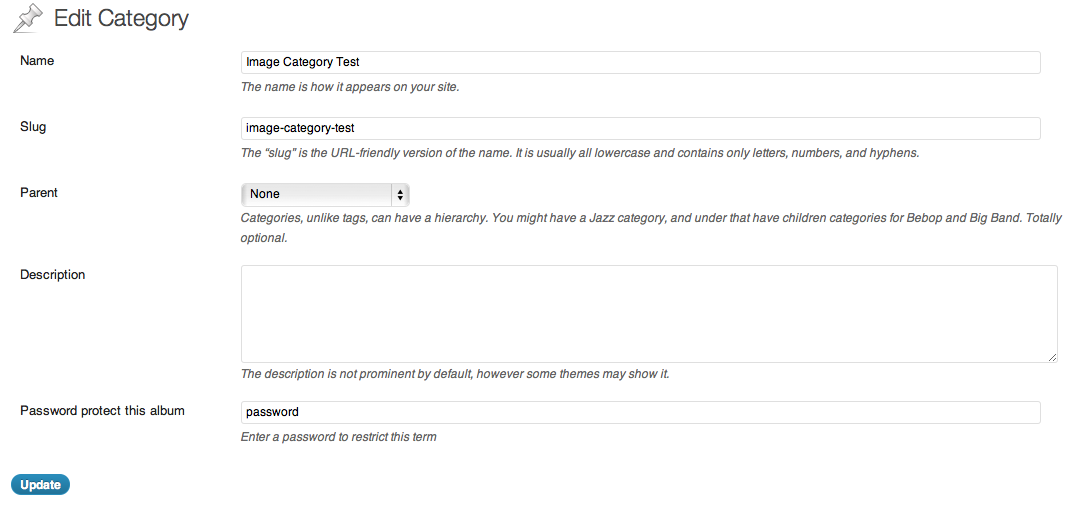
The next function we need to write is the one that takes care of saving the data we put into the meta fields. This is a pretty simple function that takes one parameter, just the term ID. With the term ID we retrieve the same option that we did in the previous two functions, using the get_option command. Since all of the data is posted from the form to the server, we also have to retrieve all of the values from the form in order to get the entered password. We do this by first mapping the keys of our posted array to an array called $term_meta using the array_keys() function. This will be the array that is saved to the database, and it ensures that each of the term meta options can be correctly matched to their posted options. Next, we loop through the $term_meta array, and for each of the keys of the array, we get the matching value (they’re matched by the key number) and store it in the $term_meta key slot. Finally, at the end, we save our final array to the WordPress database using the update_option() function.
Now, in order to help clear up the confusion you must be feeling by that long explanation, let me show you the code so you can better understand what we’re doing.
1 2 3 4 5 6 7 8 9 10 11 12 13 14 | // Save term passwords function pippin_save_term_password( $term_id ) { if ( isset( $_POST['term_meta'] ) ) { $term_meta = get_option( "taxonomy_$term_id" ); $term_keys = array_keys( $_POST['term_meta'] ); foreach ( $term_keys as $key ) { if ( isset ( $_POST['term_meta'][$key] ) ) { $term_meta[$key] = $_POST['term_meta'][$key]; } } // Save the option array. update_option( "taxonomy_$term_id", $term_meta ); } } |
The important part in understanding this function is know how the posted data (from the $_POST variable) comes in. In our HTML form, we setup the meta field with a name like this:
name="term_meta['term_pass']
This sets it up in an array, so when we save the data, we have to loop through each of the items in the array, as was explained above in much more verbose terms. Basically, we take each of the items in the posted array, store them in a new array, and then update the option in the database.
One of the things that makes this save function work really well, is that it is flexible. It’s designed to work with an unlimited number of meta options. We have added only one, but you could add half a dozen or more, and not have to change the save function at all.
There is just one more thing to do, in order to make our term password fields save: connect them with an action hook to the save function.
1 2 | add_action( 'edited_category', 'pippin_save_term_password', 10); add_action( 'create_category', 'pippin_save_term_password', 10); |
Note the name of the action hooks we’re using. Both of them have “category” in their name. If you were using this with a custom taxonomy, then you would just need to replace “category” with the name of your taxonomy, such as “post_tag”.
That’s it for the custom meta fields. We are now able to store / update our term passwords. So it’s now time to write the functions that will restrict posts that are in a term that has a password, and also the functions that will allow us to test for an entered password.
Part Two – Restricting Posts and Checking Passwords
The idea now is to first hide the content of posts that are in a restricted category, and to show a password form to users who have not yet entered the password. We also want to make sure that the user only has to enter the password once. If they enter it correctly, then browse to a different part of the site, and then come back to the original post, they should not have to enter the password again. In order to achieve this functionality, we’re going to use session variables to store the user entered password.
So, step one, start a session if it’s not already started. We can do that like this:
1 2 3 | if(!session_id()){ add_action( 'init', 'session_start' ); } |
This first checks to see if a session has already been started, and if one hasn’t, a new one is created.
Now we are going to write a function that will check a specific post and see if it is filed into a category that is password protected. This is going to be a conditional type function, meaning it will return either true or false. We will use this function later on once we edit our template files.
1 2 3 4 5 6 7 8 9 10 11 12 13 14 15 16 17 18 19 20 21 22 | // checks all of the terms attached to a post/page to see if any of them are password protected function pippin_in_term_with_password($post_id = NULL) { if($post_id == NULL) { $post_id = get_the_ID(); } $terms = get_the_terms($post_id, 'category'); if($terms) { foreach($terms as $term) { $term_meta = get_option( "taxonomy_$term->term_id" ); if($term_meta['term_pass'] != '') { if(pippin_validate_term_password($term_meta['term_pass'])) { // the password is valid so return false return false; } // this term has a password and the password is not valid, or hasn't been entered return true; } } } // if no terms, then post is not restricted return false; } |
The function takes one parameter, the ID of the post to check. If no ID is set, then we use the get_the_ID() function to retrieve it for us.
Once we have ensured that there is an ID set, we go and get all of the categories attached to this post. If there are terms (categories) connected to this post, we continue with the function, but if there are no categories, we simply return false because this post cannot be password protected (by category) if it is not assigned to any categories.
If there are categories attached to the post, we loop through each one of them and retrieve the $term_meta option for each. We then check whether the password field, $term_meta[‘term_pass’], is empty or blank; if it’s not, we then must check whether a password has already been entered for this post, using the pippin_validate_term_password() function, which we will write in a moment. If the password has been entered (again, in a form we will write in a moment) and it is the correct one, then we return false This tells us that the category’s password has been entered correctly and the user should be allowed to see the content. If pippin_validate_term_password() does not return true, meaning our password is incorrect, then our whole function needs to return true, making it so that the user cannot view the content, and, instead, the enter password form will be displayed.
Now we write the pippin_validate_term_password() function. This was just used above to test whether a password has been entered, and whether it is correct.
1 2 3 4 5 6 7 8 9 10 11 12 13 14 15 16 | // validates the password set in the $_SESSION var with the stored term password function pippin_validate_term_password($term_pass) { // set the password to a SESSION var after entering if(isset($_POST['term_password_field'])) { $_SESSION['term_password'] = $_POST['term_password_field']; } // check the SESSION var against the term password if($_SESSION['term_password'] == $term_pass) { return true; } // if the password is not valid, return false return false; } |
The function is pretty simple. It takes one parameter, the password set in the custom term meta. We first check to see whether a password has been entered in the form by using isset($_POST[‘term_password_field’]). If the password has been posted, we store it in a session variable. This allows the user to navigate around the site and come back without having to reenter their password.
Once we have the password in a session variable, we test the session variable against the $term_pass variable, which contains the actual password for the taxonomy term. If the passwords match, we return TRUE, otherwise we return FASLSE. When the function returns true, the user is allowed to view the content.
Now we have just one more function to write: the one that outputs the actual password form.
1 2 3 4 5 6 7 8 9 10 11 12 13 | // outputs the term password form
function pippin_term_password_form() {
ob_start(); ?>
<form id="term_password" action="" method="POST">
<p>
<label for="term_password_field"><?php _e('Enter the password to view this content', 'pippin'); ?></label><br/>
<input name="term_password_field" id="term_password_field" type="password" />
<input type="submit" value="Submit" id="term_submit"/>
</p>
</form>
<?php
return ob_get_clean();
} |
This is nothing more than a simple HTML form with a single password input. I’ve put the form inside of an output buffer to make it a little cleaner.
That’s it for part two. Now we move on to modifying our template files.
Part 3 – Editing the Template Files
In order to restrict our password protected posts, we need to modify our posts loop in our theme files. It’s up to you which files you modify, but most likely you will want to do the steps below for archive.php, index.php, category.php, and single.php. There may be others as well, though it depends a lot on your theme. I’m just going to modify my single.php (or actually, content-single.php since I’m doing this in the Twenty Eleven theme).
Remember the pippin_in_term_with_password() we wrote a little bit ago? Well, now it’s time to use that. We’re going to use the function to hide the main content of a password protected post, though you could also use it to hide the title, comments, or anything else.
The default Twenty Eleven theme has content-single.php, which displays the layout for single blog posts, and the section of the file that displays the content, looks like this:
1 2 3 4 | <div class="entry-content"> <?php the_content(); ?> <?php wp_link_pages( array( 'before' => '<div class="page-link"><span>' . __( 'Pages:', 'twentyeleven' ) . '</span>', 'after' => '</div>' ) ); ?> </div><!-- .entry-content --> |
since we want to hide the content, we will change it to this:
1 2 3 4 5 6 7 8 | <div class="entry-content"> <?php if(pippin_in_term_with_password(get_the_ID())) : ?> <?php echo pippin_term_password_form(); ?> <?php else : ?> <?php the_content(); ?> <?php wp_link_pages( array( 'before' => '<div class="page-link"><span>' . __( 'Pages:', 'twentyeleven' ) . '</span>', 'after' => '</div>' ) ); ?> <?php endif; ?> </div><!-- .entry-content --> |
So what is going on here? First, using pippin_in_term_with_password() we checked whether the current post is in a term that is password protected. If there is a password-protected term and the password has NOT been entered (or is incorrect), the password form is displayed. If the password has been entered (and is correct), then pippin_in_term_with_password() returns false and the regular content is displayed.
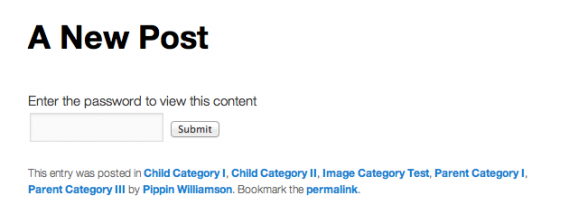
When our password form is displayed, it looks like this:
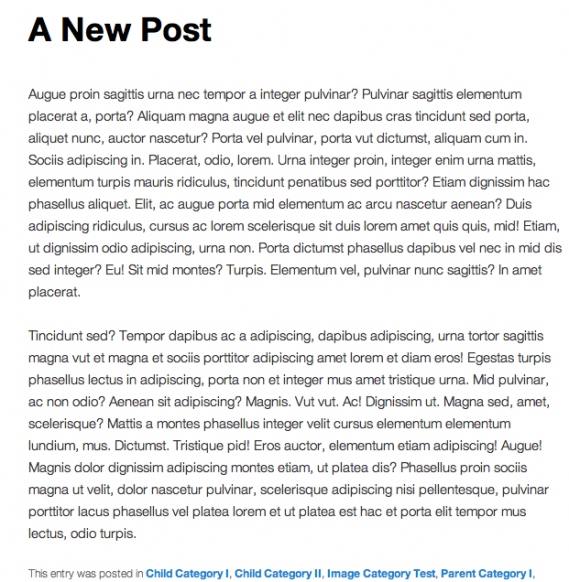
When we have entered the password in the form, it looks like this (normal):
So basically, all you need to do in order to restrict a portion of a post that is in a password-protected term is to wrap the section with the conditional statement, display the password form if it returns true, and display the content if it returns false. Like this:
1 2 3 4 5 | if(pippin_in_term_with_password(get_the_ID())) : echo pippin_term_password_form(); else : // display content here endif; |
That’s it! We’re finished. To make things a little easier on you, here’s our complete source code:
1 2 3 4 5 6 7 8 9 10 11 12 13 14 15 16 17 18 19 20 21 22 23 24 25 26 27 28 29 30 31 32 33 34 35 36 37 38 39 40 41 42 43 44 45 46 47 48 49 50 51 52 53 54 55 56 57 58 59 60 61 62 63 64 65 66 67 68 69 70 71 72 73 74 75 76 77 78 79 80 81 82 83 84 85 86 87 88 89 90 91 92 93 94 95 96 97 98 99 100 101 102 103 104 105 106 107 108 109 110 111 112 113 114 115 116 117 118 119 120 121 122 123 124 125 126 127 | <?php /*************************************** * taxonomy meta fields ***************************************/ // Edit taxonomy page function pippin_edit_term_password_field($term) { // Check for existing taxonomy meta for term ID. $term_id = $term->term_id; $term_meta = get_option( "taxonomy_$term_id" ); ?> <tr class="form-field"> <th scope="row" valign="top"><label for="term_pass"><?php _e( 'Password protect this album','pippin' ); ?></label></th> <td> <input type="text" name="term_meta[term_pass]" id="term_meta[term_pass]" value="<?php echo esc_attr( $term_meta['term_pass'] ) ? esc_attr( $term_meta['term_pass'] ) : ''; ?>"> <p class="description"><?php _e( 'Enter a password to restrict this term','pippin' ); ?></p> </td> </tr> <?php } add_action( 'category_edit_form_fields', 'pippin_edit_term_password_field', 10); // Add taxonomy page function pippin_add_term_password_field( $term ) { // Check for existing taxonomy meta for term ID. $term_id = $term->term_id; $term_meta = get_option( "taxonomy_$term_id" ); ?> <div class="form-field"> <label for="term_pass"><?php _e( 'Password protect this album','pippin' ); ?></label> <input type="text" name="term_meta[term_pass]" id="term_meta[term_pass]" value="<?php echo esc_attr( $term_meta['term_pass'] ) ? esc_attr( $term_meta['term_pass'] ) : ''; ?>"> <p class="description"><?php _e( 'Enter a password to restrict this term','pippin' ); ?></p> </div> <?php } add_action( 'category_add_form_fields', 'pippin_add_term_password_field', 10); // Save term passwords function pippin_save_term_password( $term_id ) { if ( isset( $_POST['term_meta'] ) ) { $term_meta = get_option( "taxonomy_$term_id" ); $term_keys = array_keys( $_POST['term_meta'] ); foreach ( $term_keys as $key ) { if ( isset ( $_POST['term_meta'][$key] ) ) { $term_meta[$key] = $_POST['term_meta'][$key]; } } // Save the option array. update_option( "taxonomy_$term_id", $term_meta ); } } add_action( 'edited_category', 'pippin_save_term_password', 10); add_action( 'create_category', 'pippin_save_term_password', 10); /*************************************** * password validation / form ***************************************/ if(!session_id()){ add_action( 'init', 'session_start' ); } // checks all of the terms attached to a post/page to see if any of them are password protected function pippin_in_term_with_password($post_id = NULL) { if($post_id == NULL) { $post_id = get_the_ID(); } $terms = get_the_terms($post_id, 'category'); if($terms) { foreach($terms as $term) { $term_meta = get_option( "taxonomy_$term->term_id" ); if($term_meta['term_pass'] != '') { if(pippin_validate_term_password($term_meta['term_pass'])) { // the password is valid so return false return false; } // this term has a password and the password is not valid, or hasn't been entered return true; } } } // if no terms, then post is not restricted return false; } // validates the password set in the $_SESSION var with the stored term password function pippin_validate_term_password($term_pass) { // set the password to a SESSION var after entering if(isset($_POST['term_password_field'])) { $_SESSION['term_password'] = $_POST['term_password_field']; } // check the SESSION var against the term password if($_SESSION['term_password'] == $term_pass) { return true; } // if the password is not valid, return false return false; } // outputs the term password form function pippin_term_password_form() { ob_start(); ?> <form id="term_password" action="" method="POST"> <p> <label for="term_password_field"><?php _e('Enter the password to view this content', 'pippin'); ?></label><br/> <input name="term_password_field" id="term_password_field" type="password" /> <input type="submit" value="Submit" id="term_submit"/> </p> </form> <?php return ob_get_clean(); } /*************************************** * protecting content sample ***************************************/ if(pippin_in_term_with_password(get_the_ID())) : echo pippin_term_password_form(); else : // display content here endif; |
I’m logged in but still can’t see the rest of the content, fyi.
This tutorial is restricted to paid subscribers. You will need to add a subscription to your account if you want to view the rest of this post.
Gotcha. Thanks!
Hi Pippin..
Will the ‘enter password’ display when going to archive/taxonomy/term? So you can’t see the list of posts in term without password..
thanks
No, the functions are designed for individual posts. It could be modified pretty easily, however, to hide all posts in a term.
I think it might be better to use something like this: add_filter(‘the_content’, ‘check_the_post’);
We can use conditional statements then, such as: is_single() and is_index(). What do you think?
That is better for one scenario: when you only care about hiding the post content. When I built this, AJ really wanted to hide everything, including titles, dates, and post thumbnails. In order to do that, an extra function had to be added to the loop, as in my example.
I see. Thanks for reply.
This is a very spiffy plug-in, but it blocks viewing of the preview when drafting a new post once a protected category checkbox is ticked. What would be the best way to allow previews, other than to remember to not check the box until you need to remember to check the box before posting? thanks in advance!
Here’s a little something I whipped up to easily list all passwords that are set. It could be more robust (check blog_id in wp_options, specify the taxonomic type in the table and URL) but it works for our purposes and could be a good starting point for someone.
add_action('admin_menu', 'my_pass_list_enable');

function my_pass_list_enable(){

        #Place in Posts menu

        add_posts_page('Taxonomy Passwords', 'Taxa Passwords', 'publish_posts', 'my-taxa-pass', 'my_pass_list');

}

function my_pass_list(){

        global $wpdb;
$taxametas = $wpdb->get_results('SELECT option_name, option_value FROM wp_options WHERE option_value LIKE "%term_pass%"');
foreach ($taxametas as $taxameta) {
preg_match('/(\d+)$/', $taxameta->option_name, $taxid);
$opts = unserialize($taxameta->option_value);
$cat = get_category($taxid[0]);
$taxainfo[$cat->name] = array('slug'=>$cat->slug,
'pass'=>$opts['term_pass']);
}
asort($taxainfo);
echo 'TermPassword';
while( list($key, $val) = each($taxainfo) ){
printf('%s%s', $val['slug'], $key, $val['pass']);
}
echo '';
}
Insert the following before return true on line 79 (no valid password yet) to allow the post author to preview drafts/pending posts.
#punt if draft/preview & am author $chk = get_post($post_id); if( ($chk->post_status == 'draft' || $chk->post_status == 'pending') && $chk->post_author == wp_get_current_user()->ID ) return false;Yep, that should work.
          #Generalize get_category above to allow use on tags or custom taxa

          $cat = get_term($taxid[0], 'category');
Doh, your site seems to process the accepted HTML tags other than code before code (and escaping the contents thereof) :-/
You need to paste the code inside of PRE tags. Like this:
<pre lang=”php” line=”1″>
// code here
</pre>
Awesome you should think of smotehing like that
Note that the session initiation in part two needs to have action set a lower level e.g; 16; for compatibility with the User Switching plugin; otherwise you can only switch to a given user once per twenty-four hours.
I have also found that it is necessary to add another condition to the test to determine whether or not to initiate a session:
&& !defined(‘DOING_CRON’)
This eliminates the following message from showing up in your error log whenever cron is invoked
Cannot send session cache limiter – headers already sent in …/wp-includes/plugin.php on line 406
I was stupid enough to think that it would work so many years after. What do I need to change to get it to work in version 4.1 ?
It should still work. It’s possible, however, that your server does not support PHP sessions.
What happens when you try?
Sorry for the newb question Pippin, but would it be better to use Eric Mann’s WP_Session with this rather than session_start?
Silly me – just install WP_Session and a new sessions database table and entry will be created instead of a PHPSession cookie.