Pippins Plugins
  • Email
  • Facebook
  • Feedburner
  • Github
  • Google
  • Twitter
  • Vimeo
  • Youtube
  • Rss
  • About
  • News
  • Join the Site
    • Member Benefits
    • Member Plugins
    • Email Notifications
  • Plugin Store
    • Affiliate Area
    • Checkout
  • Plugins
    • Plugin Portfolio
      • Plugin Portfolio – List View
    • Free
    • Premium
    • Member Plugins
    • Coding Standards
    • Get Plugin Support
  • Tutorials
    • Series
      • Plugin Development 101
      • Creating a User Follow System Plugin
      • Customizing Restrict Content Pro
      • Displaying Content with Easy Content Types
      • Writing Your First WordPress Plugins, Basic to Advanced
      • Working with Widgets
      • User Submitted Image Galleries
      • Plugin Thoughts
      • Integrating Stripe.com with WordPress
      • WordPress Rewrite API
    • Member Exclusive
      • Free Members
      • Subscriber Only
    • Difficulty
      • Beginner
      • Intermediate
      • Advanced
    • Action and Filter Hooks
    • Ajax
    • Custom Post Types
    • External APIs
    • Short Codes
    • Taxonomies
    • Video Tutorials
    • Widget Tutorials
    • WordPress Admin / Dashboard
    • Working with jQuery
    • WordPress Database
    • Writing Plugins
    • Tag Index
  • Reviews
  • Support Forum
  • Contact
    • Support the Site
    • Request Code Review
    • Plugin Support

Full Screen Background Images Pro Gets a Slide Show Option

Posted on November 29, 2012 by Pippin in News 24 Comments
Home» News » Full Screen Background Images Pro Gets a Slide Show Option
preview-template
Tweet
Love It - 1

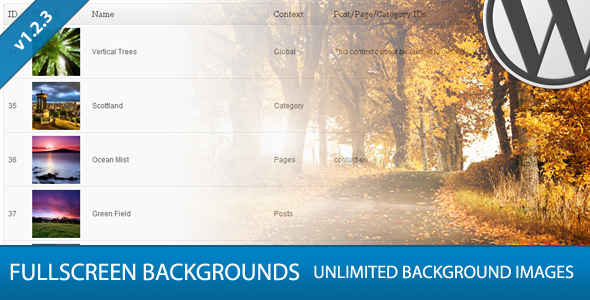
Full Screen Background Images Pro is a plugin I wrote to add full screen background images to your website. It allows you to set as many images as you want across your site and also lets you set specific photos for individual pages, posts, categories, etc. Two days ago I pushed out an update that a lot of people have been clambering for: background slideshows.

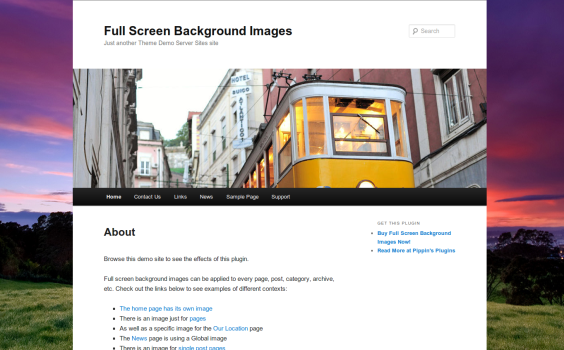
The background slideshow feature can be seen live on the plugin’s demo site. Slide shows are created automatically anytime there are multiple images for the current context. On the demo site, for example, the home page has three images set for it, so the plugin automatically cycles through the images.

There is no limit to the number of slideshows that can be created, and if you don’t want a slide show, then the plugin will intelligently detect that as well and only show the single image.
Purchase the Plugin
Related Items
  • Full Screen Background Images Plugin
Tweet Follow @pippinsplugins
Full Screen Background Images Pro

24 comments on “Full Screen Background Images Pro Gets a Slide Show Option”

  1. Brian Ball says:
    November 29, 2012 at 3:22 pm

    Hey Pippin, sounds great! Unfortunately we weren’t notified of the update in our WP installation, nor have we been for any previous updates. How can we secure the updated version?

    Many Thanks!

    Reply
    • Pippin says:
      November 29, 2012 at 3:33 pm

      You can download the new version from your Code Canyon account.

  2. Mike Zielonka says:
    November 29, 2012 at 7:06 pm

    Hey Hey Hey Pippin!

    Is there a spot for feature requests?

    I’d like to suggest adding some sort of navigation for the slideshow. There are many cases where my customers want their visitors to pause the background slideshow.

    Just an idea’r! :)

    Reply
    • Pippin says:
      December 3, 2012 at 5:10 pm

      Here is fine.

      I can tell you that will never make it in :D I had to work hard to convince my self to put in the slideshow feature at all.

    • Mike Zielonka says:
      December 5, 2012 at 5:36 pm

      I’ll find all the photographers and photo blogs on wordpress and send em your way and have them comment for the feature lol

      Thanks for writing back man. Keep kicking ass!

  3. barowen1999 says:
    December 11, 2012 at 5:07 pm

    Pippin, I’m using your plugin and it’s great. Thank you. I’ve got several pages that I have set the background on this site: http://constructionservicesofidaho.com. However, on the home page only, it appears to be rotating through to another image after viewing the one I have set. I don’t see any setting to change this. Is there a tutorial somewhere that I’ve missed on this to find out how to set it properly? I thank you in advance for your attention to this.

    Reply
    • Pippin says:
      December 11, 2012 at 6:42 pm

      The image rotation is automatic and happens when you have assigned multiple images to the same page or context. What context is the home page image using, and do you have multiple images in that context?

    • barowen1999 says:
      December 11, 2012 at 7:08 pm

      Pippin, thanks for getting back to me on this. The home page has a page id of 25, so on the line with the image, I have set Page as Context and have identified 25 as the Post/Page/Category ID. Strangely, this is the only page/post that it is doing it to.

    • Pippin says:
      December 11, 2012 at 10:01 pm

      Do you also have a Front Page image or Global image?

    • barowen1999 says:
      December 12, 2012 at 9:56 am

      Okay, I think I’m getting the hang of it, Pippin. Originally, I had two images set as global, those same images set as Pages, and then particular pages set with a particular image. I’ve deleted the lines for the pages that had an image set and then set the total of three images as Global, so they do the slideshow effect. Now, I’ve only got 3 images set.

      Then, to test, I changed all the images to Pages. No image shows for the home page. All the other pages rotated all 3 images through. I then changed one image to Global and left the other two on Pages. Then I get an image to show on the home page (it does not rotate through). The other pages only show two of the images rotating through now.

      I ended up setting all as Global and now have all three images rotating through. This will have to work. Thanks, Pippin.

    • barowen1999 says:
      December 12, 2012 at 10:12 am

      Pippin…your plugin did NOT like the new WP update. I’ve received this message upon updating:

      Warning: Missing argument 2 for wpdb::prepare(), called in /home/csiinc/public_html/wp-content/plugins/full-screen-background/includes/display-image.php on line 34 and defined in /home/csiinc/public_html/wp-includes/wp-db.php on line 990

      Warning: Missing argument 2 for wpdb::prepare(), called in /home/csiinc/public_html/wp-content/plugins/full-screen-background/includes/display-image.php on line 101 and defined in /home/csiinc/public_html/wp-includes/wp-db.php on line 990

      Any advise, besides take the plugin off?

      I await your response.

    • Pippin says:
      December 12, 2012 at 1:10 pm

      I just submitted the update to fix that issue and it should be available within 24 hours.

  4. barowen1999 says:
    December 13, 2012 at 4:42 pm

    Thanks, Pippin. That worked beautifully.

    Reply
  5. James says:
    February 4, 2013 at 7:31 am

    Have you pulled your plugins off of Code Canyon? I noticed this one throws a 404 error when you click purchase.

    Reply
    • Pippin says:
      February 4, 2013 at 12:11 pm

      Yes, it’s now sold through this site: http://pippinsplugins.com/full-screen-background-images-plugin-pro/

  6. Elmer says:
    March 5, 2013 at 3:19 pm

    Hi Pippin,
    What about for us who have purchased from codecanyon? I finally found a client who I can use this to. :)

    Reply
    • Pippin says:
      March 5, 2013 at 8:21 pm

      If your purchase was within the last 12 months, I can honor it and add it to your account here.

    • Elmer Bautista says:
      March 7, 2013 at 8:33 pm

      Sounds good to me :D

      I also purchased ECPT, btw

      Thanks!

    • Pippin says:
      March 10, 2013 at 8:27 pm

      What’s your username here?

  7. Brad Daltonb says:
    March 6, 2013 at 10:16 pm

    Pippin. This link is not working http://codecanyon.net/item/full-screen-background-images-pro/523811?ref=mordauk

    Can you please email me the new link so i can update my post. Thanks

    Reply
    • Pippin says:
      March 8, 2013 at 1:14 pm

      Here it is: http://pippinsplugins.com/full-screen-background-images-plugin-pro/

    • Brad Dalton says:
      March 8, 2013 at 3:54 pm

      How about the affiliate program?

    • Pippin says:
      March 8, 2013 at 4:25 pm

      I will have that up and running here soon.

    • Pippin says:
      March 10, 2013 at 8:26 pm

      There is now an affiliate program: http://pippinsplugins.com/affiliate-area/

Leave a Reply Cancel reply

Your email address will not be published. Required fields are marked *

You may use these HTML tags and attributes: <a href="" title=""> <abbr title=""> <acronym title=""> <b> <blockquote cite=""> <cite> <code> <del datetime=""> <em> <i> <q cite=""> <strike> <strong>

  • Login

Lost your password?

Please enter your username or e-mail address. You will receive a new password via e-mail.

  • Facebook Become a Fan Like

  • Twitter Subscribe on Twitter Follow

  • YouTube Follow my Videos Subscribe

  • RSS Feed Subscribe with RSS Subscribe

Easy Digital Downloads

Most Loved

  • Love It Pro for WordPress
  • Write a “Love It” Plugin with Ajax to Let Users Love Their Favorite Posts / Pages
  • Simple Notices Pro Plugin for WordPress
  • User Bookmarks for WordPress
  • Front End Registration and Login Forms Plugin

Similar Plugins and Posts

Sorry, no related items found.

Latest Premium Content

  • Plugin Development 101 – Introduction to Adding Dashboard Menus
  • Plugin Development 101 – Intro to Loading Scripts and Styles
  • User Follow System – Part 5
  • Plugin Development 101 – Intro to Short Codes
  • Plugin Development 101 – Registering a Custom Post Type
  • Plugin Development 101 – Intro to Actions

Latest Tutorials

  • Test Your Plugins with RTL (0)

    Right-To-Left languages are those that...

  • Submitting Your First Pull Request to a WordPress Plugin on Github (5)

    Github is an extremely popular tool for managing WordPress plugins, and one...

  • Plugin Development 101 – Introduction to Adding Dashboard Menus (1)

    Adding new menus, both top level and sub level, to the WordPress Dashboard is a really common task for plugins...

Enter your email to receive automated updates when new posts are published

Latest Tweets

  • RT @strickland: Afternoon crowd: To celebrate Memorial Day weekend @gittyapp is on sale through Monday. Now is the time to join in! http:/…
    May 25, 2013
  • .@itsananderson wins!
    May 25, 2013
  • @nhangen It is correct for some products, wrong for others
    May 25, 2013

Topics

register_setting contextual help attachments add_shortcode hook featured campaign monitor wp_enqueue_script Rémi Corson shortcodes the_content get_user_meta Sugar Event Calendar plugin authors attachment image forms login short codes do_action Related posts mail chimp comments recent posts post types apply_filters bbpress short code taxonomies custom post type gallery Ajax images Stripe taxonomy jquery users widgets add_filter easy content types add_action widget restrict content pro easy digital downloads

Weekly Newsletter

Useful Links

  • Join the Site
  • Plugin Store
  • Affiliate Area
  • Tag Index
  • Support the Site
  • Suggest a Tutorial
  • Random Post
  • Contact

Monthly Archives

(c) 2013 Pippin's Plugins