

Campaign Monitor is an email newsletter service built primarily for designers. It is definitely one of the most used email list services, along with Mail Chimp and Aweber. This tutorial is going to cover the basics of working with Campaign Monitor’s API by creating a basic newsletter signup form.
A few weeks ago, I wrote a very similar tutorial on creating a basic Mail Chimp signup form, so if you are a Mail Chimp user, check out that tutorial here. This tutorial, for Campaign Monitor, is going to be very similar to the Mail Chimp version in terms of the structure and how it works.
We will start by creating our basic plugin structure. Create a folder called campaign-monitor in your wp-content/plugins directory. Next create a file called campaign-monitor.php and place it in the newly created folder. Inside of that file, place the standard plugin header information:
1 2 3 4 5 6 7 8 9 10 | <?php /* Plugin Name: Campaign Monitor Signup Plugin URL: https://pippinsplugins.com/create-a-simple-campaign-monitor-signup-form Description: Display a signup form for any Campaign Monitor email list Version: 1.0 Author: Pippin Williamson Author URI: https://pippinsplugins.com Contributors: mordauk */ |
The next thing we need to do is download the PHP wrapper for the Campaign Monitor API. You can download it from the project’s Github page. Once you have it downloaded, create a folder called vendor in the campaign-monitor directory and place all of the API files inside of it.
Your plugin folder and file structure should look like this:

Before we jump into the Campaign Monitor API, we need to build out our basic plugin functions. These include the settings page and the short code to display the signup form. First we will build the settings page.
As we have done in many of the other tutorials involving plugin settings, we will setup a global variable that will contain all of the settings for our plugin. That variable is setup like this:
$cm_options = get_option('pippin_cm_settings'); |
Place that just after the plugin header information in the main plugin file, campaign-monitor.php. All of the code in the rest of this tutorial will go in the same file.
The variable above will load the plugin settings into a global variable, but we still have to register the setting itself with WordPress. We do that using the register_setting() function:
1 2 3 4 5 6 | // register the plugin settings function pippin_campaign_monitor_register_settings() { // register our option register_setting( 'pippin_cm_settings_group', 'pippin_cm_settings' ); } add_action( 'admin_init', 'pippin_campaign_monitor_register_settings', 100 ); |
In order to access our plugin settings, we need to setup a page in the admin. We will place our settings page under the main WordPress “Settings” menu. The menu link is added like this:
1 2 3 4 5 | function pippin_campaign_monitor_settings_menu() { // add settings page add_options_page(__('Campaign Monitor', 'pippin'), __('Campaign Monitor', 'pippin'), 'manage_options', 'pippin-campaign-monitor', 'pippin_campaign_monitor_settings_page'); } add_action('admin_menu', 'pippin_campaign_monitor_settings_menu', 100); |
This little function has been explained in a lot of tutorials on this site, but if you are not familiar with it, checkout my Writing Your First WordPress Plugin series.
Once the settings menu item is created, we setup the admin page itself. This page will display the settings for our Campaign Monitor signup form, which includes an option for the API key, the API Client ID, and the email list we want to subscribe users to. The function that displays the plugins settings is named pippin_campaign_monitor_settings_page, and is the same one used as the callback function in the add_options_page() function above. This function will output all of the HTML for the settings page.
1 2 3 4 5 6 7 8 9 10 11 12 13 14 15 16 17 18 19 20 21 22 23 24 25 26 27 28 29 30 31 32 33 34 35 36 37 38 39 40 41 42 43 44 45 46 47 48 49 50 51 52 53 | function pippin_campaign_monitor_settings_page() {
global $cm_options;
?>
<div class="wrap">
<h2><?php _e('Campaign Monitor Settings', 'pippin'); ?></h2>
<form method="post" action="options.php" class="pippin_options_form">
<?php settings_fields( 'pippin_cm_settings_group' ); ?>
<table class="form-table">
<tr valign="top">
<th scop="row">
<label for="pippin_cm_settings[api_key]"><?php _e( 'Campaign Monitor API Key', 'pippin' ); ?></label>
</th>
<td>
<input class="regular-text" type="text" id="pippin_cm_settings[api_key]" style="width: 300px;" name="pippin_cm_settings[api_key]" value="<?php if(isset($cm_options['api_key'])) { echo esc_attr($cm_options['api_key']); } ?>"/>
<span class="description"><?php _e('Enter your Campaign Monitor API key to enable a newsletter signup option with the registration form.', 'pippin'); ?></span>
</td>
</tr>
<tr>
<th scop="row">
<label for="pippin_cm_settings[client_id]"><?php _e( 'API Client ID', 'pippin' ); ?></label>
</th>
<td>
<input class="regular-text" type="text" id="pippin_cm_settings[client_id]" style="width: 300px;" name="pippin_cm_settings[client_id]" value="<?php if(isset($cm_options['client_id'])) { echo esc_attr($cm_options['client_id']); } ?>"/>
<span class="description"><?php _e('Enter your Client ID for your newsletter lists.', 'pippin'); ?></span>
</td>
</tr>
<tr>
<th scop="row">
<label for="pippin_cm_settings[list]"><?php _e( 'Email List', 'pippin' ); ?></label>
</th>
<td>
<?php $lists = pippin_get_campaign_monitor_lists(); ?>
<select id="pippin_cm_settings[list]" name="pippin_cm_settings[list]">
<?php
if($lists) :
foreach($lists as $id => $list_name) :
echo '<option value="' . $id . '"' . selected($cm_options['list'], $id, false) . '>' . $list_name . '</option>';
endforeach;
else :
?>
<option value="no list"><?php _e('no lists', 'pippin'); ?></option>
<?php endif; ?>
</select>
<span class="description"><?php _e('Choose the list to subscribe users to', 'pippin'); ?></span>
</td>
</tr>
</table>
<?php submit_button(); ?>
</form>
</div><!--end .wrap-->
<?php
} |
The HTML outputted by this function is in the same format as used by the core WordPress settings pages; doing so makes our plugin options render in a fashion that looks exactly like default WordPress pages:
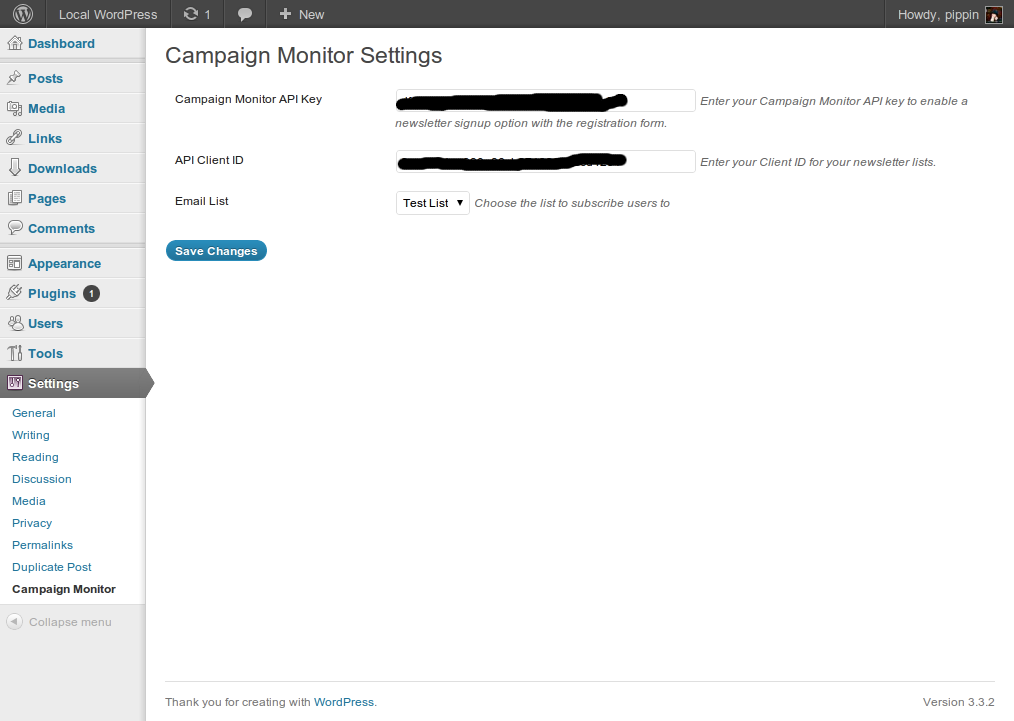
There are three different options that we have created:
- A text field for the Campaign Monitor API key
- A text field for the API Client ID
- A select menu for the email list to subscribe users to
The first two fields are straight forward; they are just plain text fields. The select menu for choosing the email list is a bit more complicated. We first use a function called pippin_get_campaign_monitor_lists() (we will create this in a moment) to store the available lists in an array named $lists, and then we loop through the array, outputting an option for each list. Each option in the select menu has a value attribute set equal to the ID of the list, and a label (name) set to the name of the list.
It is now time to dive into the first part of the Campaign Monitor API. We are going to create the function mentioned above that is used to create an array of all available email lists. The function is actually pretty simple:
1 2 3 4 5 6 7 8 9 10 11 12 13 14 15 16 17 18 19 20 21 22 23 24 | // get an array of all campaign monitor subscription lists function pippin_get_campaign_monitor_lists() { global $cm_options; if(strlen(trim($cm_options['api_key'])) > 0 && strlen(trim($cm_options['api_key'])) > 0 ) { $lists = array(); require_once(dirname(__FILE__) . '/vendor/csrest_clients.php'); $wrap = new CS_REST_Clients($cm_options['client_id'], $cm_options['api_key']); $result = $wrap->get_lists(); if($result->was_successful()) { foreach($result->response as $list) { $lists[$list->ListID] = $list->Name; } return $lists; } } return array(); // return a blank array if the API key is not set } |
At the top of the function, we first check to make sure that an API key has been entered and saved. This function is only designed to run once the settings have been saved for the first time, since an API key is required.
Once we have confirmed that we have an API key set, we load the csrest_clients.php file from the Campaign Monitor PHP API wrapper that we downloaded from Github earlier. Next, we create a new instance of the CS_REST_Clients() class, and we pass the API Client ID and the API key as parameters.
The email lists are accessible by using $wrap->get_lists();. We do this and store the lists in a variable called $result.
We next check to make sure that the lists were retrieved successfully with
if($result->was_successful()) { // ... } |
If the lists were successfully retrieved, we loop through them and store them in the $list array we created at the beginning of this function. The ID of the list is stored as the array key, and the name is stored as the array value.
If no lists were found, then a blank array is returned.
At this point, we can load out plugin settings page and everything will function just fine. Enter your API key, your Client ID, click save, and then choose a list. After choosing a list, save again.
We are almost done. There are just a few more functions to write: two for outputting the sign up form, and two for processing the signup submission. We will start with the signup form HTML.
In order to make the plugin a bit more flexible, we will setup a function to output the signup form, and also create a short code to output the same form. This allows users to easily include the signup form inside of a theme’s template files, or display it on any page with the short code.
The first function outputs the HTML for the signup form and is the one that would be used in a template file:
1 2 3 4 5 6 7 8 9 10 11 12 13 14 15 16 17 18 19 20 21 22 23 24 25 26 27 28 | // displays the campaign_monitor signup form
function pippin_campaign_monitor_form($redirect) {
global $cm_options;
ob_start();
if(isset($_GET['submitted']) && $_GET['submitted'] == 'yes') {
echo '<p>' . __('You have been successfully subscribed', 'pippin') . '</p>';
} else {
if(strlen(trim($cm_options['api_key'])) > 0 ) { ?>
<form id="pippin_campaign_monitor" action="" method="post">
<p>
<label for="pippin_cm_name"><?php _e('Enter your name', 'pippin'); ?></label><br/>
<input name="pippin_cm_name" id="pippin_cm_name" type="text" placeholder="<?php _e('Your name.', 'pippin'); ?>"/>
</p>
<p>
<label for="pippin_cm_email"><?php _e('Enter your email to subscribe to our newsletter', 'pippin'); ?></label><br/>
<input name="pippin_cm_email" id="pippin_cm_email" type="text" placeholder="<?php _e('Email . . .', 'pippin'); ?>"/>
</p>
<p>
<input type="hidden" name="redirect" value="<?php echo $redirect; ?>"/>
<input type="hidden" name="action" value="pippin_cm_signup"/>
<input type="submit" value="<?php _e('Sign Up', 'pippin'); ?>"/>
</p>
</form>
<?php
}
}
return ob_get_clean();
} |
Aside from outputting a simple HTML form, the function includes a couple of extra elements that enhance its functionality:
- If the $_GET variable “submitted” is present and equals “yes”, a success message is displayed instead of the form.
- The form checks to make sure an API key has been entered and only displays the form if one is present.
- A hidden input field named “redirect” is included. This allows us to redirect the user to a custom “success” page if we wish once they have successfully submitted the form.
To show the form in one of your template files, use this:
echo pippin_campaign_monitor_form(); |
Now we will setup the short code that can be used to display the form in a WordPress post, page, or text widget. It’s pretty simple:
1 2 3 4 5 6 7 8 9 10 11 | function pippin_campaign_monitor_form_shortcode($atts, $content = null ) { extract( shortcode_atts( array( 'redirect' => '' ), $atts ) ); if($redirect == '') { $redirect = add_query_arg('submitted', 'yes', get_permalink()); } return pippin_campaign_monitor_form($redirect); } add_shortcode('campaign_monitor', 'pippin_campaign_monitor_form_shortcode'); |
The short code does little more than return the HTML form we created in the function above, and sets a redirect. If the redirect parameter is left blank, then the current page is used, with a $_GET variable set.
If you are unfamiliar with how adding short codes works, checkout the function reference for add_shortcode().
We now have our HTML form, and if you place the short code on a page, or the function in a template, it should look about like this:
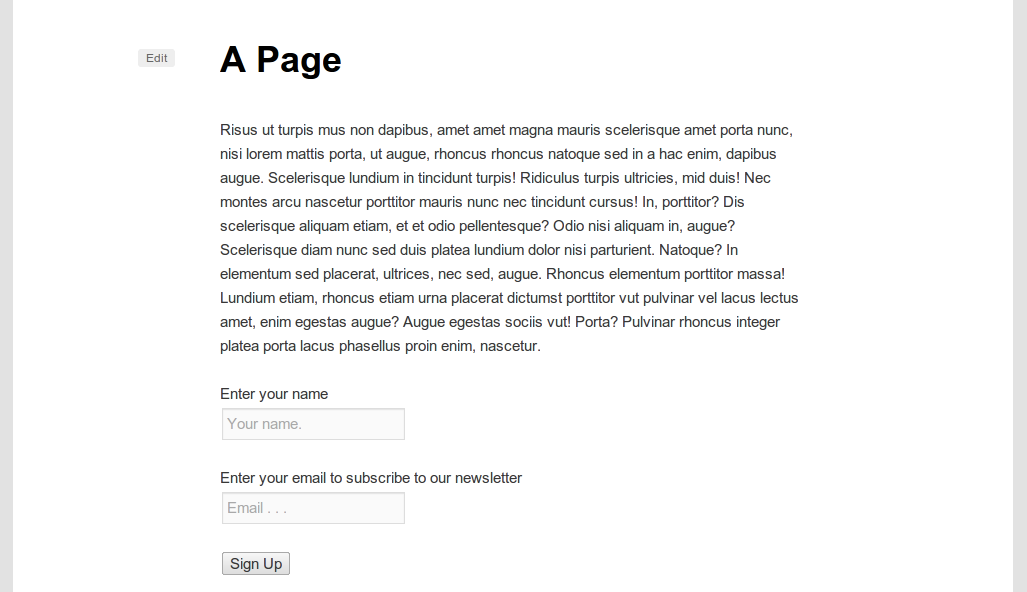
Now we just need to process the form submissions. We do that with two functions: one to “listen” for the submission, and one to actually send the email address and name to Campaign Monitor. Let’s first create the “listener” function. This function will detect when the email subscribe form has been submitted and also check the data submitted. If all data is valid, then it will send it off to Campaign Monitor.
1 2 3 4 5 6 7 8 9 10 11 12 13 14 15 16 17 18 19 20 21 22 23 24 25 26 27 28 | // process the subscribe to list form function pippin_check_for_email_signup() { // only proceed with this function if we are posting from our email subscribe form if(isset($_POST['action']) && $_POST['action'] == 'pippin_cm_signup') { // setup the email and name varaibles $email = strip_tags($_POST['pippin_cm_email']); $name = strip_tags($_POST['pippin_cm_name']); // check for a valid email if(!is_email($email)) { wp_die(__('Your email address is invalid', 'pippin'), __('Invalid Email', 'pippin')); } // check for a name if(strlen(trim($name)) <= 0) { wp_die(__('Enter your name', 'pippin'), __('No Name', 'pippin')); } // send this email to campaign_monitor pippin_cm_subscribe_email($email, $name); // send user to the confirmation page wp_redirect($_POST['redirect']); exit; } } add_action('init', 'pippin_check_for_email_signup'); |
If either the email or name field is invalid, an error is displayed alerting the user to the fact that they have to enter all of the information correctly.
Once all the data is confirmed as being “okay”, we use the pippin_cm_subscribe_email() function to send the new subscriber to Campaign Monitor. We will write this function now:
1 2 3 4 5 6 7 8 9 10 11 12 13 14 15 16 17 18 19 20 21 22 | // adds an email to the campaign_monitor subscription list function pippin_cm_subscribe_email($email, $name) { global $cm_options; if(strlen(trim($cm_options['api_key'])) > 0 ) { require_once(dirname(__FILE__) . '/vendor/csrest_subscribers.php'); $wrap = new CS_REST_Subscribers($cm_options['list'], $cm_options['api_key']); $subscribe = $wrap->add(array( 'EmailAddress' => $email, 'Name' => $name, 'Resubscribe' => true )); if($subscribe->was_successful()) { return true; } } return false; } |
The function takes two parameters: $email and $name. In much the same way as we did with the function that retrieves all email lists, we first check to make sure an API key has been saved in the settings, since we can’t subscribe someone without having a valid API key set. Once we know we have an API key, we load the csrest_subscribers.php file from the API library we downloaded from Github.
Processing the subscription is done with the $wrap->add() function, which takes three parameters:
- Name – the name of the user we are subscribing
- Resubscribe – true or false for whether we update the user’s current subscription, if it exists
If $subscribe->was_successful() comes back as true, we return TRUE for the function, otherwise we return FALSE.
That’s it, we now how a fully functional Campaign Monitor signup form.
All together, our fully coded plugin looks like this:
1 2 3 4 5 6 7 8 9 10 11 12 13 14 15 16 17 18 19 20 21 22 23 24 25 26 27 28 29 30 31 32 33 34 35 36 37 38 39 40 41 42 43 44 45 46 47 48 49 50 51 52 53 54 55 56 57 58 59 60 61 62 63 64 65 66 67 68 69 70 71 72 73 74 75 76 77 78 79 80 81 82 83 84 85 86 87 88 89 90 91 92 93 94 95 96 97 98 99 100 101 102 103 104 105 106 107 108 109 110 111 112 113 114 115 116 117 118 119 120 121 122 123 124 125 126 127 128 129 130 131 132 133 134 135 136 137 138 139 140 141 142 143 144 145 146 147 148 149 150 151 152 153 154 155 156 157 158 159 160 161 162 163 164 165 166 167 168 169 170 171 172 173 174 175 176 177 178 179 180 181 182 183 184 185 186 187 188 189 190 191 192 193 194 195 196 197 198 199 | <?php /* Plugin Name: Campaign Monitor Signup Plugin URL: https://pippinsplugins.com/create-a-simple-campaign-monitor-signup-form Description: Display a signup form for any Campaign Monitor email list Version: 1.0 Author: Pippin Williamson Author URI: https://pippinsplugins.com Contributors: mordauk */ $cm_options = get_option('pippin_cm_settings'); // register the plugin settings function pippin_campaign_monitor_register_settings() { // register our option register_setting( 'pippin_cm_settings_group', 'pippin_cm_settings' ); } add_action( 'admin_init', 'pippin_campaign_monitor_register_settings', 100 ); function pippin_campaign_monitor_settings_menu() { // add settings page add_options_page(__('Campaign Monitor', 'pippin'), __('Campaign Monitor', 'pippin'),'manage_options', 'pippin-campaign-monitor', 'pippin_campaign_monitor_settings_page'); } add_action('admin_menu', 'pippin_campaign_monitor_settings_menu', 100); function pippin_campaign_monitor_settings_page() { global $cm_options; ?> <div class="wrap"> <h2><?php _e('Campaign Monitor Settings', 'pippin'); ?></h2> <form method="post" action="options.php" class="pippin_options_form"> <?php settings_fields( 'pippin_cm_settings_group' ); ?> <table class="form-table"> <tr valign="top"> <th scop="row"> <label for="pippin_cm_settings[api_key]"><?php _e( 'Campaign Monitor API Key', 'pippin' ); ?></label> </th> <td> <input class="regular-text" type="text" id="pippin_cm_settings[api_key]" style="width: 300px;" name="pippin_cm_settings[api_key]" value="<?php if(isset($cm_options['api_key'])) { echo esc_attr($cm_options['api_key']); } ?>"/> <span class="description"><?php _e('Enter your Campaign Monitor API key to enable a newsletter signup option with the registration form.', 'pippin'); ?></span> </td> </tr> <tr> <th scop="row"> <label for="pippin_cm_settings[client_id]"><?php _e( 'API Client ID', 'pippin' ); ?></label> </th> <td> <input class="regular-text" type="text" id="pippin_cm_settings[client_id]" style="width: 300px;" name="pippin_cm_settings[client_id]" value="<?php if(isset($cm_options['client_id'])) { echo esc_attr($cm_options['client_id']); } ?>"/> <span class="description"><?php _e('Enter your Client ID for your newsletter lists.', 'pippin'); ?></span> </td> </tr> <tr> <th scop="row"> <label for="pippin_cm_settings[list]"><?php _e( 'Email List', 'pippin' ); ?></label> </th> <td> <?php $lists = pippin_get_campaign_monitor_lists(); ?> <select id="pippin_cm_settings[list]" name="pippin_cm_settings[list]"> <?php if($lists) : foreach($lists as $id => $list_name) : echo '<option value="' . $id . '"' . selected($cm_options['list'], $id, false) . '>' . $list_name . '</option>'; endforeach; else : ?> <option value="no list"><?php _e('no lists', 'pippin'); ?></option> <?php endif; ?> </select> <span class="description"><?php _e('Choose the list to subscribe users to', 'pippin'); ?></span> </td> </tr> </table> <?php submit_button(); ?> </form> </div><!--end .wrap--> <?php } // get an array of all campaign monitor subscription lists function pippin_get_campaign_monitor_lists() { global $cm_options; if(strlen(trim($cm_options['api_key'])) > 0 && strlen(trim($cm_options['api_key'])) > 0 ) { $lists = array(); require_once(dirname(__FILE__) . '/vendor/csrest_clients.php'); $wrap = new CS_REST_Clients($cm_options['client_id'], $cm_options['api_key']); $result = $wrap->get_lists(); if($result->was_successful()) { foreach($result->response as $list) { $lists[$list->ListID] = $list->Name; } return $lists; } } return array(); // return a blank array if the API key is not set } // process the subscribe to list form function pippin_check_for_email_signup() { // only proceed with this function if we are posting from our email subscribe form if(isset($_POST['action']) && $_POST['action'] == 'pippin_cm_signup') { // setup the email and name varaibles $email = strip_tags($_POST['pippin_cm_email']); $name = strip_tags($_POST['pippin_cm_name']); // check for a valid email if(!is_email($email)) { wp_die(__('Your email address is invalid', 'pippin'), __('Invalid Email', 'pippin')); } // check for a name if(strlen(trim($name)) <= 0) { wp_die(__('Enter your name', 'pippin'), __('No Name', 'pippin')); } // send this email to campaign_monitor pippin_cm_subscribe_email($email, $name); // send user to the confirmation page wp_redirect($_POST['redirect']); exit; } } add_action('init', 'pippin_check_for_email_signup'); // adds an email to the campaign_monitor subscription list function pippin_cm_subscribe_email($email, $name) { global $cm_options; if(strlen(trim($cm_options['api_key'])) > 0 ) { require_once(dirname(__FILE__) . '/vendor/csrest_subscribers.php'); $wrap = new CS_REST_Subscribers($cm_options['list'], $cm_options['api_key']); $subscribe = $wrap->add(array( 'EmailAddress' => $email, 'Name' => $name, 'Resubscribe' => true )); if($subscribe->was_successful()) { return true; } } return false; } // displays the campaign_monitor signup form function pippin_campaign_monitor_form($redirect) { global $cm_options; ob_start(); if(isset($_GET['submitted']) && $_GET['submitted'] == 'yes') { echo '<p>' . __('You have been successfully subscribed', 'pippin') . '</p>'; } else { if(strlen(trim($cm_options['api_key'])) > 0 ) { ?> <form id="pippin_campaign_monitor" action="" method="post"> <p> <label for="pippin_cm_name"><?php _e('Enter your name', 'pippin'); ?></label><br/> <input name="pippin_cm_name" id="pippin_cm_name" type="text" placeholder="<?php _e('Your name.', 'pippin'); ?>"/> </p> <p> <label for="pippin_cm_email"><?php _e('Enter your email to subscribe to our newsletter', 'pippin'); ?></label><br/> <input name="pippin_cm_email" id="pippin_cm_email" type="text" placeholder="<?php _e('Email . . .', 'pippin'); ?>"/> </p> <p> <input type="hidden" name="redirect" value="<?php echo $redirect; ?>"/> <input type="hidden" name="action" value="pippin_cm_signup"/> <input type="submit" value="<?php _e('Sign Up', 'pippin'); ?>"/> </p> </form> <?php } } return ob_get_clean(); } function pippin_campaign_monitor_form_shortcode($atts, $content = null ) { extract( shortcode_atts( array( 'redirect' => '' ), $atts ) ); if($redirect == '') { $redirect = add_query_arg('submitted', 'yes', get_permalink()); } return pippin_campaign_monitor_form($redirect); } add_shortcode('campaign_monitor', 'pippin_campaign_monitor_form_shortcode'); |
The complete source code can be downloaded below.
[download id=”43″ format=”1″]
Hi Pippin,
What if the user wanted to select which list they wanted to subscribe to? I would have though it would be a (hidden?) field in the post submission form but it doesn’t seem to be present.
Cheers,
Steve
That could definitely be done. You would need to retrieve the lists (similar to how it is done in the plugin settings), and then put them into a drop down select field (or a radio button list) that the user then chooses a list from.
That is a lovely example! I would love to go one step further and have this form sitting in Woocommerce My Account section and retrieve the customer’s data so they can check it’s up to date! Now there is a challenge for you!