

In this premium-members only tutorial, we’re going to take a brief look into working with the Mail Chimp API to create a newsletter sign up form for your WordPress site. The final result will be a complete plugin that you can install on any WordPress site to begin accepting email subscriptions to your Mail Chimp Lists.
Mail Chimp has an exceptionally well documented API that is quite easy to work with. For this plugin, we are going to use the PHP class provided by the Mail Chimp folks, and it can be downloaded from here their API Downloads page. The plugin download at the bottom of this page has the PHP class included, so feel free to just download the plugin.
So the first thing we need to do is setup our plugin file. This includes the standard plugin header information:
1 2 3 4 5 6 7 8 9 | <?php /* Plugin Name: Mail Chimp Sign Up Sample Plugin URL: https://pippinsplugins.com/create-a-simple-mail-chimp-sign-up-form Description: Display a signup form for any Mail Chimp subscriber list Version: 1.0 Author: Pippin Williamson Author URI: https://pippinsplugins.com */ |
I’ve named my plugin file “sample-mailchimp.php”, and placed it inside of a folder called “mailchimp-sample-plugin”. You can feel free to name your as you wish.
Because we are working with the Mail Chimp API, we need a method to store our unique API key, which gives us access to the account, allowing us to add emails to the subscription list. With the API, we can actually do much, much more than just add emails to a list, but for this tutorial, that’s about all we’re going to do. In order to store our API key (which you can find under your Account menu), we’re going to setup a simple plugin options page. The first step of creating the option page is loading our plugin options into a global variable, like this:
1 | $mc_options = get_option('pippin_mailchimp_settings'); |
In order for our plugin options to work, we need to register them. This is pretty simple using the register_setting() function:
1 2 3 4 5 6 7 | // register the plugin settings function pippin_mailchimp_register_settings() { // create our plugin settings register_setting( 'pippin_mailchimp_settings_group', 'pippin_mailchimp_settings' ); } add_action( 'admin_init', 'pippin_mailchimp_register_settings', 100 ); |
I’ve used this same method in multiple plugins / tutorials, so if you’re not familiar with it by now, or this is your first tutorial of mine to read, then learn more about the WordPress Settings API here.
Now we will create a menu item for our options page. This will go under the main WordPress Settings menu.
1 2 3 4 5 | function pippin_mailchimp_settings_menu() { // add settings page add_options_page(__('Mail Chimp', 'pippin'), __('Mail Chimp', 'pippin'),'manage_options', 'pippin-mailchimp', 'pippin_mailchimp_settings_page'); } add_action('admin_menu', 'pippin_mailchimp_settings_menu', 100); |
If you’re not familiar with the add_options_page() function, please consult the codex entry.
Our menu slug is “pippin-mailchimp”, and the function that renders our settings page is pippin_mailchimp_settings_menu(), so we now need to create that function.
1 2 3 4 5 6 7 8 9 10 11 | function pippin_mailchimp_settings_page() {
global $mc_options;
?>
<div class="wrap">
<h2><?php _e('Mail Chimp Settings', 'pippin'); ?></h2>
</div><!--end .wrap-->
<?php
} |
This is just the shell of our settings page. We still need to create the HTML form that we will use to input and save our options. The form looks like this:
1 2 3 4 5 | <form method="post" action="options.php" class="pippin_options_form"> <?php settings_fields( 'pippin_mailchimp_settings_group' ); ?> <!--the options will be here--> </form> |
The core “options.php” file is what processes our data and saves it to the database, so that’s what we use in our action attribute. The settings_fields() function sets up everything needed to save our options, so the only thing that is left is the individual options themselves.
Each of our options, which will be HTML input and select fields, must have their own unique name. Also, all of our plugin’s options will be stored in a single array, so we need to setup our option names like this:
name="pippin_mailchimp_settings[mailchimp_api]"
The first part of the name (before the […]), must match the second parameter of our register_setting() function above. The second part, inside of the square brackets, is the unique key for the option. Each of our options must have a unique key.
So we are going to have two options, one text input field, to save the Mail Chimp API key, and one select field that will have an option for each of the newsletter lists available in your account to subscribe users to. Our text field looks like this:
1 2 3 4 5 | <p> <label for="pippin_mailchimp_settings[mailchimp_api]"><?php _e( 'Mail Chimp API Key', 'pippin' ); ?></label><br/> <input class="regular-text" id="pippin_mailchimp_settings[mailchimp_api]" style="width: 300px;" name="pippin_mailchimp_settings[mailchimp_api]" value="<?php if(isset($mc_options['mailchimp_api'])) { echo $mc_options['mailchimp_api']; } ?>"/> <div class="description"><?php _e('Enter your Mail Chimp API key to enable a newsletter signup option with the registration form.', 'pippin'); ?></div> </p> |
Most of this is just HTML, but note name of the input field, and also how the value of the input field is set. At the top of our settings page, we setup the global $mc_options variable that contains the values of our options, as stored in the database, so that makes our option value accessible like this:
1 | $mc_options['option_name_here']; |
And in the case of our API key option, the value is accessible with this:
1 | if(isset($mc_options['mailchimp_api'])) { echo $mc_options['mailchimp_api']; } |
The isset() conditional is used so that a error isn’t thrown if the option is empty or doesn’t exist yet.
Our select field, which we will use to choose the Mail Chimp List that emails should be added to, is a little more complex. First we must retrieve an array of all the lists available to choose from, using our API key, then we have to output each list as an option in our select field. The function that will be used to retrieve the array of lists will be written in a moment, so for now we’ll just acknowledge that they will be made available in our array.
1 2 3 4 5 6 7 8 9 10 11 12 13 14 15 16 | <p> <?php $lists = pippin_get_mailchimp_lists(); ?> <select id="pippin_mailchimp_settings[mailchimp_list]" name="pippin_mailchimp_settings[mailchimp_list]"> <?php if($lists) : foreach($lists as $list) : echo '<option value="' . $list['id'] . '"' . selected($mc_options['mailchimp_list'], $list['id'], false) . '>' . $list['name'] . '</option>'; endforeach; else : ?> <option value="no list"><?php _e('no lists', 'pippin'); ?></option> <?php endif; ?> </select> <label for="pippin_mailchimp_settings[mailchimp_list]"><?php _e( 'Newsletter List', 'pippin' ); ?></label><br/> <div class="description"><?php _e('Choose the list to subscribe users to', 'pippin'); ?></div> </p> |
One of the very first things we do with this option is retrieve the array of our Mail Chimp lists, then we setup the select field, once again using our same naming convention. Next, we do a quick if check to ensure there was at least one list retrieved, and display an option that says “no lists” if none were available. If there were lists retrieved, then we run a foreach loop on the array and output each one as an option in the select field. The ID of the list is set as the value of the option, and the name of the list is set as the name/label of the option.
That’s it for both of our options, so now the only thing left is our “Save Options” button, which is a simple submit input:
1 2 3 4 | <!-- save the options --> <p class="submit"> <input type="submit" class="button-primary" value="<?php _e( 'Save Options', 'pippin' ); ?>" /> </p> |
So all together now, our settings page function looks like this:
1 2 3 4 5 6 7 8 9 10 11 12 13 14 15 16 17 18 19 20 21 22 23 24 25 26 27 28 29 30 31 32 33 34 35 36 37 38 39 40 | function pippin_mailchimp_settings_page() {
global $mc_options;
?>
<div class="wrap">
<h2><?php _e('Mail Chimp Settings', 'pippin'); ?></h2>
<form method="post" action="options.php" class="pippin_options_form">
<?php settings_fields( 'pippin_mailchimp_settings_group' ); ?>
<p>
	<label for="pippin_mailchimp_settings[mailchimp_api]"><?php _e( 'Mail Chimp API Key', 'pippin' ); ?></label><br/>
	<input class="regular-text" id="pippin_mailchimp_settings[mailchimp_api]" style="width: 300px;" name="pippin_mailchimp_settings[mailchimp_api]" value="<?php if(isset($mc_options['mailchimp_api'])) { echo $mc_options['mailchimp_api']; } ?>"/>
	<div class="description"><?php _e('Enter your Mail Chimp API key to enable a newsletter signup option with the registration form.', 'pippin'); ?></div>
</p>
<p>
<?php $lists = pippin_get_mailchimp_lists(); ?>
<select id="pippin_mailchimp_settings[mailchimp_list]" name="pippin_mailchimp_settings[mailchimp_list]">
<?php
if($lists) :
foreach($lists as $list) :
echo '<option value="' . $list['id'] . '"' . selected($mc_options['mailchimp_list'], $list['id'], false) . '>' . $list['name'] . '</option>';
endforeach;
else :
?>
<option value="no list"><?php _e('no lists', 'pippin'); ?></option>
<?php endif; ?>
</select>
<label for="pippin_mailchimp_settings[mailchimp_list]"><?php _e( 'Newsletter List', 'pippin' ); ?></label><br/>
<div class="description"><?php _e('Choose the list to subscribe users to', 'pippin'); ?></div>
</p>
<!-- save the options -->
<p class="submit">
<input type="submit" class="button-primary" value="<?php _e( 'Save Options', 'pippin' ); ?>" />
</p>
</form>
</div><!--end .wrap-->
<?php
} |
Our settings page should look about like this:
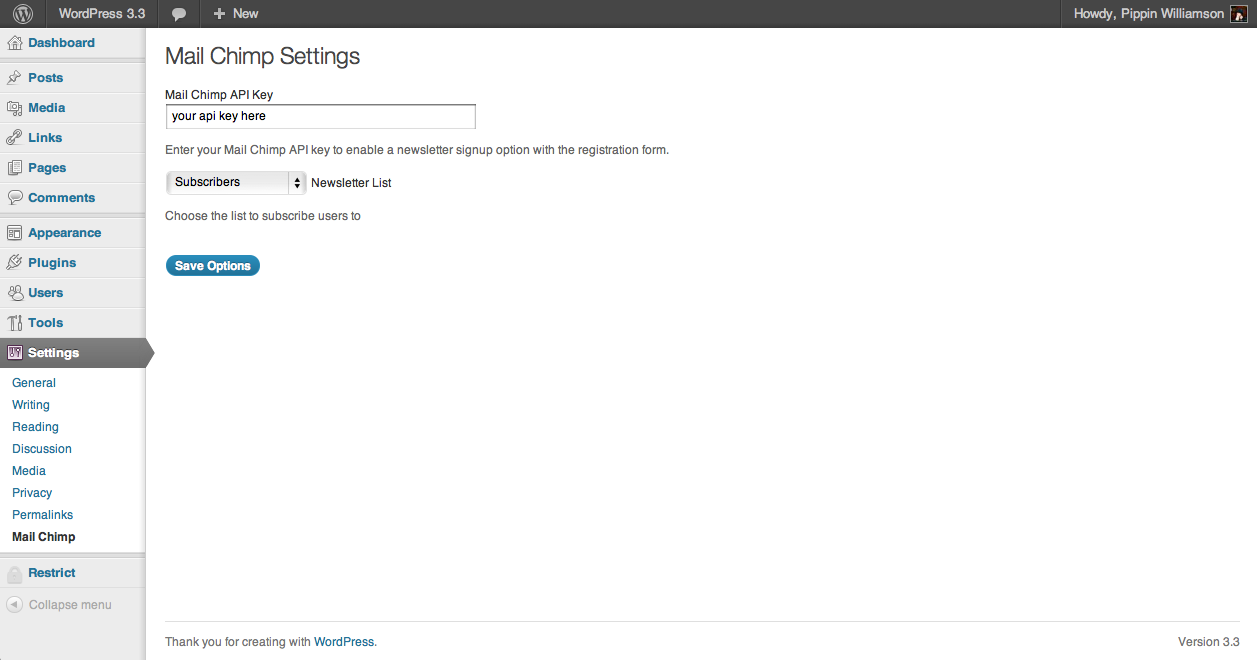
The next step in our plugin is to create the signup form. This is going to be the form users use on the front end of the site to enter their emails and subscribe to the list. The form is very simple and only contains a couple of inputs.
1 2 3 4 5 6 7 8 9 10 11 12 13 14 15 16 17 18 19 20 | // displays the mailchimp signup form
function pippin_mailchimp_form($redirect) {
global $mc_options;
ob_start();
if(strlen(trim($mc_options['mailchimp_api'])) > 0 ) { ?>
<form id="pippin_mailchimp" action="" method="post">
<p>
<label for="pippin_mailchimp_email"><?php _e('Enter your email to subscribe to our newsletter', 'pippin'); ?></label><br/>
<input name="pippin_mailchimp_email" id="pippin_mailchimp_email" type="email" placeholder="<?php _e('Email . . .', 'pippin'); ?>"/>
</p>
<p>
<input type="hidden" name="redirect" value="<?php echo $redirect; ?>"/>
<input type="hidden" name="action" value="pippin_mailchimp"/>
<input type="submit" value="<?php _e('Sign Up', 'pippin'); ?>"/>
</p>
</form>
<?php
}
return ob_get_clean();
} |
We first do a conditional check to make sure that an API key has been entered in the settings page, since there’s no reason to show a form if it can’t do anything.
Once we’ve confirmed that an API key has been entered, we setup an “email” type input field. This is where the users will enter their email address when signing up.
There are also two hidden fields: one contains the URL to which to send users after a successful signup (this will be set in our next function), and one acts as the “action” field. This is used in the processing function to know when this form (verses any other form) is being submitted.
Note that all of the inputs (and all other elements of the plugin) are fully localized. This is to ensure it is ready for translation for all of our friends that don’t speak / read English. If you’re not familiar with the localization process, read my tutorial on Localizing and Translating Plugins.
Now that we have our signup form ready, we need to attach it to a short code so that we can display it in a page, post, or widget.
1 2 3 4 5 6 7 8 9 10 11 | function pippin_mailchimp_form_shortcode($atts, $content = null ) { extract( shortcode_atts( array( 'redirect' => '' ), $atts ) ); if($redirect == '') { $redirect = home_url(); } return pippin_mailchimp_form($redirect); } add_shortcode('mailchimp', 'pippin_mailchimp_form_shortcode'); |
The short code accepts one option parameter for the “redirect” URL. This is, again, the URL that users are sent to after successfully submitting their email to the Mail Chimp list. If the redirect option is left blank, the site’s home URL will be used instead. The $redirect variable is passed to the pippin_mailchimp_form() function so that it can be outputted in our form’s “redirect” input.
Our subscribe form should now look about like this:

Since this is an advanced tutorial, I’m not explaining how the register short code process works. If you’re following everything here, then you most likely already know how to do this, but if you don’t, then consult my tutorial on adding short codes to your plugins.
We are now ready for the last few functions of the plugin. Up til now we haven’t actually done anything with the Mail Chimp API, we’ve only referenced functions that will use the API, but it’s now time to actually write our functions that will retrieve the available email lists, process our subscribe form submissions, and add an email to a list.
The first we will write is the one to retrieve an array of all available email lists.
This function is going to use the lists() from the Mail Chimp API. There are a variety of filters and other options we can use to limit the lists that are returned, but we’re going to use the defaults for this tutorial, which will return an array of all lists.
If you haven’t yet, you will need to make sure you have downloaded the MCAPI API wrapper and put it into your plugin folder.
1 2 3 4 5 6 7 8 9 10 11 12 13 14 15 16 17 18 19 20 21 22 23 24 25 26 27 28 29 30 31 32 33 34 35 | // get an array of all mailchimp subscription lists function pippin_get_mailchimp_lists() { global $mc_options; // check that an API key has been entered if(strlen(trim($mc_options['mailchimp_api'])) > 0 ) { // setup the $lists variable as a blank array $lists = array(); // load the Mail Chimp API class require_once('mailchimp/MCAPI.class.php'); // load a new instance of the API class with our API key $api = new MCAPI($mc_options['mailchimp_api']); // retrieve an array of all email list data $list_data = $api->lists(); // if at least one list was retrieved if($list_data) : // loop through each list foreach($list_data['data'] as $key => $list) : // store the list ID in our array ID key $lists[$key]['id'] = $list['id']; // store the list name our array NAME key $lists[$key]['name'] = $list['name']; endforeach; endif; // return an array of the lists with ID and name return $lists; } return false; } |
We first load up the global $mc_options variable so that we can have access to our plugin options. Then we check to make sure that our API option isn’t empty. Since our function relies on us having a valid API key, we only want to proceed with the function if an API key is entered.
Next we defined our $lists variable as a blank array. This is where we will store all of the list data we get from Mail Chimp.
Since we have to rely on functions provided by the Mail Chimp API in order to retrieve data from the MC servers, we next have to load the MCAPI wrapper, which we downloaded earlier. This is done like this:
1 | require_once('mailchimp/MCAPI.class.php'); |
And now we create a new instance of the Mail Chimp class, like so:
1 | $api = new MCAPI($mc_options['mailchimp_api']); |
This will allow us to access functions in the MCAPI like this:
1 | $api->function_name(); |
To get an array of all available email lists, we will use this:
1 | $list_data = $api->lists(); |
$list_data will now be an array containing all of the information returned by Mail Chimp. This data will be unique to our API key/account.
Once we have our list data, we do a quick conditional check out it, to ensure that data was retrieved, and then perform a foreach loop on the $list_data array:
1 2 3 4 5 6 7 8 9 | if($list_data) : // loop through each list foreach($list_data['data'] as $key => $list) : // store the list ID in our array ID key $lists[$key]['id'] = $list['id']; // store the list name our array NAME key $lists[$key]['name'] = $list['name']; endforeach; endif; |
This will take the ID and NAME of each email list and store it in our $lists array. There is a lot more information than just the ID and name returned by Mail Chimp, but these are the only two pieces of information we need right now.
At the end of our function, we return the $lists array. Remember back in our settings page function when we used this function?
1 | $lists = pippin_get_mailchimp_lists(); |
If you load your settings page now, you will be able to see a select menu of all available email lists.
The next function we need to write is the one that processes our email subscription form.
1 2 3 4 5 6 7 8 9 10 11 12 13 14 15 16 17 18 19 20 21 22 | // process the subscribe to list form function pippin_check_for_email_signup() { // only proceed with this function if we are posting from our email subscribe form if(isset($_POST['action']) && $_POST['action'] == 'pippin_mailchimp') { // this contains the email address entered in the subscribe form $email = $_POST['pippin_mailchimp_email']; // check for a valid email if(!is_email($email)) { wp_die(__('Your email address is invalid', 'pippin'), __('Invalid Email', 'pippin')); } // send this email to mailchimp pippin_subscribe_email($email); // send user to the confirmation page wp_redirect($_POST['redirect']); exit; } } add_action('init', 'pippin_check_for_email_signup'); |
The function is pretty simple. First we check to see if our “action” field was posted, and that its value equals “pippin_mailchimp”. This is to ensure that our function only processes data from our email form.
Once we’ve confirmed that data is coming from the right form, we setup an $email variable that contains the email address entered in the form. Next we have to validate the email address, and we do this by using the WordPress is_email() function. This will check for a correctly formatted email, and if the email doesn’t validate, we kill our process with the wp_die() function, which will show the error to the user.

If the email address is valid, then we use the pippin_subscribe_email() function, which we will write in a moment, to send the email address to Mail Chimp.
And lastly, we redirect our new subscriber to the page specified in the short code parameters. This is presumably the “Thank you for subscribing” page.
We attach our function to the “init” hook so that the posted data will be read when loading the page.
There is just one more function left: the pippin_subscribe_email() function which will add an email to our chosen list.
The function works pretty similar to the pippin_get_mailchimp_lists() function, but uses the MCAPI listSubscribe() function instead.
1 2 3 4 5 6 7 8 9 10 11 12 13 14 15 16 17 18 19 20 21 22 | // adds an email to the mailchimp subscription list function pippin_subscribe_email($email) { global $mc_options; // check that the API option is set if(strlen(trim($mc_options['mailchimp_api'])) > 0 ) { // load the MCAPI wrapper require_once('mailchimp/MCAPI.class.php'); // setup a new instance of the MCAPI class $api = new MCAPI($mc_options['mailchimp_api']); // subscribe the email to the list and return TRUE if successful if($api->listSubscribe($mc_options['mailchimp_list'], $email, '') === true) { return true; } } // return FALSE if any of the above fail return false; } |
Once again, we check to make sure that an API key has been entered on our settings page, and then we load the MCAPI wrapper class. Next we setup a new instance of the class, then we use the listSubscribe() function to add the email, which was passed as a parameter to the function, to the email list specified in the settings page. If the email was added successfully, we return TRUE for the function. At the very bottom, we return the function as FALSE. This will only happen if either the API key was not entered on the settings page, or the email failed to be added to the list.
As with the lists() MCAPI function, listSubscribe() has a lot of option parameters you can set, but we’re only doing the basic minimum since this is our first time (likely) working with the Mail Chimp API. If you want to extend this and add additional values to the user’s email subscription, such as first or last name, then read about it on the function’s documentation page.
That’s it! Our plugin is now complete.
Everything Together
1 2 3 4 5 6 7 8 9 10 11 12 13 14 15 16 17 18 19 20 21 22 23 24 25 26 27 28 29 30 31 32 33 34 35 36 37 38 39 40 41 42 43 44 45 46 47 48 49 50 51 52 53 54 55 56 57 58 59 60 61 62 63 64 65 66 67 68 69 70 71 72 73 74 75 76 77 78 79 80 81 82 83 84 85 86 87 88 89 90 91 92 93 94 95 96 97 98 99 100 101 102 103 104 105 106 107 108 109 110 111 112 113 114 115 116 117 118 119 120 121 122 123 124 125 126 127 128 129 130 131 132 133 134 135 136 137 138 139 140 141 142 143 144 145 146 147 148 149 150 151 152 153 154 155 156 157 158 159 160 161 162 163 164 165 166 167 168 169 170 171 172 173 174 175 176 177 178 179 180 181 182 | <?php /* Plugin Name: Mail Chimp Sign Up Sample Plugin URL: https://pippinsplugins.com/create-a-simple-mail-chimp-sign-up-form Description: Display a signup form for any mailchimp subscriber list Version: 1.0 Author: Pippin Williamson Author URI: https://pippinsplugins.com Contributors: Pippin Williamson */ $mc_options = get_option('pippin_mailchimp_settings'); function pippin_mailchimp_settings_menu() { // add settings page add_options_page(__('Mail Chimp', 'pippin'), __('Mail Chimp', 'pippin'),'manage_options', 'pippin-mailchimp', 'pippin_mailchimp_settings_page'); } add_action('admin_menu', 'pippin_mailchimp_settings_menu', 100); // register the plugin settings function pippin_mailchimp_register_settings() { // create whitelist of options register_setting( 'pippin_mailchimp_settings_group', 'pippin_mailchimp_settings' ); } add_action( 'admin_init', 'pippin_mailchimp_register_settings', 100 ); function pippin_mailchimp_settings_page() { global $mc_options; ?> <div class="wrap"> <h2><?php _e('Mail Chimp Settings', 'pippin'); ?></h2> <form method="post" action="options.php" class="pippin_options_form"> <?php settings_fields( 'pippin_mailchimp_settings_group' ); ?> <p> <label for="pippin_mailchimp_settings[mailchimp_api]"><?php _e( 'Mail Chimp API Key', 'pippin' ); ?></label><br/> <input class="regular-text" id="pippin_mailchimp_settings[mailchimp_api]" style="width: 300px;" name="pippin_mailchimp_settings[mailchimp_api]" value="<?php if(isset($mc_options['mailchimp_api'])) { echo $mc_options['mailchimp_api']; } ?>"/> <div class="description"><?php _e('Enter your Mail Chimp API key to enable a newsletter signup option with the registration form.', 'pippin'); ?></div> </p> <p> <?php $lists = pippin_get_mailchimp_lists(); ?> <select id="pippin_mailchimp_settings[mailchimp_list]" name="pippin_mailchimp_settings[mailchimp_list]"> <?php if($lists) : foreach($lists as $list) : echo '<option value="' . $list['id'] . '"' . selected($mc_options['mailchimp_list'], $list['id'], false) . '>' . $list['name'] . '</option>'; endforeach; else : ?> <option value="no list"><?php _e('no lists', 'pippin'); ?></option> <?php endif; ?> </select> <label for="pippin_mailchimp_settings[mailchimp_list]"><?php _e( 'Newsletter List', 'pippin' ); ?></label><br/> <div class="description"><?php _e('Choose the list to subscribe users to', 'pippin'); ?></div> </p> <!-- save the options --> <p class="submit"> <input type="submit" class="button-primary" value="<?php _e( 'Save Options', 'pippin' ); ?>" /> </p> </form> </div><!--end .wrap--> <?php } // displays the mailchimp signup form function pippin_mailchimp_form($redirect) { global $mc_options; ob_start(); if(strlen(trim($mc_options['mailchimp_api'])) > 0 ) { ?> <form id="pippin_mailchimp" action="" method="post"> <p> <label for="pippin_mailchimp_email"><?php _e('Enter your email to subscribe to our newsletter', 'pippin'); ?></label><br/> <input name="pippin_mailchimp_email" id="pippin_mailchimp_email" type="email" placeholder="<?php _e('Email . . .', 'pippin'); ?>"/> </p> <p> <input type="hidden" name="redirect" value="<?php echo $redirect; ?>"/> <input type="hidden" name="action" value="pippin_mailchimp"/> <input type="submit" value="<?php _e('Sign Up', 'pippin'); ?>"/> </p> </form> <?php } return ob_get_clean(); } function pippin_mailchimp_form_shortcode($atts, $content = null ) { extract( shortcode_atts( array( 'redirect' => '' ), $atts ) ); if($redirect == '') { $redirect = home_url(); } return pippin_mailchimp_form($redirect); } add_shortcode('mailchimp', 'pippin_mailchimp_form_shortcode'); // get an array of all mailchimp subscription lists function pippin_get_mailchimp_lists() { global $mc_options; // check that an API key has been entered if(strlen(trim($mc_options['mailchimp_api'])) > 0 ) { // setup the $lists variable as a blank array $lists = array(); // load the Mail Chimp API class require_once('mailchimp/MCAPI.class.php'); // load a new instance of the API class with our API key $api = new MCAPI($mc_options['mailchimp_api']); // retrieve an array of all email list data $list_data = $api->lists(); // if at least one list was retrieved if($list_data) : // loop through each list foreach($list_data['data'] as $key => $list) : // store the list ID in our array ID key $lists[$key]['id'] = $list['id']; // store the list name our array NAME key $lists[$key]['name'] = $list['name']; endforeach; endif; // return an array of the lists with ID and name return $lists; } return false; } // process the subscribe to list form function pippin_check_for_email_signup() { // only proceed with this function if we are posting from our email subscribe form if(isset($_POST['action']) && $_POST['action'] == 'pippin_mailchimp') { // this contains the email address entered in the subscribe form $email = $_POST['pippin_mailchimp_email']; // check for a valid email if(!is_email($email)) { wp_die(__('Your email address is invalid', 'pippin'), __('Invalid Email', 'pippin')); } // send this email to mailchimp pippin_subscribe_email($email); // send user to the confirmation page wp_redirect($_POST['redirect']); exit; } } add_action('init', 'pippin_check_for_email_signup'); // adds an email to the mailchimp subscription list function pippin_subscribe_email($email) { global $mc_options; // check that the API option is set if(strlen(trim($mc_options['mailchimp_api'])) > 0 ) { // load the MCAPI wrapper require_once('mailchimp/MCAPI.class.php'); // setup a new instance of the MCAPI class $api = new MCAPI($mc_options['mailchimp_api']); // subscribe the email to the list and return TRUE if successful if($api->listSubscribe($mc_options['mailchimp_list'], $email, '') === true) { return true; } } // return FALSE if any of the above fail return false; } |
i can’t view this tutorial. i already login in the page but no luck
This tutorial is only available to paid subscribers. Check out the Join the Site page for pricing.
Hey Pippin,
Very awesome 🙂 One question… after users subscribe it’d be good to tell them that it was successful and they’ll receive the verification email.
Obviously this can be easily achieved by just creating a page that says this and redirecting them there, but how could I have it so that as well as just redirecting the user to the home page, it has the standard mail chimp pop-up saying that the email has been received and that they need to confirm the email they just received? Better yet, a nice AJAX solution would be cool 😉
I added that notification in the official plugin I wrote.
hi pippen
Please help me that how i can add additional fields with every post when i am writing the post?
I don’t think I understand your question. Can you give an example of what you’re trying to do?
mean that when i creating the post there should be two additional fields where i enter the some data in integer form?
No there are not fields for that. This plugin doe not send emails when posts are published.
Hi Pippin,
In the pippin_check_for_email_signup() function, instead of just redirecting user back to home page, how can I redirect and trigger a lightbox notification or maybe append some successful text below the input box?
after
wp_redirect($_POST[‘redirect’]); exit;
I just do not know how to trigger a javascript when the redirect back to home page, like a modal (from Twitter Bootstrap) can pop up say “success!”. The function do not pass anything back. And I have no idea how to trigger JS via just URL.
Something simple can be after successful submit to mailchimp, the page redirect back and a new success right underline the input box. (If it fail, it return the error message?)
Thanks!
On the success page, check for the “success” query parameter and then echo some inline javascript to trigger the modal if it is present. Make sense?
Then my question will be how to check for the “success” query parameter? Will this be in the function pippin_mailchimp_form? Is there an example I can follow after? The trigger of modal will be
$(‘#myModal’).modal();
So will the echo will be:
echo (‘ $(‘#myModal’).modal(); ‘);
??
Thx!
Yes in that function. You can use this: