This entry is part 7 of 7 in the Writing Your First WordPress Plugins, Basic to Advanced Series
- How to Begin Writing Your First WordPress plugin
- Structuring Your First WordPress Plugin
- Writing Your First WordPress Plugin Part 3
- Writing Your First WordPress Plugin Part 4
- Writing Your First WordPress Plugin Part 5
- Writing Your First WordPress Plugin Part 6
- Writing Your First WordPress Plugin Part 7 – Final
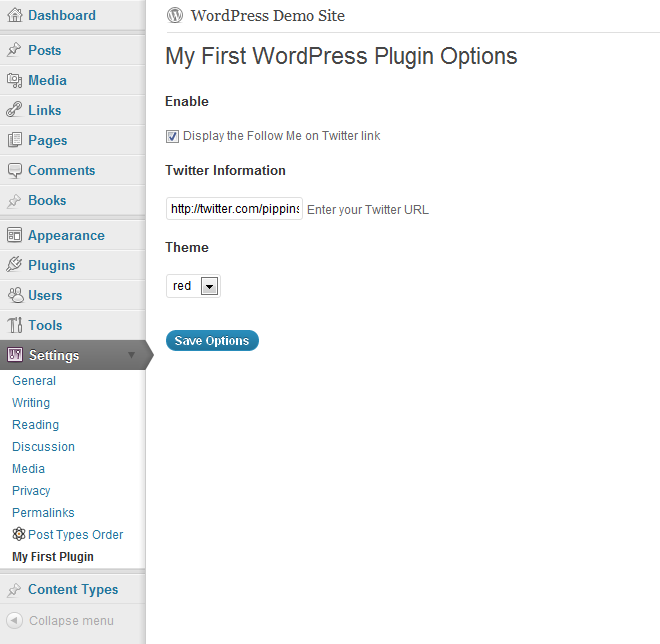
Part seven of Writing Your First WordPress Plugin concludes the series by demonstrating how to extend the plugin options that I showed you in part 6, and how to use them to control various aspects of your plugin’s output, such as turning it on or off and changing theoutput’s theme. There is not a lot of new material covered in this part, but a couple of key points are explained that will greatly assist you writing WordPress plugin option pages.
You must be logged in to view the rest of this content. Register or login from the sidebar.

I’ve really enjoyed this tutorial series and want to thank you for the effort you’ve put into providing content of this quality. I commend you for your teaching style and look forward to exploring your site and the rest of your tutorials as well.
As someone who is relatively new to Web development and very new to the world of WordPress, I’m having difficulty seeing the big picture of using WP as a CMS and what, when and where to use all of the pieces that are available to me with WP such as function.php, widgets, plugins, actions, hooks etc. Is there a logical path I can take that will help me put it all together and become proficient with it?
I’m Glad you’ve enjoyed the series! The first thing to understand with WordPress as a CMS, is realizing that it IS a true Content Management System. A year or two back WordPress was kind of a “hacked” CMS, but with a lot of the advancements the core development theme have made, primarily with custom post types, WordPress is no longer anything less than a true CMS.
So where do you start? The first thing I would tell you is just become very comfortable with the WordPress UI. Once that is done, then move on to understanding plugins. Not necessarily how to write them, but at least understanding the things they can do for you. After that it’s just time and experience. The more you use it, the more you will get accustomed and comfortable with it.
Great tutorial! But I’m having one issue.
I followed your directions for the enable checkbox, but I’m getting an error when the checkbox is unchecked:
Uninitialized string offset: 0
Shouldn’t there be an add_option() hook to setup the option? Because as it stands the enable option has no value when unchecked. Which seems to be causing the error.
add_option() is not necessary because the register_setting() function takes care of all of that. Does your checkbox value save okay?
Oh yeah. It works fine. The error is just bugging me. I would like to fix it but I’m not sure how.
Try changing checked(1, $mfwp_options['enable']); to:
if(isset($mfwp_options['enable']) { checked(1, $mfwp_options['enable']); }Hi all,
I know this is a bit of an older topic, but just found http://iamcam.wordpress.com/2008/01/15/unchecked-checkbox-values/ which is working wonders for me to make sure a checkbox value is either 0 or 1. Thanks!
Thanks for pointing that out.
Cool,
That half worked. I also had to change
if($mfwp_options['enable'] == true) {
// . . ..
}
to
if(isset($mfwp_options['enable']) && $mfwp_options['enable'] == true) {
// . . ..
}
I was getting an error in both spots.
Good job, thanks for noticing that.
Can this new check be described a bit more since the video and the text differ?
I had the error when unchecked:
Undefined index: enableWhen I used the isset function it solved it but I just wanted to know what is going on here.
Here is my stab at it…Is it checking for the variable ‘enable’ in the options field to see if it is defined AND set to value of 1 equaling to value of ‘true’. If both of these are true then show the box checked, otherwise it is unchecked?
Your stab at it is correct. The error that you were noticing was coming up because the variable we were checking against didn’t actually exist. The isset() function lets us safely check whether a var exists,
Even better wrap it in the if loop
if(isset($mfwp_options['enable'])) {
if(is_singular() && $mfwp_options['enable'] == true) {
// . . ..
}
}
This has been the best plugin development tutorial series I’ve come across with such detail. Well done. Your an excellent teacher and I’ll be getting all your plugins.
Thanks for the insight into the WP plugin development world.
Glad you’ve found it useful
Hello Pippin; Thanks again for your tutorials. When I finished the tutorial, I tried to create Options Page, following all the steps. But my options won’t save., when I save they revert to blank. I posted the entire code I am using at the following pastebin link. Please check and let me know what do I missed.
Here is the link. Thank you.
http://pastebin.com/AuPW5dSE
I think the problem is with your add_settings_field() functions. The first parameter, which is the option ID, needs to be an array that matches the options array. Currently you have this:
add_settings_field('enable_checkbox'...It should be this:
add_settings_field('mfop_theme_options[enable_checkbox]'...Thanks you.
I assume that worked?
Thanks again, Pippin.
After many iterations, I think I was missing the validation code,and it I worked when I added the following simple but effective “return” code (I am sure it need more validation and sanitation, but so far so good and it works).
function mfop_options_validate_cb($mfop_options) {
return $mfop_options;
}
Oh yes, sorry, I should have spotted that. If you use a validation function, it must (at least) return the same data that was passed to it.
Simply Amazing tutorial!!
Just wanted to say thanks for the series – very helpful!
Great series Pippin,
What about using add_action() and add_filter() before the function? I have seen it done both after and before is there a WP standard or is it a personal preference and is there difference when doing it before as opposed to after?
Before and after which function? I personally prefer to do it at the start and end of most functions, especially those that output HTML.
Maybe I am confused? Here is an example with the add_filter before a function. Will it work just as well after the function mybloginfo()? Does its placement matter outside the mybloginfo function? I am just trying to understand why sometimes I see it before a function and sometimes after.
add_filter('bloginfo', 'mybloginfo', 1, 2);
add_filter('bloginfo_url', 'mybloginfo', 1, 2);
function mybloginfo($result='', $show='') {
switch ($show) {
case 'wpurl':
$result = SITE_URL;
break;
case 'template_directory':
$result = TEMPL_DIR;
break;
default:
}
return $result;
}
Oh, I understand what you mean. Sorry I was confused. The way you have it will work just fine.
great! tutorial. thanks
Very good series and one of the best I’ve come across.
With that said, one thing I would have liked to see included is the ability to store the data in a new table and not the options table.
I think if that was covered, then it would have been an even better series.
http://codex.wordpress.org/Creating_Tables_with_Plugins
In general, custom tables should be avoided in plugins, simply because they are rarely needed. Most of the time, custom post types can be used for just about anything you want.
There are some cases where custom tables are the right way to go, however. Do you have a scenario in mind?
The reason I mentioned it is because if the plugin requires you to store lots of additional data then custom tables could be used. I’m currently about to create an R.S.V.P plugin which requires me to store lots of invitation information and personal messages for the bride and groom.
I can see that being an applicable situation for custom tables.
This tutorial has been great! Thanks, Pippin. i did notice a correction that needs to be made in the option tag of the foreach loop.
selected=”selected”
should read
Otherwise, the last listed option is marked as selected. Again, thank you for your resources here. They have been a great help in orienting me to the realm of plugins.
Oops, my php code got stripped. The replacement for “selected” should be a php code that calls the $selected variable, which would define the selected value for that option.
Yes, you’re absolutely right, that should be replaced with the selected() function.
This tutorial series is awesome. No words to appreciate. For few days I was looking for a good tutorial about WP plugin development. This is the best tutorial I found. I don’t think I need to find any more.
Thanks Again. Keep up the good work!
Hi,
please tell me where is the download link for the entire code.
It’s at the bottom of the post, where it says “Download Complete Plugin”.
Hi GREAT tutorial series how would i add a function to change text my plugin to a set font that i include in the fonts folder within my plugin..
i am trying to break down and duplicate the script found at http://alturl.com/43fo7 to create this work cloud from custom added text.
To do that you just need to load the custom CSS with your @font-face declarations.
it’s perfect. i really enjoyed.
thanks a lot for your good site and tuts
Awesome Tutorials!
I’m glad I stumbled across your website
Thanks for the tutorials, Pippin! When I have more time in a month, I’ll definitely pay for a subscription.
I only have one point of curiosity: When referring to the $mfwp_options[] dictionary, you’re only using quotes when referring to it in PHP. Why don’t you have to use quotes in html?
Thanks again!
That’s just a syntax thing. PHP requires it, HTML doesn’t.
Awesome tutorial series! Thank you so much Pippin.
Very helpful tutorial. Very clean explanation.
It will be very cool if you also have tutorial, which shows how to deal with databases and how to create a new tables etc. …
Anyway thank you very much for this tutorial.
I wrote a tutorial that shows how to create them: http://pippinsplugins.com/create-database-tables-when-plugin-is-activated/
There is a great series on WP.TutsPlus on the topic: http://wp.tutsplus.com/series/custom-database-tables/
Hi Pippin – Just wanted to say a big thanks for this brilliant series on WP Plugins. I have really enjoyed your video tutorials. The quality of the video and audio was really clear and your voice and accent are very easy to understand. Of course the actual tutorial content itself is really good, clear and easy to understand. You have a talent for teaching and clearly are very passionate about writing good WP Code. Thanks again.
Great to hear!