
This entry is part 5 of 7 in the Writing Your First WordPress Plugins, Basic to Advanced Series
- How to Begin Writing Your First WordPress plugin
- Structuring Your First WordPress Plugin
- Writing Your First WordPress Plugin Part 3
- Writing Your First WordPress Plugin Part 4
- Writing Your First WordPress Plugin Part 5
- Writing Your First WordPress Plugin Part 6
- Writing Your First WordPress Plugin Part 7 – Final
In part 5 of Writing Your First WordPress Plugin, I’m going to take you through the process of adding an admin options page to your first WordPress plugin. This options page will allow your user to configure the settings for the plugin very easily. In this case, we’re going to use it to allow the user to enter their Twitter url, which is displayed at the bottom of each post. The options page will allow more than that, but we will start simple.
For this part of the tutorial, we’re going to write two new functions, and place them in a new file called “admin-page.php”, which is placed inside of the “includes” folder.
The first function is the one that will output the HTML of our options page. For now it is very simple, but in the next couple parts of this series, I will expand this function to include the actual options form. For now it just displays a little HTML so that we know the page is working correctly.
1 2 3 4 5 6 7 8 9 | function mfwp_options_page() {
ob_start(); ?>
<div class="wrap">
<h2>My First WordPress Plugin Options</h2>
<p>This is our settings page content.</p>
</div>
<?php
echo ob_get_clean();
} |
The second function we need to write is the one that will add a link to the WordPress Settings page for us. This link will display a page with the contents of our function above.
1 2 3 4 | function mfwp_add_options_link() { add_options_page('My First WordPress Plugin Options', 'My First Plugin', 'manage_options', 'mfwp-options', 'mfwp_options_page'); } add_action('admin_menu', 'mfwp_add_options_link'); |
The end result of these two functions should look like this:
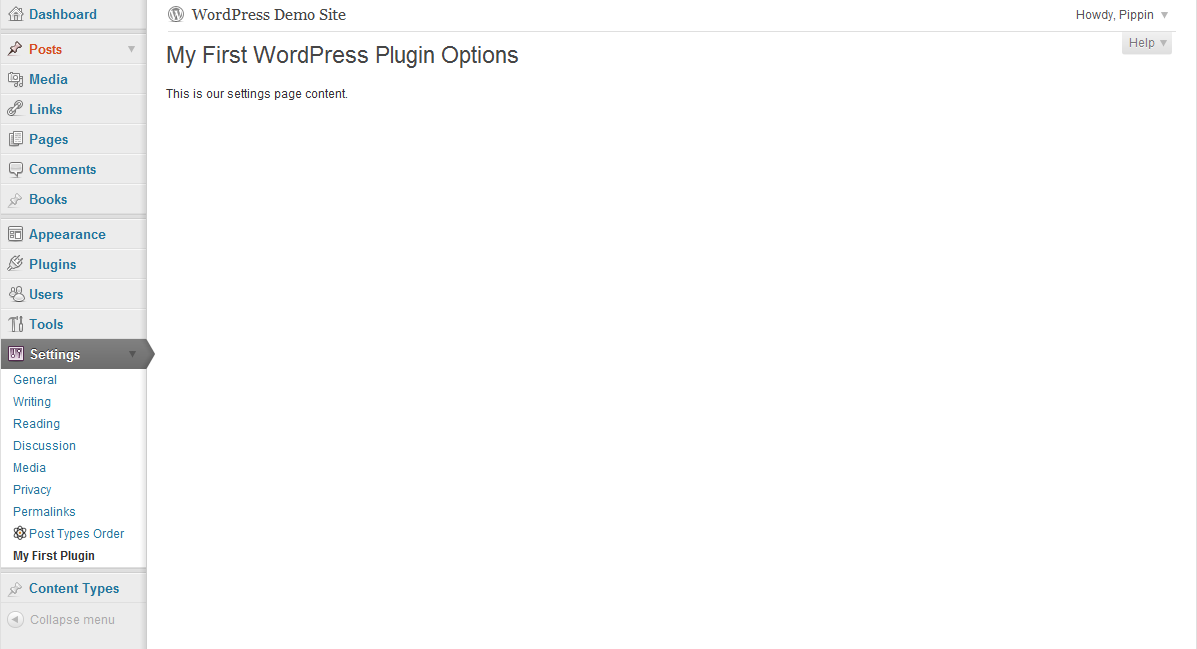
Do NOT forget to include your new “admin-page.php” file into the main plugin file, just as we have the others.
In the next part of this series, we’re going to get a little more advanced and I’m going to show you how to create the option fields themselves. Once that is done, we’ll be able to add a lot more flexibility to our plugin.
Download WIP Plugin
Thank you for continuing this series. I was waiting for it.
You’re welcome! Part 6 is scheduled for tomorrow 🙂
Not sure I understand the purpose of the output buffer. Removing ob_start() and echo ob_get_clean() returns the same result on the admin page. What are the advantages of using this function?
Thanks for this useful series.
The advantage is when you need to return the entire content of the page (or store it in a variable), rather than just echo it.
hi, why you don’t use ?> end of all php files?
Because it is not needed. Since it’s not needed, there’s really no reason to include it.
Pippin can you help me little bit in writting a plugin.i want to write a sign up plugin
Please elaborate on the plugin you want to make.
I want this…………..
When a user signs up for a volunteer opportunity,the following happens:
1. An email is sent to the volunteer with thanks.
2. Th email address is checked against user list.If there is no user with that email address,a new user is created.
3. The user is subscribed to receive updates on the project with a new comment is posted.
Are you looking for suggestions on how to write the plugin, or for me to do it for you?
Hi Pippin, I really enjoy your great tutorial. I have a question which is do we always have to use “ob_start();” for this method ? Since I think without “ob_start();” the code will work also.
No, it is not required (except for some scenarios).
admin_menu
Hi! Thank you very much for your tutorial!
Can you please explain how can i display plugins settings in “Edit Post” window. Like it done in SEO Ultimate plugin
It is like a widget in “Edit Post” window.
That is a whole series of tutorials in and of itself. Take a look at this project: https://github.com/jaredatch/Custom-Metaboxes-and-Fields-for-WordPress It provides a pretty simple way to add meta boxes.
Hi Pippin,
I have been working through lesson 5 and get the following error:
The plugin generated 407 characters of unexpected output during activation. If you notice “headers already sent” messages, problems with syndication feeds or other issues, try deactivating or removing this plugin.
This is my code:
My first WordPress options
why not working????
<php
echo ob_get_clean();
}
function mfwp_add_options_link(){
add_options_page('My first WordPress function', 'My first plugin', 'manage_options', 'mfwp-options', 'mfwp_options_page');
}
add_action('admin_menu', 'mfwp_add_options_link');
I have included it in the Index file. No other plugins are active.
Any ideas?
Thanks
As it turns out the HTML worked in the comment so I have re-added with some full stops so you can see the full code.
My first WordPress options
why not working????
<php
echo ob_get_clean();
}
function mfwp_add_options_link(){
add_options_page('My first WordPress function', 'Peters plugin', 'manage_options', 'mfwp-options', 'admin-page.php');
}
add_action('admin_menu', 'mfwp_add_options_link');
That’s not the complete code. Can you paste the entire plugin into snippi.com and share the link?
Hi pippin, link is:
http://snippi.com/s/94tw3d0✖
Cheers
Hello All, I have worked out the issue and it was so minor I can not believe I missed it.
The problem was I had <php, NOT <?php.
This seems to have caused the code to become output instead of identifing up coming code.
It now works… 🙂
Thanks
Great!
thank you for all this tutorial
hey pippin it rlly helped a lot!! keep it always…:-)
http://snippi.com/s/i09j28j
Please check my code i dono why its not working for me…in WordPress 3.9.2
Regards,
Sheikh Mohammed Shamnoon
This is working now :-)…. Problem occurred because my file name was “admin.php”,If file name is this, it doesn’t work and now i changed the file name as admin-page.php and it worked.
Hi Pippin, I’ve followed this tutorial very closely, nicely done!
There is this problem that I have: the saving of the settings does not work although I see the “Settings saved” message after I submit the form.
I can see the settings entry created in the db, but it is always empty.
So if I may: can you please help me in my specific case?
I just can’t see what I did wrong: http://snippi.com/s/y1dpg8z
I’m on wp 4.0 en_GB
Try this version: http://snippi.com/s/nimxf30
Ok, it was that method-“post” typo 🙂
Thank you and sorry to bother for such stupid things 🙂
Happy to help!
Hello Pippin!
I followed this tutorial on a wordpress 4.4.2 installation and had some issues. Is there any additions or changes that is needed for this to work on 4.4.2?
There shouldn’t be any necessary changes.
2017; Still watching.
really nice tutorial shame there are only 6 videos. I would pay for the full version of tutorial.
my settings link is not visible in admin menu …i don’t know why …can u help me … here is my code:
My First WordPress plugin options
This is our settings page content