
WP_Logging is a general use logging system that I have written for WordPress. It was first written for my Easy Digital Downloads but I have adapted it for general use. The main idea behind the class it to provide a simple solution for logging events, actions, errors, etc, inside of your WordPress plugins or themes.
The class provides a set of methods that can be used for recording log entries, relating entries to posts/pages/cpts, retrieving log entries, including those related to any post ID, and also retrieving total log counts.
In Easy Digital Downloads, the class (actually a slightly modified version) is used for tracking purchase histories, file downloads, and purchase errors from payment gateways. By storing this information, we’re much more easily able to present the store owner with an idea of what is happening behind the scenes of the site. For example, a meta box that displays the complete log history for all file downloads related to a particular product is shown to site admins:
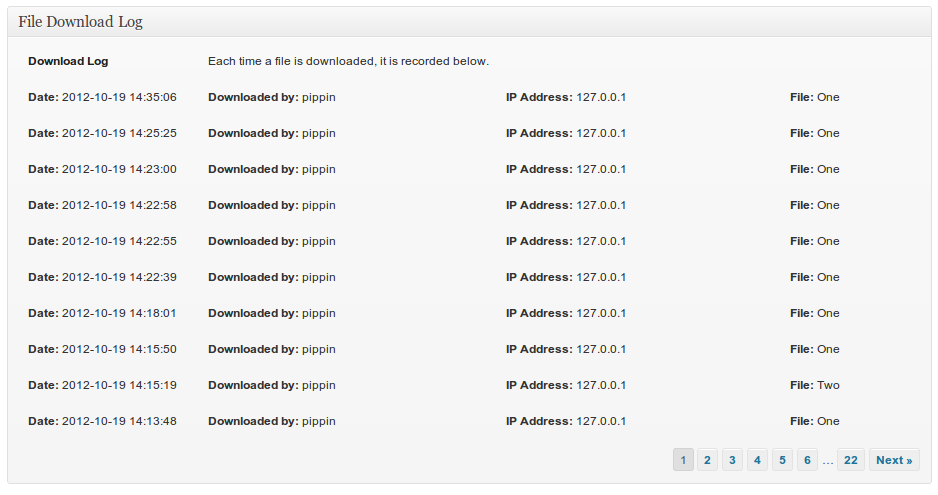
Creating log systems like this is the entire point of the WP_Logging class.
Let’s see how you can use it.
Log Types
Log entries are designed to be separated into “types”. By default the class has “error” and event” log types. You can change these to anything you want by modifying the array in the log_types() method:
1 2 3 4 5 6 7 | private function log_types() { $terms = array( 'error', 'event' ); return apply_filters( 'wp_log_types', $terms ); } |
You could also register additional log types using a filter:
1 2 3 4 5 6 7 | function pw_add_log_types( $types ) { $types[] = 'registration'; return $types; } add_filter( 'wp_log_types', 'pw_add_log_types' ); |
Recording Log Entries
There are two ways to record a log entry, one is quick and simple and the one is more involved, but also gives more control.
Using add():
1 | $log_entry = WP_Logging::add( $title = '', $message = '', $parent = 0, $type = null ); |
$title (string) – The log entry title
$message – The log entry message (string)
$parent (int) – The post object ID that you want this log entry connected to, if any
$type (string) – The type classification to give this log entry. Must be one of the types registered in log_types(). This is optional.
A sample log entry creation might look like this:
1 2 3 4 5 6 | $title = 'Payment Error'; $message = 'There was an error processing the payment. Here are details of the transaction: (details shown here)'; $parent = 46; // This might be the ID of a payment post type item we want this log item connected to $type = 'error'; WP_Logging::add( $title, $message, $parent, $type ); |
Or, without a type:
1 2 3 4 5 | $title = 'Payment Error'; $message = 'There was an error processing the payment. Here are details of the transaction: (details shown here)'; $parent = 46; // This might be the ID of a payment post type item we want this log item connected to WP_Logging::add( $title, $message, $parent ); |
Using insert_log():
1 | $log_entry = WP_logging::insert_log( $log_data = array(), $log_meta = array() ); |
This method requires that all log data be passed via arrays. One array is used for the main post object data and one for additional log meta to be recorded with the log entry.
The $log_data array accepts all arguments that can be passed to [wp_insert_post()](http://codex.wordpress.org/Function_Reference/wp_insert_post), with one additional parameter for log_type.
The $log_data array expects key/value pairs for any meta data that should be recorded with the log entry. The meta data is stored is normal post meta, though all meta data is prefixed with _wp_log_.
Creating a log entry with insert_log() might look like this:
1 2 3 4 5 6 7 8 9 10 11 12 13 | $log_data = array( 'post_title' => 'Payment Error', 'post_content' => 'There was an error processing the payment. Here are details of the transaction: (details shown here)', 'post_parent' => 46, // This might be the ID of a payment post type item we want this log item connected to 'log_type' => 'error' ); $log_meta = array( 'customer_ip' => 'xxx.xx.xx.xx' // the customer's IP address 'user_id' => get_current_user_id() // the ID number of the currently logged-in user ); $log_entry = WP_Logging::insert_log( $log_data, $log_meta ); |
Retrieving Log Entries
There are two methods for retrieving entries that have been stored via this logging class:
WP_Logging::get_logs( $object_id = 0, $type = null, $paged = null )
WP_Logging::get_connected_logs( $args = array() )
get_logs() is the simple method that lets you quickly retrieve logs that are connected to a specific post object. For example, to retrieve error logs connected to post ID 57, you’d do:
1 | $logs = WP_Logging::get_logs( 57, 'error' ); |
This will retrieve the first 10 entries related to ID 57. Note that the third parameter is for $paged. This allows you to pass a page number (in the case you’re building an admin UI for showing logs) and WP_Logging will adjust the logs retrieved to match the page number.
If you need more granular control, you will want to use get_connected_logs(). This method takes a single array of key/value pairs as the only parameter. The $args array accepts all arguments that can be passed to [wp_insert_post()](http://codex.wordpress.org/Function_Reference/wp_insert_post), with one additional parameter for log_type.
Here’s an example of using get_connected_logs():
1 2 3 4 5 6 7 | $args = array( 'post_parent' => 57, 'posts_per_page'=> 10, 'paged' => get_query_var( 'paged' ), 'log_type' => 'error' ); $logs = WP_Logging::get_connected_logs( $args ); |
If you want to retrieve all log entries and ignore pagination, you can do this:
1 2 3 4 5 6 | $args = array( 'post_parent' => 57, 'posts_per_page'=> -1, 'log_type' => 'error' ); $logs = WP_Logging::get_connected_logs( $args ); |
Both get_logs() and get_connected_logs() will return a typical array of post objects, just like [get_posts()](http://codex.wordpress.org/Template_Tags/get_posts)
Get Log Entry Counts
The get_log_count() method allows you to retrieve a count for the total number of log entries stored in the database. It allows you to retrieve logs attached to a specific post object ID, of a particular type, and also allows you to pass optional meta options for only counting log entries that have meta values stored.
The method looks like this:
1 | WP_Logging:: get_log_count( $object_id = 0, $type = null, $meta_query = null ) |
To retrieve the total number of error logs attached to post 57, you can do this:
1 | $count = WP_Logging::get_log_count( 57, 'error' ); |
To retrieve the total number of logs (regardless of type) attached to post object ID 57, you can do this:
1 | $count = WP_Logging::get_log_count( 57 ); |
The third parameter is for passing a meta query array. This array should be in the same form as meta queries passed to [WP_Query](http://codex.wordpress.org/Class_Reference/WP_Query). For example, to retrieve a count of error log entries that have a user IP that match a specific IP address, you can do this:
1 2 3 4 5 6 7 | $meta_query = array( array( 'key' => '_wp_log_customer_ip', // the meta key 'value' => 'xxx.xx.xx.xx' // the IP address to retrieve logs for ) ); $count = WP_Logging::get_log_count( 57, 'error', $meta_query ); |
The Complete Class
1 2 3 4 5 6 7 8 9 10 11 12 13 14 15 16 17 18 19 20 21 22 23 24 25 26 27 28 29 30 31 32 33 34 35 36 37 38 39 40 41 42 43 44 45 46 47 48 49 50 51 52 53 54 55 56 57 58 59 60 61 62 63 64 65 66 67 68 69 70 71 72 73 74 75 76 77 78 79 80 81 82 83 84 85 86 87 88 89 90 91 92 93 94 95 96 97 98 99 100 101 102 103 104 105 106 107 108 109 110 111 112 113 114 115 116 117 118 119 120 121 122 123 124 125 126 127 128 129 130 131 132 133 134 135 136 137 138 139 140 141 142 143 144 145 146 147 148 149 150 151 152 153 154 155 156 157 158 159 160 161 162 163 164 165 166 167 168 169 170 171 172 173 174 175 176 177 178 179 180 181 182 183 184 185 186 187 188 189 190 191 192 193 194 195 196 197 198 199 200 201 202 203 204 205 206 207 208 209 210 211 212 213 214 215 216 217 218 219 220 221 222 223 224 225 226 227 228 229 230 231 232 233 234 235 236 237 238 239 240 241 242 243 244 245 246 247 248 249 250 251 252 253 254 255 256 257 258 259 260 261 262 263 264 265 266 267 268 269 270 271 272 273 274 275 276 277 278 279 280 281 282 283 284 285 286 287 288 289 290 291 292 293 294 295 296 297 298 299 300 301 302 303 304 305 306 307 308 309 310 311 312 313 314 315 316 317 318 319 320 321 322 323 324 325 326 327 328 329 330 331 332 333 334 335 336 337 338 339 340 341 342 343 344 345 346 347 348 349 350 351 352 353 354 355 356 357 358 359 360 | <?php /** * Class for logging events and errors * * @package WP Logging Class * @copyright Copyright (c) 2012, Pippin Williamson * @license http://opensource.org/licenses/gpl-2.0.php GNU Public License */ class WP_Logging { /** * Class constructor. * * @since 1.0 * * @access public * @return void */ function __construct() { // create the log post type add_action( 'init', array( $this, 'register_post_type' ), -1 ); // create types taxonomy and default types add_action( 'init', array( $this, 'register_taxonomy' ), -1 ); } /** * Log types * * Sets up the default log types and allows for new ones to be created * * @access private * @since 1.0 * * @return array */ private function log_types() { $terms = array( 'error', 'event' ); return apply_filters( 'wp_log_types', $terms ); } /** * Registers the wp_log Post Type * * @access public * @since 1.0 * * @uses register_post_type() * * @return void */ public function register_post_type() { /* logs post type */ $log_args = array( 'labels' => array( 'name' => __( 'Logs', 'wp-logging' ) ), 'public' => false, 'query_var' => false, 'rewrite' => false, 'capability_type' => 'post', 'supports' => array( 'title', 'editor' ), 'can_export' => false ); register_post_type( 'wp_log', $log_args ); } /** * Registers the Type Taxonomy * * The Type taxonomy is used to determine the type of log entry * * @access public * @since 1.0 * * @uses register_taxonomy() * @uses term_exists() * @uses wp_insert_term() * * @return void */ public function register_taxonomy() { register_taxonomy( 'wp_log_type', 'wp_log' ); $types = self::log_types(); foreach ( $types as $type ) { if( ! term_exists( $type, 'wp_log_type' ) ) { wp_insert_term( $type, 'wp_log_type' ); } } } /** * Check if a log type is valid * * Checks to see if the specified type is in the registered list of types * * @access private * @since 1.0 * * * @return array */ private function valid_type( $type ) { return in_array( $type, self::log_types() ); } /** * Create new log entry * * This is just a simple and fast way to log something. Use self::insert_log() * if you need to store custom meta data * * @access private * @since 1.0 * * @uses self::insert_log() * * @return int The ID of the new log entry */ public static function add( $title = '', $message = '', $parent = 0, $type = null ) { $log_data = array( 'post_title' => $title, 'post_content' => $message, 'post_parent' => $parent, 'log_type' => $type ); return self::insert_log( $log_data ); } /** * Stores a log entry * * @access private * @since 1.0 * * @uses wp_parse_args() * @uses wp_insert_post() * @uses update_post_meta() * @uses wp_set_object_terms() * @uses sanitize_key() * * @return int The ID of the newly created log item */ public static function insert_log( $log_data = array(), $log_meta = array() ) { $defaults = array( 'post_type' => 'wp_log', 'post_status' => 'publish', 'post_parent' => 0, 'post_content'=> '', 'log_type' => false ); $args = wp_parse_args( $log_data, $defaults ); do_action( 'wp_pre_insert_log' ); // store the log entry $log_id = wp_insert_post( $args ); // set the log type, if any if( $log_data['log_type'] && self::valid_type( $log_data['log_type'] ) ) { wp_set_object_terms( $log_id, $log_data['log_type'], 'wp_log_type', false ); } // set log meta, if any if( $log_id && ! empty( $log_meta ) ) { foreach( (array) $log_meta as $key => $meta ) { update_post_meta( $log_id, '_wp_log_' . sanitize_key( $key ), $meta ); } } do_action( 'wp_post_insert_log', $log_id ); return $log_id; } /** * Update and existing log item * * @access private * @since 1.0 * * @uses wp_parse_args() * @uses wp_update_post() * @uses update_post_meta() * * @return bool True if successful, false otherwise */ public static function update_log( $log_data = array(), $log_meta = array() ) { do_action( 'wp_pre_update_log', $log_id ); $defaults = array( 'post_type' => 'wp_log', 'post_status' => 'publish', 'post_parent' => 0 ); $args = wp_parse_args( $log_data, $defaults ); // store the log entry $log_id = wp_update_post( $args ); if( $log_id && ! empty( $log_meta ) ) { foreach( (array) $log_meta as $key => $meta ) { if( ! empty( $meta ) ) update_post_meta( $log_id, '_wp_log_' . sanitize_key( $key ), $meta ); } } do_action( 'wp_post_update_log', $log_id ); } /** * Easily retrieves log items for a particular object ID * * @access private * @since 1.0 * * @uses self::get_connected_logs() * * @return array */ public static function get_logs( $object_id = 0, $type = null, $paged = null ) { return self::get_connected_logs( array( 'post_parent' => $object_id, 'paged' => $paged, 'log_type' => $type ) ); } /** * Retrieve all connected logs * * Used for retrieving logs related to particular items, such as a specific purchase. * * @access private * @since 1.0 * * @uses wp_parse_args() * @uses get_posts() * @uses get_query_var() * @uses self::valid_type() * * @return array / false */ public static function get_connected_logs( $args = array() ) { $defaults = array( 'post_parent' => 0, 'post_type' => 'wp_log', 'posts_per_page' => 10, 'post_status' => 'publish', 'paged' => get_query_var( 'paged' ), 'log_type' => false ); $query_args = wp_parse_args( $args, $defaults ); if( $query_args['log_type'] && self::valid_type( $query_args['log_type'] ) ) { $query_args['tax_query'] = array( array( 'taxonomy' => 'wp_log_type', 'field' => 'slug', 'terms' => $query_args['log_type'] ) ); } $logs = get_posts( $query_args ); if( $logs ) return $logs; // no logs found return false; } /** * Retrieves number of log entries connected to particular object ID * * @access private * @since 1.0 * * @uses WP_Query() * @uses self::valid_type() * * @return int */ public static function get_log_count( $object_id = 0, $type = null, $meta_query = null ) { $query_args = array( 'post_parent' => $object_id, 'post_type' => 'wp_log', 'posts_per_page'=> -1, 'post_status' => 'publish' ); if( ! empty( $type ) && self::valid_type( $type ) ) { $query_args['tax_query'] = array( array( 'taxonomy' => 'wp_log_type', 'field' => 'slug', 'terms' => $type ) ); } if( ! empty( $meta_query ) ) { $query_args['meta_query'] = $meta_query; } $logs = new WP_Query( $query_args ); return (int) $logs->post_count; } } $GLOBALS['wp_logs'] = new WP_Logging(); |
You can download or fork the class on Github.
Nice class fella. I was going to create a logger for YAPS framework – mind if I fork and extend your class?
Fork all you want! If you make changes that would benefit everyone, I’d love to see some pull requests 😉
Mainly because then I do not need to maintain as much. Either that or how do you fancy, when released, extending the framework with your class?
Are you familiar with how to extend classes in PHP?
Well, extending classes yes, but sadly PHP doesn’t allow injecting of methods like that of languages such as Ruby.
However, I’m looking to add some clever setters and getters that will allow for extending core classes of such. For example, $yaps->setLogger(new LoggerClass()) would allow a global usage of $yaps->getLogger()->loggerClassMethod().
Note: this process has yet to be thought out and was off the top of my head as an example.
Just to clarify,you can do method overridingand injection into classes but PHP needs to be compiled with said functionality and there’s a good chance user’s hosts won’t have.
Sounds pretty cool to me and I’d love to see what you come up with 😀
Hi Pippin,
Thanks for the class, I already have similar logging class, but only missing thing was relating it to objects (posts, pages, etc). And thanks for providing this and I also liked showing errors on Edit screens.
Thanks,
Syed
You’re welcome!
This is great, and just what I was looking for. Anyone know if there is a hook or filter for when a plugin is installed or upgraded? I would love to be able to add a log entry so I can track what might be a system event that could cause errors. Thanks!
I’m not aware of one, though you could check for the presence of query vars. You’ll notice that there are several vars added to the URL when a plugin is activated.
Hi,
Your class can be used in commercial plugins? (of course, leaving the copyright header intact)? Thanks in advance!
Diana
Yes you may.
I’m so glad I found this, saved me quite some time 🙂 Thanks!
Hey Pippin,
Can I use your class in my commercial plugin I am developing?
Grayson
Yes you can.
Wߋuld anybody recommend Yoggy’s Money Vault Email Scraper
Software?