Pippins Plugins
  • Email
  • Facebook
  • Feedburner
  • Github
  • Google
  • Twitter
  • Vimeo
  • Youtube
  • Rss
  • About
  • News
  • Join the Site
    • Member Benefits
    • Member Plugins
    • Email Notifications
  • Plugin Store
    • Affiliate Area
    • Checkout
  • Plugins
    • Plugin Portfolio
      • Plugin Portfolio – List View
    • Free
    • Premium
    • Member Plugins
    • Coding Standards
    • Get Plugin Support
  • Tutorials
    • Series
      • Plugin Development 101
      • Creating a User Follow System Plugin
      • Customizing Restrict Content Pro
      • Displaying Content with Easy Content Types
      • Writing Your First WordPress Plugins, Basic to Advanced
      • Working with Widgets
      • User Submitted Image Galleries
      • Plugin Thoughts
      • Integrating Stripe.com with WordPress
      • WordPress Rewrite API
    • Member Exclusive
      • Free Members
      • Subscriber Only
    • Difficulty
      • Beginner
      • Intermediate
      • Advanced
    • Action and Filter Hooks
    • Ajax
    • Custom Post Types
    • External APIs
    • Short Codes
    • Taxonomies
    • Video Tutorials
    • Widget Tutorials
    • WordPress Admin / Dashboard
    • Working with jQuery
    • WordPress Database
    • Writing Plugins
    • Tag Index
  • Reviews
  • Support Forum
  • Contact
    • Support the Site
    • Request Code Review
    • Plugin Support

Widget Ninja Premium Plugin Review

Posted on June 2, 2011 by Pippin in Reviews 9 Comments
Home» Reviews » Widget Ninja Premium Plugin Review
Tweet
Love It - 0

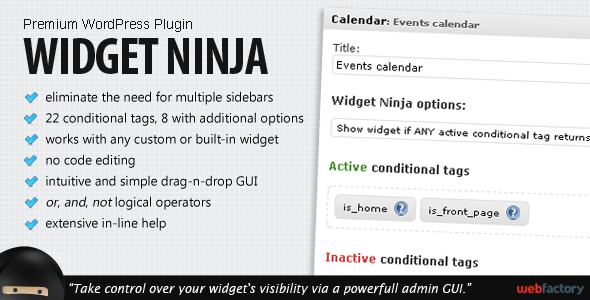
Widget Ninja is a new premium plugin from the Web Factory, available at Code Canyon.net. It provides a method for users to control in exactly which environment their widgets appear.

Gordan, of Web Factory, was kind enough to donate me a copy of the plugin for review here.

As usual, I simply dropped the plugin in the wp-content/plugins folder and activated it without any troubles. Once activated, the plugin adds a selection of options to every single widget registered on your WordPress site, both custom and core that allow you to control on which pages the widget appears. Unlike most plugins that provide some sort of “extra sidebar functionality”, Widget Ninja works by placing conditional statements on each widget individually, rather than each sidebar as a whole. This gives you, the user, much more control.

The interface is perfectly simple and easy to use. On the widget screen, once you have dragged a widget to a sidebar, you simply expand the widget (just like normal) and then drag and drop the conditional tags you want into place. So, for example, let’s say you want a particular widget to only appear when viewing a Page. All you have to do is drag the is_page option into the “active tags” section and click save. Now this widget will only show up when viewing a page, such as About Us.

There are about two dozen conditional tags to choose from, allowing you to match just about any criteria you could possibly have, assuming you do not want to limit your widget display to a particular category/taxonomy archive, or specific page. The conditional tags available allow you to control which types of pages the widgets show up on, but not which specific pages, categories, tags, taxonomies, etc, within those types the widgets show up on. This is really the only limitation the plugin has, but for the vast majority of people, this will most likely not be an issue.

Update: I was incorrect about the plugin not allowing you to limit widgets to a specific post, page, or category. 8 of the conditional tags can accept an additional ID parameter, which makes this plugin even more awesome.

Overall, just like all of Web Factory’s other plugins, Widget Ninja is an awesome addition to anyone’s WordPress. It is simple enough for anyone to use, and even provides helpful tool tips for those who are having a little trouble. For the $10 price tag, I would absolutely recommend it.

My Rating: ★★★★★

Tweet Follow @pippinsplugins
widget, widgets

9 comments on “Widget Ninja Premium Plugin Review”

  1. Mark Delorey says:
    June 3, 2011 at 5:00 am

    What’s the advantage of using this plugin over Widget Logic? Just the GUI? From my experience, widget logic gives you the ability to use more specific conditional tags which seems to be the main limitation with Widget Ninja.

    Reply
    • pippin says:
      June 3, 2011 at 2:19 pm

      @Mark – Widget Logic has an advantage and a disadvantage, when compared to Widget Ninja. It’s advantage is that it allows specific conditional statements, as you said, that allow the user to specify individual pages, categories, etc. Widget Ninja does not allow this. The disadvantage, however, is that it requires the user enter the conditional tags manually, whereas Widget Ninja has a very nice drag and drop interface. In my opinion, if you need the specificity, then use Widget Logic, but if you only need to control widgets on a content type basis, then use Widget Ninja, as it is much more friendly to use.

  2. Mark Delorey says:
    June 3, 2011 at 3:07 pm

    For $10, that sounds like a steal. That makes it way easier for my clients to manage their widgets once I set up their site without having to know all of the conditional tags off the top of their head.

    I’ll wonder if there are conflicts when using Widget Logic and Widget Ninja at the same time.. Best of both worlds. Ideally, Code Factory would add the specific filtering as an option in their plugin.

    Reply
    • pippin says:
      June 3, 2011 at 3:15 pm

      Definitely, and you’re right, the specific logic is the only thing I feel is missing from their plugin. Otherwise, it is fantastic.

  3. Mark Delorey says:
    June 28, 2011 at 3:33 pm

    I just tested the latest versions of Easy Content Types and Widget Ninja together on a site I’m working on, and it looks like they have a conflict.

    When I drop in the “is_page” condition and go to select specific pages using the tool icons, the page selection dialog is all screwed up. Any suggestions?

    Reply
    • pippin says:
      June 29, 2011 at 3:50 pm

      @Mark – I’m pretty sure Gordan is right.

      @Gordan – Thanks for jumping in there ;)

  4. Gordan says:
    June 28, 2011 at 10:23 pm

    Hi Mark, that sounds like a jQuery UI Dialog issue. Please contact us via email with your site’s details and we’ll have a look.

    Gordan, Web Factory

    Reply
  5. Nasir Rashid says:
    April 13, 2012 at 12:41 pm

    Not Working for me :( . I can’t drag and drop any conditional tag. Any suggestions?????????

    Reply
    • Pippin says:
      April 13, 2012 at 12:52 pm

      It’s probably a jQuery conflict. Ask WebFactory, the developers of the plugin.

Leave a Reply Cancel reply

Your email address will not be published. Required fields are marked *

You may use these HTML tags and attributes: <a href="" title=""> <abbr title=""> <acronym title=""> <b> <blockquote cite=""> <cite> <code> <del datetime=""> <em> <i> <q cite=""> <strike> <strong>

  • Login

Lost your password?

Please enter your username or e-mail address. You will receive a new password via e-mail.

  • Facebook Become a Fan Like

  • Twitter Subscribe on Twitter Follow

  • YouTube Follow my Videos Subscribe

  • RSS Feed Subscribe with RSS Subscribe

Easy Digital Downloads

Most Loved

  • Love It Pro for WordPress
  • Write a “Love It” Plugin with Ajax to Let Users Love Their Favorite Posts / Pages
  • Simple Notices Pro Plugin for WordPress
  • User Bookmarks for WordPress
  • Front End Registration and Login Forms Plugin

Similar Plugins and Posts

  • Featured Comments Plugin
  • User Submitted Image Gallery – Part 7
  • Displaying Custom Post Types in Widgetized Sidebars
  • Advanced WordPress Widget Bundle
  • Better Related Posts Widget

Latest Premium Content

  • Plugin Development 101 – Introduction to Adding Dashboard Menus
  • Plugin Development 101 – Intro to Loading Scripts and Styles
  • User Follow System – Part 5
  • Plugin Development 101 – Intro to Short Codes
  • Plugin Development 101 – Registering a Custom Post Type
  • Plugin Development 101 – Intro to Actions

Latest Tutorials

  • Submitting Your First Pull Request to a WordPress Plugin on Github (2)

    Github is an extremely popular tool for managing WordPress plugins, and one...

  • Plugin Development 101 – Introduction to Adding Dashboard Menus (1)

    Adding new menus, both top level and sub level, to the WordPress Dashboard is a really common task for plugins...

  • Plugin Development 101 – Intro to Loading Scripts and Styles (16)

    In this part of Plugin...

Enter your email to receive automated updates when new posts are published

Latest Tweets

  • Shop Front, A simple, free &amp; highly extensible theme for @eddwp http://t.co/0lo6PfnVYE
    May 23, 2013
  • RT @tommcfarlin: Should a #WordPress Plugin Change Post Content? http://t.co/7wt12HO17x
    May 23, 2013
  • RT @chrislema: WordPress Plugin Prices Are Too Low: Even if you were going to trade hours for dollars, which I don&#039;t recommen... http://t.c…
    May 23, 2013

Topics

campaign monitor the_content shortcodes add_options_page Rémi Corson contextual help featured Sugar Event Calendar attachments Tom McFarlin register_setting wp_enqueue_script hook short codes mail chimp Related posts login plugin authors do_action attachment image forms bbpress comments recent posts apply_filters post types short code taxonomies custom post type images gallery Ajax Stripe jquery taxonomy users widgets add_filter easy content types add_action widget restrict content pro easy digital downloads

Weekly Newsletter

Useful Links

  • Join the Site
  • Plugin Store
  • Affiliate Area
  • Tag Index
  • Support the Site
  • Suggest a Tutorial
  • Random Post
  • Contact

Monthly Archives

(c) 2013 Pippin's Plugins