
This entry is part 4 of 9 in the User Submitted Image Galleries Series
- User Submitting Gallery Images – Part 1
- User Submitted Gallery Images – Part 2
- User Submitted Image Gallery – Part 3
- User Submitted Image Gallery – Part 4
- User Submitted Image Gallery – Part 5
- User Submitted Image Gallery – Part 6
- User Submitted Image Gallery – Part 7
- User Submitted Image Gallery – Part 8
- User Submitted Image Gallery – Final Overview
In part three of this User Submitted Image Gallery plugin tutorial series, we created the function that processes image uploads. Now it is time to build our gallery’s short code, which will be used to display the complete gallery of user submitted images. This short code is rather complex and we won’t fully finish it for a couple more parts yet, but by the end of this section we will have a fully paginated gallery that shows all of the images.
Creating the Gallery Short Code
The first step in creating our short code is setting up the function and defining the optional parameters:
1 2 3 4 5 6 7 8 9 10 | // displays the user submitted gallery function uig_show_gallery($atts, $content = null ) { extract( shortcode_atts( array( 'filters' => 'true', 'columns' => 3, 'per_page' => 6 ), $atts ) ); // the rest of our function will go here } add_shortcode('user_gallery', 'uig_show_gallery'); |
The short code is going to have a few of parameters:
- filters – true/false – determines if the category and tag filters are shown
- columns – the number of columns for the gallery to display in
- per_page – the number of images to show per gallery page
The category and tag filters are not going to be built until the next part of this series, but we want to go ahead and set up the necessary options.
Now, the first thing that we are going to do inside of the short code function is load the necessary CSS. A special note about this, the method I’m using in this function only works with WordPress 3.3 and later. 3.3 introduced the ability to load scripts in the middle of the page, instead of only in the header / footer. This means that if you are using this technique in a plugin or theme that is going to be distributed, you have to either make your users very aware of the fact that it will only work in 3.3+, or you must use a different method.
If you have already read Part Two of this series, then note that I updated it to use this method as well for the upload form.
Loading the scripts is very simple:
1 2 | // load the necessary CSS -- this is loaded inline and only work with WP 3.3+ wp_enqueue_style('uig-gallery', UIG_PLUGIN_URL . 'includes/css/gallery.css'); |
If you didn’t do it in Part Two, then you should go and create the gallery.css file, and place it in a folder called “css”, which is then placed inside of the “includes” folder. This CSS file will contain all of the styling needed for our gallery.
The next few pieces of code might not make a lot of sense just yet, but they will be used near the end of the function, so bare with me.
We need to set up some variables that will be used for the gallery pagination. These consist of variables for the current gallery page, the total number of images in the gallery, and the number of images displayed per page, and also the number of pages of images.
1 2 3 4 5 6 7 8 9 10 11 12 13 14 15 16 17 18 19 20 21 22 23 | /*** some pageination variables ***/ // check what page we are on if (isset($_GET['page'])) $page = $_GET['page']; else $page = 1; // default number of pages $total_pages = 1; // image offset. Used in the get_posts() query to show only images for the current page $offset = $per_page * ($page-1); // get the cached image count. This is used to determine the total number of pages $image_count = get_transient('uig_image_count'); if( false === $image_count ) { $image_count = wp_count_posts('uig_image')->publish; // store count in transient with a one hour expiration set_transient('uig_image_count', $image_count, 3600); } // calculate the total number of pages $total_pages = ceil($image_count/$per_page); /*** end pagination variables ***/ |
First we are checking to see if the $_GET[‘page’] variable is set. This is used to determine the current page we are on.
Next, a default number of pages (1) is set. After that, we determine what the offset for the query should be. The offset is used so that get_posts() (which we will use in a moment) knows how many images to skip. This is required in order for pagination to work.
After we have computed the offset, we retrieve the total number of images in the gallery. This count is stored in a transient for caching. If you’re not familiar with transients, then check out my introductory tutorial.
The total number of pages is calculated by rounding the result of the image count divided by the $per_page variable, which is set by the short code parameters.
Our next bit of code will start our output buffer, and also setup the location for the image filters (which we are building in the next part):
1 2 3 4 5 6 | // start our output buffer ob_start(); if($filters == 'true') { // category and tag filters will go here } |
It’s now time to setup the image query using the get_posts() function. It’s a pretty simple query; we just define the post type (uig_image), the number of posts, and the offset. The latter two parameters are required for our pagination to work.
1 2 3 4 5 6 7 8 9 10 11 12 13 | // setup the image args $image_args = array( 'post_type' => 'uig_image', 'numberposts' => $per_page, 'offset' => $offset ); $images = get_posts($image_args); if($images) : // image loop will go here else : echo '<p>' . __('No public images have been uploaded.', 'uig') . '</p>'; endif; // end if($images) |
This query will get all of our approved images (pending images will not be included).
Now that we have all of our images stored in the $images variable, we can build a foreach() loop to display each of the images. The loop is a little bit complex because we have to do automatic calculations to ensure that the images get outputted in the correct layout, i.e. number of rows and columns.
1 2 3 4 5 6 7 8 9 10 11 12 13 14 15 16 17 18 | /*** main image loop ***/ $counter = 1; echo '<ul id="gallery-images" class="uig-clearfix">'; foreach($images as $image) : if($counter % $columns == 0) { $last = ' last'; } else { $last = ''; } if($new_row || $counter == 1) { $first = ' first'; } else { $first = ''; } echo '<li class="gallery-image image-' . $counter . $last . $first . '">'; echo '<a href="' . get_permalink($image->ID) . '">'; echo get_the_post_thumbnail($image->ID, 'uig-gallery-image'); echo '</a>'; echo '</li>'; if($counter % $columns == 0) { $new_row = true; } else { $new_row = false; } $counter++; endforeach; echo '</ul>'; /*** end main image loop ***/ |
This loop will display each of the image thumbnails, linked to the single image page, and will output them with the necessary classes to control columns. So if you enter “3” for the number of columns, then the third, sixth, ninth, etc, image will get a class of “last”, and the fourth, seventh, and tenth images, etc, will get a class of “first”. These classes are then used in the CSS to create the columns.
Note: this loop does not automatically resize the images to fit in your container. You will have to adjust the image sizes in the images-sizes.php or filters.php files to make the images work / align perfectly.
After the image loop, we want to display our gallery pagination. To do this, we are going to use the paginate_links() function.
1 2 3 4 5 6 7 8 9 10 11 12 13 14 15 16 17 18 19 20 | /*** display pagination ***/ // pagination base $base = get_permalink(get_the_ID()) . '%_%'; echo '<div id="gallery-pagination">'; echo paginate_links( array( 'base' => $base, 'format' => '?page=%#%', 'prev_text' => __('Previous', 'uig'), 'next_text' => __('Next', 'uig'), 'total' => $total_pages, 'current' => $page, 'end_size' => 1, 'mid_size' => 5, )); echo '</div>'; /*** end pagination display ***/ |
The first part of this code snippet defines the $base for our pagination, which is pretty much just the permalink of our gallery page, and a place holder for the page number.
Inside of the paginate_links() function we define format of our query variable, which will be ?page=#, and also the total number of pages in the gallery. Lastly, we tell the function the current page we are on.
And that’s it for our gallery short code, except for the final line, which is just to return the contents of the output buffer:
1 | return ob_get_clean(); |
All together now, our gallery short code function looks like this:
1 2 3 4 5 6 7 8 9 10 11 12 13 14 15 16 17 18 19 20 21 22 23 24 25 26 27 28 29 30 31 32 33 34 35 36 37 38 39 40 41 42 43 44 45 46 47 48 49 50 51 52 53 54 55 56 57 58 59 60 61 62 63 64 65 66 67 68 69 70 71 72 73 74 75 76 77 78 79 80 81 82 83 84 85 86 87 88 89 90 91 92 93 94 95 96 97 98 99 100 | // displays the user submitted gallery function uig_show_gallery($atts, $content = null ) { extract( shortcode_atts( array( 'filters' => 'true', 'columns' => 3, 'per_page' => 6 ), $atts ) ); // load the necessary CSS -- this is loaded inline and only work with WP 3.3+ wp_enqueue_style('uig-gallery', UIG_PLUGIN_URL . 'includes/css/gallery.css'); /*** some pageination variables ***/ // check what page we are on if (isset($_GET['page'])) $page = $_GET['page']; else $page = 1; // default number of pages $total_pages = 1; // image offset. Used in the get_posts() query to show only images for the current page $offset = $per_page * ($page-1); // get the cached image count. This is used to determine the total number of pages $image_count = get_transient('uig_image_count'); if( false === $image_count ) { $image_count = wp_count_posts('uig_image')->publish; // store count in transient with a one hour expiration set_transient('uig_image_count', $image_count, 3600); } // calculate the total number of pages $total_pages = ceil($image_count/$per_page); /*** end pagination variables ***/ // start our output buffer ob_start(); if($filters == 'true') { // category and tag filters will go here } // setup the image args $image_args = array( 'post_type' => 'uig_image', 'numberposts' => $per_page, 'offset' => $offset ); $images = get_posts($image_args); if($images) : /*** main image loop ***/ $counter = 1; echo '<ul id="gallery-images" class="uig-clearfix">'; foreach($images as $image) : if($counter % $columns == 0) { $last = ' last'; } else { $last = ''; } if($new_row || $counter == 1) { $first = ' first'; } else { $first = ''; } echo '<li class="gallery-image image-' . $counter . $last . $first . '">'; echo '<a href="' . get_permalink($image->ID) . '">'; echo get_the_post_thumbnail($image->ID, 'uig-gallery-image'); echo '</a>'; echo '</li>'; if($counter % $columns == 0) { $new_row = true; } else { $new_row = false; } $counter++; endforeach; echo '</ul>'; /*** end main image loop ***/ /*** display pagination ***/ // pagination base $base = get_permalink(get_the_ID()) . '%_%'; echo '<div id="gallery-pagination">'; echo paginate_links( array( 'base' => $base, 'format' => '?page=%#%', 'prev_text' => __('Previous', 'uig'), 'next_text' => __('Next', 'uig'), 'total' => $total_pages, 'current' => $page, 'end_size' => 1, 'mid_size' => 5, )); echo '</div>'; /*** end pagination display ***/ else : echo '<p>' . __('No public images have been uploaded.', 'uig') . '</p>'; endif; // end if($images) return ob_get_clean(); } add_shortcode('user_gallery', 'uig_show_gallery'); |
Displaying the Gallery
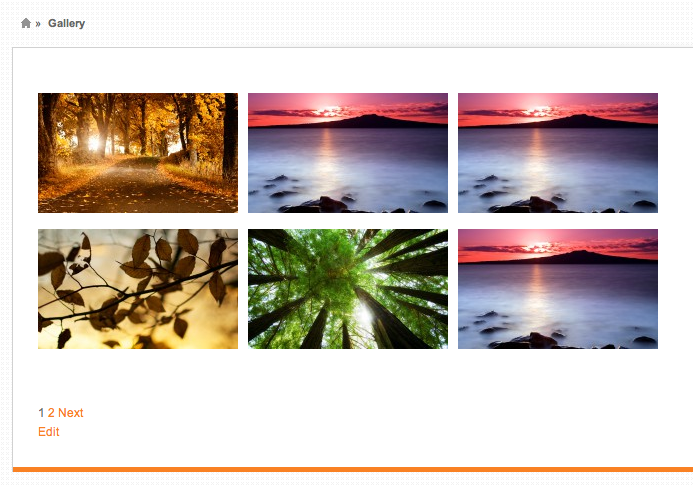
You can display the image gallery by placing the [user_gallery] in any page. Your results will vary a little, but should look something like this:
Still to Come
- Filtering the gallery by categories and tags
- Viewing individual image details, including comment streams and descriptions
- Modifying the dashboard columns
How would I add a image title, description & url link to the thumbnails?
Do you want to show the title/description of the “image” custom post type, or the title/description of the attachment file? The thumbnails are already linked to the single page for the image; do you want to link them somewhere else?
hey Pippin, been scratching my head why the gallery when using the downloaded code was only showing 1 image. Line 84 in shortcodes.php is “‘per_page’ => 1”, I changed this value to 20 and it is looking good (I realise this could have been passed through as a parameter in the shortcode, but thought the default value should be higher).
My next problem is that my theme is overriding the html width attributes of the image to “auto” in the gallery causing the images to fill up the width of the content box. Would it be better to setup the images dimensions dimensions in the gallery.css to avoid conflict with themes?
Thirdly is a feature request / improvement idea. It would be nice if you could filter by image year then month (much like the post widget) and the image year is pulled from the EXIF data when uploaded… I am sure this is possible and if I figure it out – will be sure to post a copy.
The last bit of feedback is that I will be working on allowing posted images to be approved without having to be reviewed, if you are creating a paid version of this – it would be worth considering making this an option.
I have spent ages looking for plugins to achieve what you have created with this plugin and I am sure that I am not the only willing paying customer! I’m and nothing but a hack, but they way this is written makes it easy for me to understand!
Thanks!
Probably should have tried this before posting. I added the image width and height attributes in the gallery CSS wih success. BUT, I now realise why the theme was applying auto image attributes that is because it is a responsive theme… will look into a solution!
Yep, responsive themes usually remove those 🙂
Filtering images would be really sweet, though I doubt it will make it into a part of the series, sorry. If you’re interested in doing some custom coding on it, I can provide a little guidance.
hmmm… code did not post correctly, added to snippi: http://snippi.com/s/n89ysj5
You will want to look at the add/remove_query_arg() function. To remove pagination, use remove_query_arg( ‘image-page’)
Thanks Pippin, got the date filtering added in and it is working well (I am sure it could do with a tidy up from my hacking).
Here is the modified gallery code: http://snippi.com/s/l10nvyy
The only thing I am struggling with is filtering after pagination (I don’t think my modifications have introduced this issues). For example, if I am on page 5 of the images and apply a category filter the page parameter stays in the URL and the page displays “No images found.”
When applying a filter (changing the query) the page should default back to page 1, but I am struggling to find a solution to this. Any ideas?
Now onto the EXIF data import…