Pippins Plugins
  • Email
  • Facebook
  • Feedburner
  • Github
  • Google
  • Twitter
  • Vimeo
  • Youtube
  • Rss
  • About
  • News
  • Join the Site
    • Member Benefits
    • Member Plugins
    • Email Notifications
  • Plugin Store
    • Affiliate Area
    • Checkout
  • Plugins
    • Plugin Portfolio
      • Plugin Portfolio – List View
    • Free
    • Premium
    • Member Plugins
    • Coding Standards
    • Get Plugin Support
  • Tutorials
    • Series
      • Plugin Development 101
      • Creating a User Follow System Plugin
      • Customizing Restrict Content Pro
      • Displaying Content with Easy Content Types
      • Writing Your First WordPress Plugins, Basic to Advanced
      • Working with Widgets
      • User Submitted Image Galleries
      • Plugin Thoughts
      • Integrating Stripe.com with WordPress
      • WordPress Rewrite API
    • Member Exclusive
      • Free Members
      • Subscriber Only
    • Difficulty
      • Beginner
      • Intermediate
      • Advanced
    • Action and Filter Hooks
    • Ajax
    • Custom Post Types
    • External APIs
    • Short Codes
    • Taxonomies
    • Video Tutorials
    • Widget Tutorials
    • WordPress Admin / Dashboard
    • Working with jQuery
    • WordPress Database
    • Writing Plugins
    • Tag Index
  • Reviews
  • Support Forum
  • Contact
    • Support the Site
    • Request Code Review
    • Plugin Support

Sugar Event Calendar

Posted on June 25, 2012 by Pippin in Plugins, Premium, Shop 226 Comments
Home» Plugins » Sugar Event Calendar
sc-preview-no-ribbon
Tweet
Love It - 13

Sugar Event Calendar is a sweet, simple WordPress event calendar plugin.

Most event calendar plugins are either way too simple, or extremely overly complex and bloated. Sugar Event Calendar is designed to be simple, light weight, and provide just the major features you need for event management.

Checkout Loading — Item successfully added to your cart.

Features

  • Simple Event Management
  • Recurring Events for Weekly, Monthly, and Yearly
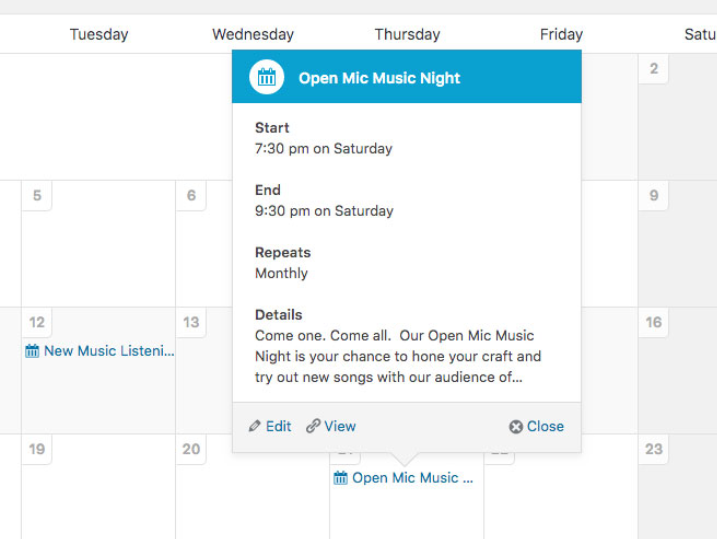
  • Ajax Enabled Calendar View
  • Large and Small Calendars
  • Events Custom Post Type
  • Event Categories
  • Show Calendars for Specific Categories
  • Simple Event Configuration
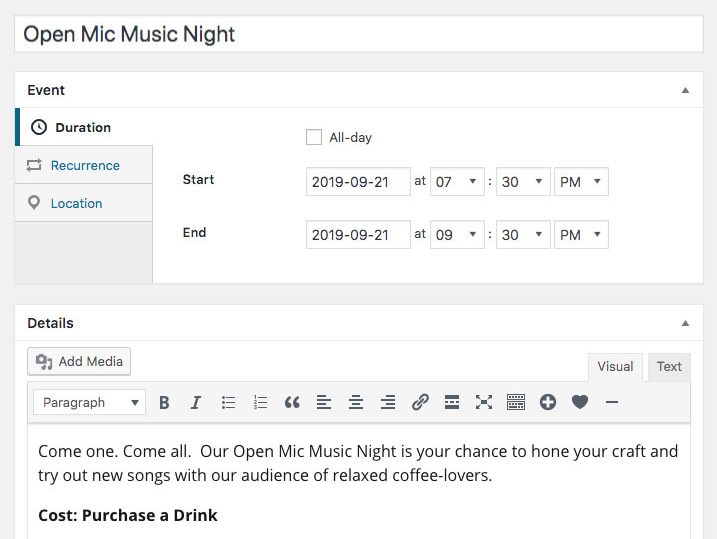
  • Easily Set Event Dates
  • Easily Set Event Start and End Time
  • Short Codes and Widgets for Showing Calendars
  • Events Archive, Listed by Date of Occurrence
  • Several Event-Related Widgets
  • Translated into:
    • English
    • German
    • French
    • Serbian
    • Swedish

Basic Usage

Once you have created your events, you can display a calendar, as shown in the demo, using the following short code:

[sc_events_calendar]

If you would like to show a calendar of only events from a particular category, then do this:

[sc_events_calendar category="category-name"]

And if you would like to show events from more than one category, but not all, do this:

[sc_events_calendar category="category-name, second-category"]

You will also find several new Event widgets in your Appearance > Widgets page.

Along with the calendar views, Sugar Event Calendar also has an events archive that shows the events in the order they occur and in the same styling / layout as your current WordPress theme. The archive is located at http://yoursite.com/events.

Checkout Loading — Item successfully added to your cart.

Live Demo Download Lite Version Support Forums

Gravity Forms Integration

Want to use Gravity Forms for event registration or attendance forms? I’ve built a free add-on for exactly that. Checkout the Gravity Forms add-on.

Google Maps for Venues and Event Locations

There is a free add-on that will add an address field to your Event Details configuration, which will allow you to show a Google Map of the event location. Checkout the free Maps add-on.

Advanced Customization

Events Archive

A regular post type archive of events can be found at yoursite.com/events. This archive displays events in the order that they occur. You can easily customize the appearance of this archive by creating a file called "archive-sc_event.php" an then modifying it to suit your needs.

If you choose to customize your archive, you should also create a file called "taxonomy-sc_event_category.php" and copy the contents of archive-sc_event.php to it. This taxonomy-sc_event_category.php file will be used when displaying an archive for an event category.

Single Event View

By default, Sugar Event Calendar will render single event detail pages using the single.php file included with your theme. If you wish to customize the appearance of this page, create a file called "single-sc_event.php", copy the contents from single.php, and then customize to suit your needs.

Action Hooks

The plugin includes several action hooks that you can use to add additional content (or execute functions) in various places:

  • sc_before_calendar - Runs before any calendar HTML is outputted
  • sc_after_calendar - Runs after the final calendar HTML is outputted
  • sc_before_event_content - Runs before the content of a single event page is displayed
  • sc_after_event_content - Runs after the content of a single event page is displayed
  • sc_event_meta_box_before - Runs at the top of the "Event Details" meta box in the admin
  • sc_event_meta_box_after - Runs at the bottom of the "Event Details" meta box in the admin
  • sc_before_calendar_widget - Runs before the calendar widget HTML
  • sc_after_calendar_widget - Runs after the calendar widget HTML
  • sc_before_event_list_widget - Runs before the event list widget
  • sc_after_event_list_widget - Runs after the event list widget
  • sc_before_category_widget - Runs before the event categories widget
  • sc_after_category_widget - Runs after the event categories widget
  • sc_before_filter_widget - Runs before the event filter widget
  • sc_after_filter_widget - Runs after the event filter widget
Filter Hooks

The plugin includes several filter hooks that you can use to manipulate the behavior of the plugin:

  • sc_event_list_query - This filter can be used to change the query parameters of the query used to retrieve events for the "Event List" widget
  • sc_calendar_query_args - This filter can be used to change the query parameters of the query used to retrieve events for the calendars
  • sc_event_labels - This filter can be used to change the post type labels for the Events post type
  • sc_event_rewrite - This filter can be used to change the "rewrite" parameter for the Events post type
  • sc_event_supports - This filter can be used to change the "support" attributes for the Events post type
  • sc_event_category_labels - This filter can used for changing the Event Category labels
  • sc_event_category_rewrite - This filter can be used for changing the "rewrite" parameter of the Events Category taxonomy

Related Items
  • Sugar Event Calendar – Google Maps
Tweet Follow @pippinsplugins
calendar, events, featured, Sugar Event Calendar

226 comments on “Sugar Event Calendar”

Comment navigation

← Older Comments
  1. Nancy says:
    February 10, 2013 at 8:35 am

    Hi again,

    Quick question: I noticed that on my events pages, the previous and next buttons go to the events based on posting date and not chronological date. I was able to get the correct chronological order by forcing the created dates to be in the right order. I wasn’t sure if this was normal or if you wanted your plugin to force the events to sort by chronological order with the next and previous buttons.

    Reply
    • Pippin says:
      February 10, 2013 at 6:19 pm

      The next/prev link buttons are not part of the plugin but rather part of your theme, so no, sorry, they cannot be made to go chronological.

      I’d suggest that you remove them from the event pages. if you’re unsure how to do that, I’ll be happy to assist you.

  2. Julia Roberts says:
    February 11, 2013 at 11:48 am

    I must be crazy, but I can’t figure out how to change the color of the calendar! Where do I go to do that?
    Thanks

    Reply
    • Pippin says:
      February 11, 2013 at 11:52 am

      The plugin does not include color options. If you’d like to change the colors, you have to do it via custom CSS.

  3. Davies Memorial UU Church Blog says:
    February 11, 2013 at 6:34 pm

    I’m currently testing the free version on a community site that I own, but I’d like to use it on a redesign for my church site that is currently in development. I need to know about the fee schedule for the paid version. I see we get a lot of extras. Do we get support also? Do we pay annually? Do we pay whenever it is updated? Do we pay whenever there’s a WP upgrade? Will it be updated and compatible with future WP upgrades? I appreciate your commitment to this good WP plugin.

    Reply
    • Pippin says:
      February 14, 2013 at 9:17 am

      Davies,

      The plugin is a one time purchase, including support and updates. The license, support, and updates are for one year. If you need updates or support after one year, then a new purchase is required.

  4. tobias albers-heinemann says:
    February 14, 2013 at 1:52 am

    hi, is it possible to create events about more days? can i create an event from 02.03.-07.03.2013 for example?

    Reply
    • Pippin says:
      February 14, 2013 at 9:16 am

      No, sorry.

    • Tobias says:
      February 14, 2013 at 10:18 am

      hmm why not? is it a bug or a feature? a lot of events takes more days…

    • Pippin says:
      February 14, 2013 at 10:20 am

      It’s a feature I simply haven’t built in. This event calendar is designed to be very simple and minimal. While that feature is definitely one that a lot of events need, it’s also quite difficult to build and I haven’t done it yet.

  5. ahansendesign says:
    February 26, 2013 at 5:02 am

    I love the plugin but have one question, is there anyway to show the date in the Event List widget?

    Also, another vote for multi-day events as a future update! :)

    Reply
    • ahansendesign says:
      February 26, 2013 at 5:37 am

      Sorry, I didn’t realize there was a support forum and I have since posted the question there instead. I figured it made more sense than the comments, so please delete my previous comment (and this).

      Thanks

    • Pippin says:
      February 26, 2013 at 9:38 am

      I’ll answer your support ticket shortly. Thanks for posting there.

  6. Sandra says:
    March 9, 2013 at 1:59 pm

    Hi,

    I’m looking for a very simple calendar plugin that can show small calendars for a year at a time. That can be styled with css to look something like this http://www.i-park.org/events-updates/calendar.

    I doesn’t need to take bookings or do anything except show events?

    Can the lite or full version show 12 months at a time?

    Thanks!

    Sandra

    Reply
    • Pippin says:
      March 9, 2013 at 3:20 pm

      No, sorry, it can only do one month at a time.

  7. Joe says:
    March 18, 2013 at 2:09 pm

    Hi,

    I’m looking for a calendar that can do a few specific things, and am hoping this does as I like the plugins of your that i have.

    So here goes…

    Is it possible to restrict the date to a single month, so the user doesn’t have the option to click next & previous unless the days crossover multiple months. This would depend on each calendar? Each booking would only be for a single month as this is booking a slot to show a guest blog.

    Is it possible to have the calendar automatically go to the month where the bookings are available? Each of these calendars will be showing 31 days maximum availability, and usually months in advance, so if the available dates are in May, I don’t want it to show March when the user goes to it.

    Is it possible to set how many bookings can be made on a specific date,usually it would just be one, but sometimes there will be 2 or three. Also, sometimes, there would be no limit on the number of bookings that can be made on a specific date.

    Thanks,

    Joe

    Reply
    • Pippin says:
      March 19, 2013 at 10:03 am

      1. No, sorry, restricting the date isn’t possible.

      2. The calendar will always default to the current month, sorry.

      3. By default the plugin does not support event booking, but the Gravity Forms add-on can be used for that, and since Gravity Forms allows you to limit the number of registrations, that will work just fine.

  8. Jakub Kadlec says:
    March 18, 2013 at 5:54 pm

    Hello,
    And thanks for your beatiful plugin.

    I just have one question bothering me – I need to translate labels of days etc. on my sidebar widget – now, I found the localization files and I translated proper lines, but it actually doesn’t seem to do anything to my widget.

    Is it translating just the regular calendar view? Is there a way to translate labels on the widget?

    Any help would be appreciated.

    Reply
    • Pippin says:
      March 19, 2013 at 10:04 am

      The labels should be fully translatable as well. What language are you translating into and how are you doing it? Are you using .mo/.po files or a translation plugin?

    • Jakub Kadlec says:
      March 20, 2013 at 11:26 am

      Yes, of course I am, but even after I translated the mo/po files, labels on the widget seems unchanged. Does the widget use the same label variables as the main plugin?

  9. Pippin says:
    March 20, 2013 at 12:37 pm

    Do the text strings used in the widget show up in the default.po file?

    Reply
  10. Vernard says:
    March 20, 2013 at 6:19 pm

    Hello, I have a question, can this calendar create a full Year display like this one on this website?:
    http://talyst.com/training/talyst-classes/

    That example right there is not very optimal, it was just the single month view, minimized to that size, and duplicated to each month.

    I’m looking for a plugin that can display a full-year calendar, and mark days that have events on it (and color coded, too)

    Reply
    • Pippin says:
      March 20, 2013 at 8:40 pm

      No, sorry.

  11. Jacob Dubail says:
    April 2, 2013 at 1:21 pm

    Hey Pippin,

    Is there an extension available for Sugar Event Calendar integration with either Google Calendar or iCal? Any way to sync events amongst services?

    Many thanks!

    -Jacob

    Reply
    • Pippin says:
      April 2, 2013 at 1:26 pm

      No, sorry.

    • Jacob Dubail says:
      April 2, 2013 at 1:28 pm

      Thanks for the quick reply, Pippin. I appreciate it!

  12. Helen says:
    April 3, 2013 at 3:12 pm

    Hello, I’ve got the Lite version installed with Gravity Forms add-on…. and like how it works…. I do think I need to purchase the full version for one reason and I can’t find an example or verification —- With the purchased or full version can I show an event list in a widget? I would need to show the next 5, for example, upcoming events. I would like to know if this is possible with premium version and see an example of how this list would display before going ahead and putchasing. Thank you!

    Reply
    • Pippin says:
      April 3, 2013 at 3:50 pm

      Yep! That’s one of the features of the full version.

    • Helen says:
      April 3, 2013 at 4:04 pm

      Thanks for your reply, but I need a little more to go on____

      An example of the upcoming event list, I’d like to know___

      Does the upcoming list show the date and time and event title or just the event title?

      Can I control how many upcoming events show up? For example, let’s say I want to always have the next 5 upcoming events show up?

      Also, Can you click through to the event post set up from the list?

      Is the upcoming event list ready for a widget?

    • Pippin says:
      April 3, 2013 at 7:35 pm

      You can see a sample here (bottom right): http://demo.pippinsplugins.com/sugar-calendar/events/

      It is a widget that lets you control the number, and order.

  13. Helen says:
    April 4, 2013 at 1:02 pm

    Hi, again, Thanks for pointing out the example…. I couldn’t find it before… But, I still have a couple of questions ——

    Are there two upcoming events shown because there are only two future events on the calendar or in other words, Can I control the # of upcoming events listed?

    Can I have the date in the list?

    Need to know these things before going ahead and buying and setting up a whole calendar/registration form/pay pal set up with this plugin

    Reply
    • Pippin says:
      April 4, 2013 at 6:55 pm

      1. Yes, there are only two upcoming ones in the demo. You can set it to show any number you want.

      2. Sorry, the date is not included, though I should add that.

  14. gc schow says:
    April 10, 2013 at 5:27 pm

    I am new to WP I bought your candler because I like the way it looks. Now with that said, what are the steps to using it. I know you put the command line on the page i want, but for the rest ??????

    Can you please help me
    Thanks GC

    Reply
    • Pippin says:
      April 10, 2013 at 5:52 pm

      Please read the setup instructions on this page.

  15. Kim Lloyd says:
    April 24, 2013 at 6:07 am

    Hello,
    My plan was to fix the autotop filter issue with Woothemes and post the answer to your forum. Alas, I am just not that good. I didn’t want to add to your pile.

    I just purchased your Sugar event calendar plugin yesterday and saw your video on the practice of removing the autotop filter that some theme developers have. I saw this in the Woothemes SupportPress code (admin-shortcodes.php):

    // Replace WP autop formatting
    if ( ! function_exists( ‘woo_remove_wpautop’ ) ) {
    function woo_remove_wpautop( $content ) {
    $content = do_shortcode( shortcode_unautop( $content ) );
    $content = preg_replace( ‘#^|^|$#’, ”, $content );
    return $content;
    } // End woo_remove_wpautop()
    }

    So after trying to find the original woo_remove_wpautotop, I couldn’t find it, so I thought by commenting this code out, it would either break or my problem would be fixed. But no. Neither happened. Has anyone run into this issue with a Wootheme before? If so, I couldn’t find it on your forum.

    Thanks,
    Kim

    Reply
    • Kim Lloyd says:
      April 24, 2013 at 7:17 am

      Also, do you have a rate for customizing your plugin? For example: When someone is creating a new event, I’d like them to indicate who the event owner is from a dropdown list of registered users. I don’t need to display it publicly anywhere, except for as a hidden field on the event details so I can pass it to a custom PHP script. I have your Gravity Forms add on as well.

    • Pippin says:
      April 24, 2013 at 9:15 am

      In general I don’y do any customizations, sorry.

    • Pippin says:
      April 24, 2013 at 9:14 am

      Does SupportPress run on top of another theme as a child-theme?

    • Kim Lloyd says:
      April 24, 2013 at 9:21 am

      no it does not…

    • Kim Lloyd says:
      April 24, 2013 at 11:58 am

      This is the URL: http://fuzehub.com/nyevents/

    • Pippin says:
      April 24, 2013 at 3:21 pm

      I don’t think your issue is caused by the formatter. It’s happening because you have an HTML PRE tag surrounding the short code.

    • Kim Lloyd says:
      April 24, 2013 at 3:46 pm

      ugh, thanks. Well partial success now. Both in the sidebar widget and the full width, have the selectors underneath each other. Should I open a ticket with SupportPress?

    • Pippin says:
      April 24, 2013 at 4:17 pm

      That’s caused by this CSS in the theme: http://screencloud.net/v/4JKJ

  16. 0161-Jon says:
    April 26, 2013 at 9:57 am

    Hi Pippin,

    just working on a dev site and on my main events page, the event titles are not links like I would expect them to be. They were on a different site I used this plugin on but not this new one. No idea why as I’ve not done anything different as far as I can tell.

    Would you possibly be able to take a quick look please (in which case should I email you the details?) or if the above suggests a common error on my part then please advise?

    Thanks

    Jon

    Reply
    • Pippin says:
      April 26, 2013 at 6:10 pm

      Can you give me a URL to the page?

    • 0161-Jon says:
      April 27, 2013 at 5:11 am

      Hi Pippin,

      I will email you the details if you don’t mind as it’s in a password protected dev directory

    • Pippin says:
      April 28, 2013 at 10:10 pm

      Sure thing.

    • 0161-Jon says:
      April 30, 2013 at 10:20 am

      Hi Pippin,

      I emailed you the details, did you get them ok?

      cheers

      Jon

    • Pippin says:
      May 13, 2013 at 9:02 pm

      Sorry for the delay Jon. I see the problem as you described. This is because your archives.php file (which ever one you’re using for that page) is not adding the necessary hyperlink.

      Are you building the theme custom?

    • 0161-Jon says:
      May 14, 2013 at 2:50 am

      Hi Pippin,
      yes I am building a custom child theme. I am using archive-sc_event.php as per the instructions to create the archive page.

    • 0161-Jon says:
      May 14, 2013 at 2:53 am

      forgot to mention, creating a child theme of twentytwelve

    • 0161-Jon says:
      May 28, 2013 at 6:07 am

      Hi Pippin,

      just checking to see if you had any further ideas since my last reply to your question about my issue? I have set up archive-sc_event.php as per your instructions, this worked fine on th elast site I used your plugin but not on this one even though the relevant code is the same.

  17. doakh says:
    May 2, 2013 at 8:05 am

    I am very interested in your plugin. I am planning to develop a website on my development server and them move it to their domain. How does this work with a single site license?

    Thanks

    Reply
    • Pippin says:
      May 2, 2013 at 10:32 am

      That will work perfectly fine :)

  18. Nick says:
    May 6, 2013 at 8:35 am

    Interested in your plugin, is it possible to list today’s events only in a widget, even if its spanning-running over months?

    Thanks

    Reply
    • Pippin says:
      May 6, 2013 at 11:11 am

      No, sorry.

  19. Uwe Wiese says:
    May 6, 2013 at 1:08 pm

    Hi, i have a big Problem. If i look in the month may 2013 all is working fine but when i chenge the month to june or later in 2013 i get the following massage

    Access Denied. Your site administrator has blocked your access to the WordPress back-office

    I hope you can help me pleasae

    Reply
    • Pippin says:
      May 6, 2013 at 1:10 pm

      That’s not caused by my plugin. Sounds like a conflict with a security plugin.

  20. Craig Grella says:
    May 20, 2013 at 12:55 pm

    Pippin,

    I’m using your pro calendar and have a question about getting the map to display in the post.
    I’m using thesis 2, so it ignores the separate post templates.
    I’m wondering, is there a shortcode I can use to get the map to display?
    If not, can you point me to your template file which controls the view of the map?
    That way I can pick out the appropriate code and make a thesis box to display it in my skin editor.
    Thanks.
    By the way, I bought SC calendar because I’ve tried so many other calendars and they all hardly work.
    SC calendar just seems to work well.
    Thanks.
    Craig

    Reply
    • Pippin says:
      May 20, 2013 at 4:28 pm

      Are you using the Google Maps add-on?

    • Craig Grella says:
      May 20, 2013 at 6:10 pm

      Yes, I’ve got that add on that works with your plugin. I can get everything from the front end editor, and I see your plugin is pretty well commented, so I know I can replicate the code for the map part in a box for Thesis 2 that will render that where I need it.

      Just wondering if you had worked out a shortcode that would allow me to take the extremely easy lazy way around it?

      If not, I’ll just do the work and then make the box available to the community with a recommendation to get the pro version of your plugin.

      Let me know.

      Thanks.

      Craig

    • Pippin says:
      May 21, 2013 at 2:25 pm

      I have not sorry, though you could just use my Simple Google Maps plugin, instead of the add-on: http://wordpress.org/plugins/simple-google-maps-short-code/

    • Craig Grella says:
      May 21, 2013 at 3:03 pm

      I think i’m good now, but thanks for the link. It might be helpful on another site.
      Craig

  21. Karen says:
    May 29, 2013 at 11:00 am

    I need the first day of the week to be Sunday so the dates line up correctly. How do I change that?

    http://www.downtowncanandaigua.com/lineup-100-days/

    Thanks,

    - Karen

    Reply
    • Pippin says:
      May 29, 2013 at 3:15 pm

      Can you please open a ticket in the support forums? http://pippinsplugins.com/support

  22. Lucille says:
    May 29, 2013 at 1:49 pm

    Hello I just purchased your plugin… I like the simplicity of it. However, is there any way to include the date/time in the list of events as a widget? I saw in a previous posting that someone had asked and you replied that you should probably include that. Is that anyway for us to change to make that happen now before your next release?

    Reply
    • Pippin says:
      May 29, 2013 at 3:16 pm

      Can you please open this as a ticket in the forums? http://pippinsplugins.com/support

  23. royeyal says:
    May 30, 2013 at 3:15 am

    Hi there Pippin,
    I’ve translated to Hebrew, and the plugin works great RTLed.
    1.) On the .po file there’s M. What does that stand for? I haven’t seen any use for it.
    2.) Is there a chance to have 24 hour option, instead of AM/PM?
    Thanks!

    Reply
    • Pippin says:
      June 2, 2013 at 11:34 pm

      1. That stands for “Month”
      2. You can set that by going to Settings > General.

Comment navigation

← Older Comments

Leave a Reply Cancel reply

Your email address will not be published. Required fields are marked *

You may use these HTML tags and attributes: <a href="" title=""> <abbr title=""> <acronym title=""> <b> <blockquote cite=""> <cite> <code> <del datetime=""> <em> <i> <q cite=""> <strike> <strong>

  • Login

Lost your password?

Please enter your username or e-mail address. You will receive a new password via e-mail.

  • Facebook Become a Fan Like

  • Twitter Subscribe on Twitter Follow

  • YouTube Follow my Videos Subscribe

  • RSS Feed Subscribe with RSS Subscribe

Easy Digital Downloads

Most Loved

  • Love It Pro for WordPress
  • Write a “Love It” Plugin with Ajax to Let Users Love Their Favorite Posts / Pages
  • Simple Notices Pro Plugin for WordPress
  • User Bookmarks for WordPress
  • Front End Registration and Login Forms Plugin

Similar Plugins and Posts

  • Creating a Simple Events System with Easy Content Types
  • Restrict Content Pro – Premium Content Plugin
  • Full Screen Background Images Plugin
  • Custom Post Type Calendar Widget
  • Easy Content Types

Latest Premium Content

  • Plugin Development 101 – Introduction to Adding Dashboard Menus
  • Plugin Development 101 – Intro to Loading Scripts and Styles
  • User Follow System – Part 5
  • Plugin Development 101 – Intro to Short Codes

Latest Tutorials

  • Storing Session Data in WordPress without $_SESSION (19)

    The term Session in web development refers to...

  • Test Your Plugins with RTL (1)

    Right-To-Left languages are those that...

  • Submitting Your First Pull Request to a WordPress Plugin on Github (5)

    Github is an extremely popular tool for managing WordPress plugins, and one...

Enter your email to receive automated updates when new posts are published

WP Core Contributions

  • [24316]

View the ticket on Trac.

WP Codex Contributions

  • Function: shortcode exists
  • Function: has shortcode
  • Function: shortcode exists
  • Function: shortcode exists
  • Function: has shortcode

View all 41 changes in the Codex.

Latest Tweets

  • Could not fetch Twitter RSS feed.

Topics

hook Tom McFarlin meta box get_user_meta Rémi Corson contextual help wp_enqueue_script register_setting Sugar Event Calendar attachments shortcodes campaign monitor add_options_page authors mail chimp attachment image forms short codes plugin do_action login Related posts post types apply_filters comments recent posts short code bbpress taxonomies custom post type gallery images Ajax Stripe taxonomy jquery widgets users add_filter easy content types add_action widget restrict content pro easy digital downloads

Weekly Newsletter

Useful Links

  • Join the Site
  • Plugin Store
  • Affiliate Area
  • Tag Index
  • Support the Site
  • Suggest a Tutorial
  • Random Post
  • Contact

Monthly Archives

(c) 2013 Pippin's Plugins