
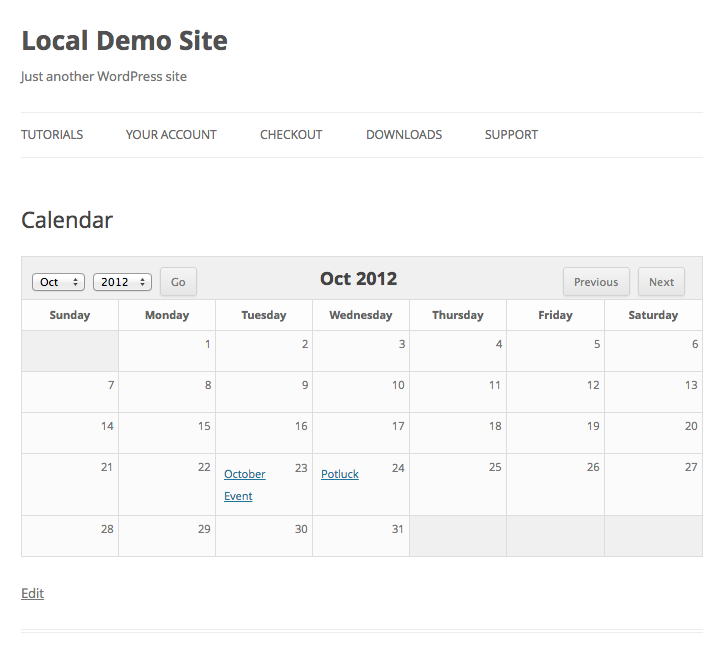
Most event calendar plugins are either way too simple, or extremely overly complex and bloated. Sugar Event Calendar is designed to be simple, light weight, and provide just the major features you need for event management.
Note: an extended version of this plugin is available for $16.
Features
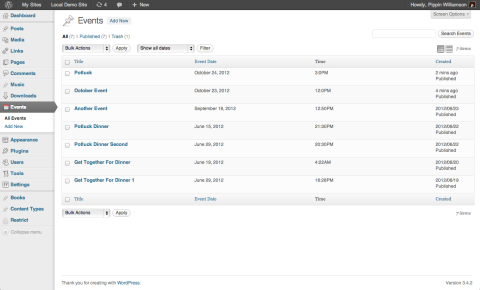
* Simple Event Management
* Ajax Enabled Calendar View
* Events Custom Post Type
* Simple Event Configuration
* Easily Set Event Dates
* Easily Set Event Start and End Time
* A short code for showing the calendar of events
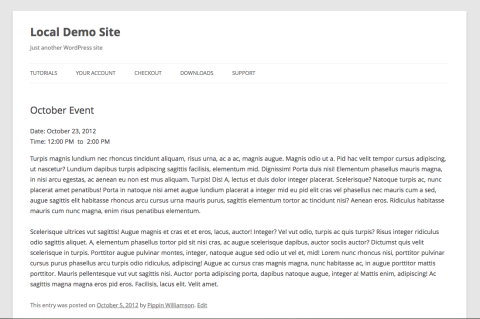
* Events Archive, Listed by Date of Occurrence
Extended Features
A full version of this plugin with additional features is available for purchase. It includes recurring events, large and small calendar views, event categories, widgets for displaying calendars and event filters, and more.
Languages
Sugar Event Calendar Lite has been translated into:
* English
* German
* French
* Serbian
* Swedish
Follow this plugin on Github.
Installation
1. Upload the ‘sugar-calendar-lite’ folder to the ‘/wp-content/plugins/” directory
2. Activate the plugin through the ‘Plugins’ menu in WordPress
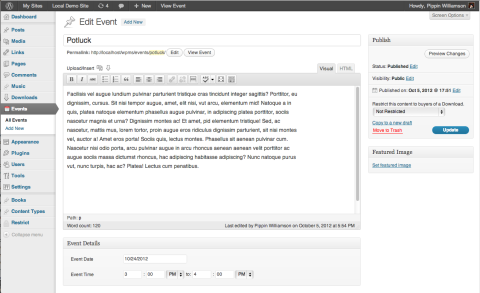
3. Go to the new Events post type and create some events
4. Display the calendar on any page with [sc_events_calendar]
5. View the archive of events at yoursite.com/events
Hi Pippin,
Please excuse my newb q’s as I am just getting up to speed with WP. I am wondering why the calendar is not displaying full width. Also starupsocal.org/events does not render a page, and I am wondering where I can edit the color of the buttons shown on the calendar page (and elsewhere – in green).
Thank you for you help.
Steve
Can you show me a page where the calendar is?
starupsocal.org/events is not showing as a calendar because that is the event archive. Change the slug of that page to “calendar” (or similar) and then it should work.
OK the reference on page slug helped, as I was not paying attention to slugs and using the default. I have changed that setting to use the post name now. So the page http://startupsocal.org/calendar/ is the page I created as “Menu” in the header where I put [sc_events_calendar] in the body to render the calendar. It is all squished to the center and I am thinking it is some default formatting but I am not sure where to look. Thank you for you help.
Steve
Also, is there a bug that has the minutes displaying as only one “0” for the default?
That’s just caused by the styling / layout of the default Twenty Fourteen theme. You’ll notice that it varies a little theme to theme.
Hello Pippin,
Is there any way to increase the text size of events listed under each day in the monthly view? From the code I was able to identify my H2 is being used for month, but am unable to find what font/size is being used for the text.
Thank you so much!
-Samantha
Are you familiar with CSS?
Good morning Pippin,
Yes I am, I am also familiar with the how to amend the code for both plug ins and themes.
Thanks!,
Samantha
See my reply on the other post you commented on 🙂
Hi Pippin,
Did you have a chance to look at the calendar implementation on http://startupsocal.org/calendar/ ? It is still rendering squished in the center.
See my comment above.
Hi Pippin, can you explain how to increase the size in the calendar text in the monthly view for events? I am familiar with CSS.
You can do:
.sc_day_div { font-size: 18px; }Pippin you are the best!!! Any way to make the text bold as well?
Add: `font-weight: 500;` to it.
Hi Pippin. I posted my question on the WordPressp plugin site — here is a link with all the details. Would appreciate any help you can provide Thanks.
https://wordpress.org/support/topic/events-do-not-display-in-calendar-cannnot-change-status-to-published?replies=1
Hi Pippin
I’d like to use your plugin, but the /events slug is already in use on my website.
When I installed the plugin, it overwrote my /events page with the plugin’s. I couldn’t access my original page anymore. So I uninstalled the plugin and now the /events slug just redirects to the homepage of my site. My original /events page is still inaccessible.
Do you know how I could reclaim the /events slug for my original page? Also, is it possible to use this plug in but have it populate a different page, say /calendar for example.
Thanks for what looks like a great plugin.
Andy
Go to Settings > Permalinks and click “Save Changes” and it will probably come back.
The /events slug cannot be changed in the plugin, so if you’d like to use it, you’ll need to change the slug of your existing events page.
The permalinks fix worked a treat – thank you! For now I prefer to keep the /events slug for my page. Thanks again for you help.
Andy
Glad to hear it!
Is there a way to sync this calendar with our organization’s Facebook events?
Not out of the box, sorry.
Hi. Is there a way to center the calendar on my page?
Yep! Are you familiar with CSS?
Can I post the short code in my sidebar to show the calendar there? Can I add some code to it to make it display smaller, to fit in the sidebar? Thanks.
No, sorry, but the paid version does include a calendar widget to do that.
Hi Pippin is it possible calendar day month year italian translate?
waiting your repond
Yes it’s possible. The plugin is ready for translation. All you’ll need to do is supply the .mo file.
Thanks for the free version simple in concept but got a few issues.
– The date/time show in undesired place (top of post) and there is no way to control placement
– The buttons show as flat rectangles with rounded corner, not with the style as pictured in the screenshots
– Past events shows a “Blog Archive” header atop the list which should not be there as those are events not blog posts
Not using the plugin due to the above issues, hopefully will be addressed soon… it would’ve been quite nice to be able to use it.
Thanks 🙂
1. Could you show me an example of how it’s displaying for you?
2. Those are controlled by your theme. The plugin keeps it simple so that the buttons inherit the styles in your theme.
3. That’s also controlled by your theme. If you’re comfortable with editing theme template files, I can show you how to address it.
Hi Pippin! Thank you for the plugin! I’m not familiar with CSS. Could you please explain me how to change single event background? In my current theme I have a colorful image as a background, and now single event is not readable. here’s the link: http://torsunovclubdc.com/events/%D0%B0%D0%BD%D0%BD%D0%B0%D0%B4%D0%B0-%D0%B0%D0%B4%D0%B6%D0%B0-%D1%8D%D0%BA%D0%B0%D0%B4%D0%B0%D1%88%D0%B8/
Thank you!
Hi Pippin! Thank you for the plugin. Is there a wy in the lite version to show the events in a list with an shortcode of something?
waiting for your respond,
thanks
No, sorry, that’s only in the paid version.
I’m working with the free version for a client and am considering upgrading. I need to have a single list of events below the calendar view- without the event’s details/ descriptions. Is this possible with the paid version?
Also, why is it displaying wonky on my site? The header grey seems to be too short? http://www.mainstreetgolconda.org/new/calendar-of-events/
Do you mean just a list of event titles?
The header height is caused by a minor CSS conflict with your theme. Are you familiar with CSS?
Hello Pippin,
First of all: nice work your calendar! I’m wondering if I can change button language? Probably somewhere in the code of your plugin, but then it’ll be gone after an update? The rest of the plugin is already translated. Can you help me out please?
Hi Laurens,
You sure can! This tutorial should help you out: http://premium.wpmudev.org/blog/how-to-translate-a-wordpress-plugin/
Hi Pippin,
How do I disable my name from appearing at the bottom of an event details page?
The calendar looks great, but I don’t want my name there at the bottom of the page for each event’s details.
You will need to edit your theme template files to remove that.
Please tell me how to get the entire archive calendar on the home page?
The event list page or the calendar view?
I want to show the event list page as my home page! I’m using a Genesis child theme – is there a simple way to do this (custom fields maybe)?
You will need to build a custom query through hooks and filters to add it to your home page.
Hi, is it possible in your calendar to schedule meetings of 20 minutes duration??? I mean change the end time of the meeting. In the standard calendar I only can schedule meetings with 15 minutes intervals. Thank you!
No that is not supported, sorry.
The plugin doesn’t work anymore as WP updates. It is now in need of an update. Are you able to update it to work on WP 4.4.2?
I’m not aware of any compatibility problems. What kind of issues are you seeing?
Hi! I am just getting nothing: http://www.mjvibe.com/calendar/
and got Warning: This plugin has not been tested with your current version of WordPress.
That only means that support for the latest version hasn’t been explicitly declared. Everything still works fine 🙂
Ok cool! Thanks! But the page doesn’t work still! On that page only [sc_events_calendar] is present! If I remove this, the page is live. If I put it on, the page just doesn’t load! 🙁
Thank you Pippin but it still doesn’t work when I put [sc_events_calendar] on the page! If I remove it! The page is working but no calendar! 🙁 Is it due to the amount of data I have in the calendar maybe?
Ok! But why the page doesn’t work then? This is the code I use on that page: [sc_events_calendar]
The page re-appear if I remove the above. 🙁
Thank you! So sorry if you have already received that message but my comments don’t show!
If I remove [sc_events_calendar] the page is showing but as soon as I had [sc_events_calendar], the page doesn’t work! So there is an issue with the plugin! 🙁
Hi Pippin! Still not working! Not sure what’s happening! 🙁
Sorry for not seeing your comment earlier! I had some issues with Akismet automatically trashing a bunch of comments.
If you’re still having trouble, could you please send me a support ticket? I’ll be more than happy to help: https://pippinsplugins.com/plugin-support
Still cannot access the calendar on my website. http://www.mjvibe.com/calendar/ The code [sc_events_calendar] doesn’t work. 🙁
Since the last update of wordpress we have also lost the calendar on this site – http://embroiderersact.org.au
see the ‘Whats on at a glance” page – it is blank in Safari, returns a “Fatal error: Unknown: Cannot use output buffering in output buffering display handlers in Unknown on line 0” in Chrome and Firefox
This problem occurred at the beginning of February
Does the problem go away if all other plugins are temporarily deactivated?
I just purchased the full version. What is the installation process? I already have the free version installed with events on my calendar. I don’t want to loose my past event entries.
Any guidance would be helpful.
Deactivate and delete the free version (no data will be lost) then install the new one.
Where can I find the shortcode in the plugin? I had to first find this site to locate it.
The Lite version includes one shortcode, [sc_events_calendar]
That shortcode will display the event calendar.
If you’re using the Pro version, there are additional shortcodes which you can find documented here: https://docs.sugarcalendar.com/article/1955-event-list-shortcode
Sugar Calendar plugin is on my shortlist of possible calendars for a small nonprofit I’m designing for. It appears to be a good fit but I’m having issues getting the calendar to display correctly. I’m sure I will need to add CSS code and at least one of my issues has been addresses elsewhere in this forum.
Month, Week, Day view options only appear on the backend.
Event font is white and not visible on the front end.
Assigned calendar colors not visible on the front end.
Calendar height is compressed
I am using the Divi theme and am comfortable adding CSS code if pointed in the right direction.
Just answered most of my questions so let me rephrase a couple of them.
Can the default calendar height be adjusted via CSS/PHP?
Can the default calendar color be modified via CSS/PHP?
Am I correct that calendar colors and view options are visible on the backend only?
New to this so thank you in advance.