Pippins Plugins
  • Email
  • Facebook
  • Feedburner
  • Github
  • Google
  • Twitter
  • Vimeo
  • Youtube
  • Rss
  • About
  • News
  • Join the Site
    • Member Benefits
    • Member Plugins
    • Email Notifications
  • Plugin Store
    • Affiliate Area
    • Checkout
  • Plugins
    • Plugin Portfolio
      • Plugin Portfolio – List View
    • Free
    • Premium
    • Member Plugins
    • Coding Standards
    • Get Plugin Support
  • Tutorials
    • Series
      • Plugin Development 101
      • Creating a User Follow System Plugin
      • Customizing Restrict Content Pro
      • Displaying Content with Easy Content Types
      • Writing Your First WordPress Plugins, Basic to Advanced
      • Working with Widgets
      • User Submitted Image Galleries
      • Plugin Thoughts
      • Integrating Stripe.com with WordPress
      • WordPress Rewrite API
    • Member Exclusive
      • Free Members
      • Subscriber Only
    • Difficulty
      • Beginner
      • Intermediate
      • Advanced
    • Action and Filter Hooks
    • Ajax
    • Custom Post Types
    • External APIs
    • Short Codes
    • Taxonomies
    • Video Tutorials
    • Widget Tutorials
    • WordPress Admin / Dashboard
    • Working with jQuery
    • WordPress Database
    • Writing Plugins
    • Tag Index
  • Reviews
  • Support Forum
  • Contact
    • Support the Site
    • Request Code Review
    • Plugin Support

Stripe Integration Part 7 – Creating and Storing Customers

Posted on September 11, 2012 by Pippin in Advanced, External APIs, Tutorials, Writing Plugins 27 Comments
Home» Tutorials » Advanced » Stripe Integration Part 7 – Creating and Storing Customers
blueprints
Tweet
Love It - 0
This entry is part 7 of 9 in the Integrating Stripe.com with WordPress Series
← Stripe Integration Part 6 – Payment ReceiptsStripe Integration Part 8 – Working with Invoices →
  • Stripe Integration Part 1 – Building the Settings and a Simple Payment Form
  • Stripe Integration Part 2 – Recurring Payments
  • Stripe Integration Part 3 – Variable Prices and Enhanced Plan Handling
  • Stripe Integration Part 4 – Multiple Recurring Payment Options
  • Stripe Integration Part 5 – Accepting Discount Codes
  • Stripe Integration Part 6 – Payment Receipts
  • Stripe Integration Part 7 – Creating and Storing Customers
  • Stripe Integration Part 8 – Working with Invoices
  • Stripe Integration Part 9 – The Stripe Button

The Stripe customer system let’s us keep track of people that have signed up for our subscriptions or purchased our products. Anytime a user signs up for a subscription, a customer is created for them in Stripe. Once a customer has been created, we can see all payments that customer has made, add or subtract charges to their account, give them discounts, and a few other things. In this part of our Stripe and WordPress integration tutorial series, we’re going to look at some of the basics of working with customers.

Before we go too far, let’s look back at some of the code we’ve already written, since we have actually already done a little work with customers. In includes/process-payment.php, we have two ways of processing payments:

  1. Recurring payments
  2. One time payments

Anytime a recurring payment is created, a customer is created. This is because a customer is required in order to setup recurring billing. We created our customer like this:

1
2
3
4
5
6
$customer = Stripe_Customer::create(array(
		'card' => $token,
		'plan' => $plan_id,
		'email' => strip_tags(trim($_POST['email']))
	)
);

Pretty simple, right? There is not a lot too it, but we’re going to expand on this now.

When processing payments, we create a customer for our recurring payments, but not for the one-time payments. Let’s upgrade this so that individual payments are attributed to customers as well, which will give us a much better tracking system for our earnings.

Currently our one-time payments are created like this:

1
2
3
4
5
6
$charge = Stripe_Charge::create(array(
		'amount' => $amount, // amount in cents
		'currency' => 'usd',
		'card' => $token
	)
);

The Stripe Charge accepts a customer parameter that can be passed so that the payment is attributed to a customer. In order to pass that customer parameter we need to do two things:

  1. Check if we already have a custom ID for the current user (only if they are logged in). If we do, we will use this customer ID.
  2. Create a new customer if we do not have an existing customer ID and then pass the newly created ID to our charge object.

Let’s first adjust our code in process-payment.php to create a customer if needed:

1
2
3
4
5
6
7
8
9
10
11
12
13
14
15
16
17
18
19
20
21
22
23
24
25
26
27
28
29
30
31
32
33
if( is_user_logged_in() )
	$customer_id = get_user_meta( get_current_user_id(), '_stripe_customer_id', true );
else
	$customer_id = false;
 
if( !$customer_id ) {
 
	// create a new customer if our current user doesn't have one
	$customer = Stripe_Customer::create(array(
			'card' => $token,
			'email' => strip_tags(trim($_POST['email']))
		)
	);
 
	$customer_id = $customer->id;
 
	if( is_user_logged_in () ) {
		update_user_meta( get_current_user_id(), '_stripe_customer_id', $customer_id );
	}
}
if( $customer_id ) {
 
	$charge = Stripe_Charge::create(array(
			'amount' => $amount, // amount in cents
			'currency' => 'usd',
			'customer' => $customer_id
		)
	);
 
} else {
	// the customer wasn't found or created, throw an error
	throw new Exception( __( 'A customer could not be created, or no customer was found.', 'pippin' ) );
}

This first checks to see if the user is logged in. If they are, we attempt to retrieve their customer ID from the user meta table. If no meta is available, get_user_meta() will return false. If $customer_id is false, either because the user is logged out or because the customer ID didn’t exist in the meta, we go ahead and create a customer. To create the customer, all we need is the email address and card token.

Once the customer has been created, we update $customer_id with the ID number returned from Stripe, and then, if the user is logged in, store it in the user’s meta.

After the customer ID has been created or retrieved, we create the one-time charge. Note, however, that the Stripe_Chart function has been updated with a new “customer” parameter, which has replaced the “card” parameter we had before. This is because Stripe only needs the customer ID. When the customer ID is provided, it will charge the card the customer currently has on file.

In the case that no customer ID is found, and no customer can be created, we use throw new Exception to trigger the error notice, alerting us that something went wrong.

Once a payment is submitted now, you will see this in your Stripe Dashboard:
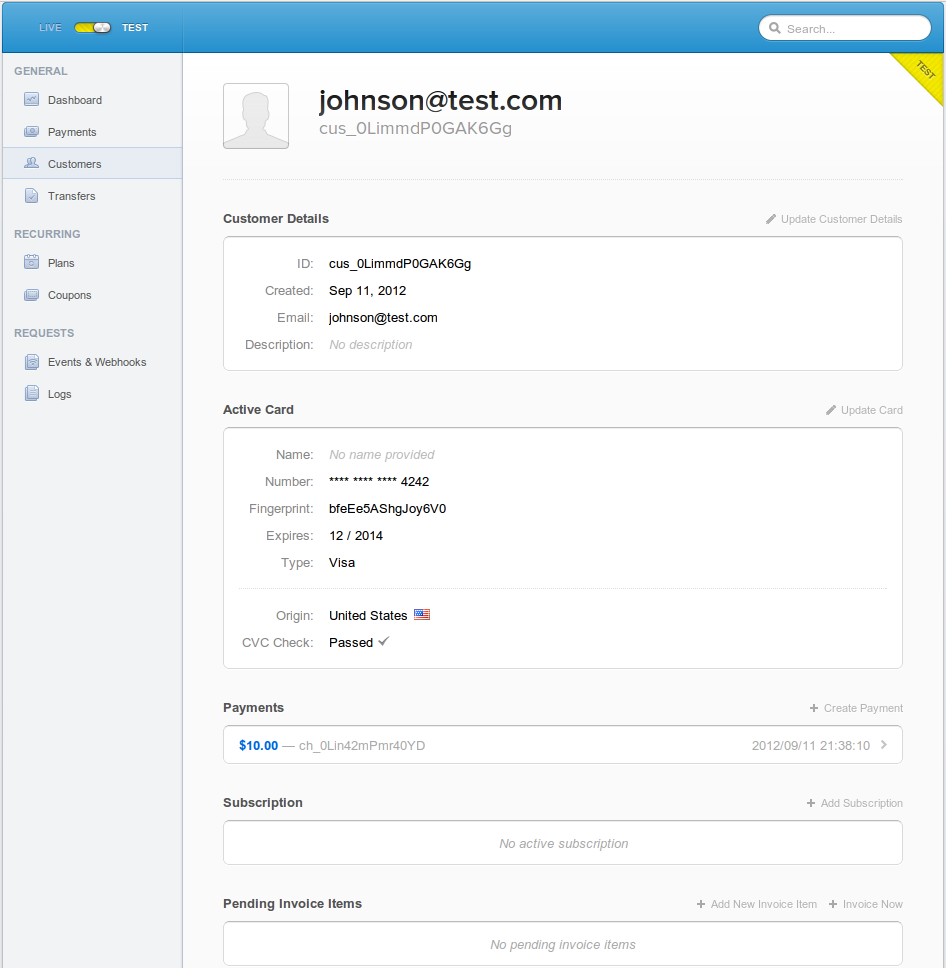
Now we have just one more modification we need to make in order for our plugin to be completely customer friendly. Since it is very feasible that a logged-in user may come back and update their subscription, let’s update the recurring portion of our payment processing to check if the current user already has a Stripe ID stored on the site.

We will use the same process for recurring payments:

  1. Check if the user is logged in and if they have a stored Stripe customer ID. If an ID is found, we update this customer with the new info.
  2. If no customer is found, we create a brand new customer and store the ID for future use, if the user is logged in.

Our updated code looks like this:

1
2
3
4
5
6
7
8
9
10
11
12
13
14
15
16
17
18
19
20
21
22
23
24
25
26
27
28
29
30
31
32
33
34
35
36
37
38
39
40
41
42
43
44
45
46
47
48
49
try {		
 
	if( is_user_logged_in() )
		$customer_id = get_user_meta( get_current_user_id(), '_stripe_customer_id', true );
	else
		$customer_id = false;
 
	if( $customer_id ) {
 
		// retrieve our customer from Stripe
		$cu = Stripe_Customer::retrieve( $customer_id );
 
		// update the customer's card info (in case it has changed )
		$cu->card = $token;
 
		// update a customer's subscription
		$cu->updateSubscription(array(
				'plan' => $plan_id
			)
		);
 
		// save everything
		$cu->save();
 
	} else {
 
		// create a brand new customer
		$customer = Stripe_Customer::create(array(
				'card' => $token,
				'plan' => $plan_id,
				'email' => strip_tags(trim($_POST['email'])),
				'coupon' => $using_discount ? trim($_POST['discount']) : null
			)
		);
 
		if( is_user_logged_in () ) {
			// store the new customer ID in the meta table
			update_user_meta( get_current_user_id(), '_stripe_customer_id', $customer->id );
		}
                $customer_id = $customer->id;
	}
 
	// redirect on successful recurring payment setup
	$redirect = add_query_arg('payment', 'paid', $_POST['redirect']);
 
} catch (Exception $e) {
	// redirect on failure
	$redirect = add_query_arg('payment', 'failed', $_POST['redirect']);
}

First we check to see if the user is logged in, and attempt to retrieve a stored customer ID if they are. If no ID is found, or the user is not logged in, $customer_id will be false.

If we have found a customer ID, we use Stripe_Customer::retrieve to grab all of the current information for the customer from Stripe. Next we use $cu->card to update the stored credit card with what the user has just entered on the page. After storing the card, we update the customer’s subscription using $cu->updateSubscription(). This allows the customer to change their subscription, even in the middle of an existing subscription. If the customer already had a subscription, the new one will be prorated if necessary.

After updating the card and the subscription, we do $cu->save() to send all of the changes to Stripe.

Now, we we did not find a customer ID, or the user isn’t logged in, then we create a new customer just like we used too. We also make sure that we store the newly created customer ID if the user is logged in.

That’s it! We now have a much more complete customer system with our Stripe billing.

One of the things that’s really great about using customer’s in Stripe, is that we, as the admin, can update or modify the customer’s subscription at any time. For example, using the invoice object, which we will look at in the next part, we can attach arbitrary fees to our customers, which will then be paid for when the customer’s next payment comes through. You can also give your customer’s discounts (or prorated amounts) in the middle of their subscription, which is something you definitely cannot do with many systems, such as PayPal.

The complete code that we have worked with in this part is below. You can also download the complete plugin (with everything we’ve done up to this point) at the bottom.

1
2
3
4
5
6
7
8
9
10
11
12
13
14
15
16
17
18
19
20
21
22
23
24
25
26
27
28
29
30
31
32
33
34
35
36
37
38
39
40
41
42
43
44
45
46
47
48
49
50
51
52
53
54
55
56
57
58
59
60
61
62
63
64
65
66
67
68
69
70
71
72
73
74
75
76
77
78
79
80
81
82
83
84
85
86
87
88
89
90
91
92
93
94
95
96
97
98
99
100
101
102
103
104
105
106
107
108
109
110
111
112
113
114
115
116
117
118
119
120
121
122
123
124
125
126
127
128
129
130
131
132
133
134
135
136
137
138
139
140
141
142
143
144
145
146
147
148
149
150
151
152
153
154
155
156
157
158
159
<?php
 
function pippin_stripe_process_payment() {
	if(isset($_POST['action']) && $_POST['action'] == 'stripe' && wp_verify_nonce($_POST['stripe_nonce'], 'stripe-nonce')) {
 
		global $stripe_options;
 
		// load the stripe libraries
		require_once(STRIPE_BASE_DIR . '/lib/Stripe.php');
 
		$amount = base64_decode($_POST['amount']) * 100;
 
		// retrieve the token generated by stripe.js
		$token = $_POST['stripeToken'];
 
		// check if we are using test mode
		if(isset($stripe_options['test_mode']) && $stripe_options['test_mode']) {
			$secret_key = $stripe_options['test_secret_key'];
		} else {
			$secret_key = $stripe_options['live_secret_key'];
		}
 
		Stripe::setApiKey($secret_key);		
 
		$using_discount = false;
 
		// check for a discount code and make sure it is valid if present
		if(isset($_POST['discount']) && strlen(trim($_POST['discount'])) > 0) {
 
			$using_discount = true;
 
			// we have a discount code, now check that it is valid			
 
			try {
 
				$coupon = Stripe_Coupon::retrieve( trim( $_POST['discount'] ) );
				// if we got here, the coupon is valid
 
			} catch (Exception $e) {
 
				// an exception was caught, so the code is invalid
				wp_die(__('The coupon code you entered is invalid. Please click back and enter a valid code, or leave it blank for no discount.', 'pippin'), 'Error');
 
			}
 
		}
 
		if(isset($_POST['recurring']) && $_POST['recurring'] == 'yes') { // process a recurring payment
 
			$plan_id = strip_tags(trim($_POST['plan_id']));		
 
			try {		
 
				if( is_user_logged_in() )
					$customer_id = get_user_meta( get_current_user_id(), '_stripe_customer_id', true );
				else
					$customer_id = false;
 
				if( $customer_id ) {
 
					// retrieve our customer from Stripe
					$cu = Stripe_Customer::retrieve( $customer_id );
 
					// update the customer's card info (in case it has changed )
					$cu->card = $token;
 
					// update a customer's subscription
					$cu->updateSubscription(array(
							'plan' => $plan_id
						)
					);
 
					// save everything
					$cu->save();
 
				} else {
 
					// create a brand new customer
					$customer = Stripe_Customer::create(array(
							'card' => $token,
							'plan' => $plan_id,
							'email' => strip_tags(trim($_POST['email'])),
							'coupon' => $using_discount ? trim($_POST['discount']) : null
						)
					);
 
					if( is_user_logged_in () ) {
						// store the new customer ID in the meta table
						update_user_meta( get_current_user_id(), '_stripe_customer_id', $customer->id );
					}
				}
 
				// redirect on successful recurring payment setup
				$redirect = add_query_arg('payment', 'paid', $_POST['redirect']);
 
			} catch (Exception $e) {
				// redirect on failure
				$redirect = add_query_arg('payment', 'failed', $_POST['redirect']);
			}
 
		} else { // process a one-time payment
 
			// attempt to charge the customer's card
			try {
 
				if($using_discount !== false) {				
					// calculate the discounted price
					$amount = $amount - ( $amount * ( $coupon->percent_off / 100 ) );
				}	
 
				if( is_user_logged_in() )
					$customer_id = get_user_meta( get_current_user_id(), '_stripe_customer_id', true );
				else
					$customer_id = false;
 
				if( !$customer_id ) {
 
					// create a new customer if our current user doesn't have one
					$customer = Stripe_Customer::create(array(
							'card' => $token,
							'email' => strip_tags(trim($_POST['email']))
						)
					);
 
					$customer_id = $customer->id;
 
					if( is_user_logged_in () ) {
						update_user_meta( get_current_user_id(), '_stripe_customer_id', $customer_id );
					}
				}
				if( $customer_id ) {
 
					$charge = Stripe_Charge::create(array(
							'amount' => $amount, // amount in cents
							'currency' => 'usd',
							'customer' => $customer_id
						)
					);
 
				} else {
					// the customer wasn't found or created, throw an error
					throw new Exception( __( 'A customer could not be created, or no customer was found.', 'pippin' ) );
				}
 
				// redirect on successful payment
				$redirect = add_query_arg('payment', 'paid', $_POST['redirect']);
 
			} catch (Exception $e) {
				wp_die($e);
				// redirect on failed payment
				$redirect = add_query_arg('payment', 'failed', $_POST['redirect']);
			}
		}
 
		// redirect back to our previous page with the added query variable
		wp_redirect($redirect); exit;
	}
}
add_action('init', 'pippin_stripe_process_payment');
Download Plugin
Tweet Follow @pippinsplugins
Stripe

27 comments on “Stripe Integration Part 7 – Creating and Storing Customers”

  1. Jason says:
    September 11, 2012 at 5:45 pm

    Great series. . .i’ve been working on so many stripe projects lately, and I feel like your tutorials are perfectly timed. Right as I need to start working on something, you post a tutorial on it. . .keep it up!

    Reply
    • Pippin says:
      September 11, 2012 at 5:53 pm

      Thanks Jason! Stripe is definitely one of my favorite systems to work with.

  2. NaukriBox says:
    September 13, 2012 at 3:53 pm

    Great Post Thanks a Lot…

    Reply
  3. dialsandhya says:
    September 14, 2012 at 3:03 pm

    Great series thanks a lot friend…

    Reply
  4. Heather says:
    September 14, 2012 at 5:33 pm

    Thanks for such an informative series… you really have a great way of explaining the whys and hows. :)

    Reply
  5. Hal Gatewood says:
    September 19, 2012 at 2:09 pm

    Are we required to let the user know that we are “storing their information”?

    Reply
    • Pippin says:
      September 19, 2012 at 2:12 pm

      None of the customer’s credit card info is stored on your server. It’s sent to Stripe and stored on their secure servers.

      Technically I’d say no, you’re not required. But it is probably best if you do.

  6. Eric says:
    October 23, 2012 at 2:39 pm

    So much better than Paypal!!! I can’t begin to tell you how much easier this was than working with Paypal. I tried three different flavors of Paypal and 80 hours of work and none of them worked correctly. After 4 hours of work I had Stripe about 90% fully integrated in our solution. Just 4 hours after having never used Stripe before.

    Reply
    • Pippin says:
      October 23, 2012 at 3:19 pm

      Yep, Stripe is beautiful :)

  7. Barry says:
    November 7, 2012 at 9:16 pm

    Awesome series! I had heard about stripe through somewhere else but was in over my head before this tutorial. I’ve just run into one snag, perhaps you could shed some light on as I’ve contacted stripe but they said that they had not created the error “the Stripe token was not generated correctly. Please try again.” I feel this will turn many customers away. Is this a time out error? Thanks a million dude – you rock.

    Reply
    • Pippin says:
      November 8, 2012 at 11:18 pm

      Glad to help!

      Where / when are you seeing that error?

    • Barry@g-lessons.com says:
      November 9, 2012 at 9:51 am

      I see the reply after the credit card information has been submitted. I think it is a timeout issue – the webpages are loaded very slowly (think something is happening on the server side). This happened a few times a couple of nights ago but has not happened since and the pages are loading appropriately (speed-wise). I’ve written this off as a server issue – great plug-in, great newsletters – take care!

    • Pippin says:
      November 10, 2012 at 9:23 pm

      Ok let me know if you run into the issue again!

  8. George says:
    November 13, 2012 at 5:13 pm

    Thank you so much for your tutorials!

    I’m not much of a programmer, so I apologize in advance for stupid questions.

    I have a “products page” where I sell 6 different products in sets.
    For example:
    each product may have sets of 10 or 100 items with different prices and different shipping charges.
    So, for the set of 10 items the price would be $20 and shipping $5
    and for the set of 100 items the price is $70 & shipping is $8

    At this time I have shipping charges set at $5 for purchases up to $20 and $8 for purchases from $20 to $100.

    I guess that I will need to design a shopping cart and then pass all totals for products and shipping to the page with a Stripe form.

    Are you planning on going to this directions with your tutorials by any chance?

    Reply
    • Pippin says:
      November 14, 2012 at 3:51 pm

      This goes quite a ways beyond the scope of what this series will cover, sorry. I’d suggest that you use one of the popular ecommerce plugins that already support this (and Stripe integration).

  9. Nour Akalay says:
    November 25, 2012 at 2:53 am

    Hello,

    I just love this tutorial, such an eye opener. Please don’t stop.
    I quote

    For example, using the invoice object, which we will look at in the next part…

    Sooo… When’s the next part coming out live?

    Many thanks again

    Reply
    • Pippin says:
      November 25, 2012 at 8:44 pm

      Planning for it sometime next week.

    • Nour Akalay says:
      November 26, 2012 at 2:00 am

      That’s great thanks :)

  10. Pranaya says:
    January 29, 2013 at 4:34 pm

    After searching for hours, your post solved exactly what I was struggling with. Thanks for this very helpful Stripe series.

    Reply
  11. John Smith says:
    March 18, 2013 at 8:22 am

    ERROR ON SUBMIT

    exception ‘Stripe_InvalidRequestError’ with message ‘Amount must be at least 50c’ in C:\wamp\www\powercore\wp-content\plugins\wordpress-stripe-integration\lib\Stripe\ApiRequestor.php:66 Stack trace: #0 C:\wamp\www\powercore\wp-content\plugins\wordpress-stripe-integration\lib\Stripe\ApiRequestor.php(114): Stripe_ApiRequestor->handleApiError(‘{? “error”: {?…’, 400, Array) #1 C:\wamp\www\powercore\wp-content\plugins\wordpress-stripe-integration\lib\Stripe\ApiRequestor.php(54): Stripe_ApiRequestor->_interpretResponse(‘{? “error”: {?…’, 400) #2 C:\wamp\www\powercore\wp-content\plugins\wordpress-stripe-integration\lib\Stripe\ApiResource.php(69): Stripe_ApiRequestor->request(‘post’, ‘/charges’, Array) #3 C:\wamp\www\powercore\wp-content\plugins\wordpress-stripe-integration\lib\Stripe\Charge.php(26): Stripe_ApiResource::_scopedCreate(‘Stripe_Charge’, Array, NULL) #4 C:\wamp\www\powercore\wp-content\plugins\wordpress-stripe-integration\includes\process-payment.php(161): Stripe_Charge::create(Array) #5 [internal function]: pippin_stripe_process_payment(”) #6 C:\wamp\www\powercore\wp-includes\plugin.php(406): call_user_func_array(‘pippin_stripe_p…’, Array) #7 C:\wamp\www\powercore\wp-settings.php(306): do_action(‘init’) #8 C:\wamp\www\powercore\wp-config.php(179): require_once(‘C:\wamp\www\pow…’) #9 C:\wamp\www\powercore\wp-load.php(29): require_once(‘C:\wamp\www\pow…’) #10 C:\wamp\www\powercore\wp-blog-header.php(12): require_once(‘C:\wamp\www\pow…’) #11 C:\wamp\www\powercore\index.php(17): require(‘C:\wamp\www\pow…’) #12 {main}

    Reply
    • Pippin says:
      March 20, 2013 at 6:54 pm

      Your charge amounts must be greater than 0.50.

  12. John Smith says:
    March 23, 2013 at 5:39 am

    Hi pippin,
    I want to store ‘charge id’ in my database as you stored ‘customer id’.
    How can i get charge id?

    i did this in “process-payment.php” line 163

    line 154: if ( $customer_id ) {

    $charge = Stripe_Charge::create( array(
    ‘amount’ => $amount, // amount in cents
    ‘currency’ => ‘usd’,
    ‘customer’ => $customer_id
    )
    );

    line:163 $_SESSION['charge_id'] = $charge['id'];

    But the session variable is not storing the charge_id value.
    Any idea why?

    Reply
    • Pippin says:
      March 26, 2013 at 4:04 pm

      Try $charge->id

  13. Denny says:
    March 24, 2013 at 9:43 am

    Any ideas how to pass user address and information using stripe.js for Expresso Store with Expression Engine?

    My post parameters in firebug:

    XID fed1e38bf58d11e6c32305c22c679c287fe1b90c
    billing_address1 2423 Reimer Rd
    billing_address2
    billing_address3 Blastoff
    billing_country us
    billing_name Denny Test
    billing_phone 330-620-8199
    billing_postcode 44281
    billing_region OH
    form_name
    next Confirm Order
    next_url store/confirm-stripe
    order_email sydpixel@gmail.com
    return_url store/details
    secure_return 1
    shipping_address1 2423 Reimer Rd
    shipping_address2
    shipping_address3 Blastoff
    shipping_country us
    shipping_name Denny Test
    shipping_phone 330-620-8199
    shipping_postcode 44281
    shipping_region OH
    shipping_same_as_billing 0
    shipping_same_as_billing 1
    site_id 1

    My response in Stripe logs


    object: "card"
    last4: "4444"
    type: "MasterCard"
    exp_month: 1
    exp_year: 2014
    fingerprint: "3HSdYop7eOmsdo3a"
    country: "US"
    name: "Denny Test"
    address_line1: "undefined"
    address_line2: "undefined"
    address_city: null
    address_state: null
    address_zip: "undefined"
    address_country: null
    cvc_check: "pass"
    address_line1_check: "pass"
    address_zip_check: "pass"

    You can see address is “undefined”. Do I need to add these to the create token js?

    Reply
    • Pippin says:
      March 25, 2013 at 11:03 am

      You have to pass them like this:

      1
      2
      3
      4
      5
      6
      7
      8
      9
      10
      11
      12
      13
      
      Stripe.createToken({
      	number: 	     jQuery('.card-number').val(),
      	name: 		     jQuery('.card-name').val(),
      	cvc: 		     jQuery('.card-cvc').val(),
      	exp_month:       jQuery('.card-expiry-month').val(),
      	exp_year: 	     jQuery('.card-expiry-year').val(),
      	address_line1: 	 jQuery('.card-address').val(),
      	address_line2: 	 jQuery('.card-address-2').val(),
      	address_city: 	 jQuery('.card-city').val(),
      	address_state: 	 state,
      	address_zip: 	 jQuery('.card-zip').val(),
      	address_country: jQuery('.billing-country').val()
      }, edd_stripe_response_handler);
  14. support@spottedtailoutdoors.com says:
    May 9, 2013 at 11:19 am

    Pippin – I tried using your contact form but it did not seem to be functioning, is there another way to get in touch with you? I have interest in the Stripe plugin but am not a programmer.

    Reply
    • Pippin says:
      May 10, 2013 at 4:11 pm

      My contact form definitely still works (received several emails today). What made you think it didn’t work?

Leave a Reply Cancel reply

Your email address will not be published. Required fields are marked *

You may use these HTML tags and attributes: <a href="" title=""> <abbr title=""> <acronym title=""> <b> <blockquote cite=""> <cite> <code> <del datetime=""> <em> <i> <q cite=""> <strike> <strong>

  • Login

Lost your password?

Please enter your username or e-mail address. You will receive a new password via e-mail.

  • Facebook Become a Fan Like

  • Twitter Subscribe on Twitter Follow

  • YouTube Follow my Videos Subscribe

  • RSS Feed Subscribe with RSS Subscribe

Easy Digital Downloads

Most Loved

  • Love It Pro for WordPress
  • Write a “Love It” Plugin with Ajax to Let Users Love Their Favorite Posts / Pages
  • Simple Notices Pro Plugin for WordPress
  • User Bookmarks for WordPress
  • Front End Registration and Login Forms Plugin

Similar Plugins and Posts

  • Stripe Integration Part 9 – The Stripe Button
  • Stripe Integration Part 8 – Working with Invoices
  • Stripe Integration Part 6 – Payment Receipts
  • Stripe Integration Part 5 – Accepting Discount Codes
  • Stripe Integration Part 4 – Multiple Recurring Payment Options

Latest Premium Content

  • Plugin Development 101 – Introduction to Adding Dashboard Menus
  • Plugin Development 101 – Intro to Loading Scripts and Styles
  • User Follow System – Part 5
  • Plugin Development 101 – Intro to Short Codes
  • Plugin Development 101 – Registering a Custom Post Type
  • Plugin Development 101 – Intro to Actions

Latest Tutorials

  • Submitting Your First Pull Request to a WordPress Plugin on Github (2)

    Github is an extremely popular tool for managing WordPress plugins, and one...

  • Plugin Development 101 – Introduction to Adding Dashboard Menus (1)

    Adding new menus, both top level and sub level, to the WordPress Dashboard is a really common task for plugins...

  • Plugin Development 101 – Intro to Loading Scripts and Styles (16)

    In this part of Plugin...

Enter your email to receive automated updates when new posts are published

Latest Tweets

  • @jaredatch @kimparsell :D
    May 23, 2013
  • @jaredatch there is, as long as there is at least one ticket
    May 23, 2013
  • RT @Astoundify: We are hiring p/t tech support rep for our support forum if your interested email contact [at] http://t.co/bcXNhcwZx5
    May 23, 2013

Topics

attachments wp_enqueue_script hook Sugar Event Calendar the_content shortcodes add_options_page get_user_meta contextual help Tom McFarlin add_shortcode register_setting meta box forms do_action short codes mail chimp login authors attachment Related posts image plugin recent posts comments apply_filters post types bbpress short code taxonomies custom post type Ajax images gallery Stripe taxonomy jquery widgets users add_filter easy content types add_action widget restrict content pro easy digital downloads

Weekly Newsletter

Useful Links

  • Join the Site
  • Plugin Store
  • Affiliate Area
  • Tag Index
  • Support the Site
  • Suggest a Tutorial
  • Random Post
  • Contact

Monthly Archives

(c) 2011 Pippin's Plugins