

While writing up a tutorial for the upcoming WP Roots.com, I put together this quick widget that can be used to display a list of your blog authors, including gravatars and post counts.
[box style=”notice”]A greatly enhanced version of this plugin is available here[/box]
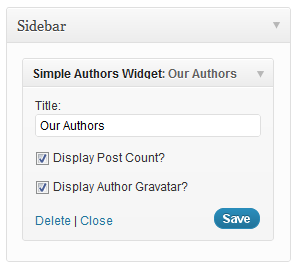 So, as the code was complete, I figured I might as well drop it into a quick plugin and make it available for all of you 🙂
Download the plugin below and let me know what you think!
Download
I really like the simplicity of this widget. I’ve noticed now that subscribers are registering on my site, they’re also appearing in the list. I’d like to be able to confine it to “contributors” and “admins” (basically anyone that makes posts on the site, not normal subscribers or or people who comment).
Is there an easy way to make this exclusion?
Thanks!
@davincikittie – Yes, you can add a simple parameter to the author query to prevent it from pulling certain user levels.
So add something like this to the query: WHERE user_level != 2
Thanks for the quick reply! When I added the extra code to the query, all users disappeared from the widget. I checked the DB and there’s no user_level column in the users table. I found the user_level information in the usermeta table, but it was part of the meta data.
@Davincikittie – Oh shoot, you’re right, sorry. It will actually be a bit more difficult to exclude certain user levels. I’m planning to add that feature to the Advanced version today or tomorrow.
Great! Looking forward to it. =)
Will you reply here when it’s ready so I don’t keep checking back impatiently? 😉
Please tell me how can i call it ???
Once activated, the plugin will create a new Widget in the “Appearance > Widgets”. You can place it in any widgetized area.
Hi , i have the same problem. ok if name is admin, but if i’m the administrator and don’t write anything on the client blog, my name i.e. Maurizio is display on the widget like this Maurizio (0), and this’s not right!!!
i solve it like this: if users have no post i don’t display him…
i add this code : if (count_user_posts($author->ID) != 0) {
after line 45: $author_info = get_userdata($author->ID);
and this code: }
after line 58: echo ”;
maybe this two simple line can be added to the next version plugin..
bye from Italy
Maurizio
Thanks for the suggestion. I will check it.
Hi I just installed the plugin, the problem I had is that the authors wanted to sort by number of post, reviewing the documentation ( http://codex.wordpress.org/Function_Reference/get_users )modify the plugin as follows:
$authors = get_users( array(
'who' => 'authors',
'number' => 99999,
'orderby' => 'post_count',
'order' => 'DESC'
) );
I think that would be a good feature to include sorting option in the plugin:
‘display_name’ or ‘post_count’.
I added the feature to sort by number of posts, I made a change file that I would like to integrate these, please check:
https://gist.github.com/3861150
Looks great! Thanks for posting!
Hello,
very usefull tutorial for me, but I found one error in a source code. If You want the option “gravatar” work You should replace line 51 with condition “if($gravatar) echo get_avatar($author->ID, 40);”. Unless You did not correct this lineg gravatars will show every time :o)
Thanks Pippin.
Bro I used It . This Plugin Have Professional Look .
Hi there!
I’ve just downloaded the plugin but I cannot understand how to choose the author for every post. Every article in the blog is written by someone else, so how can I match the right author to his/her post?
Pls explain me how if I was 6…..:-)
thanks
You can’t, sorry, that’s not what the plugin is for.
Great plugin!!! Awesome!
Nice plugin. But, how do we exclude select authors? Any way to do?
You can’t, sorry.
sounds like a good plugin
but would you please add a follow author button so unregistered users can follow authors
I have to say many bloggers are guilty of believing these myths and even actively letting them affect their blogging success.
I like the first 2 myths the most as they are actually connected – instead of publishing daily it’s best to publish once or few times per week and spend the rest of the time promoting.
And one of the best forms of promotion is taking advantage of the search engines, rather than ignoring search engines.
Google is bigger now than ever before and will keep getting bigger.
If bloggers spend more time writing articles that rank and promoting such articles to get more links, success will be easier and long term.
Hello, I’ve just downloaded the plugin but I cannot understand how to choose the author for every post. Every article in the blog is written by someone else, so how can I match the right author to his/her post?general store
Pingback: How to Create A Wordpress Widget - WP Roots