
The Shortcodes Pro plugin is written by Matt Varone and is now available for free from Matt’s website and the WordPress Plugin repository.
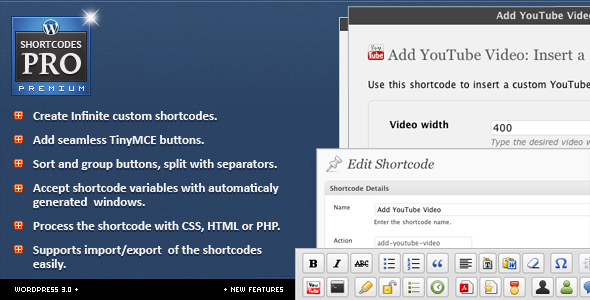
In the author’s words:
Shortcodes Pro allows quick and easy creation of WordPress shortcodes and TinyMCE rich editor buttons from the comfort of the WordPress interface.
Matt contacted me a few days ago asking if I’d be willing to review the plugin for him, so, after getting my hands on the plugin, I got down and dirty running it through the hoops.
After just a few short minutes of playing with the plugin, I immediately became aware of a few things:
- This plugin is NOT written by an amateur by any means
- It is extremely well laid out, both in terms of interface and code
- The interface is simple and easy to use
- It makes creating advanced shortcodes very easy
Within less than 5 minutes, I was able to create three different shortcodes with varying number of attributes. I was also able to easily add new TinyMCE buttons to the editor for each shortcode, making them almost too easy to use. If I wanted, I was also able to rearrange and place the buttons wherever I wanted.
Even though I was able to figure out how to use every aspect of the plugin very quickly and without help, in part because of Matt’s excellently laid out tips throughout the plugin’s interface, I did go ahead and open up the help documentation included with the plugin. It left nothing to be desired, which is not something many plugin help files can boast. If a user were having any sort of trouble with the plugin, they’d be able to find the answer in the help file without any need of contacting the developer.
Now, with all of my praise, there was one aspect of the plugin that I did feel was lacking. While the plugin made it extremely easy to create shortcodes, I did wish there were a place to insert custom CSS for the shortcodes. I was able to create a shortcode to insert a button (including color and size options) within seconds, but I had no good way of entering the necessary CSS for the button. Obviously I could put my CSS into my theme file, but the idea with the plugin is to remove the need for that. If I wanted to, I could also enter the CSS into the shortcode form used for creating the HTML output, but that would mean displaying custom CSS for each and every shortcode, causing duplicate code.
So my suggestion to the author is to add another settings panel where users can enter all of the custom CSS for their shortcodes. And, of course, also include the ability to export the CSS with the rest of the export options.
Overall, an absolutely awesome plugin that I would not hesitate for a moment to recommend.

Thanks for the review Pippin, Im humbled with your comments and really appreciate your suggestion! It’s great to have this type of feedback.
It’s no surprise you have this feeling about CSS (which also could be Javascript or asset images) I must have went a hundred times around my head about this matter! yet I can’t make up my mind of where I stand on this, I came to realize it’s a grey area where different users have different needs. Some want to have shortcodes look and behave the same across all themes and some wants them to be different. Since I have yet not decided if the plugin should take a side, for now the approach has been to leave the decision open for the users to decide.
This post however really encourages me to keep thinking it over till I find an appropriate solution that could fit both worlds elegantly. Definitely don’t discard the possibility that it becomes a feature in the near future 🙂
Thanks again for such a nice review and hats off for your awesome plugins!
Kind Regards!
I would encourage you to add a simple textarea in settings or somewhere that users could enter any custom CSS they want. If users want to use it, they can, but there’s nothing forcing them too 🙂
Reviewing the plugin was a pleasure.
Plugin URL is not linking to the plugin page, but to this page itself!
Thanks for catching that. I’ve fixed it.
Matt – I think just adding the ability to add a class should be sufficient. i.e. class=”mystyle.” IMO it’s always best to put styles in the stylesheet where it can be styled site wide. When the user changes the theme down the road, it’s much more convenient than editing the styles in each shortcode. Just my 2¢. Pippin, thanks for the review!
That would also be sufficient, though it would be nice to be able to take your shortcodes from ones theme to another, without having to copy the stylesheets.
Well, right but, imagine you have 40 shortcodes and you wanna change the color to match the new theme. Change it in 40 places? Or just copy one line from stylesheet to stylesheet.
Very good point.
Hi Guys, thanks for all the suggestions!
Crafting a sweet update for 2.0, wont give much details but most of the work is being done on the assets management part. Will be posting more details soon on twitter and my blog.
Tx again Pippin for the review 🙂
Kind Regards!
Sweet, looking forward to the update!
what happened to this plugin, Pippen? I can’t find it on CodeCanyon???
@Aaron – Matt, the developer decided to pull it from Code Canyon and make it open source. You can find it here: http://www.mattvarone.com/featured-content/shortcodes-pro/
Very nice post; I use shortcodes in my woocommerce store by manually adding codes instead using plugins Because I think plugins can slow down the speed of my website. However, I have this detailed guide about shortcodes https://codup.co/woocommerce-shortcodes-guide/ in which many useful shortcodes are mentioned.