
In order to be kind to our friends that do not speak the language we have written our plugin in, it is always a good idea to fully localize your WordPress plugin. This means make it “ready for translation”. If you are one of those that is blessed with the fluency of more than one language, then you can also translate it, but for the majority of us, localizing will be enough. Making your plugin ready for translation is actually a pretty simple task, but, unfortunately, has very, very little good documentation on how it is done. So I’d like to take you in depth on the topic and actually demonstrate how it is done.

For this tutorial, I’m going to start from the beginning and actually show you how to setup your plugin for translation (this means localizing it). I’m going to do this by translating part of one of my plugins, Full Screen Background Images Pro. To help you out, I’m going to provide basic instructions after the video in text form, but the majority of explanations will take place in the video.
How Translation Works
While it may sound very difficult and time consuming, making a plugin ready for translation (and even translating it) does not take long, nor is it difficult. It works by storing all of your plugin text into a “catalog”, which acts as a reference and has all of the text translations stored in it. When WordPress is set to display in a language other than the default (English), the catalog is used to look up the appropriate translations for each piece of text. The translation is then displayed instead of the original text.
Step 1 – Load the Plugin Text Domain
The plugin text domain is what determines which language the plugin text is displayed in. By loading the text domain, we tell our plugin to display in the language that is defined in the wp-config.php file.
To load the plugin text domain, we are going to use the load_plugin_textdomain() function. Your’s will differ slightly, but the exact function call I used in my Full Screen Background Images Pro plugin looks like this:
load_plugin_textdomain( 'fsb', false, dirname( plugin_basename( __FILE__ ) ) . '/languages/' ); |
This will load the default language file for the plugin, or the language file for the currently selected language. Notice that I have /languages/ on the end of my third parameter. This is because I have stored all of my language files inside of the “languages” folder in my root plugin directory.
Now we need to make our plugin text ready to translate.
Step 2 – Localize Your Plugin Text
In order for text to translate correctly, all strings need to be passed through a PHP function that will automatically display the translated text when a non-default language is chosen. There are several different functions we use:
a. __() for echo functions
Anywhere that you echo text using PHP, you need to replace the plain text with a the __(”) function. So if you have:
<?php echo 'This is plain text'; ?> |
it would become
<?php echo __('This is plain text', 'fsb'); ?> |
You will also use this function anytime you have text that is passed as a parameter to another function, or within an array. For example, when using the add_submenu_page() function, it might look like this:
add_submenu_page( 'themes.php', __('Full Screen Background Image', 'fsb'), __('Fullscreen BG Image', 'fsb'), 'manage_options', 'full-screen-background', 'fsb_admin_page' ); |
b. _e() for Plain Text
Anywhere you are are displaying plain text, such as in your plugin’s HTMl, you will use the _e(”) function. So, for example, you would change
<h2>My plugin Title</h2> |
To
<h2><?php _e('My Plugin Title', 'fsb'); ?></h2> |
You will need to replace all text in your plugin with one of these functions. Once you have done that, you are ready to translate your plugin.
Step 3 – Create the Translation File For Text Domain
The first thing you need to do now is go and download the Poedit program. It runs on just about every platform, so regardless of whether you are using Mac, Windows, or Linux, you will be fine.
- Open the program then click on File > New Catalog
- Enter a name for your project – I used the same as my prefix and text domain: “fsb”
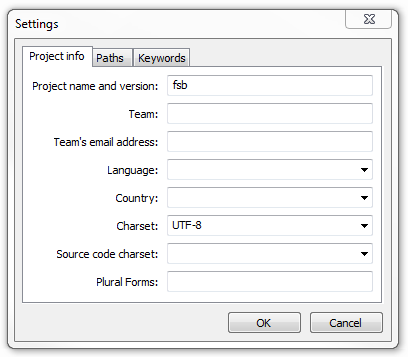
- Click on the “paths” tab and enter the path for the files that needs translating. I created a folder called “languages” in my main plugin folder, and this is where my .po (the file format) catalog will be stored. So for the base path, enter “../”. This means “back one directory.
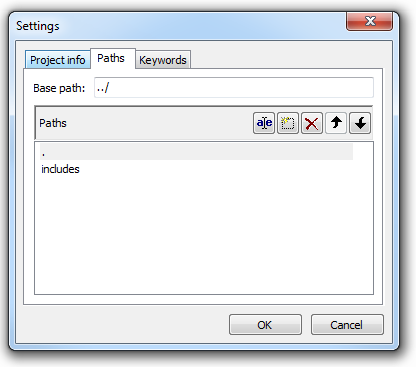
I also have an “includes” folder in my plugin, so to ensure that all of those files get processed, I need to add “includes” as a path. - Click on the “keywords” tab and enter __ (that’s a double underscore) and _e for the keywords (these were used in step 2 to localize the plugin).
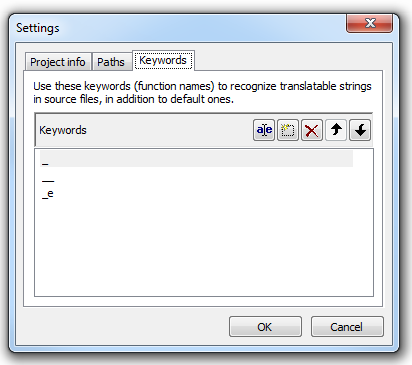
These keywords are used to automatically parse the PHP files and pull the strings that need translated into our .po file. - Now save your .po file into your plugin’s “language” folder. The filename will be “default.po”.
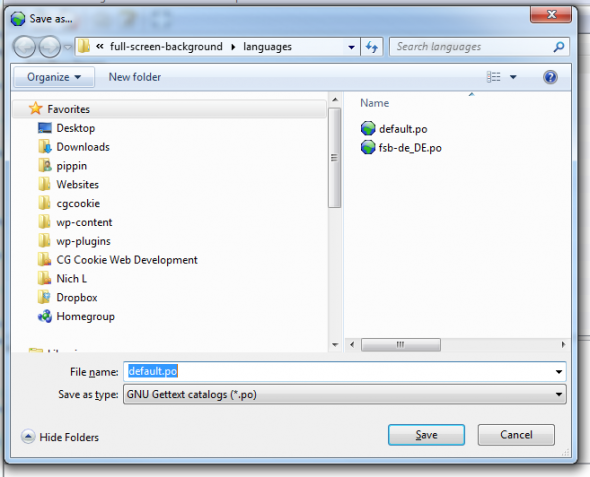
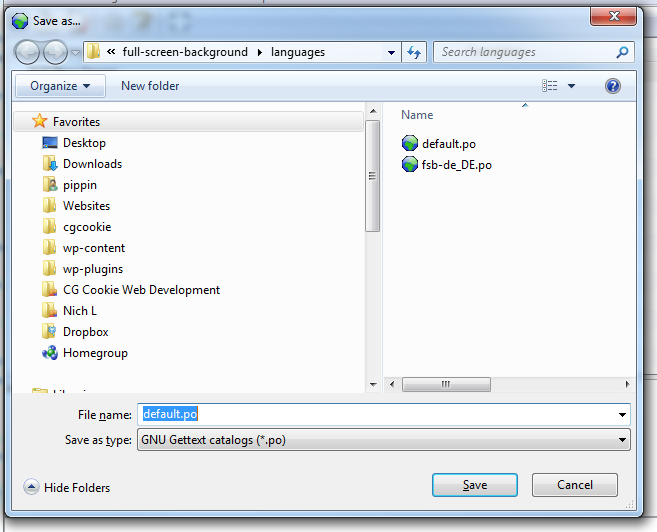
If you’ve done everything correctly, you will see that all of your text strings have been automatically pulled into your .po file after clicking “OK” in step 4 above.
Step 4 – Translate the .po File and Create a New .mo File
If you do not intend to do the actual translation of your plugin, then you can skip to the last step where we change the language WordPress displays in. If you want to go ahead and do the translation, read on.
First (with the default.po) file still opened, click on the File Menu and go to Save As. You want to save a copy of your .po file for the specific language you are translating to.
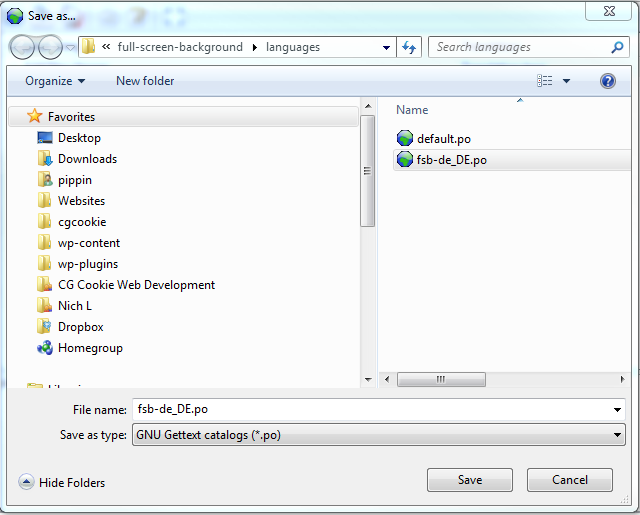
In my case, I am translating to German, so I save my file as “fsb-de_DE.po”. Note that first my file is prefixed with my plugin text domain. This is very important. Second, note the “de_DE” part of the name. This is the language code plus the country code. These must be exact. You can see a complete list of language codes here, and a list of country codes here.
Now that you have created a new copy, you can begin translating the strings. To do this, simply click on the string you want to translate and enter its translated in the “Translation here” box.
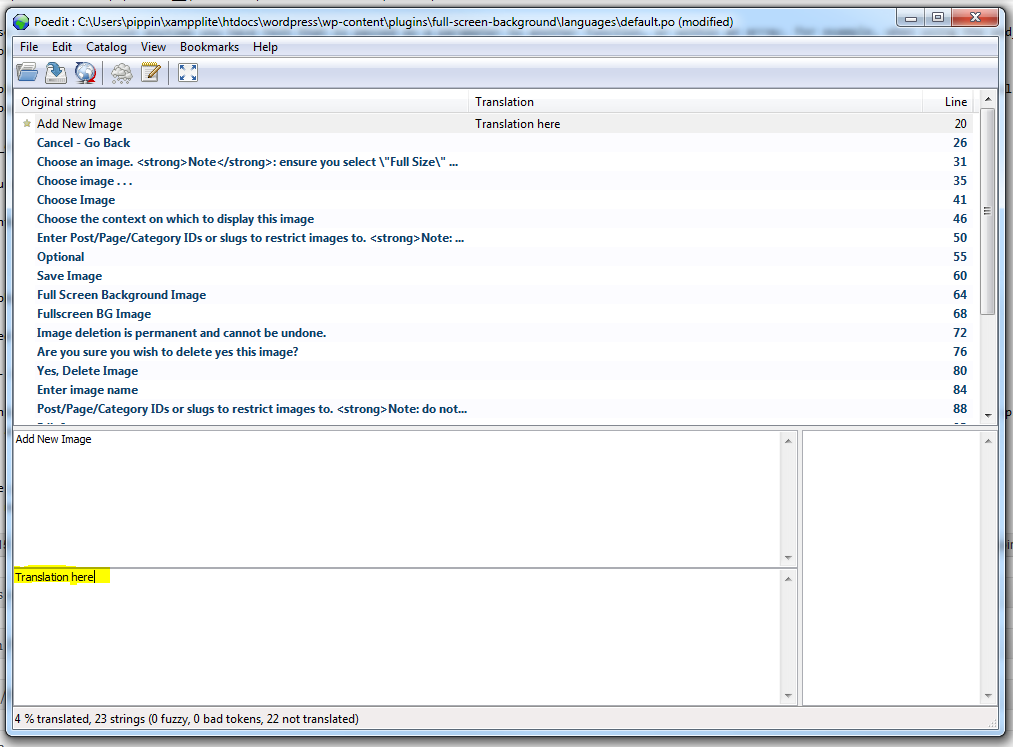
You will need to translate every single string. When you save the file, a “fsb-de_DE.mo” file will be automatically created. The .mo file is the one that actually displays the translations in WordPress, though you do not need to do anything with it.
Step 5 – Download the WordPress Language File
By default WordPress is only setup in English, so if we want to display it in any other language, we have to install the language file. All of the .mo translation files for WP core are available from the WordPress Language repository. You will need to navigate to the language you want and download the .mo file. For me the de_DE.mo (German) language file is located in: wordpress-i18n/de_DE/trunk/messages/de_DE.mo
Once you have selected the file, download and save it to “wp-content/languages/”. If your wp-content directory does not have a “languages” folder, you can create it.
Step 6 – Changing Our WordPress Language
If you are using WordPress as a regular, single site install, then you need to open the “wp-config.php” and find this line:
define('WPLANG', ''); |
and change the second parameter to the language you want. So if we’re changing out site to display in German, we’d do:
define('WPLANG', 'de_DE'); |
Our plugin (and the rest of WordPress) will now be displayed in German. Pretty cool!
Now, if you are using WordPress as a Multi Site install, this will not work. Instead, you need to go to Settings > General for each site and select the desired language from the drop down list at the bottom of the page. WordPress will automatically detect all of the languages you have installed in the wp-content/languages directory.
That’s it! WordPress and your plugin are now fully translated.
Translating WordPress Themes
If you are trying to translate your WordPress theme, please follow the guide posted by my friend AJ Clarke of WP Explorer.
Please let me know what you think and any questions you have in the comments.
Great tutorial!
You are AWESOME! I love your tutorials and plugins. Can’t wait to see what’s next!
@Jason – Thanks! Keep your eyes open because there’s something pretty cool coming in a few days 🙂
plugin or tutorial?
Speaking of tutorials. . .I know you were working on adding an update system to your CodeCanyon plugins. . .did you get one up and running?
That would be an AWESOME tutorial!
@Jason – There are a few new plugins coming really soon. One should be out later today, and several more over the next two weeks.
I did get the update system running. It’s currently active in Easy Content Types and Full Screen Background Images Pro. I do like the idea of doing a tutorial on it, so I probably will next week 🙂
That would be so awesome!
Did you end up using this: http://codecanyon.net/item/wordpress-plugin-update/270593
Or did you create something on your own?
No, I used one that was originally built for themes. You can read about it: http://codecanyon.net/forums/thread/a-wordpress-plugin-update-notifier-script/50850
Nice! I’ll check it out.
Thanks!
Great tutorial, thanks for all the developpers not doing it yet. Internationalization should be also a priority when creating a plugin or a theme. You’re giving an oportunity do do it the right way
Yes, it should definitely be a priority. Glad you liked it.
Just started development this year and was a little baffled about how to do this since diving into WP dev. Thanks for the great tutorial. Will be sure to link to it when I get my personal site up and runnning. Nice name btw.
Nice name yourself 😉
Hey Pippin nice video my friend! We are in the process of translating our premium plugins and I have to say your tutorial literally saved me hours of research. Thank you!
Great!
You explained everything in a very simple way , it used to look like a mystery to me but not anymore. I m using it in all of my themes now. Just one thing that I didn’t understand is that why use __e(‘text’, ‘domain’) for plain text but __(‘text’, ‘domain’); for using in the function’s argument?
Okay got that, didn’t notice, it echos it.
Yep!
It works great. 🙂 just one question. How to add strings to be converted in po editor? I want to add some strings to be converted in that po file but I am not quite sure about its working.
Can you please guide me on this a little?
The strings need to be inside your plugin’s PHP files. When running POEdit, the strings will be automatically picked up.
Pippin —
Thanks for another the great tut. I’m working on a plugin wich creates a tinymce modal where the user chooses settings and inserts a generate a short code into the post. The modal itself is just html and javascript.
I assume its not enough to convert the file to php and use _e(‘string’, ‘prefix’) to echo the translated strings, but an instance of wordpress must also be loaded into the modal as well?
Loading WP just to allow translation feels like bringing a tank to a card game.
Isn’t the modal used inside of WordPress, so it’s already loaded?
Not unless Im doing it terribly wrong (possible), but even when the modal is a php file, its still triggered by tinyMCE button javascript, and from the context of the modal I’ve no access to WP constants etc. The only way around this that I’ve found is to specifically load wordpress prior to outputting the modal markup like so:
define(‘WP_USE_THEMES’, false);
// path relative to plugins dir
require(‘../../../../../../wp-blog-header.php’);
It works, the strings translate etc, it just seems (to me) to be a lot of overhead.
Nice supplementary reading to Pippin’s article here by Otto:
http://ottopress.com/2012/internationalization-youre-probably-doing-it-wrong/
Hi Pippin.
I need to translate just the EDD front end to another language. I want to keep the admin interface in English.
Is that possible with what you describe in this video?
Will my blog readers see EDD front end in a different language, while I keep the English version of WordPress and your plugin?
Thank you.
No, sorry, that will translate everything.
Thanks, Pippin.
But the WordPress core language files can remain in English, right?
I do everything that you describe here https://easydigitaldownloads.com/docs/using-your-own-translation-files/ , I even use the files in yet another language, that are fully translated, and nothing happens.
Where can I find help on that?
That’s because it will only load the file for the language that the rest of WordPress is using.
Stella,
have you figured out how to do this?
i also need to translate only the front end, how to do that?
thanks.
I would like to translate just one plugin so that I can use my terminology for the interface (get rid of state and zip and use province and postal code among other things). I don’t want to affect the rest of WordPress at all.
Is this possible?
Check out the Say What plugin: https://wordpress.org/plugins/say-what/
Hello Pippin
How can i translate the Restrict Content Pro plugin in German?
I just need the Login-Form and Registration-Form Labels in my Language.
thanks
Open a support ticket and I’ll be happy to help you: https://pippinsplugins.com/plugin-support/
Hello Pippin, WordPress is not based on WPLANG setting anymore, how should I get to translate the strings on restrict contento pro?
The WPLANG constant will still work though.
Hello Pippin,
I have just started a new site, but the WPLANG in the wp-config is missing! I have to put it back there? How this thing works? Can you help me please?
Sorry Pippin,
I got desperated, it is working fine. I’ve forgot to upload the translation files……
thanks
Glad to hear it.
Pippin, Just watched the tutorial. Very helpful, thanks. Video is a bit old now so any major changes at this point we should be aware of.
Need to localize my plugin(wpbackitup) so getting started with your video.
Thanks
Chris
No changes that I’m aware of!
Great Tutorial!
Keep going.
Thank you – the only post I could find that helped.