
There are several plugins and “app” themes available for job board / job posting websites, but what if you want to roll your own? A lot of people would go about thinking that building such as system would be extremely complex and expensive, and some of the time they would be right. However, if we leverage the power of a few of different plugins, it is actually quite easy to build our own jobs board or job posting system that we can integrate into any WordPress website.
The system created in the above video is pretty simple, but works quite well as a demonstration of the kind of system that is quite easy to build you combine Easy Content Types, Gravity Forms, and Custom Post Types add-on for Gravity Forms.
In the video I walk you through the process of building the system shown in the screenshots below:
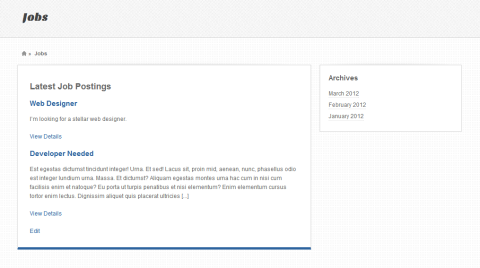
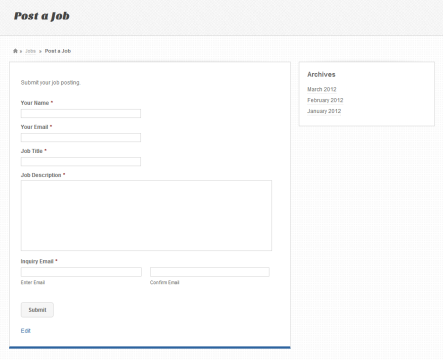
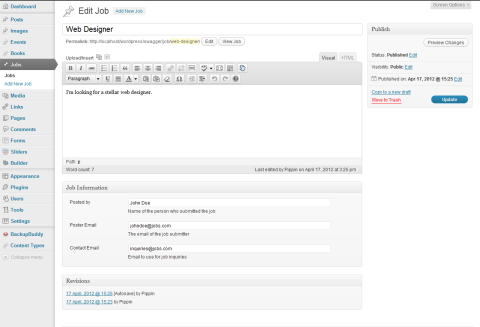
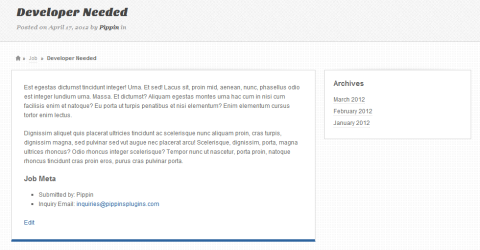
The code used for both template files is also below:
1 2 3 4 5 6 7 8 9 10 11 12 13 14 15 16 17 | <h3>Latest Job Postings</h3> <?php $jobs_query = new WP_Query( array('post_type' => 'jobs', 'posts_per_page' => -1) ); if ( $jobs_query->have_posts() ) : while ( $jobs_query->have_posts() ) : $jobs_query->the_post(); ?> <h4><a href="<?php the_permalink(); ?>"><?php the_title(); ?></a></h4> <?php the_excerpt(); ?> <p><a href="<?php the_permalink(); ?>">View Details</a></p> <?php endwhile; else: echo 'no jobs found'; endif; wp_reset_postdata(); ?> |
1 2 3 4 5 6 7 | <?php the_content(); ?> <h4>Job Meta</h4> <ul> <li>Submitted by: <?php echo get_post_meta($post->ID, 'ecpt_postedby', true); ?></li> <li>Inquiry Email: <a href="mailto:<?php echo get_post_meta($post->ID, 'ecpt_contactemail', true); ?>"><?php echo get_post_meta($post->ID, 'ecpt_contactemail', true); ?></a></li> </ul> |
This is terrific Pippin, kudos! I currently use the jobroller theme from AppThemes and it’s okay, but I am looking for a better solution. I love GF but I’m wondering if you have any suggestions on creating the sort of frontend UX that allows users to filter jobs, etc.
Drew
Thanks, Drew. Creating the filtering system really wouldn’t be very hard. Simply add a taxonomy to Jobs post type, then display the terms of the taxonomy on the Jobs page. The selected “category” can be added to the jobs query (in the template file) using URL query parameters.
Did any of that make sense?
sure did, many thanks.
the power and flexibility of Gravity Forms seems limitless. I recently took a similar approach to create paid member business listings. I used ECPT to generate the post types and taxonomies, then GF for the submission and membership. And the Members plugin for protecting content. I posted it on my blog
Yeah, it’s awesome. You should post the link, that sounds great!
Thanks Pippin for considering my request and create a tutorial but is there a way do the same without using Gravity Forms?
Yes it can be done, as long as you are okay with creating the submission form completely from scratch. I could do another tutorial on that.
it would be great if you can do another for it.
Thank you
Great tut!
How about editing the entries that users created once they back ond logged in?? Is it possible?
Thanks so much,
Iryna
Editing entries by the admin or the user that posted the job?
for the user that posted the job.
Thanks os much!
for the user edit without going to the back-end. thanks
For scenarios where the user wants to update their job posting I presume? That’s definitely possible, but goes quite a bit beyond the scope of this tutorial. Maybe later.
Looks very useful feature!!
I think I fugured the edit post for users by using this plugin: http://wordpress.org/extend/plugins/wp-user-frontend/installation/
thanks!
Hi Pippin,
I got a membership for that specific post, but don’t see any video. Just trying it on FF without any add blocker, but with activated VPN as I am currently located in Mainland China, which is kind of a PITA when it comes to browing the internet.
Any thoughts about the missing video would be highly appreciated
Best
Sven
Hmm, can you try it in Chrome? I’ve just checked and the video is working fine here.
I think I found the problem. Can you take a look and see if the video loads for you now?
Hi Pippin,
sorry for not following up. Comment notification seemes to have failed too 😉
Still not working in FF, but I managed to download the video in the meantime…
Another question: I would be highly interested in the 2nd part of the tutorial. Should read an online application process. I might use part 1 on my private blog some day, as it covers internships in China, but part 2 would really sweeten the cake!
Best
Sven
I’m glad you’ve been able to download the video at least 🙂
Pippin
I’d like to use this technique to allow users to submit reviews for a CPT on my site (‘universities’). I’m thinking the review would then need to be associated with the particular university being reviewed, and then ideally output below the university profile page somehow. Could this be done in concert with the ‘posts 2 posts’ plugin or some such thing?
Most certainly!
Pippin
Trying to work my way through this tutorial with jobs prior to tacking my reviews, however I’m getting caught up trying to display the meta info. Not sure if this is the best place to seek help or in the forums.
Are they meta fields from Easy Content Types? If so, in the forums please.
Actually, have it working now. Your templates are a little different than mine but figured it out.
Great!
Hi,
Great tutorial, thanks.
I’d like the breadcrumb and navigation from the individual custom posts to direct back to the ‘jobs’ listing page, rather than to the custom post ‘job’. Is this possible? This way the user is always directed back to the main jobs page rather than the job custom post archive page.
Many thanks!
Definitely, but it is outside the scope of this tutorial, sorry.
Great tutorial! but I have a question, how would you approach an “edit your post” solution after you post the job?
it would be very interesting if you do a job board project tutorial from A – Z.
Thanks again, I am learning a lot!!!!!
Michel
That is a bit trickier and has to be done with a few more security concerns in mind.
I will try and write up a tutorial on it at some point.
Yes i second that would love to see good tutorial on that part..
I have looked at tools such as CRED but there is no real good solution or guide for editing user content with Gravity forms at the moment..
a solution is really needed here..
thanks
Hi,
thank you for showing possibilities. Is that also achievable via the ninjaforms?
My main request is if you mind helping me finding a suitable collection of your plugins i like to buy to fulfill my need. This combination should enable the follwing in the best case:
1. User can register safely from specific registration page so they should be redirected.
2. User can choose a plan (one-time, recurring) and pay via payment gateway (paymill, paypal etc.) to get access to his specific role and capabilities.
3. Role can upload x-pictures related to one specific project with the possibility of editing unlimited projects,
4.User have their own profile page after subscription (redirect for loged in users) with the possibility to edit their profile and projects. Profile pages shouldn’t be accessible for non registered users.
5.User can cancel the recurring or one-time subscription of course
6.Images should be uploaded to cdn and delivered to front-page via cdn in best case
7. Newsletter Management via mailpoet (preferred) or mailchimp
8. Vistors can search for projects and related categorys and tags
So i really would like to order all the plugins you could recommend me for that. There is a bunch of awesome plugins like the Easy Content Types etc. here and on edd but i can’t decide myself which combination could fulfill the best.
Do i need Restrict Content Pro for that as well?
Thank you a lot for your help in advance and have great xmas days.
Julian
Great posting pippin!
I’ve been using this exact combination of plugins and utilized the merge tags in gravity forms to create some very nice looking job adverts with automatically populated tables.
The link beloe
w shows an example of the result.
http://nagoya-info.com/jobs/