

Most of the time I prefer to create my own plugins for advanced pieces of functionality on a site, but when it comes to related and/or connected pieces of content, there is no better plugin or solution than Posts 2 Posts.
Posts 2 Posts is a plugin written by Scribu and Ciobi and it provides:
Efficient many-to-many connections between posts, pages, custom post types, users.
In a nutshell, Posts to Posts provides a system for creating relationships between pieces of content on your site. You can use it for manually specifying related posts, other recommended content and many more advanced uses. Posts 2 Posts also lets you connects WordPress users to posts, pages, and custom post types, which could easily be used for setting up a multi-author post system.
I am in the middle of building an advanced educational workshop site for CG Cookie, Inc. and am utilizing Posts 2 Posts heavily. I’d like to describe the system a little bit to help put the powers of this plugin into context, after which we will jump into the code.
The site is structured around “workshops”. Each Workshop contains a multitude of content that is separated into Weeks, and each Week then has its own specific content, which is then in turn broken up into Tutorials, Videos, and Exercises. The goal is to create a page (not a page post type) that shows the Workshop overview (the Weeks), and then on each detail page for the Weeks show all of the content from each of the sections: Exercises, Videos, Tutorials.
Take a look at the diagram below to get a better image of how the content is organized:
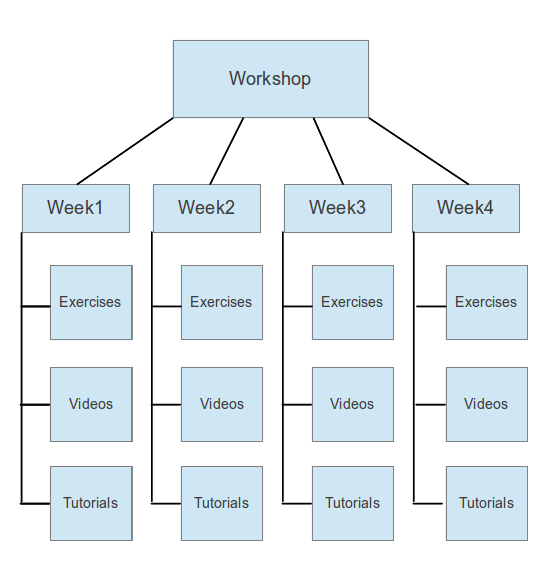
When viewing a Week’s detail page, all Exercises connected to that particular Week will be shown, and the same for all connected Videos and Tutorials.
Pretty cool right? Posts 2 Posts is the system that lets us create this kind of content organization.
The site has the following custom post types setup:
- Workshops
- Weeks
- Tutorials
- Exercises
- Videos
Because of the different post types, each kind of content is kept separate in the WordPress admin, which makes it very, very easy to navigate and create new content. This is one of the truly beautiful things about custom post types, and Posts 2 Posts helps really take advantage of it.
When a Workshop is created, it is connected to each Week that is part of the Workshop (you can connect Workshops to Weeks or Weeks to Workshops since Posts 2 Posts can go both directions). When an Exercise, Video, or Tutorial is created, it is connected to the appropriate week, which then inherently connects it to the top level Workshop.
The screenshot below shows the Edit page for a Week:
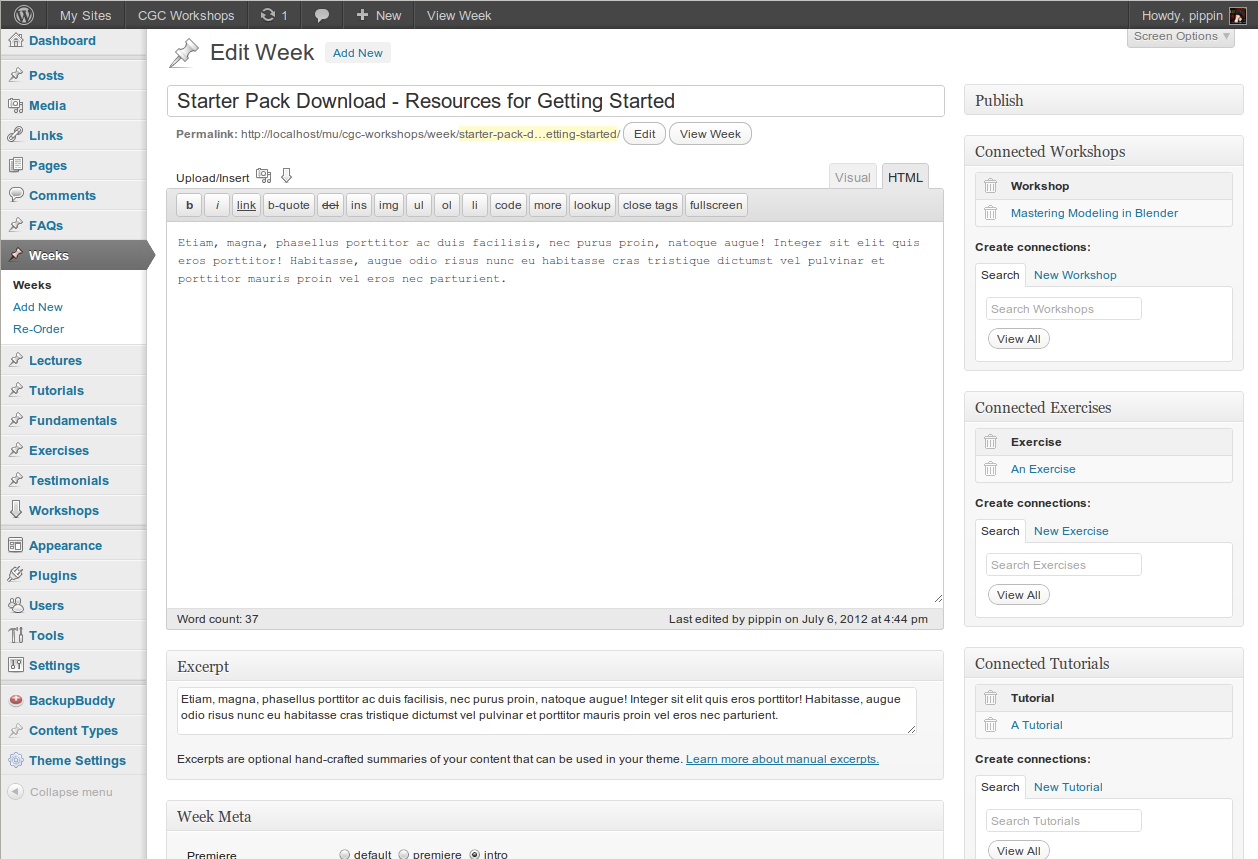
Take note of the meta boxes on the right side of the screen for Connected Workshops, Connected Exercises, and Connected Tutorials. These meta boxes are provided by Posts 2 Posts and provide the complete interface needed to creating connections between pieces of content.
Even though Posts 2 Posts provides a tremendous interface for connecting content, all content connection types (Workshops > Weeks for example) must be created manually in your code. Creating connection types is really simple and Scribu has some great documentation if my example isn’t enough.
Once you have Posts 2 Posts active, you create connections like this:
1 2 3 4 5 6 7 8 9 10 11 12 | function pw_connection_types() { // Make sure the Posts 2 Posts plugin is active. if ( !function_exists( 'p2p_register_connection_type' ) ) return; p2p_register_connection_type( array( 'name' => 'your_connection_type_name', 'from' => 'post_type_1_name', 'to' => 'post_type_name_2' ) ); } add_action( 'wp_loaded', 'pw_connection_types' ); |
The Posts 2 Posts meta boxes will now be available on both post types, allowing you to connect content from either post type.
For the Workshops site, here are the connections I registered:
1 2 3 4 5 6 7 8 9 10 11 12 13 14 15 16 17 18 19 20 21 22 23 24 25 26 27 28 29 30 | function cgc_connection_types() { // Make sure the Posts 2 Posts plugin is active. if ( !function_exists( 'p2p_register_connection_type' ) ) return; p2p_register_connection_type( array( 'name' => 'weeks_to_workshops', 'from' => 'week', 'to' => 'download' ) ); p2p_register_connection_type( array( 'name' => 'lectures_to_weeks', 'from' => 'lecture', 'to' => 'week' ) ); p2p_register_connection_type( array( 'name' => 'tutorials_to_weeks', 'from' => 'tutorial', 'to' => 'week' ) ); p2p_register_connection_type( array( 'name' => 'exercises_to_weeks', 'from' => 'exercise', 'to' => 'week' ) ); } add_action( 'wp_loaded', 'cgc_connection_types' ); |
Displaying the related / connected content is simple. Posts 2 Posts registers a few new WP_Query parameters that we can use to pull in just connected items. A basic Posts 2 Posts loop (and the one I used for showing Weeks of Workshops) looks like this:
1 2 3 4 5 6 7 8 9 10 11 12 13 14 15 16 17 18 19 20 | <?php // Find connected weeks $connected = new WP_Query( array( 'connected_type' => 'weeks_to_workshops', // the name of your connection type 'connected_items' => get_queried_object(), 'nopaging' => true, ) ); // Display connected weeks if ( $connected->have_posts() ) : ?> <h3>Weeks in this Workshop</h3> <ul> <?php while ( $connected->have_posts() ) : $connected->the_post(); ?> <li><a href="<?php the_permalink(); ?>"><?php the_title(); ?></a></li> <?php endwhile; ?> </ul> <?php // Prevent weirdness wp_reset_postdata(); endif; |
That’s it. There really is not much too it since we get to leverage the tremendous power of Posts 2 Posts.
I can only think of one thing to say “Thank You!”
You are so dang awesome. Thanks for another informative post + plugin.
It’s the plugin that has most helped me out (after ECPT, of course!) on a current project – an events website. We have events that link to agenda, that link to speakers, that link to … on and on. Without this plugin I”d be crying quietly in a corner some where. Nice write up, thanks.
Crying in a corner is about the best description I’ve heard in a while for what it’s like to create complex relationships without Posts 2 Posts 🙂
So right haha!
posts2posts can really help on these types of complex content hierarchy sites. I think Pods CMS does something similar but is maybe overkill and version 2.0 isn’t out yet.
I’ve used posts2posts on a project to get manually curated related posts, like Bill Erickson explains here:
http://www.billerickson.net/manually-curated-related-posts/
I haven’t ever used Pods except for a few minutes way back in its early days. Any thoughts on it?
I recently used posts2posts on a project and it saved my butt! For me, it represents the ability to use WordPress for projects of such a higher level of complexity that I would have built with Drupal in the past. It is a crucial missing piece of the WordPress-as-CMS puzzle and really opens a lot of doors.
Thanks for the great post and thanks to Scribu for the plugin!
It really is such a great plugin and one that I would really love to see integrated into WP core.
Wow… I’ve been thinking this week about how to handle a nearly identical use case. It’s an education site with curriculum organized into 5 modules, each with 4-5 units, each with 4-6 activities. Each relationship is unique (ie no one activity shows up in two units) but I wasn’t sure how best to create and handle grand-child CPTs. This seems a good approach. Thanks!
The site I’m using it for actually goes much more advanced than what I described. I’m also using it to connect individual forums inside of bbPress to specific workshops and specific weeks inside of a workshop.
For that site I mentioned I ended up using Types & Views, which is similar, but a little more GUI driven and less code driven. As such it’s awesome and limiting at the same time. I think next time I’ll probably uses P2P. Nothing really wrong with T&V, just a I think for someone who knows how to code PHP that P2P speeds things up without limiting of slowing things own, whereas T&V is just crazy awesome for someone who doesn’t know how to code, but can be a bit much for those that do.
Thank you for this fantastic post, I never had the patience to read through the docs of this plugin, but I sure love your explanation. Great stuff!
Hey Pippin, just wondering if you prefer to keep the P2P connections code in functions.php or in a site-specific plugin. If the latter, do you have any tips for that? Thanks
It depends on the situation, but usually a site-specific plugin is better. If you ever change themes, you really don’t want to suddenly lose all of your connections.
I’m also the great fan of this plugin, so that I’m happy to see you post. Scribu releases updates very quickly so that sometimes the documentation looks confusing and do not cover all options or usage scenarios. Personaly, I also tried to write some king of tutorial about it (just in case: http://www.onextrapixel.com/2012/05/18/the-practical-guide-to-multiple-relationships-between-posts-in-wordpress/), but your example is much more interesting and I like it a lot. Thank you for if.
That’s a great post. I never realized that you could add the extra meta fields. That’s slick.
Oh! There are a lot of great things that could be done – meta fields could be added, UI for them could be customised (up to the possiblity to extend default metabox class), connections then could be queried and/or ordered in dependence of meta values… Have not I told that I great fan of the plugin 🙂
Late on this, but thanks for your article. It really complements this one by Pippin.
Hi man, thanks for this powerful tool.
I have always supported your major projects.
Thanks again.
Thanks for this great article.
I´m building a site that are going to have a CPT called ‘buildings’ and a child CPT called ‘issues’. I want to display buildings with their child ‘issues’ and i see no problem with that. The only thing that i dont have a solution to is that the user has to be able to report a ‘issue’ from the front-end through a form. When the form is submitted a CPT of ‘issue’ is created and connected to the parent ‘buildning’.
Any thoughs on a front-end form solution for this? Does anybody know if i can do the connection with a hook when the form is submitted?
I would suggest Gravity Forms for the front end submission form.
I’m not sure how how to create a connection via the form hook, though I’m sure there is a way. I’d contact Scribu (the plugin developer) and ask him.
Wow thank you so much!!! I had been struggling trying to make a post 2 post connection for the past couple of days and I was finally able to do it.
Thank you!!!
Nice! Thanks for the very clear explanation. One thing I don’t understand is how you order the list of posts? For example, if your workshop contains “weeks” how do you make the list of weeks be ordered correctly? Is it just a matter of making sure you add them in the correct order? Thanks!
Scribu has documentation on how to do that: https://github.com/scribu/wp-posts-to-posts/wiki/Connection-ordering
Any Bulk Edit/Quick Edit Option tutorial?
I do not, sorry.
Great article – came across this article the other day – I have got much inspiration from other articles on you website – just wondered do you still use this plugin if not can you suggest an alternative – as it seems to be unsupported
Hello,
As the P2P become unmaintained, we need another solution for long term. For that reason, I’ve created an alternative solution for creating relationships. It’s very much similar to P2P with some improvements. It’s also open source on Github for feedback and contribution.