Pippins Plugins
  • Email
  • Facebook
  • Feedburner
  • Github
  • Google
  • Twitter
  • Vimeo
  • Youtube
  • Rss
  • About
  • News
  • Join the Site
    • Member Benefits
    • Member Plugins
    • Email Notifications
  • Plugin Store
    • Affiliate Area
    • Checkout
  • Plugins
    • Plugin Portfolio
      • Plugin Portfolio – List View
    • Free
    • Premium
    • Member Plugins
    • Coding Standards
    • Get Plugin Support
  • Tutorials
    • Series
      • Plugin Development 101
      • Creating a User Follow System Plugin
      • Customizing Restrict Content Pro
      • Displaying Content with Easy Content Types
      • Writing Your First WordPress Plugins, Basic to Advanced
      • Working with Widgets
      • User Submitted Image Galleries
      • Plugin Thoughts
      • Integrating Stripe.com with WordPress
      • WordPress Rewrite API
    • Member Exclusive
      • Free Members
      • Subscriber Only
    • Difficulty
      • Beginner
      • Intermediate
      • Advanced
    • Action and Filter Hooks
    • Ajax
    • Custom Post Types
    • External APIs
    • Short Codes
    • Taxonomies
    • Video Tutorials
    • Widget Tutorials
    • WordPress Admin / Dashboard
    • Working with jQuery
    • WordPress Database
    • Writing Plugins
    • Tag Index
  • Reviews
  • Support Forum
  • Contact
    • Support the Site
    • Request Code Review
    • Plugin Support

Get the Name of the Current Action or Filter

Posted on March 19, 2012 by Pippin in Action and Filter Hooks, Intermediate, Quick Tips, Tutorials No Comments
Home» Tutorials » Action and Filter Hooks » Get the Name of the Current Action or Filter
Tweet
Love It - 2

After watching a Twitter discussion this morning (shown in the image below), Helen Hou-Sandi, a WordPress developer and core-committer mentioned a function I had never heard of that can be used for finding the name of the current action or filter hook. It is called current_filter() and is extremely useful. Check out the snippets below for examples.
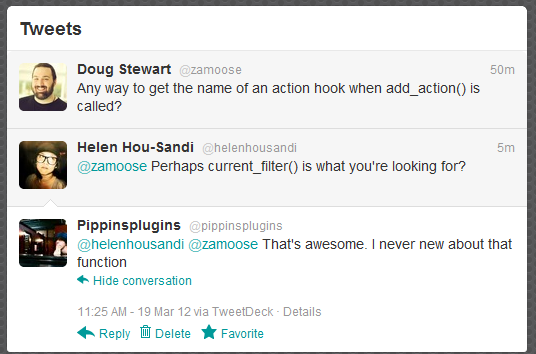
Let’s say that you need to discover the name of the hook that is running, perhaps at a very specific time. The current_filter() function can be used for exactly that. While the examples below are very simple, they should illustrate the point well.

1
2
3
4
function pippin_show_current_filter() {
	echo 'Current action/filter: ' . current_filter(); exit;
}
add_action('template_redirect', 'pippin_show_current_filter');

When you load a page on your site, you will see:

Current action/filter: template_redirect
1
2
3
4
function pippin_show_current_filter() {
	echo 'Current action/filter: ' . current_filter(); exit;
}
add_action('pre_get_posts', 'pippin_show_current_filter');

Now when you load a page on your site, you will see:

Current action/filter: pre_get_posts
Tweet Follow @pippinsplugins
add_action, add_filter, current_filter

Leave a Reply Cancel reply

Your email address will not be published. Required fields are marked *

You may use these HTML tags and attributes: <a href="" title=""> <abbr title=""> <acronym title=""> <b> <blockquote cite=""> <cite> <code> <del datetime=""> <em> <i> <q cite=""> <strike> <strong>

  • Login

Lost your password?

Please enter your username or e-mail address. You will receive a new password via e-mail.

  • Facebook Become a Fan Like

  • Twitter Subscribe on Twitter Follow

  • YouTube Follow my Videos Subscribe

  • RSS Feed Subscribe with RSS Subscribe

Easy Digital Downloads

Most Loved

  • Love It Pro for WordPress
  • Write a “Love It” Plugin with Ajax to Let Users Love Their Favorite Posts / Pages
  • Simple Notices Pro Plugin for WordPress
  • User Bookmarks for WordPress
  • Front End Registration and Login Forms Plugin

Similar Plugins and Posts

  • Plugin Development 101 – Intro to Actions
  • Plugin Development 101 – An Intro to Filters
  • Using pre_get_posts to Modify Queries for Meta Data and More
  • Introduction to the gettext Filter in WordPress
  • Let’s Talk Extensible Code

Latest Premium Content

  • Plugin Development 101 – Introduction to Adding Dashboard Menus
  • Plugin Development 101 – Intro to Loading Scripts and Styles
  • User Follow System – Part 5
  • Plugin Development 101 – Intro to Short Codes
  • Plugin Development 101 – Registering a Custom Post Type
  • Plugin Development 101 – Intro to Actions

Latest Tutorials

  • Test Your Plugins with RTL (0)

    Right-To-Left languages are those that...

  • Submitting Your First Pull Request to a WordPress Plugin on Github (5)

    Github is an extremely popular tool for managing WordPress plugins, and one...

  • Plugin Development 101 – Introduction to Adding Dashboard Menus (1)

    Adding new menus, both top level and sub level, to the WordPress Dashboard is a really common task for plugins...

Enter your email to receive automated updates when new posts are published

Latest Tweets

  • @jpetersen Anything I can help with? @billerickson
    May 24, 2013
  • RT @wpninjas: Ninja Forms is not on GitHub? What?! That&#039;s totally awesome! What does that mean to me? // Great question: http://t.co/y2bLkF…
    May 24, 2013
  • @diekloon It wast last night and I don&#039;t remember what I searched on the site, but I do know it didn&#039;t show up :)
    May 24, 2013

Topics

hook meta box Rémi Corson featured shortcodes campaign monitor add_options_page register_setting Sugar Event Calendar attachments add_shortcode wp_enqueue_script the_content image forms short codes Related posts login do_action authors mail chimp attachment plugin recent posts comments post types bbpress apply_filters short code taxonomies custom post type Ajax images gallery Stripe jquery taxonomy users widgets add_filter easy content types add_action widget restrict content pro easy digital downloads

Weekly Newsletter

Useful Links

  • Join the Site
  • Plugin Store
  • Affiliate Area
  • Tag Index
  • Support the Site
  • Suggest a Tutorial
  • Random Post
  • Contact

Monthly Archives

(c) 2013 Pippin's Plugins