
Pippins Plugins
  • Email
  • Facebook
  • Feedburner
  • Github
  • Google
  • Twitter
  • Vimeo
  • Youtube
  • Rss
  • About
  • News
  • Join the Site
    • Member Benefits
    • Member Plugins
    • Email Notifications
  • Plugin Store
    • Affiliate Area
    • Checkout
  • Plugins
    • Plugin Portfolio
      • Plugin Portfolio – List View
    • Free
    • Premium
    • Member Plugins
    • Coding Standards
    • Get Plugin Support
  • Tutorials
    • Series
      • Plugin Development 101
      • Creating a User Follow System Plugin
      • Customizing Restrict Content Pro
      • Displaying Content with Easy Content Types
      • Writing Your First WordPress Plugins, Basic to Advanced
      • Working with Widgets
      • User Submitted Image Galleries
      • Plugin Thoughts
      • Integrating Stripe.com with WordPress
      • WordPress Rewrite API
    • Member Exclusive
      • Free Members
      • Subscriber Only
    • Difficulty
      • Beginner
      • Intermediate
      • Advanced
    • Action and Filter Hooks
    • Ajax
    • Custom Post Types
    • External APIs
    • Short Codes
    • Taxonomies
    • Video Tutorials
    • Widget Tutorials
    • WordPress Admin / Dashboard
    • Working with jQuery
    • WordPress Database
    • Writing Plugins
    • Tag Index
  • Reviews
  • Support Forum
  • Contact
    • Support the Site
    • Request Code Review
    • Plugin Support

Featured Comments Plugin

Posted on December 16, 2012 by Pippin in Plugins 4 Comments
Home» Plugins » Featured Comments Plugin
Tweet
Love It - 3

Featured Comments is a great little plugin that lets you easily feature and / or bury comments. The idea is to emphasize comments that you want to stand out and to hide (bury) comments that have little or no value. When featured, comments will get a new “featured” class added to their HTML. When buried, comments will get a “buried” class added. You can use these classes to style the comments as you wish.

This plugin was originally written Utkarsh Kukreit, but I have taken over development and maintenance of the plugin since he is no longer interested in keeping it up.

From the comments dashboard page, you will be able to mark any comment as featured or buried:
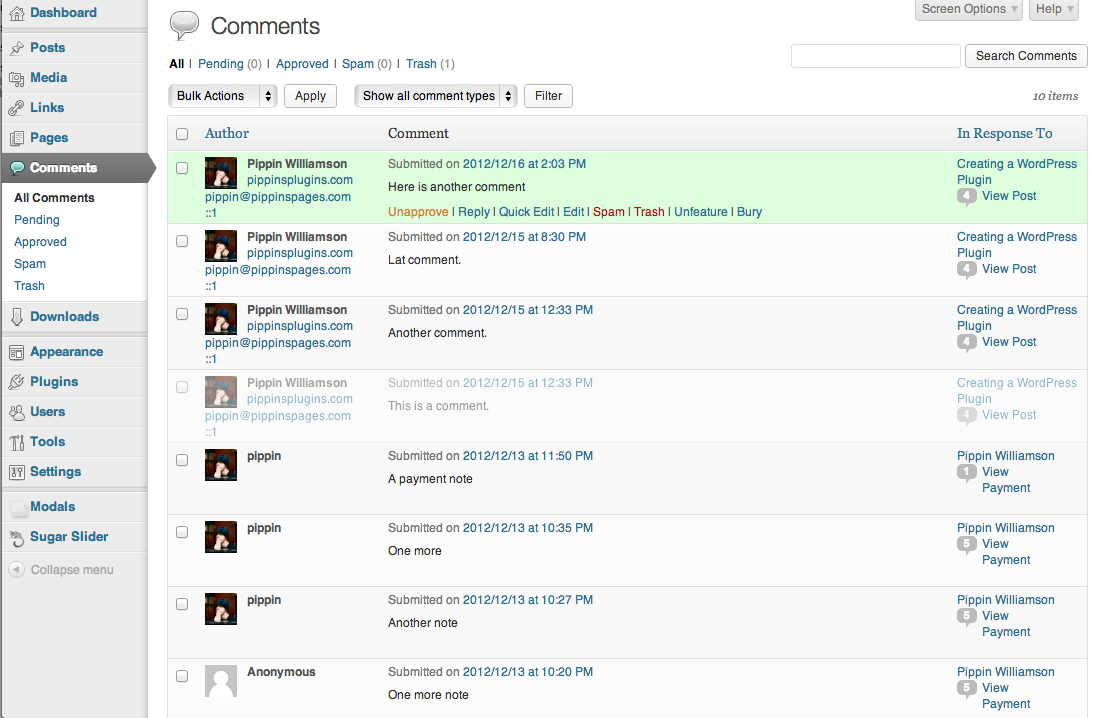
screenshot-1

You can also mark comments as featured from the Edit screen for individual comments:
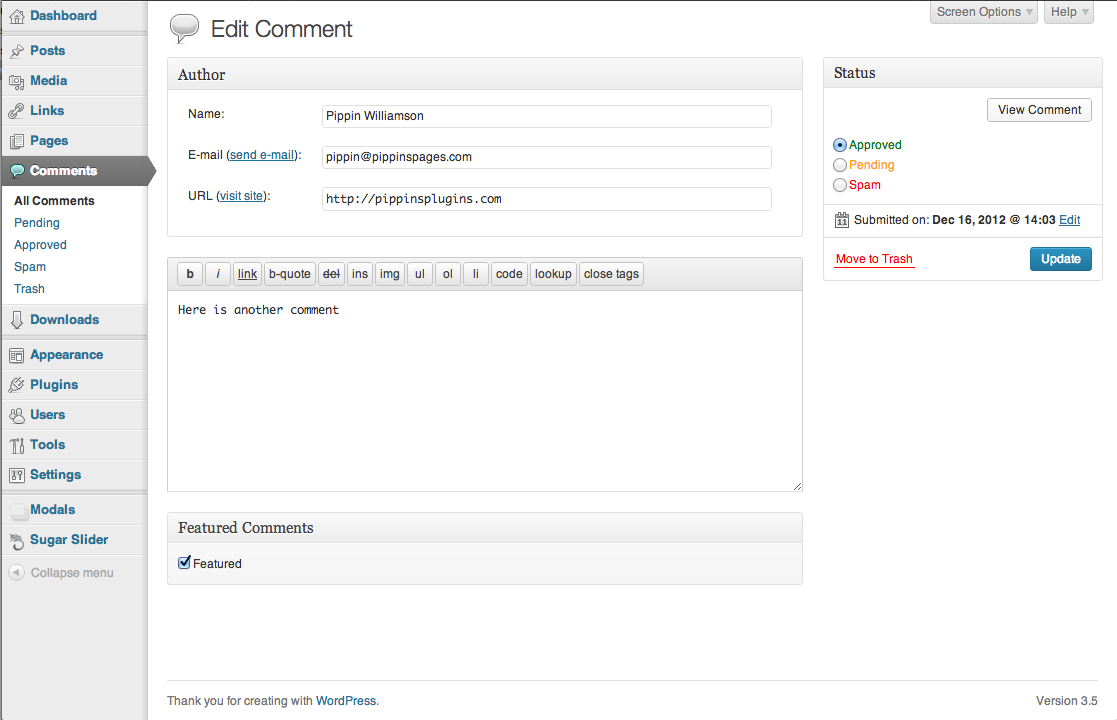
screenshot-2

The HTML markup of the comments will look something like this on the front end (will differ slightly):
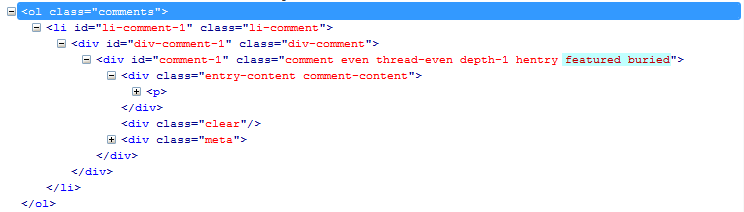
screenshot-3

In Appearance > Widgets, you will also have a new “Featured Comments” widget.

Download Plugin
 

Tweet Follow @pippinsplugins
comments, widget, wp_comment_query

4 comments on “Featured Comments Plugin”

  1. John Saddington says:
    December 16, 2012 at 5:28 pm

    So the idea is that it adds a class that you have to then style via CSS, etc., right?

    I installed it and the forward-facing “feature” button doesn’t appear to work as intended… does nothing.

    I’ll have to dig in a bit.

    I was looking for something like this that can easily stylize certain people’s comments… perhaps I’ll use this as a base and build off of it.

    Reply
    • Pippin says:
      December 16, 2012 at 6:14 pm

      Yes, that is correct.

      Does it work in the backend? You most likely have a jQuery conflict if it’s not working on the front.

  2. Ian Blackford says:
    December 21, 2012 at 3:15 am

    Hi Pippin,

    This is almost the exact thing I have been looking for, I say almost, because what I really want is the ability for the admin to tweet the comment out via their twitter account.

    How difficult would it be to add a ‘tweet this comment’ button to each comment in the admin?

    Some of my clients are a bit lazy about updating their social channels so if they could do it semi automatically while admining their comments then I reckon that would be a good thing.

    This could become a premium plugin perhaps?

    Best regards

    Ian

    Reply
    • Pippin says:
      December 21, 2012 at 12:46 pm

      That’s really not difficult to do from a dev perspective, but is a completely different plugin. I will consider writing it.

Leave a Reply Cancel reply

Your email address will not be published. Required fields are marked *

You may use these HTML tags and attributes: <a href="" title=""> <abbr title=""> <acronym title=""> <b> <blockquote cite=""> <cite> <code> <del datetime=""> <em> <i> <q cite=""> <strike> <strong>

  • Login

Lost your password?

Please enter your username or e-mail address. You will receive a new password via e-mail.

  • Facebook Become a Fan Like

  • Twitter Subscribe on Twitter Follow

  • YouTube Follow my Videos Subscribe

  • RSS Feed Subscribe with RSS Subscribe

Easy Digital Downloads

Most Loved

  • Love It Pro for WordPress
  • Write a “Love It” Plugin with Ajax to Let Users Love Their Favorite Posts / Pages
  • Simple Notices Pro Plugin for WordPress
  • User Bookmarks for WordPress
  • Front End Registration and Login Forms Plugin

Similar Plugins and Posts

  • Comments Not Replied To Plugin
  • Querying Comments with WP_Comment_Query and Meta Query in 3.5
  • Add Comment Status Links to Comments Menu
  • User Submitted Image Gallery – Part 7
  • Displaying Custom Post Types in Widgetized Sidebars

Latest Premium Content

  • Plugin Development 101 – Introduction to Adding Dashboard Menus
  • Plugin Development 101 – Intro to Loading Scripts and Styles
  • User Follow System – Part 5
  • Plugin Development 101 – Intro to Short Codes
  • Plugin Development 101 – Registering a Custom Post Type
  • Plugin Development 101 – Intro to Actions

Latest Tutorials

  • Test Your Plugins with RTL (0)

    Right-To-Left languages are those that...

  • Submitting Your First Pull Request to a WordPress Plugin on Github (5)

    Github is an extremely popular tool for managing WordPress plugins, and one...

  • Plugin Development 101 – Introduction to Adding Dashboard Menus (1)

    Adding new menus, both top level and sub level, to the WordPress Dashboard is a really common task for plugins...

Enter your email to receive automated updates when new posts are published

Latest Tweets

  • @Otto42 certainly a more entertaining alternative
    May 26, 2013
  • RT @toscho: #WordPress: How post meta fields work. http://t.co/uDRaDu0EsS
    May 25, 2013
  • RT @strickland: Afternoon crowd: To celebrate Memorial Day weekend @gittyapp is on sale through Monday. Now is the time to join in! http:/…
    May 25, 2013

Topics

add_options_page campaign monitor Tom McFarlin the_content wp_enqueue_script Rémi Corson get_user_meta Sugar Event Calendar attachments contextual help register_setting meta box hook attachment do_action image authors forms short codes Related posts plugin mail chimp login bbpress comments recent posts post types apply_filters short code taxonomies custom post type gallery Ajax images Stripe taxonomy jquery users widgets add_filter add_action easy content types widget restrict content pro easy digital downloads

Weekly Newsletter

Useful Links

  • Join the Site
  • Plugin Store
  • Affiliate Area
  • Tag Index
  • Support the Site
  • Suggest a Tutorial
  • Random Post
  • Contact

Monthly Archives

(c) 2013 Pippin's Plugins