
Since WordPress makes it so easy to run a multi-author blog, one of the things site administrators often want to do is have a page that shows all of the contributing authors of the blog. This could of course be done with a regular WordPress page, but that becomes much more difficult to update and maintain, so we want to automate it. This tutorial will show you how to create a simple short code that output a list of all authors on the site, including their avatars, name, biographies, and links to their post archives.
First, we start by setting up our plugin header:
1 2 3 4 5 6 7 8 9 | /*
Plugin Name: Author Archive Short Code
Plugin URI: https://pippinsplugins.com/creating-a-short-code-to-show-a-detailed-list-of-blog-authors
Description: Adds a short code that allows you to display a list of all authors on your site, along with their gravatars, bios and author archive links
Author: Pippin Williamson
Contributors: mordauk
Author URI: https://pippinsplugins.com
Version: 1.0
*/ |
Once that’s done, we write the shell of our function that will setup and register our short code.
1 2 3 4 | function pippin_list_authors() { // code will go here } add_shortcode('authors', 'pippin_list_authors'); |
Inside of this function, we go and retrieve a list of all of the authors using the get_users() function.
1 2 3 4 5 6 7 | $authors = get_users(array( 'orderby' => 'display_name', 'count_totals' => false, 'who' => 'authors' ) ); |
This will retrieve all authors ordered by their display name.
Next we setup our $list variable, which will be a string that contains all of our HTML for the author list.
1 2 3 4 5 6 7 8 9 10 11 | $list = ''; if($authors) : $list .= '<ul class="author-list">'; // will loop through each o the authors here $list .= '</ul>'; endif; return $list; |
Inside of our unordered list, we need to loop through the array of authors we retrieved with the get_users() function so that we can show the details for each authors. This is done like so:
1 2 3 4 5 6 7 8 9 10 11 12 13 14 15 16 17 | foreach($authors as $author) : $list .= '<li class="author">'; $archive_url = get_author_posts_url($author->ID); $list .= get_avatar($author->user_email, 60); $list .= '<a href="'. $archive_url . '" title="' . __('View all posts by ', 'pippin') . $author->display_name . '">' . $author->display_name . '</a>'; $list .= '<p class="author-bio">' . get_user_meta($author->ID, 'description', true) . '</p>'; $list .= '<p class="author-archive"><a href="'. $archive_url . '" title="' . __('View all posts by ', 'pippin') . $author->display_name . '">' . __('View author\'s posts', 'pippin') . '</a></p>'; $list .= '</li>'; endforeach; |
To get the information for each author in the foreach loop, we are using a few very handy functions:
- get_author_posts_url() – retrieves the URL to the author’s post archive
- get_avatar() – retrieves the author’s image set via gravatar.com
- get_user_meta() – retrieves meta data for the user, in this case the author’s biography
And that’s it. That is all we need to show a list of our authors along with their images, names, descriptions, and archive links.
The only thing we have left is styling. To make our list look a little better, let’s load a stylesheet using the wp_enqueue_style() function.
1 | wp_enqueue_style('author-list', plugin_dir_url(__FILE__) . '/css/author-list.css'); |
Since WordPress 3.3+ allows inline style and script loading, we can place this function directly into our short code function. So all together, our function looks like this:
1 2 3 4 5 6 7 8 9 10 11 12 13 14 15 16 17 18 19 20 21 22 23 24 25 26 27 28 29 30 31 32 33 34 35 36 37 38 39 40 41 42 43 44 45 46 47 48 49 50 51 52 53 | /* Plugin Name: Author Archive Short Code Plugin URI: https://pippinsplugins.com/creating-a-short-code-to-show-a-detailed-list-of-blog-authors Description: Adds a short code that allows you to display a list of all authors on your site, along with their gravatars, bios and author archive links Author: Pippin Williamson Contributors: mordauk Author URI: https://pippinsplugins.com Version: 1.0 */ function pippin_list_authors() { $authors = get_users(array( 'orderby' => 'display_name', 'count_totals' => false, 'who' => 'authors' ) ); $list = ''; if($authors) : wp_enqueue_style('author-list', plugin_dir_url(__FILE__) . '/css/author-list.css'); $list .= '<ul class="author-list">'; foreach($authors as $author) : $list .= '<li class="author">'; $archive_url = get_author_posts_url($author->ID); $list .= get_avatar($author->user_email, 60); $list .= '<a href="'. $archive_url . '" title="' . __('View all posts by ', 'pippin') . $author->display_name . '">' . $author->display_name . '</a>'; $list .= '<p class="author-bio">' . get_user_meta($author->ID, 'description', true) . '</p>'; $list .= '<p class="author-archive"><a href="'. $archive_url . '" title="' . __('View all posts by ', 'pippin') . $author->display_name . '">' . __('View author\'s posts', 'pippin') . '</a></p>'; $list .= '</li>'; endforeach; $list .= '</ul>'; endif; return $list; } add_shortcode('authors', 'pippin_list_authors'); |
And to improve our appearance, our stylesheet has the following styles:
1 2 3 4 5 6 | .author-list { margin: 0; padding: 0; } .author-list li { display: block; margin: 0 0 20px 0;} .author-list li:after { display: block; float: none; height: 0; visibility: hidden; content: "."; clear: both; } .author-list img { float: left; margin: 0 10px 10px 0;} .author-list .author-bio { margin: 0; } .author-list .author-archive { float: right; } |
Once you’ve placed the [authors] short code on a page, your result should look about like this:
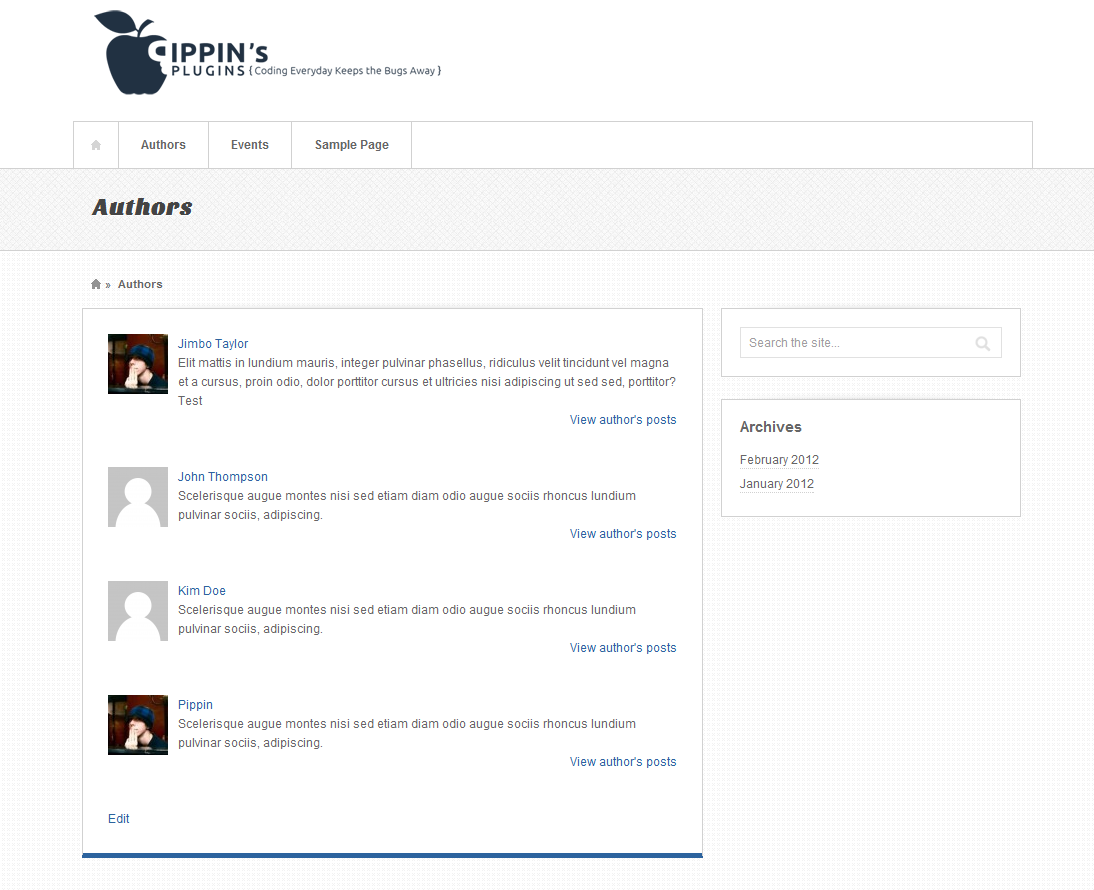
You can download the complete plugin below.
[download id=”32″ format=”1″]
I am just curious… why would you not just create a template file within the theme and select this file on the page?
Great question. If you’re building a theme, then you could most definitely do that, but what if you’re not the person who developed the theme? This would allow you to do the same thing with any page. The method used in this short code also applies to themes, so you could use this exact same code to build a template in your theme.
Fantastic tut Pippin, can’t wait to start playing around with it tomorrow! I wasn’t even thinking about making them shortcodes but that is a fantastic idea
Nice about this function is it can be echoed in a template file as well.
Couldn’t wait until tomorrow and with a little display:none work, put together a very simply list: http://www.adaptistration.com/tafto/contributor-archive/
Nice!
actually I think the ability to load scripts and styles inline in shortcodes is pretty important, because it means plugins have no excuse to load their scripts on every page anymore.
Yeah, definitely! It’s one of the 3.3 features I’m only really starting to use, but it’s awesome. Gone are the days of using three different functions in order to get scripts to load only when the short code is present.
Great Tut! Playing around with it now! Would love to add authors twitter, facebook, etc links.
I guess my only question is how can you remove some some of the admin users from the list?
I just added the ‘exclude’ => array(id#),
This worked great!
Yep, that’s how 🙂
Great! I can’t wait to start playing with it, this weekend!
Let me know if you have any questions!
hi,
I’m trying to exclude specific authors in the list. I see that there was mention of using an exclude but not sure exactly where in the code to put that. For purposes, I want to exclude authors with the id of 259 and 14. Can anyone give me the revised code for that?
Thanks,
Rob
Inside of the get_users() function, add this:
How can I make the orderby sort the authors by their last name instead of their display name.
Right now it is:
$authors = get_users(array(
‘orderby’ => ‘display_name’,
‘count_totals’ => false,
‘exclude’ => array(1,277,),
‘who’ => ‘authors’
It’s actually not possible to sort by the last name, not without building your own custom sorting options.
Thank tou very much!!!!
I was looking for a simple plug-in like this to my newest creative blog! Can we give you 5 stars for this plug in? Where’s the link on wp? 😀
btw my blog’s link is http://www.labcriativo.com.br
Pippin,
Thank you so much for this plugin.. I was looking for this a long time ago and I just found it here. Exactly the way I wanted it, and very simple programming.. Great job buddy!
Hi, is there any way how teach this plugin to work with Co Author plus plugin?
Thanks
No, sorry.
Hi,
How would you modify this script to display only authors with the user type “contributors” & “authors” or NOT show user who are “administrators”.
Thanks
You wouldn’t be able to use get_users() for that, you’d have to query the database directly using the $wpdb class.
Hi Julian
how are you i have same problem have you got solution
please check this link
http://azhar.markobabovic.com/wp/46-2/
i want filter
please reply
how to change the Gravatar in this plugin.
hi, nice tut! but i have question.. how to add only 1 user in shortcode like for example im only displaying the name of jick.. [author-list = jick] and displayin there 3 recent posts and thumbnail.. im still newbie.. help pls..
works like a charm. Thanks!
Hi,
Is there a way that I can reorder authors using this shortcode when they appear on a page?
No, sorry.
Hi,
Is it possible to get this plugin to display social profiles of the authors below the description?
Not out of th be, sorry.
really helpfull thanks a lot 🙂
Is it possible to pass the get_users array to shortcode attributes so that they can be specified in the shortcode?
e.g. [authors orderby=”display_name” count_totals=”false” who=”authors”]
Curious if this still works? I inserted the code into a new page and it only displays the code – not the intended output. I am definitely not a coder, so I may very well be doing something wrong…