
Payment gateways are “methods” of accepting payments for purchases through Easy Digital Downloads. By default, the plugin comes with two payment gateways: PayPal Standard and Manual Payment. Due to the extensible nature of the plugin, add-on payment gateways can be created, of which there are quite a few available. We can have a gateway to process payments through Stripe, Moneybookers, or many, many others. In this tutorial, I’m going to walk you through the process of creating your own custom payment gateway.
NOTE: this tutorial is severely out of date though some of the methods are still applicable today.
Introduction
There are four primary sections to a payment gateway in Easy Digital Downloads:
- Registering the gateway
- Setting up the credit card form, if any
- Processing the payment
- Adding the gateway settings for API keys and such
We will go through the process step by step.
Registering the Gateway
By registering the payment gateway, we make it available for use. This process also makes the gateway appear in the Payment Gateways list, shown below:
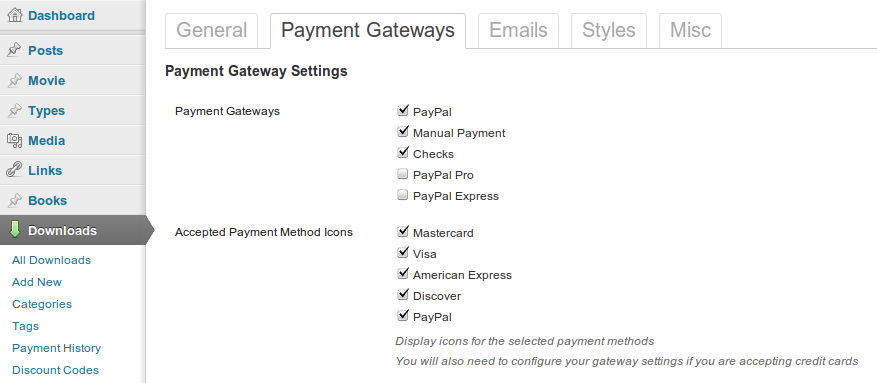
Adding our own custom gateway is very simple, it is just one function attached to a filter. The structure of the function looks like this:
// registers the gateway function pw_edd_register_gateway($gateways) { $gateways['gateway_id'] = array('admin_label' => 'Label Shown in the Admin', 'checkout_label' => __('Label Shown on Checkout', 'your_textdomain')); return $gateways; } add_filter('edd_payment_gateways', 'pw_edd_register_gateway'); |
Replace the place holders with actual values and we get this:
// registers the gateway function pw_edd_register_gateway($gateways) { $gateways['sample_gateway'] = array('admin_label' => 'Sample Gateway', 'checkout_label' => __('Sample Gateway', 'pw_edd')); return $gateways; } add_filter('edd_payment_gateways', 'pw_edd_register_gateway'); |
That’s it. Your gateway will now be available in the list of Payment Gateways in the settings for Easy Digital Downloads. You can enable it and select it as your method of payment during checkout. It won’t function yet, since we haven’t setup the payment processing function, but it is there.
Setting Up (or disabling) the Credit Card Form
Some payment gateways, such as Stripe, accept credit card details on the checkout page, and other gateways, such as PayPal, redirect the user to a secure site where the payment is processed. Easy Digital Downloads can easily support both of these.
The main difference between these two kinds of payment gateways is that one requires a credit card form on the site, and the other doesn’t.
By default, Easy Digital Downloads will output a credit card form that looks like this:
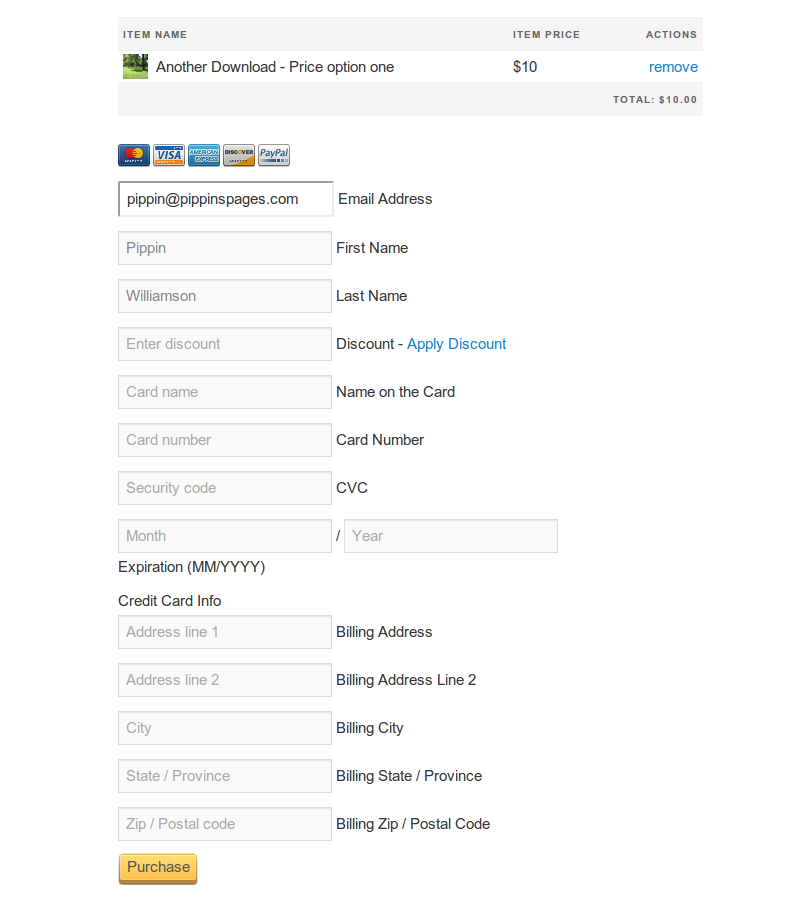
If your payment gateway accepts credit cards, then this form will likely work just fine for you, but if you would like to use your own custom form (as the Stripe gateway does), then there is a simple way to set it up.
When loading the checkout page, EDD will look to see if the following action is registered:
edd_{gateway ID}_cc_form
If the action is registered, then whatever function (for outputting HTML) is hooked to the action will be executed, otherwise the default credit card form is loaded instead.
To completely disable the credit card form, all you have to do is register the edd_{gateway ID}_cc_form action (with your gateway ID) and attach a blank function, or one that returns nothing. A sample function for disabling the credit card form is shown below:
function pw_edd_sample_gateway_cc_form() { // register the action to remove default CC form return; } add_action('edd_sample_gateway_cc_form', 'pw_edd_sample_gateway_cc_form'); |
With this action registered, the checkout form will now look like this:

Disabling the credit card forms is something you will usually do when creating a gateway that accepts payment through the merchant site, such as PayPal or Moneybookers.
Now what if you want to customize the credit card forms? You simply register the action as you did above and add HTML output to your function, like so:
// setup a custom CC form for Sample Gateway function pw_edd_sample_gateway_cc_form() { ob_start(); ?> |
<!--?php echo ob_get_clean(); } add_action('edd_sample_gateway_cc_form', 'pw_edd_sample_gateway_cc_form'); </pre--> |
This is the exact HTML that the Stripe payment gateway uses.
Processing the Payment
When a purchase is made through a gateway, Easy Digital Downloads executes a gateway-specific function for processing the payment. The function that is executed is determined by a special hook, similar to the way the credit card form is outputted (or not).
function gateway_function_to_process_payment($purchase_data) { // payment processing happens here } add_action('edd_gateway_{gateway ID}', 'gateway_function_to_process_payment'); |
To setup the function that processes the purchase in your gateway, all you have to do is hook your function to this action: edd_gateway_{gateway ID}.
Inside of your hooked function, you can process the payment however you wish. Some gateways will redirect to the offsite merchant here, while others will use an API to process the payment without leaving the site.
The $purchase_data parameter contains all of the necessary information about the downloads being purchased. It also contains information about the buyer, such as email, user ID (if logged in), first name, and last name.
When processing the payment, there are a few things you need to take into account:
- Is the plugin in Test mode?
- Make sure you check for valid data in any credit card fields you have setup, and store the errors if there are any.
- Setup and store the purchase data in EDD.
- Process the payment or redirect to a merchant site.
- Mark the payment as complete (if applicable).
- Redirect back to checkout on error, or the thank you page on successful payment.
The first thing we do is check whether Easy Digital Downloads is being used in test mode. We do this with a simple conditional function:
/********************************** * set transaction mode **********************************/ if(edd_is_test_mode()) { // set test credentials here } else { // set live credentials here } |
This conditional will allow you to properly setup your merchant API keys or redirect URLs. For example, in PayPal Standard, when the plugin is in test mode, the following URL is used:
https://www.sandbox.paypal.com/cgi-bin/webscr
But when in Live mode, this one is used:
https://www.paypal.com/cgi-bin/webscr
This makes it much easier for us to test our payment gateway to make sure it is working properly.
The next thing we do in our process purchase function is check for valid data. If your gateway accepts credit cards, then you need to make sure that the data entered is okay. You can do that easily like this:
// errors can be set like this if(!isset($_POST['card_number'])) { // error code followed by error message edd_set_error('empty_card', __('You must enter a card number', 'edd')); } |
The edd_set_error(() function will store the error and display it on the checkout page.
After our data validation checks run, we do a quick test to see if any errors were recorded:
// check for any stored errors $errors = edd_get_errors(); if(!$errors) { // no errors, so process the payment } else { $fail = true; // errors were detected } |
If there are no errors detected, we move on to processing the payment, or redirecting to the off site merchant. If there are errors, then we set a flag which will cause the user to be redirected back to the purchase page.
Next, inside of the !$errors conditional, we need to retrieve the purchase summary. This is not required but is a good thing to do, as the summary contains basic information related to what items the user purchased.
$purchase_summary = edd_get_purchase_summary($purchase_data); |
Remember, the $purchase_data is passed as a parameter to our payment processing function, and it contains all of the information about the purchase.
After the purchase summary is retrieved, we setup and store a pending purchase, which goes into the Payment History page. This particular step will very rarely differ between gateways, but, if for any reason, you can modify it if needed.
/********************************** * setup the payment details **********************************/ $payment = array( 'price' => $purchase_data['price'], 'date' => $purchase_data['date'], 'user_email' => $purchase_data['user_email'], 'purchase_key' => $purchase_data['purchase_key'], 'currency' => $edd_options['currency'], 'downloads' => $purchase_data['downloads'], 'cart_details' => $purchase_data['cart_details'], 'user_info' => $purchase_data['user_info'], 'status' => 'pending' ); // record the pending payment $payment = edd_insert_payment($payment); |
The edd_insert_payment() function will create the payment in Easy Digital Downloads, making it available in the Payment History. It will look like this:

Note that the payment status is “pending”. We only want to mark the payment as “complete” once we have a confirmed payment. Once the payment is marked as “complete”, the purchase receipt with download links is sent out, as is the admin sale notification email.
At this point we now either redirect to the off site merchant or process the payment onsite with a merchant API. Since the method for processing the payment itself can differ so much, I’m leaving that part up to you. If you are already looking to create a payment gateway for a particular merchant, then you probably are at least a little aware of how it works, but feel free to ask if you need help.
Once you have confirmed that the merchant payment was complete, you will update the status of the payment and send the buyer to the success page:
$merchant_payment_confirmed = false; /********************************** * Process the credit card here. * If not using a credit card * then redirect to merchant * and verify payment with an IPN **********************************/ // if the merchant payment is complete, set a flag $merchant_payment_confirmed = true; if($merchant_payment_confirmed) { // this is used when processing credit cards on site // once a transaction is successful, set the purchase to complete edd_update_payment_status($payment, 'complete'); // go to the success page edd_send_to_success_page(); } else { $fail = true; // payment wasn't recorded } |
There’s just one part left, and that is redirecting back to the checkout page if there were any errors:
if( $fail !== false ) { // if errors are present, send the user back to the purchase page so they can be corrected edd_send_back_to_checkout('?payment-mode=' . $purchase_data['post_data']['edd-gateway']); } |
The complete payment processing function looks like this:
// processes the payment function pw_edd_process_payment($purchase_data) { global $edd_options; /********************************** * set transaction mode **********************************/ if(edd_is_test_mode()) { // set test credentials here } else { // set live credentials here } /********************************** * check for errors here **********************************/ /* // errors can be set like this if(!isset($_POST['card_number'])) { // error code followed by error message edd_set_error('empty_card', __('You must enter a card number', 'edd')); } */ // check for any stored errors $errors = edd_get_errors(); if(!$errors) { $purchase_summary = edd_get_purchase_summary($purchase_data); /********************************** * setup the payment details **********************************/ $payment = array( 'price' => $purchase_data['price'], 'date' => $purchase_data['date'], 'user_email' => $purchase_data['user_email'], 'purchase_key' => $purchase_data['purchase_key'], 'currency' => $edd_options['currency'], 'downloads' => $purchase_data['downloads'], 'cart_details' => $purchase_data['cart_details'], 'user_info' => $purchase_data['user_info'], 'status' => 'pending' ); // record the pending payment $payment = edd_insert_payment($payment); $merchant_payment_confirmed = false; /********************************** * Process the credit card here. * If not using a credit card * then redirect to merchant * and verify payment with an IPN **********************************/ // if the merchant payment is complete, set a flag $merchant_payment_confirmed = true; if($merchant_payment_confirmed) { // this is used when processing credit cards on site // once a transaction is successful, set the purchase to complete edd_update_payment_status($payment, 'complete'); // go to the success page edd_send_to_success_page(); } else { $fail = true; // payment wasn't recorded } } else { $fail = true; // errors were detected } if( $fail !== false ) { // if errors are present, send the user back to the purchase page so they can be corrected edd_send_back_to_checkout('?payment-mode=' . $purchase_data['post_data']['edd-gateway']); } } add_action('edd_gateway_sample_gateway', 'pw_edd_process_payment'); |
Setting Up the Gateway Settings
In order for most payment gateways to function, you need to have the ability to store API keys or email addresses that are connected to the merchant account. Luckily, Easy Digital Downloads provides a very simple way of doing this.
All we have to do is setup an array of fields and pass it through a filter. When creating your settings, you have a variety of field types to choose from:
- header – A section header. This just outputs a label.
- checkbox – a simple check box field.
- multicheck – a list of check boxes.
- text – a simple text input field.
- select – a drop down menu field.
- rich_editor – a tinymce text editor field.
For our sample gateway, we are going to register three new setting fields: one for a section header, one for a live API key, and one for a test API key.
The function for registering the settings looks like this:
// adds the settings to the Payment Gateways section function pw_edd_add_settings($settings) { $sample_gateway_settings = array( array( 'id' => 'sample_gateway_settings', 'name' => '<strong>' . __('Sample Gateway Settings', 'pw_edd') . '</strong>', 'desc' => __('Configure the gateway settings', 'pw_edd'), 'type' => 'header' ), array( 'id' => 'live_api_key', 'name' => __('Live API Key', 'pw_edd'), 'desc' => __('Enter your live API key, found in your gateway Account Settins', 'pw_edd'), 'type' => 'text', 'size' => 'regular' ), array( 'id' => 'test_api_key', 'name' => __('Test API Key', 'pw_edd'), 'desc' => __('Enter your test API key, found in your Stripe Account Settins', 'pw_edd'), 'type' => 'text', 'size' => 'regular' ) ); return array_merge($settings, $sample_gateway_settings); } add_filter('edd_settings_gateways', 'pw_edd_add_settings'); |
$sample_gateway_settings is a multidimensional array (a separate array for each field). After the array of new fields is set up, we return the array through the array_merge() function, which combines the $settings (the existing plugin settings) with our new fields.
Our settings will look like this, in the Payment Gateways section:

Final Gateway Code
The final code for our add-on gateway looks like this:
<!--?php /* Plugin Name: Easy Digital Downloads - Sample Gateway Plugin URL: http://easydigitaldownloads.com/extension/sample-gateway Description: A sample gateway for Easy Digital Downloads Version: 1.0 Author: Pippin Williamson Author URI: https://pippinsplugins.com Contributors: mordauk */ // registers the gateway function pw_edd_register_gateway($gateways) { $gateways['sample_gateway'] = array('admin_label' =--> 'Sample Gateway', 'checkout_label' => __('Sample Gateway', 'pw_edd')); return $gateways; } add_filter('edd_payment_gateways', 'pw_edd_register_gateway'); function pw_edd_sample_gateway_cc_form() { // register the action to remove default CC form return; } add_action('edd_sample_gateway_cc_form', 'pw_edd_sample_gateway_cc_form'); // processes the payment function pw_edd_process_payment($purchase_data) { global $edd_options; /********************************** * set transaction mode **********************************/ if(edd_is_test_mode()) { // set test credentials here } else { // set live credentials here } /********************************** * check for errors here **********************************/ /* // errors can be set like this if(!isset($_POST['card_number'])) { // error code followed by error message edd_set_error('empty_card', __('You must enter a card number', 'edd')); } */ // check for any stored errors $errors = edd_get_errors(); if(!$errors) { $purchase_summary = edd_get_purchase_summary($purchase_data); /********************************** * setup the payment details **********************************/ $payment = array( 'price' => $purchase_data['price'], 'date' => $purchase_data['date'], 'user_email' => $purchase_data['user_email'], 'purchase_key' => $purchase_data['purchase_key'], 'currency' => $edd_options['currency'], 'downloads' => $purchase_data['downloads'], 'cart_details' => $purchase_data['cart_details'], 'user_info' => $purchase_data['user_info'], 'status' => 'pending' ); // record the pending payment $payment = edd_insert_payment($payment); $merchant_payment_confirmed = false; /********************************** * Process the credit card here. * If not using a credit card * then redirect to merchant * and verify payment with an IPN **********************************/ // if the merchant payment is complete, set a flag $merchant_payment_confirmed = true; if($merchant_payment_confirmed) { // this is used when processing credit cards on site // once a transaction is successful, set the purchase to complete edd_update_payment_status($payment, 'complete'); // go to the success page edd_send_to_success_page(); } else { $fail = true; // payment wasn't recorded } } else { $fail = true; // errors were detected } if( $fail !== false ) { // if errors are present, send the user back to the purchase page so they can be corrected edd_send_back_to_checkout('?payment-mode=' . $purchase_data['post_data']['edd-gateway']); } } add_action('edd_gateway_sample_gateway', 'pw_edd_process_payment'); // adds the settings to the Payment Gateways section function pw_edd_add_settings($settings) { $sample_gateway_settings = array( array( 'id' => 'sample_gateway_settings', 'name' => '<strong>' . __('Sample Gateway Settings', 'pw_edd') . '</strong>', 'desc' => __('Configure the gateway settings', 'pw_edd'), 'type' => 'header' ), array( 'id' => 'live_api_key', 'name' => __('Live API Key', 'pw_edd'), 'desc' => __('Enter your live API key, found in your gateway Account Settins', 'pw_edd'), 'type' => 'text', 'size' => 'regular' ), array( 'id' => 'test_api_key', 'name' => __('Test API Key', 'pw_edd'), 'desc' => __('Enter your test API key, found in your Stripe Account Settins', 'pw_edd'), 'type' => 'text', 'size' => 'regular' ) ); return array_merge($settings, $sample_gateway_settings); } add_filter('edd_settings_gateways', 'pw_edd_add_settings'); |
Concluding Notes
Overall, the payment gateway process for Easy Digital Downloads is pretty simple. It may seem complex if you’re not familiar with this kind of system, but once you work with it a little, you’ll find it quite simple.
One very important thing to take note of is that when you are working with an offsite payment system, you will likely have to setup a “listener” function that will help you detect when payments are confirmed. If you are building such a system, then I would encourage you to look at the source code for the PayPal Standard gateway for a sample system.
Download the Sample Gateway
The complete source code for the sample gateway can be download below.
[download id=”45″ format=”1″]
Help to how to payment getway add to website from Bangladesh
hey thanks for the tutorial but how can one create unit tests for the custom payment gateway
The download button is gone.
Thanks, all worked well.
I have created a plugin for Bluesnap Payment gateway, everything is ok thank you
how did you do it’
Hi! Is this tutorial still relevant and actual for EDD 2019?
Wondering about the same. Would like to add Skrill to my sites. You guys used to have a payment gateway extension but I can’t find it anymore on your site.
hello and thanks for the tutorial.
This works fine but i have a problem.
How do i call the update function after payment has been done on merchant website and redirected back.
Hi
Download link is not working!
Same problem here!!
How would one go about implementing Alipay payment gateway using Stripe’s Source API? It says that EDD Stripe removed Alipay because it’s not being supported, but it is. Any helpful tips or hints would be appreciated.
I would like to know how to use sources api in stripe too
Thanks for this Tutorial.
It’s Useful for Create Custom Payment Gateway for Easy digital downloads.
it’s really helpful tips and also good for someone who is looking to create a payment account. I was recently trying to find out this kind of ideas for creating an online gateway, but this article is helping me and now I got everything whatever is required for an online gateway. thanks for sharing your thoughts and experience. God blessed you.
Yay, thanks for the tutorial, it’s work, but the download button is gone ↑↑↑
i am very interested for manual payment (bank transfer) however this is to complicated for me, wish there was such plugin where the buyer select bank transfer and after purchase he gets the bank details shown and send to his email and admin gets a message about it of the purchase made by bank transfer
anyone know how to do this?
where do i add these codes pls
Can’t download your source code.The short code isn’t working
Just copy the last box of code, that is the whole thing anyway. Except you have to fix some typos, because his code display plugin isn’t working right.
I have also worked on these payment gateways but nowadays I have changed my payment gateway and it is quite good you should go for this to know about it click the link given below
if anyone has a working AliPay gateway can you share a link to that? thanks
CODE IS NOT WORKING CAN U GUIDE ME
If I do my downloads as name-your-price can I add a paypal donate button, and if so, do I actually need a payment gateway?
You can use the built-in PayPal gateway that is included with the core plugin. It’s free to use.
For the name-your-price, you will want to use our Custom Prices add-on: https://easydigitaldownloads.com/downloads/custom-prices/
Nice post about creating payment gateway plugin for website. Thanks for sharing. Is there any post about payu money payment gateway? Thanks
Fine