
Pippins Plugins
  • Email
  • Facebook
  • Feedburner
  • Github
  • Google
  • Twitter
  • Vimeo
  • Youtube
  • Rss
  • About
  • News
  • Join the Site
    • Member Benefits
    • Member Plugins
    • Email Notifications
  • Plugin Store
    • Affiliate Area
    • Checkout
  • Plugins
    • Plugin Portfolio
      • Plugin Portfolio – List View
    • Free
    • Premium
    • Member Plugins
    • Coding Standards
    • Get Plugin Support
  • Tutorials
    • Series
      • Plugin Development 101
      • Creating a User Follow System Plugin
      • Customizing Restrict Content Pro
      • Displaying Content with Easy Content Types
      • Writing Your First WordPress Plugins, Basic to Advanced
      • Working with Widgets
      • User Submitted Image Galleries
      • Plugin Thoughts
      • Integrating Stripe.com with WordPress
      • WordPress Rewrite API
    • Member Exclusive
      • Free Members
      • Subscriber Only
    • Difficulty
      • Beginner
      • Intermediate
      • Advanced
    • Action and Filter Hooks
    • Ajax
    • Custom Post Types
    • External APIs
    • Short Codes
    • Taxonomies
    • Video Tutorials
    • Widget Tutorials
    • WordPress Admin / Dashboard
    • Working with jQuery
    • WordPress Database
    • Writing Plugins
    • Tag Index
  • Reviews
  • Support Forum
  • Contact
    • Support the Site
    • Request Code Review
    • Plugin Support

CGC Maintenance Mode Plugin for WordPress

Posted on October 12, 2011 by Pippin in Free, Plugins, Utilities 43 Comments
Home» Plugins » Free » CGC Maintenance Mode Plugin for WordPress
Tweet
Love It - 1

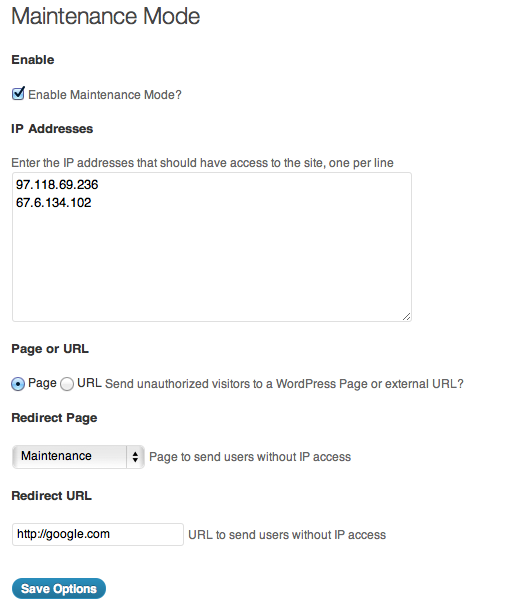
This is a simple, very easy to use Maintenance Mode plugin that allows you to put your site into “maintenance mode” in order to perform updates or other changes. The plugin allows you to specify a set of authorized IP addresses for people that will be allowed to see the site normally, and also to set a redirect location for unauthorized visitors.

The greatly enhanced Pro version of this plugin is now available on Code Canyon

Demonstration

From the plugin settings page, you can quickly enable maintenance mode, set the authorized IP addresses, and choose where to redirect visitors who do not have access, either to a WordPress page or external URL.
Download Plugin
Tweet Follow @pippinsplugins
IP, maintenance, retrict

43 comments on “CGC Maintenance Mode Plugin for WordPress”

  1. Michael says:
    October 13, 2011 at 3:50 pm

    Finally, a maintenance page plug-in that has thought the process of a maintenance page through and through.

    Thanks Pippin.

    Reply
  2. Pippin says:
    October 13, 2011 at 4:24 pm

    @Michael – Thanks for the kind words. The pro version will be coming out pretty soon :)

    Reply
  3. Jose Depaz says:
    October 15, 2011 at 5:22 pm

    Awesome!!! Just what I need. I can’t wait to have the pro version. Just an idea… countdowns are great in letting visitors know when they the site will be up again. I guess a shortcode to display that countdown on any exist page would be great.

    Reply
    • Pippin says:
      October 15, 2011 at 7:12 pm

      That’s on the todo list for the pro version, which is about 70% done. Features will include: automatically turning maintenance mode on/off between a certain time frame, unlimited custom templates (with several included), timer count down, and a little more.

  4. Pippin says:
    November 4, 2011 at 1:12 pm

    @Jose – the Pro version is now available: http://codecanyon.net/item/cgc-maintenance-mode-pro/720242?ref=mordauk

    Reply
  5. Jo says:
    December 11, 2011 at 4:10 am

    Hi pippin,
    I have installed your plugin an activated it as per the steps in your video however I being redirected to my maintenance page on my own computer dispite having entered my computers ip address. Is there anything obvious I may have done wrong? Thank you for your help :)

    Reply
    • Pippin says:
      December 11, 2011 at 11:16 am

      Are you running it on localhost? If so, then ips do not work in that scenario.

    • Kate says:
      May 11, 2013 at 8:49 pm

      Me too! I am on hostgator site, not localhost. I have the Headway framework and now I can’t get to the Headway Visual Editor either…..any ideas? I will have to deactivate your plugin soon to get back to work but I am leaving it so you can see it. I love the plugin but…..
      http://e-inkvoices.com

    • Pippin says:
      May 11, 2013 at 9:03 pm

      Why are you using maintenance mode on localhost? IP addresses don’t always play by the same rules on local installs, so that’s probably the problem.

  6. Jo says:
    December 11, 2011 at 9:24 pm

    Thanks for your reply! Hmm not sure what u mean by localhost…can u elaborate?

    Reply
  7. michael says:
    December 12, 2011 at 6:22 am

    Hello Jo,

    Are you running your WP on a test installation on your computer? To jump in, I think that is yo what Pippin was referring.

    Reply
  8. Pippin says:
    December 12, 2011 at 8:36 am

    @Jo – yes, Michael is correct. Do you have the plugin setup on a test site that is running on your computer, vs running on a live web server?

    Reply
  9. Nick says:
    December 28, 2011 at 2:08 pm

    My ISP changed my IP address unexpectedly and now I am locked out. I have tried removing the plugin via FTP, but I still can’t get to the admin dashboard. What now?

    Reply
    • Nick says:
      December 28, 2011 at 2:10 pm

      Disregard that. I had mistyped the URL! Need more caffeine.

    • Pippin says:
      December 28, 2011 at 2:11 pm

      @Nick – Ha, okay.

    • Pippin says:
      December 28, 2011 at 2:11 pm

      @Nick – You will always be able to access /wp-admin. The plugin doesn’t prevent users from getting there at all. Also, if you have removed the plugin via FTP, then it cannot be preventing you from getting in, not unless you have a cache issue.

  10. Matt Rees says:
    February 9, 2012 at 3:38 am

    thanks for this plugin – but I’m having trouble getting it to work properly – even when activated, computers whose IP addresses I haven’t entered are still being granted access rather than being redirected.

    any idea how I can stop this? thanks!

    Reply
    • Pippin says:
      February 9, 2012 at 8:53 am

      Do you have all of the redirect settings set? It sounds like perhaps something in your theme or another plugin is conflicting.

  11. angie says:
    August 9, 2012 at 9:21 am

    Hi, I installed this but when I enter my IP address it’s not giving me access – I can stil log in and access the dashboard, but not the pages. I am not working on a local host.

    How do you enter the number? Should there be spaces, dots separating them?

    Thanks

    Reply
    • Pippin says:
      August 9, 2012 at 7:39 pm

      Is this on a local machine or live server?

  12. David Mitchell says:
    September 30, 2012 at 1:37 pm

    Hi, I think I took from above that I would always be able to type in /wp-login.php and access the admin area right, even if the ip address is not on the list? right?

    I have my IP in there so I can access now. I am partially deactivating the site for a year, and so sometimes ip addresses change. I want to make sure I can’t get locked out. I tried to figure out where the ip addresses are stored in the database so I could add later if need be, but didn’t figure that out.

    Please confirm if my understanding is accurate… Thanks.

    Reply
    • Pippin says:
      September 30, 2012 at 6:05 pm

      Correct, you will always be able to access the login page.

  13. Andrea Vischi says:
    January 3, 2013 at 6:41 am

    Hi Pippin…
    I’m using your plugin and I’ve noticed that you don’t have considered the situation when the server (on wich wordpress is installed) is behind a proxy. I’ve edited the function restrict-access.php in your plugin like this:

    function cmm_ip_test($ips){
    $userIP = isset($_SERVER['HTTP_CLIENT_IP']) ? $_SERVER['HTTP_CLIENT_IP'] : (empty($_SERVER['HTTP_X_FORWARDED_FOR']) ? (empty($_SERVER['REMOTE_ADDR']) ? @getenv('REMOTE_ADDR') : $_SERVER['REMOTE_ADDR']) : $_SERVER['HTTP_X_FORWARDED_FOR']);
    if(in_array($userIP, $ips)) {
    return true;
    }
    return false;
    }

    Maybe you can release an update of the plugin with this feature added.
    It would be nice also that the IP address of the administrator was mentioned somewhere in the setting page.

    Thank’s for your work.

    Reply
    • Pippin says:
      January 3, 2013 at 8:02 pm

      I have accounted for that in the Pro version, just haven’t updated the free version. I will try and get an update out.

  14. Fede says:
    March 5, 2013 at 8:14 am

    Hey Pippin,
    I don’t know if I messed up by updating WordPress to 3.5.1, but after spending weeks building my site behind the curtain of your great plug-in, now I can’t access the site anymore! I can access the dashboard and everything else, but I can’t see the new site, as I’m redirected every time, in spite of my IP being on the list.
    As far as I can understand, I’m working on a live server.
    It was working perfectly before.
    Thanks
    Fede

    Reply
    • Pippin says:
      March 10, 2013 at 12:12 pm

      Does it only redirect when you view the front end, or also when in the admin?

  15. Rick Collins says:
    March 14, 2013 at 7:04 am

    Hi Pippin, I’ve been using this plug-in for some time now and love it. Recently I’ve been having the problem of accessing my site while in Maintenance Mode even though my IP address has been entered into the exceptions box. I’m still being redirected to the Maintenance Page. I’ve double-checked my IP address and it’s right. It used to work…….

    Reply
    • Pippin says:
      March 14, 2013 at 12:45 pm

      What version of the plugin are you using?

  16. Kate says:
    May 11, 2013 at 8:51 pm

    to add to what I replied to above….free version of plugin

    Reply
  17. Kate says:
    May 11, 2013 at 8:53 pm

    Sorry, I probably should have added my comment at the bottom. Here it is:

    Me too! I entered the IP but still cant get in from my ipad (which is the IP I entered, not my computer) I CAN get in on my computer. I am on hostgator site, not localhost.

    BUT I have the Headway framework and now I can’t get to the Headway Visual Editor at all…..any ideas? I will have to deactivate your plugin soon to get back to work but I am leaving it so you can see it. I love the plugin but…..
    http://e-inkvoices.com

    Reply
    • Pippin says:
      May 11, 2013 at 9:04 pm

      If you enter the IP of your computer, does it work?

    • Davide Renzi says:
      May 12, 2013 at 12:30 am

      Sometimes mobile devices go through a proxy that exposes an IP address other than the one that owns the device.
      In addition, some managers change this IP at regular intervals.
      See “Andrea Vischi” comment…

    • Pippin says:
      May 12, 2013 at 5:21 pm

      Yes, that could certainly explain why some mobile devices don’t work.

  18. Kate says:
    May 13, 2013 at 5:53 pm

    Hi again,
    So I have entered my computer’s IP. Which I got from Network utility so I am sure it is right. I can get to the dashboard from the computer and work on pages directly (but I cannot use the Headway Visual Editor at all) and whenever I want to View Page, it sends me to the maintenance page: http://e-inkvoices.com/launching-in-may-2013/

    Reply
    • Pippin says:
      May 13, 2013 at 9:19 pm

      The Headway editor probably doesn’t work because it is bypassing the plugin’s IP check system, which is not really surprising.

    • Kate says:
      May 14, 2013 at 10:57 pm

      I am not understanding your response. Suggestion to fix? Are all theses folks using Headway? I also can’t see any pages…..

    • Pippin says:
      May 15, 2013 at 8:48 pm

      No, those other responses are related to viewing the site from mobile devices.

      For Headway, I don’t think there will be a way (without some custom code) with use the Visual Editor and have it in Maintenance Mode at the same time.

  19. Kate says:
    May 13, 2013 at 5:56 pm

    Just to review:
    On a live server
    Same thing happens on my ipad

    Reply
  20. Kate says:
    May 13, 2013 at 7:44 pm

    When I click on HW Visual editor View ANY page, I get
    URL http://e-inkvoices.com/launching-in-may-2013/#layout=single-page-12205

    Reply
  21. Kate says:
    May 16, 2013 at 2:46 pm

    To continue from above….
    Okay, I accept that it is incompatible with Headway and you don’t have a suggestion to fix that. I don’t always use the Headway editor and I could work on pages IF I could see then those pages BUT I can’t, as I said above.

    I am also using it on a site that is running the Catalyst framework and on that site as well, when I click VIEW PAGE or post, I am redirected to the maintenance page and cannot see the page I am working on. IPs are entered.

    Your thoughts on making this work for the WordPress Editor, if not for the Headway Editor?

    Reply
  22. Kate says:
    May 16, 2013 at 2:48 pm

    and on my phone, I can’t see the sites at all–it is a white screen

    Reply
  23. Kate says:
    May 16, 2013 at 2:53 pm

    I fixed it by entering the IP of my home network, not my computers

    Reply
    • Pippin says:
      May 17, 2013 at 1:24 pm

      That’s the one you’re supposed to enter; the outside IP, not your computer’s internal IP.

Leave a Reply Cancel reply

Your email address will not be published. Required fields are marked *

You may use these HTML tags and attributes: <a href="" title=""> <abbr title=""> <acronym title=""> <b> <blockquote cite=""> <cite> <code> <del datetime=""> <em> <i> <q cite=""> <strike> <strong>

  • Login

Lost your password?

Please enter your username or e-mail address. You will receive a new password via e-mail.

  • Facebook Become a Fan Like

  • Twitter Subscribe on Twitter Follow

  • YouTube Follow my Videos Subscribe

  • RSS Feed Subscribe with RSS Subscribe

Easy Digital Downloads

Most Loved

  • Love It Pro for WordPress
  • Write a “Love It” Plugin with Ajax to Let Users Love Their Favorite Posts / Pages
  • Simple Notices Pro Plugin for WordPress
  • User Bookmarks for WordPress
  • Front End Registration and Login Forms Plugin

Similar Plugins and Posts

  • CGC Maintenance Mode Pro Plugin for WordPress
  • Write an Advanced Maintenance Mode Plugin

Latest Premium Content

  • Plugin Development 101 – Introduction to Adding Dashboard Menus
  • Plugin Development 101 – Intro to Loading Scripts and Styles
  • User Follow System – Part 5
  • Plugin Development 101 – Intro to Short Codes
  • Plugin Development 101 – Registering a Custom Post Type
  • Plugin Development 101 – Intro to Actions

Latest Tutorials

  • Submitting Your First Pull Request to a WordPress Plugin on Github (1)

    Github is an extremely popular tool for managing WordPress plugins, and one...

  • Plugin Development 101 – Introduction to Adding Dashboard Menus (1)

    Adding new menus, both top level and sub level, to the WordPress Dashboard is a really common task for plugins...

  • Plugin Development 101 – Intro to Loading Scripts and Styles (16)

    In this part of Plugin...

Enter your email to receive automated updates when new posts are published

Latest Tweets

  • @jasonbobich hmm, interestinf
    May 19, 2013
  • @jasonbobich I haven&#039;t recently
    May 19, 2013
  • @strickland lol I passed out for two hours, so who knows
    May 19, 2013

Topics

Tom McFarlin wp_enqueue_script attachments get_user_meta register_setting shortcodes featured add_shortcode contextual help Rémi Corson meta box Sugar Event Calendar add_options_page forms login short codes authors Related posts do_action attachment mail chimp image plugin post types apply_filters bbpress comments recent posts taxonomies short code custom post type gallery Ajax images Stripe taxonomy jquery widgets users add_filter add_action easy content types widget restrict content pro easy digital downloads

Weekly Newsletter

Useful Links

  • Join the Site
  • Plugin Store
  • Affiliate Area
  • Tag Index
  • Support the Site
  • Suggest a Tutorial
  • Random Post
  • Contact

Monthly Archives

(c) 2011 Pippin's Plugins