

There are a lot of premium membership tutorial sites out there, this one included, and they usually require that memberships purchase a subscription to the site in order to access the premium content. In this tutorial, I’m going to walk you through the process pf creating an À la Carte tutorial site that lets users purchase access to only the tutorials they want.
This tutorial will be a bit different than what I usually do, as I’m going to be mostly walking you through the setup of a plugin, rather than how to write it from scratch.
We will be using Easy Digital Downloads to power our tutorial store. If you are not familiar with EDD, it is an ecommerce plugin I have written (with the help of several other developers) for selling digital products. You might be asking why we would use a downloads plugin for selling tutorials, and the answer is simple: EDD is extremely flexible and provides everything we need, so with just some minor tweaking, we can turn it into a Tutorial Access plugin.
Along with EDD, we will also be using the Content Restriction add-on. This extension is a $29 add-on (the main EDD plugin is free), so you will need to purchase it to be able to setup the system described in this tutorial. If you are a premium member on this site, then you have access to a 50% off discount code, listed below. If you’d like to save 50% on the Content Restriction add-on, then Join the Site today and you will see the discount code when you come back to this post.
Once you have both Easy Digital Downloads and the Content restriction add-on installed, you are ready to get started.
The way that we will setup the À la Carte shop is by having tutorials (regular Posts) that have their content hidden by a short code, and then a separate EDD product that defines the pricing for the tutorial. A button to purchase access will be placed at the bottom of each tutorial with a second short code.
Before we jump into our content creation, let’s first look at doing some minor tweaks to the EDD plugin. By default, EDD includes a lot of product options that have no use in this scenario, so we are going to remove them. We are also going to rename “Downloads” to “Tutorials”.
The code below will allow us to make the tweaks to the EDD product options, and you can place it in your functions.php or your own custom plugin (recommended).
Changing “Downloads” to “Tutorials”
1 2 3 4 5 6 7 8 9 10 | define('EDD_SLUG', 'product'); // changes the post type slug function pw_edd_labels( $labels ) { $labels = array( 'singular' => __('Tutorial','wmb'), 'plural' => __('Tutorials','wmb') ); return $labels; } add_filter('edd_default_downloads_name', 'pw_edd_labels'); |
Once this snippet is active, the menu that previously said “Downloads”, will now say “Tutorials”, as will all other instances of the download label throughout the plugin.
Removing Unneeded Product Options
The default product configuration page in EDD looks like this:
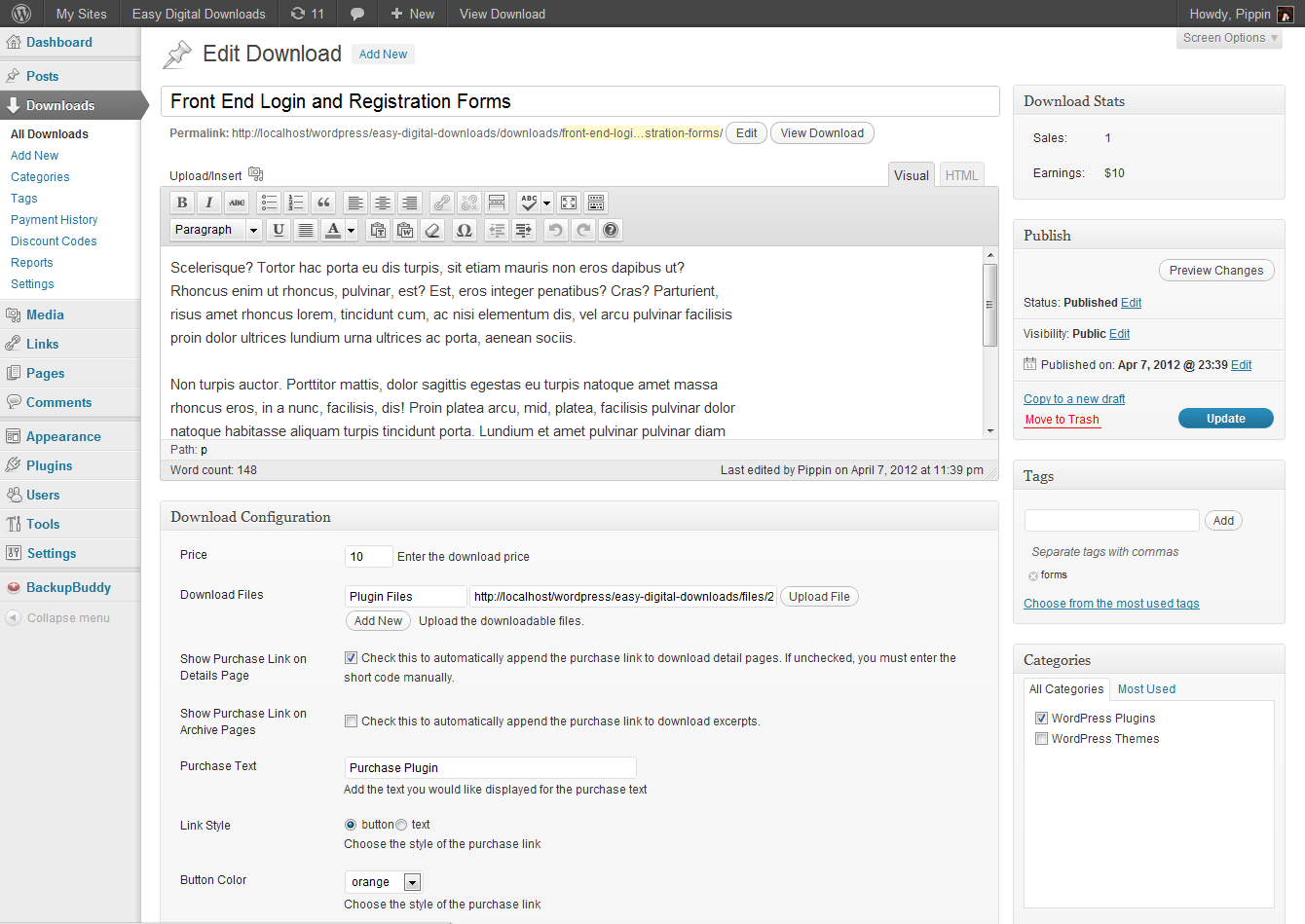
and this:
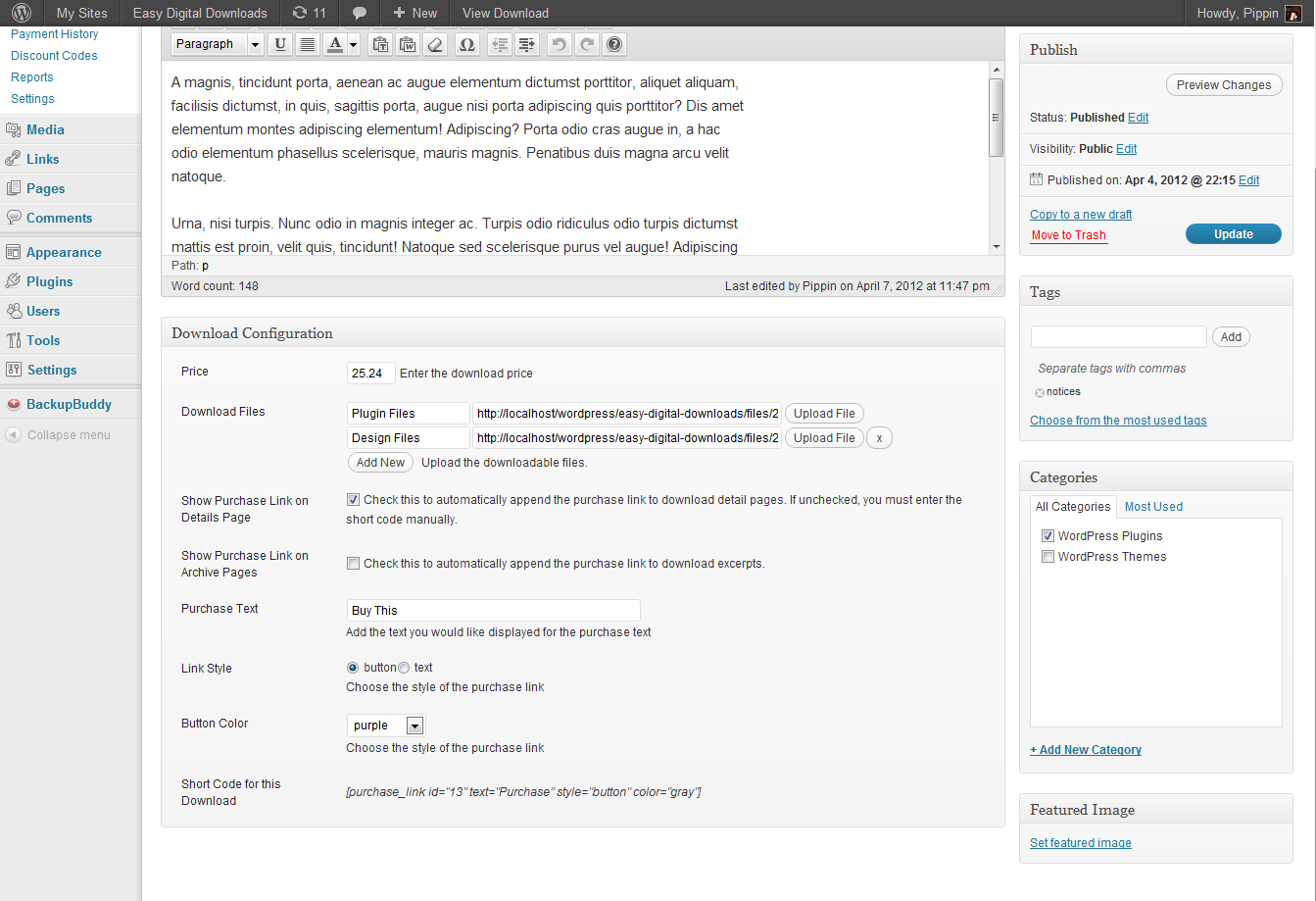
We really don’t need all of these options. The only ones we need are:
- Title
- Categories (maybe)
- Tags (maybe)
- Price
- Purchase Log
We will now remove the options we don’t need.
First we will modify the attributes that the product post type supports. For this scenario, we only need a title:
1 2 3 4 | function pw_edd_post_type_supports( $supports ) { return array('title'); } add_filter('edd_download_supports', 'pw_edd_post_type_supports'); |
Next we will remove the “Download Log” meta box, since our tutorials do not have downloadable files (though you could if you wanted to include source files with the tutorials):
1 2 3 4 | function pw_remove_edd_metaboxes() { remove_meta_box('edd_file_download_log', 'download', 'normal'); } add_action('add_meta_boxes', 'pw_remove_edd_metaboxes', 999); |
Lastly, we will remove unneeded options from the main Download Configuration meta box:
1 2 3 4 5 6 7 8 9 | function pw_remove_product_options() { remove_action('edd_meta_box_fields', 'edd_render_files_field', 20); remove_action('edd_meta_box_fields', 'edd_render_purchase_text_field', 30); remove_action('edd_meta_box_fields', 'edd_render_link_styles', 40); remove_action('edd_meta_box_fields', 'edd_render_button_color', 50); remove_action('edd_meta_box_fields', 'edd_render_disable_button',60); remove_action('edd_meta_box_fields', 'edd_render_meta_notes',70); } add_action('admin_init', 'pw_remove_product_options'); |
Our Tutorial product configuration is now greatly simplified and looks like this:

We can now start setting up our content.
There are two steps to adding an À la Carte tutorial:
- Create the Tutorial product, which defines the access price
- Create the Post with the tutorial content
When you create a Tutorial product, simply give it a title (probably the name of your post, or similar), set a price, and optionally define categories and tags. That’s it; the bulk of the content for a tutorial is defined in the post.
The key to creating À la Carte tutorials is restricting the content of the tutorial to only those users that have purchased, and this ability is provided by the Content Restriction add-on.
The Content Restriction add-on will give you two methods for restricting content to buyers:
- A short code, [edd_restrict], to restrict portions of content
- A meta box option to restrict the entire content
We are going to use the short code for this tutorial. If you want to use the meta box option, then you will need to tweak your template files a little bit in order to show the Purchase Access button. If you are an advanced user who is comfortable doing this, then I recommend the meta box option as it is a little bit easier and more efficient.
The short code provided by the Content Restriction add-on is quite simple to use. It accepts two main parameters:
- id – the ID of the product we are requiring users to have purchased
- message – the text to show to users who have not purchased access
There is a third parameter called “price_id” for users who wish to use EDD’s variable pricing system. Consult the add-on documentation if you are interested in this.
When you create your tutorial posts, you will use the [edd_restrict] short code to hide the portion of the content that want users to be required to purchase, and you will do it like this:
[edd_restrict id="#" message="You must purchase access to view the rest of this content."]This content is restricted.[/edd_restrict]
The # is replaced with the ID number of your Tutorial product.
This will result in the following:
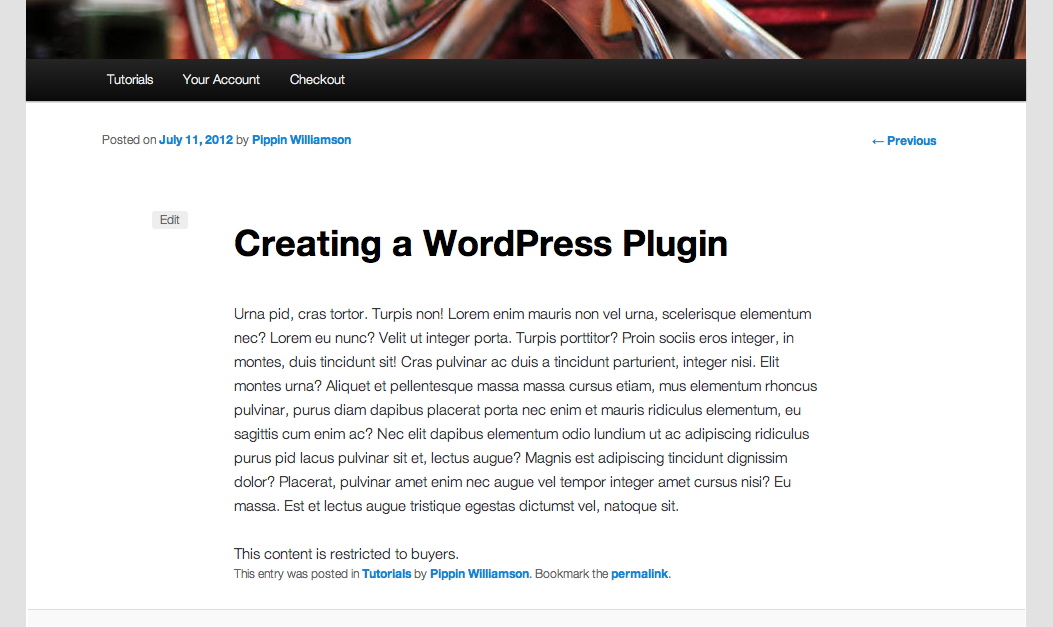
Once a user has purchased access, they will see the entire contents of the post.
Now we just need to place the Purchase Access button at the bottom of our post. To do this, we will use the [purchase_link] short code provided by EDD. You can find the exact short code to use on the Tutorials page:
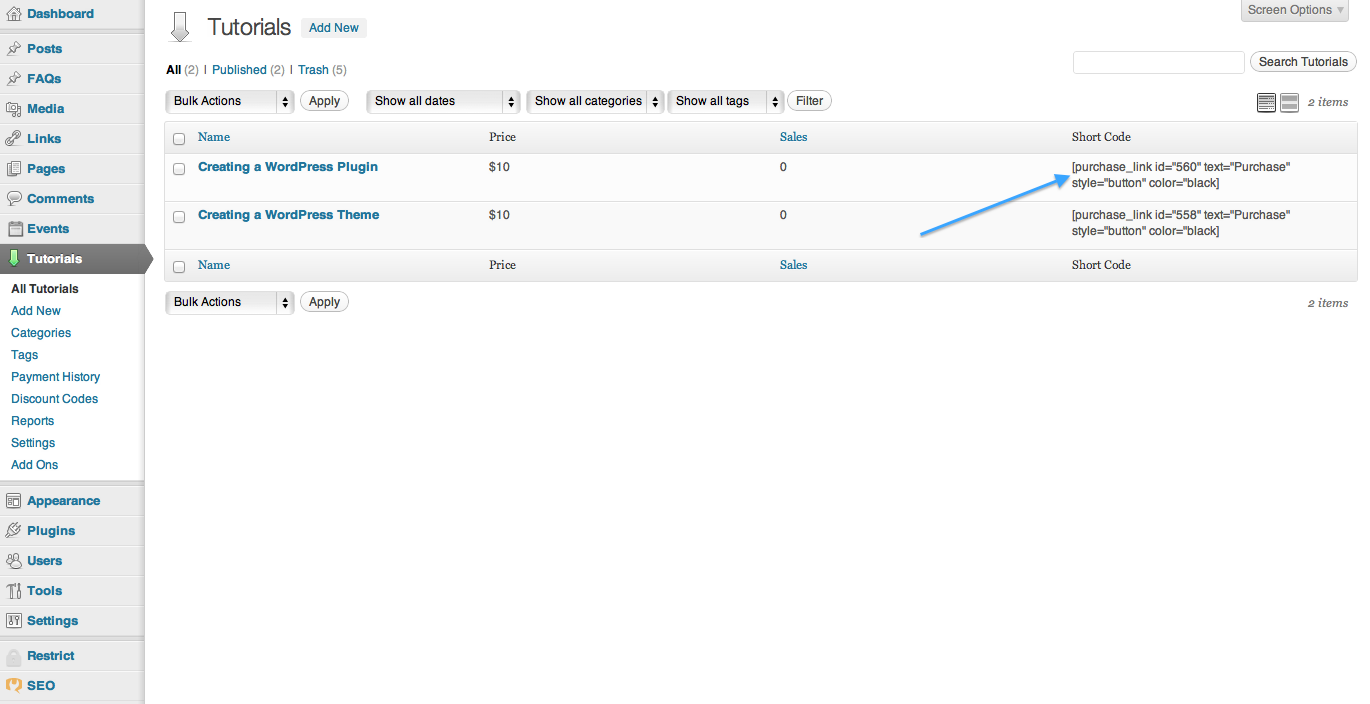
You can also use the short code generator button located in the Upload/Insert section of the editor:

Your purchase link short code, once created, will look like this:
Once placed at the bottom of your tutorial post content, you will have something like this:

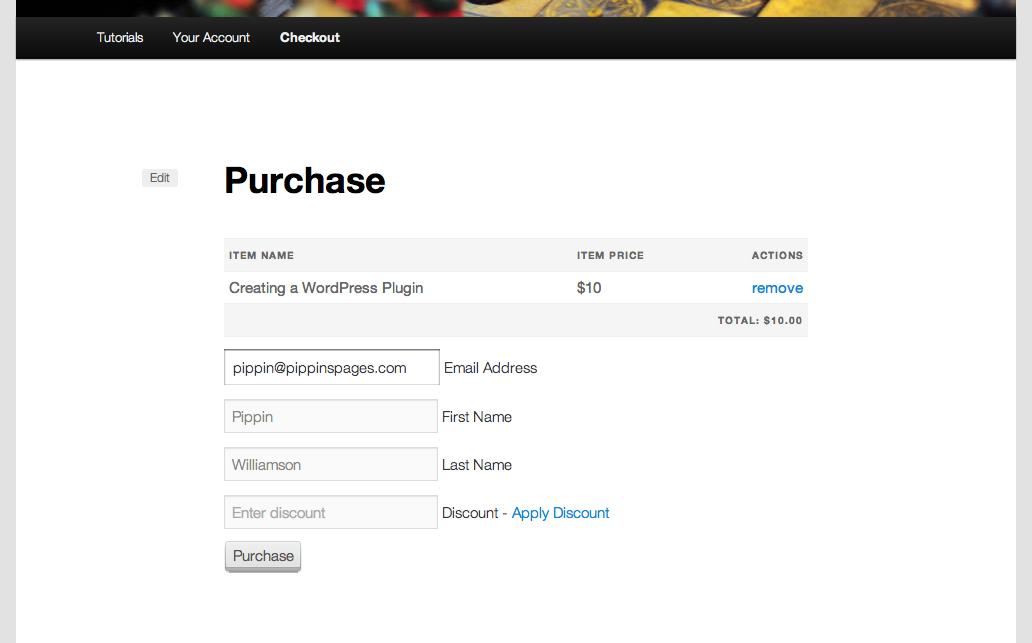
When a user wants to purchase access, they simply click on the button, go to the checkout page, complete the purchase, and that’s it! They now have complete access to the tutorial contents.
It depends on the theme you’re using, but the basic checkout page (provided by EDD) will look like this:
Some Notes
The above system that I have walked you through can be setup in less than 10 minutes and works very, very well, but there are a few things you should take note of:
1. Users must be logged-in in order to view the restricted content. I recommend you requires users have an account to purchase access. You can easily turn on this restriction in EDD by going to Tutorials (or Downloads) > Settings > Misc and check the box to Disable Guest Checkout and the box for Show Register / Login Forms.
2. You will need to go through basic Easy Digital Downloads setup. This includes setting a page to act as the checkout page, a purchase success page, and possibly a purchase history page. These only take a moment to setup and are described in the Installation and Basic Setup documentation pages.
3. Since users are required to be logged-in, you can show a login form with [edd_login].
Hey Pippin,
Great post!
Remark: the Content Restriction link is invalid (you’ve appended the URL to your domain as root)
Cheers! 🙂
Thanks for the catch! It’s been fixed.
Awesome! I’ve been thinking of starting a site for some more advance tutorials (with the more basic ones free). This will really help as I don’t have time for something custom. Thanks a lot!
This looks like it could work for us – EDD is another impressive piece of software from the Pippin team. A couple questions:
1. Does the EDD “Download Link Expiration” setting have an effect here – would that be the way to give users access to the tutorial for a specific period of time? We want to sell access to content by the month.
2. Similarly, does the EDD “Disable Redownload” option do anything when the CR addon is displaying the content?
3. How about “Disable Guest Checkout” – if the user is logged out of the site but they bookmark the page that the CR content is on, can they still view the content?
4. Finally, are bundles possible with this setup? Doesn’t seem like it but maybe I’m missing something. It looks like each tutorial need to be managed as its own Tutorial (aka EDD “Download”) product and users must purchase them individually, correct? Any ideas for this type of packaging? (Buy 3 at 50% off or whatever)
Thanks in advance for any help.
1. No, the expiration has no effect here.
2. No it does not.
3. No, users are always required to be logged in to verify that they can view the content.
4. You can create a bundle by categorizing the products and then using [purchase_collection] short code. I can give you more information on this if you’d like, though it does not automatically discount the amount.
I bought your Restrict Content Pro plugin and found out it wasn’t really what I needed, so I ended up buying this one too :X
So far it’s working rather well for what I need, but as I need to modify it a bit, I had a couple questions. I hope that’s okay?
1. Is there any way to ‘hide’ the purchase button if the user has already paid for the post? Right now, it comes up regardless.
2. I really need access to restricted content to expire after x amount of days (and the time frames will vary post-to-post), so I plan to get my hands dirty with that modification; ideally the expiration will work just like your “Restrict Content Pro”. I know this is probably far too involved to expect any snippets, but if you had any advice on the best way to do this, or anything to point me toward, or even vagueish encouragement, that would be lovely!
3. It’d be awesome if links to the purchased content could be included in the purchase and download history, and also the emails and receipts as well. In my case, we’re not promoting the restricted posts on the front-end at all, just the product grid, so there’s no way for the user to find the restricted content once they’ve purchased it. I figure maybe just adding an extra meta field for Download?
(Sorry for the long comment; I would have made a support ticket or forum post, but this add-on wasn’t listed as a product option).
Thanks in advance!
1. There is with a small amount of PHP. Are you comfortable with that?
2. Not out of the box, sorry. It’s not too difficult to do with a couple of custom PHP functions, so let me know, as with 1, if you’re comfortable with that.
3. Are you selling any actual file downloads or just the content?
1 and 2. Yes, totally comfortable with PHP!
3. Just the content, no actual downloads. But like, for instance, right now when a user purchases an item, the Purchase History shows the item, and below it says, “No downloadable files found.” Screenshot: http://oi48.tinypic.com/359ya1u.jpg
Ideally, instead of that, it would link the user to the page they purchased access to.
Thanks so much for the reply!
1. This should do the trick: https://gist.github.com/4535753
2. This one I need to think on a bit.
3. Have you ever used the Posts 2 Post plugin?
Hi Pippin!
This sounds great but I have a couple questions.
I use EDD to sell services, but I also want to sell tutorials and possibly other things on the same site with EDD. Is there a way to create multiple EDD_SLUG or “Categories” To place different product types in?
Also, are there any major differences in using Content Restriction as apposed to Restric Content Pro which you wrote?
The reason is I would rather have just the one main plugin with addons, than a completely separate plugin for restricting content.
Thanks!
There is not a way to have multiple slugs, sorry.
The biggest difference between RCP and EDD Content Restriction is that RCP limits customers to a single subscription whereas EDD can support any number of subscriptions for a customer.