
Pippins Plugins
  • Email
  • Facebook
  • Feedburner
  • Github
  • Google
  • Twitter
  • Vimeo
  • Youtube
  • Rss
  • About
  • News
  • Join the Site
    • Member Benefits
    • Member Plugins
    • Email Notifications
  • Plugin Store
    • Affiliate Area
    • Checkout
  • Plugins
    • Plugin Portfolio
      • Plugin Portfolio – List View
    • Free
    • Premium
    • Member Plugins
    • Coding Standards
    • Get Plugin Support
  • Tutorials
    • Series
      • Plugin Development 101
      • Creating a User Follow System Plugin
      • Customizing Restrict Content Pro
      • Displaying Content with Easy Content Types
      • Writing Your First WordPress Plugins, Basic to Advanced
      • Working with Widgets
      • User Submitted Image Galleries
      • Plugin Thoughts
      • Integrating Stripe.com with WordPress
      • WordPress Rewrite API
    • Member Exclusive
      • Free Members
      • Subscriber Only
    • Difficulty
      • Beginner
      • Intermediate
      • Advanced
    • Action and Filter Hooks
    • Ajax
    • Custom Post Types
    • External APIs
    • Short Codes
    • Taxonomies
    • Video Tutorials
    • Widget Tutorials
    • WordPress Admin / Dashboard
    • Working with jQuery
    • WordPress Database
    • Writing Plugins
    • Tag Index
  • Reviews
  • Support Forum
  • Contact
    • Support the Site
    • Request Code Review
    • Plugin Support

Better Recent Posts Widget Plugin

Posted on May 13, 2011 by Pippin in Free, Plugins, Utilities, Widgets 110 Comments
Home» Plugins » Free » Better Recent Posts Widget Plugin
Tweet
Love It - 2

WordPress comes with a Recent Posts widget that you can use to display a list of your latest posts in your widgetized sidebar, but it’s really not very good in the fact that it does give you any control over your posts at all. So I’ve written a new one.

An enhanced version of this plugin is available from Code Canyon.net

This is a very simple plugin, but it gives you much better control over your widget display.
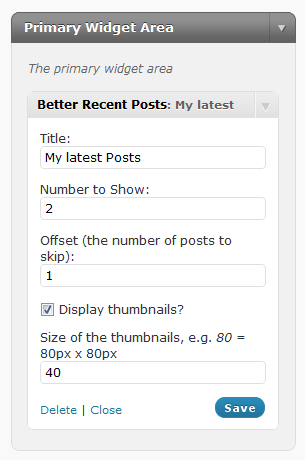
Plugin features include:

  • New Recent Posts Widget
  • Widget Title Option
  • Option to control the number of posts displayed
  • Option to control the posts offset
  • Ability to enable post thumbnails
  • Thumbnail size option
  • Choose the post type to display

If you’d like me to write a tutorial on how to make a widget like this, let me know in the comments!

Change Log

v1.1 - added ability to choose which post type to display

v1.1.1 - fixed a bug with post type detection

v1.1.2 - added category selection

v1.1.3 - fixed bug with select field options vanishing

v1.1.4 - fixed offset bug and post type bug in posts query
Download
Tweet Follow @pippinsplugins
recent posts, widget

110 comments on “Better Recent Posts Widget Plugin”

Comment navigation

← Older Comments
  1. Jenni says:
    August 16, 2011 at 3:57 am

    Yes no problems. The site is currently running locally – its nearly finished so Ill get everything else up, make it live to the server and send over the login details. Thanks for your help :-)

    Reply
    • Pippin says:
      August 16, 2011 at 10:15 am

      @Jenni – Cool, just send it to me in an email when ready.

  2. Jenni says:
    August 18, 2011 at 4:30 am

    Hi Pippin, the site is now live. Whats your email address?

    Reply
    • Pippin says:
      August 18, 2011 at 10:03 am

      @Jenni – go to my contact page.

  3. Ashley says:
    August 23, 2011 at 8:20 am

    Hey, Pippin! How do I get rid of dates on the widget? If I’m posting only a certain category, I don’t want to show that the post is older, if that makes sense. Thanks!

    Ashley

    Reply
    • Pippin says:
      August 23, 2011 at 9:44 am

      @Ashley – That’s a feature available in the pro version, which you can pick up here for $4.

  4. Ashley says:
    August 23, 2011 at 10:29 am

    Thanks! I downloaded the Better Related Posts widget for $5, but I think it’s the wrong one. If I download the Better Recent Posts Pro widget, do I have the option to leave out the dates?

    Reply
  5. Pippin says:
    August 23, 2011 at 10:34 am

    @Ashley – Yes, the Pro version has the option to hide the post dates. How did you pay $5 and download the wrong one?

    Reply
  6. Ashley says:
    August 23, 2011 at 10:42 am

    Okay, I downloaded the pro version. Is there a way I can display posts from only a certain category, instead of the recent posts? In the free version, we were able to put in the category ID, but I don’t see that in this version. Thanks! :) It’s a great widget!

    Reply
  7. Ashley says:
    August 23, 2011 at 10:43 am

    Oh, just saw your question – I searched for your widgets, and that was the first one that popped up, and the titled looked similar, so I thought that was the widget you were talking about. Oops. Oh, well!

    -Ashley

    Reply
  8. Ashley says:
    August 23, 2011 at 10:51 am

    Yeah, I can’t seem to be able to get a single category to post, instead of just the recent posts. Any help would be greatly appreciated. I have the category ID. Thanks!

    Reply
  9. Pippin says:
    August 23, 2011 at 10:57 am

    @Ashley – See the option for “Taxonomy Term IDs to Display Posts From”. Enter the category IDs there, and make sure you select “category” above. Also, please ask any further comments related to the pro version here

    Reply
  10. Brian says:
    August 25, 2011 at 1:41 am

    any way to select multiple post types? I have 4 CPT’s I want to display, but don’t want 4 widgets.

    Reply
    • Pippin says:
      August 25, 2011 at 11:05 am

      @Brian – No, but I may be adding that feature to the Pro version some time soon.

  11. Advanced WordPress Widgets says:
    August 27, 2011 at 4:11 pm

    [...] While I have left the output to nothing more than simple text messages, you can just as easily use the options to control a post query, just as I did with my Better Recent Posts Widget. [...]

    Reply
  12. Andy White says:
    September 13, 2011 at 11:10 am

    Hi Pippin,

    I really like this plugin, so simple but really effective. Thank you.

    I’ve made an small update to the source code that was really crucial for me, and I thought I’d share incase others were looking for the same thing. It’s just an extra field for thumbnail height (the designs I had didn’t feature square images). I added timthumb to the directory to display the new sizes. It’s a really simple update and just add’s that extra bit of loveliness to the plugin. Let me know if you’d like me to email the updated version to you.
    Andy

    Reply
    • Pippin says:
      September 13, 2011 at 11:12 am

      @Andy – Cool, thanks! Why don’t you go ahead and post instructions here for anyone else wanting to make the modification.

  13. Jay says:
    October 13, 2011 at 5:03 pm

    Hi Pippin and Andy – The ability to resize the thumbnails and not only have squared dimensions would be great. Can you guys post the solution on the comments so that everyone can benefit from it? Thanks a lot for your work!

    Reply
    • Pippin says:
      October 13, 2011 at 5:26 pm

      @Jay – Andy did that update on his own, so if he’s willing to email the code to you, fantastic. Andy, if you want, go ahead and email it to me and I will publish it here.

  14. Oz says:
    February 14, 2012 at 2:42 am

    I bought pro version from Code Canyon two days ago.
    I’m sending extra thumbnail (50px) to wordpress with database manipulation.
    (to wp-posts table as post_type=attachment )
    How can I use it for side bar widget.. I’m using recent posts pro for both main content and sidebar.
    Best regards

    Reply
    • Pippin says:
      February 14, 2012 at 9:19 am

      I’m not quite sure what you’re trying to do. As long as the image is set as the Featured Image on the posts, it will work fine.

  15. Pippin's Pages | { Coding everyday keeps the bugs away } says:
    March 5, 2012 at 2:13 pm

    [...] Better Recent Posts Widget [...]

    Reply
  16. Tim says:
    May 3, 2012 at 6:31 am

    This an awesome plugin, thanks for making it available. Quick question if you have time, do you know if there is anyway to have the dates removed from the bottom? Keep plugin away :)

    Reply
    • Pippin says:
      May 3, 2012 at 10:01 am

      The Pro version of the widget includes an option to show/hide the date. If you want to keep the free version, then you will have to modify it yourself. The pro version is here: http://codecanyon.net/item/better-recent-posts-widget-pro/318193

    • Tim says:
      June 30, 2012 at 8:23 am

      The free version was working great until we did the latest WordPress 3.4.1 update, and then the thumbnails disappeared :) Any ideas on what we could do to make the thumbs reappear? Thanks!

    • Pippin says:
      July 1, 2012 at 7:55 pm

      Did they only disappear on the front end? I’m wondering if the “Featured Image” box has also disappeared when edited/creating a post.

  17. Vivek says:
    May 8, 2012 at 8:12 am

    Hy,

    I have Post type called News. The News will be in English and German. Is it possible to display English news in English page and German news on German page.

    Regards.,
    Vivek

    Reply
    • Pippin says:
      May 8, 2012 at 5:43 pm

      You will have to use a multi language / translation plugin to do this, but yes, it should be possible. Take a look at the qTranslate plugin.

  18. badboy says:
    May 17, 2012 at 5:08 am

    your plugin didn’t display thumball on my site using WordPress 3.3.2. Pls fix it. Thanks

    P/s: I’m waiting your fixing.

    Reply
    • Pippin says:
      May 17, 2012 at 4:54 pm

      Are you using the “Featured Image” for setting the thumbnails?

  19. Anders says:
    May 30, 2012 at 9:12 am

    When using your Better Recent Posts Widget free version and trying to sort by CategoryID, it still show other Categories. You got an idea why that is?

    Reply
    • Pippin says:
      May 30, 2012 at 10:20 am

      Can you give me a screenshot of your widget configuration?

    • Anders says:
      May 30, 2012 at 1:11 pm

      Mailed you ;)

    • Pippin says:
      May 30, 2012 at 2:43 pm

      Great. I will get to it as soon as I can.

  20. lir says:
    July 1, 2012 at 4:32 pm

    Seems like there is a problem after the update to the latest wordpress version 3.4.1 .

    I have thumb pics on my posts, after the update they are not longer showing.

    Any idea what should I do?

    Same thing happened on 2 sites, I’m sure it was the wordpress update…

    Reply
    • Pippin says:
      July 1, 2012 at 9:31 pm

      Are you still able to set the “Featured Image” while editing or creating posts?

  21. lir says:
    July 2, 2012 at 1:31 pm

    The option is there, but it won’t allow to add any new photos, weird thing is one pic is showing (out of 6), I tried to see why, but not much luck on that.
    I have a plugin that auto sets those pics it’s not done manually, however I tried and wasn’t able to fix those manually as well.

    Reply
    • Pippin says:
      July 2, 2012 at 8:12 pm

      Either your theme or another plugin is causing a conflict. I’d suggest deactivating each plugin one by one until you find the one causing it.

  22. Josh says:
    July 5, 2012 at 2:43 am

    The only issue I’m having is in Internet Explorer the thumbnail size is ignored. Any idea on how I can fix that?

    Reply
    • Pippin says:
      July 5, 2012 at 3:37 pm

      In what way is it ignored? Can you describe more please?

  23. Chris says:
    July 6, 2012 at 6:14 am

    Is it possible to pull posts from another blog using rss?

    Reply
    • Pippin says:
      July 6, 2012 at 7:36 pm

      No, not with this plugin.

  24. Bojan says:
    October 10, 2012 at 12:01 am

    Hi,

    Is it possible to show complete Post content rather than just its title?
    I would like to use it to show-up scheduled post from a category (one per day). This posts have nothing more than just few rows of text, nothing heavy, so it will fit nicely into sidebar.

    Free version using.

    Thanks!

    Reply
    • Pippin says:
      October 10, 2012 at 2:16 pm

      The Pro version has the option to show the excerpt, but not the complete content.

  25. Diane says:
    October 12, 2012 at 5:10 am

    Hi great widget, is there a way to use your widget on the page. I am looking at getting 4 recent posts (4 different categories) in columns next to each other underneath some content. So was looking for a short code please. Hope you can help. Thanks

    Reply
    • Pippin says:
      October 12, 2012 at 12:28 pm

      There is not a short code, sorry.

  26. George says:
    November 19, 2012 at 2:21 pm

    Hey i was trying this plugin out because im interested in buying your “widget bundle” on codecanyon but I can’t get the thumbnails to display a different size even after configuring in the options. If I put a thumbnail size of 200 it creates a box thats 200px in width but the actual thumbnail is 75px.

    This is the most important part for me and i wish i can cure these headaches and just find a plugin that works :-/

    Do you know what could be the problem?

    Reply
    • Pippin says:
      November 19, 2012 at 2:49 pm

      I just answered your same question on the .org support forums.

  27. Simon Templeton says:
    January 5, 2013 at 10:05 pm

    Hi Pippin, I just want to say a big thank you for this excellent recent posts widget, I’m setting up a site for a client on the nightclubbing theme from gorilla themes and no matter how I tried I couldn’t get the standard wordpress recent posts widget to work. I plugged yours in and wham, worked straight away.

    Thankfully there are awesome coders like yourself. Top marks, I’ll be recommending you in my next wordpress blog post. :) (huge smile)

    Simon Templeton – internet & social media consultant

    Reply
  28. Stephen Slominski says:
    January 11, 2013 at 11:25 am

    ” That’s a feature available in the pro version, which you can pick up here for $4.”

    Can you explain how I can pick it up for $4 pls? Only it seems in order for me to purchase you require me to open an account with a minimum $20 cash deposit and won’t give any change.

    Reply
    • Pippin says:
      January 11, 2013 at 9:57 pm

      If you pay through PayPal (instead of a deposit) you can avoid the $20 minimum.

  29. The Plugins I Run | Pippins Plugins says:
    February 12, 2013 at 10:38 am

    [...] 6. Better Recent Posts Widget Pro [...]

    Reply
  30. Rickard says:
    April 13, 2013 at 6:41 am

    No matter what I put in the number to show field it always show the latest six posts.

    Any suggestions on how to solve this?

    Reply
    • Pippin says:
      April 13, 2013 at 9:07 pm

      Are you using the free or paid version?

    • Rickard says:
      April 15, 2013 at 3:12 am

      Free version

    • Pippin says:
      April 15, 2013 at 4:34 pm

      Are you using an Elegant Themes theme by chance?

    • Rickard says:
      April 16, 2013 at 12:29 am

      Yes I am.

    • Pippin says:
      April 17, 2013 at 7:16 pm

      I suspect if you change the Per Page option for Archives in the Elegant Themes ePanel options, the number will increase.

      Elegant Themes over writes the per page in customer queries due to some rather lack-luster code quality. Their code quality has cost me hours and hours in support time.

Comment navigation

← Older Comments

Leave a Reply Cancel reply

Your email address will not be published. Required fields are marked *

You may use these HTML tags and attributes: <a href="" title=""> <abbr title=""> <acronym title=""> <b> <blockquote cite=""> <cite> <code> <del datetime=""> <em> <i> <q cite=""> <strike> <strong>

  • Login

Lost your password?

Please enter your username or e-mail address. You will receive a new password via e-mail.

  • Facebook Become a Fan Like

  • Twitter Subscribe on Twitter Follow

  • YouTube Follow my Videos Subscribe

  • RSS Feed Subscribe with RSS Subscribe

Easy Digital Downloads

Most Loved

  • Love It Pro for WordPress
  • Write a “Love It” Plugin with Ajax to Let Users Love Their Favorite Posts / Pages
  • Simple Notices Pro Plugin for WordPress
  • User Bookmarks for WordPress
  • Front End Registration and Login Forms Plugin

Similar Plugins and Posts

  • Featured Comments Plugin
  • User Submitted Image Gallery – Part 7
  • Displaying Custom Post Types in Widgetized Sidebars
  • Advanced WordPress Widget Bundle
  • Listing Custom Post Type Entries with a Short Code

Latest Premium Content

  • Plugin Development 101 – Introduction to Adding Dashboard Menus
  • Plugin Development 101 – Intro to Loading Scripts and Styles
  • User Follow System – Part 5
  • Plugin Development 101 – Intro to Short Codes
  • Plugin Development 101 – Registering a Custom Post Type
  • Plugin Development 101 – Intro to Actions

Latest Tutorials

  • Test Your Plugins with RTL (0)

    Right-To-Left languages are those that...

  • Submitting Your First Pull Request to a WordPress Plugin on Github (5)

    Github is an extremely popular tool for managing WordPress plugins, and one...

  • Plugin Development 101 – Introduction to Adding Dashboard Menus (1)

    Adding new menus, both top level and sub level, to the WordPress Dashboard is a really common task for plugins...

Enter your email to receive automated updates when new posts are published

Latest Tweets

  • @strickland That is rather unfortunate
    May 27, 2013
  • @adampickering_ lol, yep!
    May 27, 2013
  • It&#039;s really hard to take a "This plugin sucks" comment posted to YouTube seriously
    May 27, 2013

Topics

wp_enqueue_script register_setting shortcodes attachments add_shortcode hook featured meta box the_content campaign monitor get_user_meta Rémi Corson contextual help mail chimp forms Related posts plugin login authors short codes attachment do_action image comments post types bbpress apply_filters recent posts short code taxonomies custom post type Ajax gallery images Stripe taxonomy jquery widgets users add_filter easy content types add_action widget restrict content pro easy digital downloads

Weekly Newsletter

Useful Links

  • Join the Site
  • Plugin Store
  • Affiliate Area
  • Tag Index
  • Support the Site
  • Suggest a Tutorial
  • Random Post
  • Contact

Monthly Archives

(c) 2013 Pippin's Plugins