

bbPress includes a feature that allows users to subscribe to forum topics, meaning that anytime a new reply is posted to that topic, all subscribed users will receive an email alerting them of the reply. bbPress does not, however, provide an option to customize the contents of this email, so that’s what this extension for bbPress does.
With this simple extension for bbPress, you can customize the email that is sent out to topic subscribers when a new reply is posted to a topic.
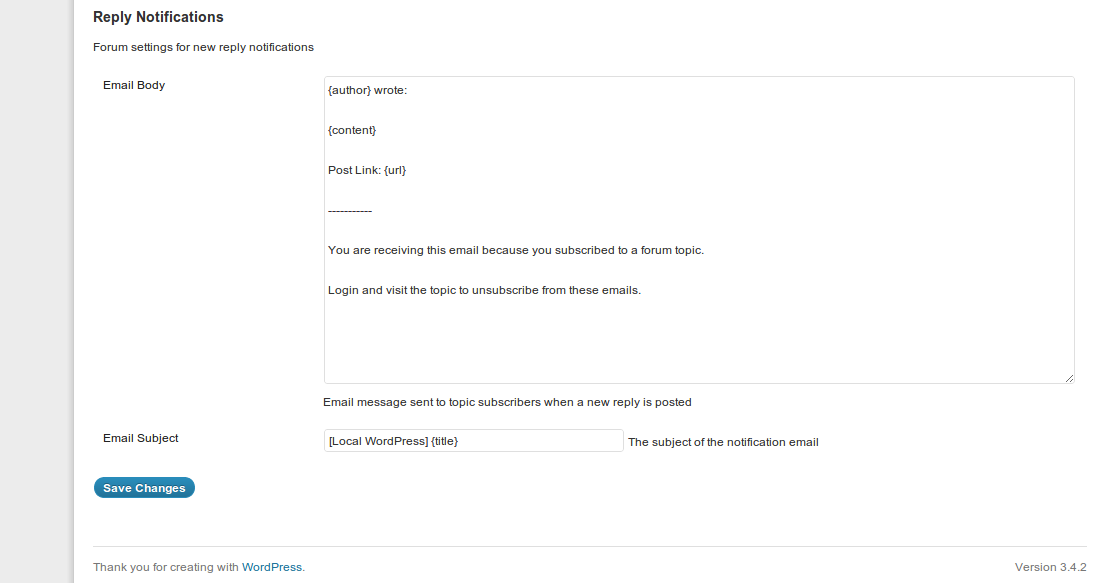
Once activated, you will have two new options in Settings > Forums that will let you configure the email and subject to your liking. See the screenshot below:
Perfect! I was looking for a way to customize the outgoing message.
Had been digging in the code and bam, you sent me an update with this info / plugin.
Thanks!
Terry
Hello
Is there an option to have email notification, with the checkbox, for the visitors not registered, please ?
The comment in post or page use this method.
Best regards
Alain
The email notification system is provided by bbPress (not this plugin). All this plugin does it make it possible to modify the email that is sent out.
OK, I’m agree with you but, Is there an option to have email notification, with the checkbox, for the visitors not registered, please ?
Best regards
Alain
No there is not an option.
Merci pour la réponse !
Quelqu’un saurait-il faire une modification de ce type afin d’offrir à tout utilisateur non enregistré la possibilité de réception de notification ?
Par avance merci
Alain
Sorry, but I only speak/read English 🙂
Well done! I managed already by editing the core-files but obviously that wasn’t an option…
Hello, I need this just for one specific forum, not all of them… I have the option of suscribe topic by topic (bbpress) or all the forums (adding plugins), nothing in the middle
other plugins:
http://wordpress.org/extend/plugins/bbpress-email-notifications/
http://wordpress.org/extend/plugins/bbpress-notify/
can you help me?
I can point in the right direction for customizing the PHP, but only if you’re comfortable with PHP. Are you?
Yes, thanks!!!! You mean the php in the bbpress itself or in the other extensions?
In the the bbPress Private reply extension.
Great plugin! Just a couple questions…
Where can I find a complete list of shortcodes (e.g. {author}, {title}, {content}, etc.) that can be used within the reply notifications form?
Also, is it possible to change what appears at the beginning of the Email Subject? Right now it defaults to [Blog Name] regardless of what I put into that field.
Thanks,
Bill
The email body supports: {author}, {content}, {url}.
The email subject supports just {title}.
The subject should allow you to change the entire thing, so if it’s not, that is probably a bug.
Hey there!
Thank you for this plugin, it’s exactly what I needed, and saved me a boat load of time.
There’s only one thing I had to hack into it for my needs, and I was wondering if you wanted to incorporate it into your next release as well.
I wanted to use the title of the post in the email message. here’s the reply_message function as I modified it:
function reply_message( $message, $reply_id, $topic_id, $user_id ) {
$reply_content = strip_tags( bbp_get_reply_content( $reply_id ) );
$reply_url = bbp_get_reply_url( $reply_id );
$reply_author = bbp_get_reply_author_display_name( $reply_id );
$topic_title = strip_tags( bbp_get_topic_title( $topic_id ) );
$custom_message = get_option( ‘_bbp_reply_notice_body’ );
$message = $custom_message ? $custom_message : $message;
$message = str_replace( ‘{author}’, $reply_author, $message );
$message = str_replace( ‘{content}’, $reply_content, $message );
$message = str_replace( ‘{url}’, $reply_url, $message );
$message = str_replace( ‘{title}’, $topic_title, $message );
return $message;
}
Thanks again!
I will consider it on the next update, thanks!
Is there a way to swap-out {content} with just an excerpt? I would like to encourage my readers to click on the post link and come back to my website to read the rest of the message!
Also, to Alain. I use this plug-in to pre-check the notify of reply box by de-fault. Works like a charm!
http://wordpress.org/plugins/bbpress-stay-checked/
Ciao,
L
Not at this time.
Struggling with the notification formatting …just keeps coming through in jumbled message. just trying to get
{author} wrote:
{content}
{url}
To stop receiving click here
Follow us on Twitter @remotestylist
but it consistently sends in one line wrap text. Ideas?
Could you show me a screenshot of how it comes through?
can you email me as i have a screenshot which i can’t attach here
Upload it to https://imgur.com/ and then share the link.
here is the link
http://imgur.com/bUDNGIJ
My first guess is that it’s caused by an issue with another plugin on your site. Could you deactivate all other plugins and see if that fixes the issue?
hi..
Im using bbPress Custom Reply Notifications plugin for forum email sending but i want to change the structure of email body means i want to change the font color, font size etc. i change the file and add inline css but they don’t take css. i dont know what is the problem. Please give solution for that.
CSS is not accepted in the email, sorry.
So what i do for that. Any solution.
I don’t have a solution for you, sorry.
I see that the email subject only contains {title} — are there any plans, or is there any way, to add the separate subforum headings to the subject line? We have users who used to be on a ListServe and filtered out forum posts based on the subject line, but are no longer able to do that. The more detail we could get into the subject line, the better. Thanks!
Not at this time, sorry.
Would love if this worked with the Private Replies extension. We ask users for some private info to do their support request but never get emailed. I don’t have time to keep checking the forums every day and sometimes topics go untouched for weeks since I did not get the email from a private reply.
Hi,
Is there some conflict with the latest BBPress and this plugin as our Admins now receive two email notifications with slightly different content when a new topic is created.
I’m sure one email is generated from this plugin and the other from bbpress core.
I’m not aware of a conflict.
Do you have any other plugins that modify bbPress emails?
Any plans on updating the app? I really want this functionality but it hasn’t been updated…
I do not have plans to update it at this time.
I am genuinely delighted to glance at this blog posts which consists of plenty
of helpful data, thanks for providing these
statistics.
The B-Tight Cellulite Cream product additionally utilizes
Guarana in order to work due to the fact that guarana has been displayed in some studies to
slow down the destructive results of aging on skin [1] The manner in which it could be able to aid the customer drop weight is by targeting
fat lipids and also enhancing blood circulation.
Very nice blog post. I absolutely love this website.
Keep it up!
Hello,
nice exstension. I need a possibility to reduce the content, that only a part of the answer of the topic is shown in the mail. Is it possible?
Best regards!
Peter