Pippins Plugins
  • Email
  • Facebook
  • Feedburner
  • Github
  • Google
  • Twitter
  • Vimeo
  • Youtube
  • Rss
  • About
  • News
  • Join the Site
    • Member Benefits
    • Member Plugins
    • Email Notifications
  • Plugin Store
    • Affiliate Area
    • Checkout
  • Plugins
    • Plugin Portfolio
      • Plugin Portfolio – List View
    • Free
    • Premium
    • Member Plugins
    • Coding Standards
    • Get Plugin Support
  • Tutorials
    • Series
      • Plugin Development 101
      • Creating a User Follow System Plugin
      • Customizing Restrict Content Pro
      • Displaying Content with Easy Content Types
      • Writing Your First WordPress Plugins, Basic to Advanced
      • Working with Widgets
      • User Submitted Image Galleries
      • Plugin Thoughts
      • Integrating Stripe.com with WordPress
      • WordPress Rewrite API
    • Member Exclusive
      • Free Members
      • Subscriber Only
    • Difficulty
      • Beginner
      • Intermediate
      • Advanced
    • Action and Filter Hooks
    • Ajax
    • Custom Post Types
    • External APIs
    • Short Codes
    • Taxonomies
    • Video Tutorials
    • Widget Tutorials
    • WordPress Admin / Dashboard
    • Working with jQuery
    • WordPress Database
    • Writing Plugins
    • Tag Index
  • Reviews
  • Support Forum
  • Contact
    • Support the Site
    • Request Code Review
    • Plugin Support

Add Custom User Meta Fields to Restrict Content Pro Registration

Posted on February 24, 2012 by Pippin in Action and Filter Hooks, Advanced, Free Members, Member Restricted, Tutorials, Video Tutorials, Working with Users, Writing Plugins 37 Comments
Home» Tutorials » Action and Filter Hooks » Add Custom User Meta Fields to Restrict Content Pro Registration
Tweet
Love It - 0
This entry is part 2 of 8 in the Customizing Restrict Content Pro Series
← Mail Chimp for Restrict Content ProRemoving “Restrict This Content” Meta Box in Restrict Content Pro →
  • Mail Chimp for Restrict Content Pro
  • Add Custom User Meta Fields to Restrict Content Pro Registration
  • Removing “Restrict This Content” Meta Box in Restrict Content Pro
  • Restrict Content Pro – Campaign Monitor
  • Restrict Content Pro – Graphs
  • Restrict Content Pro – Stripe Payment Gateway
  • Hide wp-login.php with Restrict Content Pro
  • Add a Agree to Our Terms of Use Field to Restrict Content Pro

Restrict Content Pro is my premium content plugin that makes it very easy to sell subscriptions to your WordPress website. It is the plugin that powers the subscription system to this site. This subscribers’s only tutorial is going to walk you through the process of adding new form fields to the registration form, and then storing the data enter in those fields in the user’s meta. I will also cover how to output the newly acquired information in the Members page of the plugin admin section.

The gist of what we are going to be doing in this tutorial can be see in the two screenshots below:

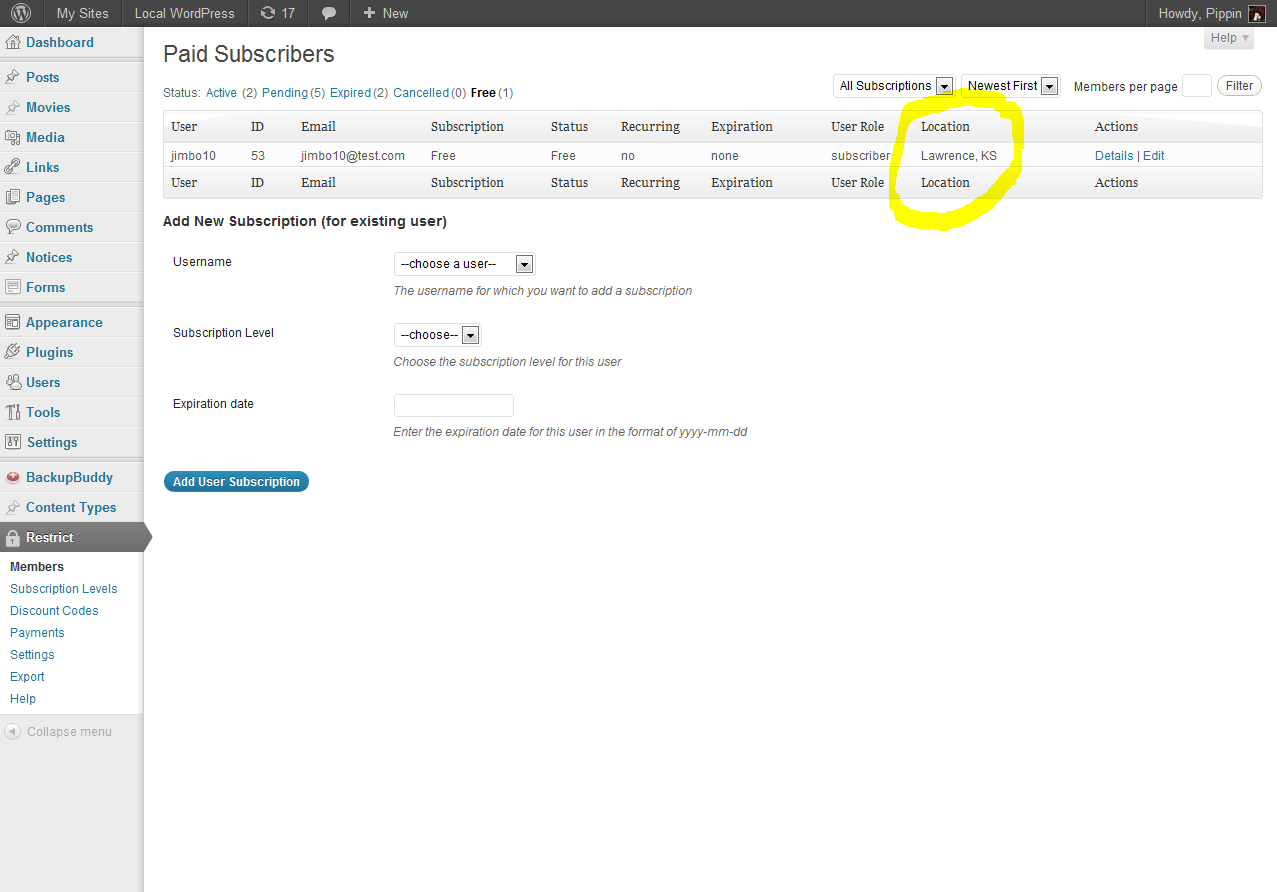
The complete code written in the video is below:

1
2
3
4
5
6
7
8
9
10
11
12
13
14
15
16
17
18
19
20
21
22
23
24
25
26
27
28
29
30
31
32
 
function pippin_add_location_field() {
	?>
	<p>
		<label for="rcp_location"><?php _e('Your Location', 'rcp'); ?></label>
		<input name="rcp_location" id="rcp_location" type="text"/>
	</p>
	<?php
}
add_action('rcp_after_password_registration_field', 'pippin_add_location_field');
 
function pippin_save_location($posted, $user_id) {
	if($posted['rcp_location']) {
		update_user_meta($user_id, 'rcp_location', $posted['rcp_location']);
	}
}
add_action('rcp_form_processing', 'pippin_save_location', 10, 2);
 
function pippin_add_table_header_footer() {
	?>
	<th class="rcp-location-col"><?php _e('Location', 'rcp'); ?></th>
	<?php
}
add_action('rcp_members_page_table_header', 'pippin_add_table_header_footer');
add_action('rcp_members_page_table_footer', 'pippin_add_table_header_footer');
 
function pippin_add_row($user_id) {
	?>
	<td><?php echo get_user_meta($user_id, 'rcp_location', true); ?></td>
	<?php
}
add_action('rcp_members_page_table_column', 'pippin_add_row');

Related Items
  • Restrict Content Pro – Wysija Add On
  • Restrict Content Pro – Premium Content Plugin
Tweet Follow @pippinsplugins
add_action, get_user_meta, restrict content pro, update_user_meta

37 comments on “Add Custom User Meta Fields to Restrict Content Pro Registration”

  1. BA Kumar says:
    May 10, 2012 at 6:05 am

    Hi,

    Is it possible to create multiple registration froms for different custom role for my project in WP with user meta, and at the same time i need customize the form with my own CSS.

    when user login we need give update they profile with profile picture.

    please help me

    thanks
    BA Kumar

    Reply
    • Pippin says:
      May 11, 2012 at 11:06 am

      Yes, it is possible, but only if you know how to do it by copying the existing form and creating a second one.

      There are several plugins out there that allow users to set profile images, but there is not a way included with RCP.

    • BA Kumar says:
      May 11, 2012 at 11:20 am

      Hi,

      Thank you for reply, but i s short. if you have free time please provide detailed explanation.
      it very important who search multiple registration forms like me.

      please help me

      Thank you

    • Pippin says:
      May 11, 2012 at 1:04 pm

      Duplicating the forms is not too difficult, but it goes far beyond the scope of the support you get included with the plugin purchase.

  2. Mithun1 says:
    May 18, 2012 at 5:12 am

    where I can add this code?

    Reply
    • Pippin says:
      May 18, 2012 at 10:07 am

      Your theme’s functions.php or any custom plugin is fine.

  3. kakon says:
    May 19, 2012 at 11:50 am

    i added the code but it’s not working. Location is not showing on back end. How can I fix it. How can I add more field?

    Reply
  4. kakon says:
    May 20, 2012 at 1:05 am

    now problem has been solved. do you have any option to add moneybookers ? how can i add?

    Reply
    • Pippin says:
      May 20, 2012 at 3:29 pm

      In order to use Money Bookers, you will have to build a custom payment gateway. How comfortable with PHP are you?

  5. Kyle says:
    July 11, 2012 at 7:50 pm

    Hi, How do I add multiple fields. I was able to add location, but when i copy and alter for a 2nd field I get an error which seems like I can’t add 2 identical hooks:
    Fatal error: Cannot redeclare pippin_add_table_header_footer() (previously declared in /home/condo/public_html/condo/wp-content/plugins/custom-functions/custom-functions.php:50) in /home/condo/public_html/condo/wp-content/plugins/custom-functions/custom-functions.php on line 86

    Reply
    • Pippin says:
      July 12, 2012 at 9:48 am

      Kyle, you have to change the name of the second function/hook. As you noted, they cannot be the same. Just renamed the second pippin_add_table_header_footer() to something else and then also rename it in the add_action().

  6. Mario says:
    September 15, 2012 at 8:50 pm

    This modification is great, i’m using to add multiple fields however, another 14 records, which works fine, until I get to the admin section.

    All the columns are added, however they get *squashed*, editing the admin-style.css file and adding extra CSS records.. as follows :

    .rcp-user-col { width: 100px; }
    .rcp-id-col { width: 50px; }
    .rcp-email-col { width: 180px; }
    .rcp-sub-col { width: 140px; }
    .rcp-status-col { width: 70px; }
    .rcp-recurring-col { width: 90px; }
    .rcp-expiration-col { width: 140px; }
    .rcp-role-col { width: 90px; }
    .rcp-city-col { width: 70px; }
    .rcp-state-col { width: 70px; }
    .rcp-country-col { width: 90px; }
    .rcp-postcode-col { width: 70px; }
    .rcp-phone-col { width: 40px; }
    .rcp-mobile-col { width: 40px; }
    .rcp-dob-col { width: 40px; }
    .rcp-age-col { width: 25px; }
    .rcp-sex-col { width: 40px; }
    .rcp-parents-col { width: 90px; }
    .rcp-hsyear-col { width: 40px; }
    .rcp-hs-col { width: 70px; }
    .rcp-hsaddress-col { width: 90px; }
    .rcp-handicap-col { width: 50px; }
    .rcp-actions-col { }

    once I get to a certain number the action column completely vanishes and i’m unsure why :(

    any idea / assistance on why this would be occuring? or is there a different way to view/edit the data?

    Reply
    • Pippin says:
      September 16, 2012 at 3:19 pm

      How many columns do you have with your modified code?

  7. Will says:
    December 18, 2012 at 7:23 pm

    If the answer to that is “Lots and lots” – is there a hook to add fields to the detail view, instead of the list view in the admin area?

    Reply
  8. Will says:
    December 18, 2012 at 7:56 pm

    And the answer of course is yes. Checking the source I found rcp_view_member_after:

    function pippin_add_fields($user_id) { ?>

    <?php
    }
    add_action('rcp_view_member_after', 'pippin_add_fields');

    Hope that helps someone. This plugins code really is very well written.

    Reply
    • Pippin says:
      December 19, 2012 at 5:55 pm

      Your code was stripped out, please post again via snippi.com

    • Will says:
      December 19, 2012 at 6:26 pm

      http://snippi.com/s/kepbxqh

      Really the key thing is what the hook is, but yeah. Here is an example of what I’m adding (its actually like 20 fields)

    • Pippin says:
      December 20, 2012 at 8:55 pm

      Thanks for reposting!

  9. Dustin Thornborrow says:
    January 7, 2013 at 9:34 pm

    Using your example of “location”. How would I have the content of that input added to the email that is sent to the admin on submit? Currently it just shows

    Reply
  10. Dustin Thornborrow says:
    January 7, 2013 at 9:38 pm

    Whoops that go cut off. Currently one email shows first and last name, the other shows username and email.

    Reply
    • Pippin says:
      January 9, 2013 at 5:10 pm

      Are you familiar with using filters in WordPress?

  11. ahmad says:
    January 8, 2013 at 5:15 pm

    hi, I am adding like 4 new filed in RCP plugin the way you described above. I have couple of question. First one i want to make my new field required field how can i make my new fields required field. I explored your Member-form.php you are using there like to make field required . i am trying for my flied like function pippin_add_dlic_field(){
    ?>

    but its not wrking.
    2nd question when i see my new field in restrict Member area in word press its look weird not with sequence and how can i fetch all field from database by using user id. like i want to see all field info of user. how can i fetch all field from database. thanks Plz reply me asap.

    Reply
    • Pippin says:
      January 9, 2013 at 5:14 pm

      1. To make a field required, you need to check if the data is present when the form is submitted and then set an error if it isn’t. See this tutorial.

      2. Can you give me a screenshot? You can’t fetch all the fields at once; each one has to be fetched individually.

  12. Ahmad says:
    January 10, 2013 at 7:05 am

    here is screen
    http://s1278.beta.photobucket.com/user/mian325/media/screen_zps463343cb.jpg.html?sort=3&o=0

    Reply
  13. ali Ahmad says:
    January 10, 2013 at 8:35 am

    1- Plz have look for my new field code for required field
    http://snippi.com/s/xt63dtb
    2- Here is snap shot of my Members in restrict content pro

    http://s1278.beta.photobucket.com/user/mian325/media/screen_zps463343cb.jpg.html

    Reply
  14. Ahmad says:
    January 11, 2013 at 10:09 am

    is there any way that i can display my total number of active members by using restrict content pro plugin. I want to display on my page how much member i have now and it will update as member increase. Plz help me how can i do that

    Reply
    • Pippin says:
      January 14, 2013 at 9:06 pm

      I’ve responded to your ticket in the support forum.

  15. Marie Powell says:
    January 23, 2013 at 4:34 pm

    I successfully added two new fields to the form – thank you!

    My issue: Can you explain how to move the two new fields to display after the Email field and before the Username field? I would like…

    First Name
    Last Name
    Email
    Your Company
    Phone Number
    Username
    Password
    Password again

    Reply
    • Pippin says:
      January 23, 2013 at 9:29 pm

      Sorry but that is not possible.

  16. Ahmad says:
    February 2, 2013 at 9:18 am

    Hi, When my expired user try to pay subscription again register button does not work. Same if one user get member and decided to pay subscription later. Later he get login and try to pay by paypal by clicking on register button he cant pay.. register button dont go to paypal page. Please let me know what is wrong.

    Reply
    • Pippin says:
      February 4, 2013 at 11:31 am

      Please open this as a support ticket: http://support.pippinsplugins.com/forums/forum/restrict-content-pro/

      This tutorial is not the place to ask for support.

  17. mezzaninegold says:
    February 14, 2013 at 7:36 am

    Can the user then update this meta information or is it only on registration?

    Reply
    • Pippin says:
      February 19, 2013 at 2:13 pm

      It is possible to make that happen but the code is this tutorial does not make that possible.

    • mezzaninegold says:
      March 1, 2013 at 11:04 am

      I solved this by using the “User Meta Manager” plugin by simply adding the new meta fields. Worked straight away without any fuss so users can now go their profile page and update the fields.

    • Pippin says:
      March 4, 2013 at 8:52 pm

      Great!

  18. Simon says:
    February 26, 2013 at 4:37 am

    How do I remove the auto renew tickbox and as default have it not to auto renew (I am only offering free subscriptions)?

    Reply
    • Pippin says:
      February 26, 2013 at 4:14 pm

      Post this in the support forums and I’ll be happy to help.

Leave a Reply Cancel reply

Your email address will not be published. Required fields are marked *

You may use these HTML tags and attributes: <a href="" title=""> <abbr title=""> <acronym title=""> <b> <blockquote cite=""> <cite> <code> <del datetime=""> <em> <i> <q cite=""> <strike> <strong>

  • Login

Lost your password?

Please enter your username or e-mail address. You will receive a new password via e-mail.

  • Facebook Become a Fan Like

  • Twitter Subscribe on Twitter Follow

  • YouTube Follow my Videos Subscribe

  • RSS Feed Subscribe with RSS Subscribe

Easy Digital Downloads

Most Loved

  • Love It Pro for WordPress
  • Write a “Love It” Plugin with Ajax to Let Users Love Their Favorite Posts / Pages
  • Simple Notices Pro Plugin for WordPress
  • User Bookmarks for WordPress
  • Front End Registration and Login Forms Plugin

Similar Plugins and Posts

  • Restrict Content Pro – Member Discounts for Easy Digital Downloads
  • Restrict Content Pro – bbPress Extension
  • Restrict Content Pro – Wysija Add On
  • Restrict Content Pro – CSV User Import
  • WP Push Releases Restrict Content Pro Extension

Latest Premium Content

  • Plugin Development 101 – Introduction to Adding Dashboard Menus
  • Plugin Development 101 – Intro to Loading Scripts and Styles
  • User Follow System – Part 5
  • Plugin Development 101 – Intro to Short Codes
  • Plugin Development 101 – Registering a Custom Post Type
  • Plugin Development 101 – Intro to Actions

Latest Tutorials

  • Submitting Your First Pull Request to a WordPress Plugin on Github (2)

    Github is an extremely popular tool for managing WordPress plugins, and one...

  • Plugin Development 101 – Introduction to Adding Dashboard Menus (1)

    Adding new menus, both top level and sub level, to the WordPress Dashboard is a really common task for plugins...

  • Plugin Development 101 – Intro to Loading Scripts and Styles (16)

    In this part of Plugin...

Enter your email to receive automated updates when new posts are published

Latest Tweets

  • @jaredatch @kimparsell :D
    May 23, 2013
  • @jaredatch there is, as long as there is at least one ticket
    May 23, 2013
  • RT @Astoundify: We are hiring p/t tech support rep for our support forum if your interested email contact [at] http://t.co/bcXNhcwZx5
    May 23, 2013

Topics

hook meta box Rémi Corson featured shortcodes campaign monitor add_options_page register_setting Sugar Event Calendar attachments add_shortcode wp_enqueue_script the_content image forms short codes Related posts login do_action authors mail chimp attachment plugin recent posts comments post types bbpress apply_filters short code taxonomies custom post type Ajax images gallery Stripe jquery taxonomy users widgets add_filter easy content types add_action widget restrict content pro easy digital downloads

Weekly Newsletter

Useful Links

  • Join the Site
  • Plugin Store
  • Affiliate Area
  • Tag Index
  • Support the Site
  • Suggest a Tutorial
  • Random Post
  • Contact

Monthly Archives

(c) 2011 Pippin's Plugins