
WordPress 3.3 has a really nice new Help menu that can be used by plugin and theme developers to show a lot of helpful information to the users. It’s very similar to the Contextual Help Tab, but allows much more information to displayed in a more organized fashion. Instead of all content being displayed in a single pane, the new 3.3 help menu allows you to separate your help information into multiple tabs.
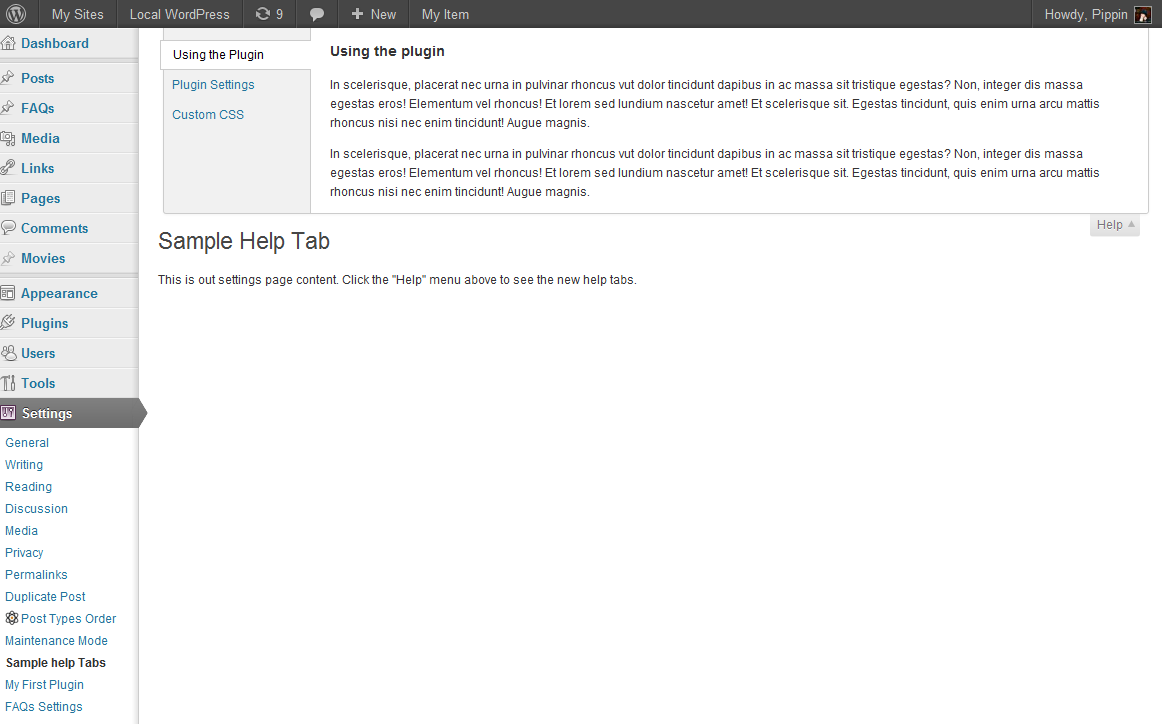
[box style=”notice”]Note, in the official 3.3 release, the Help button has been removed from the toolbar, and has been restored to the Help tab in the top right.[/box]
Adding tabs to the WordPress 3.3 Help menu is not difficult, but works a little differently than the < 3.3 Contextual Help Tab, and is not backwards-compatible. Any helps tabs you have set up for WP 3.2.1 or earlier, will not show up in WP 3.3 (unless you used the add_contextual_help(), and nor will Help menu tabs setup in WP 3.3 show up in WP 3.2.1 or earlier. So you have to make sure that you go the extra mile and make your plugin help information accessible to users of WordPress 3.3 and earlier.
1 2 3 4 5 6 7 8 9 10 11 12 13 14 15 16 17 18 19 20 21 22 23 24 25 26 27 28 29 30 31 32 33 34 35 36 37 38 39 40 41 42 43 44 45 46 47 48 49 50 51 52 53 54 55 56 57 58 59 60 61 62 63 64 65 66 67 68 69 70 71 72 73 74 75 76 77 78 79 80 81 | <?php /* Plugin Name: Sample 3.3 Help Tabs Plugins Plugin URI: https://pippinsplugins.com/ Description: Put custom functions in this plugin Author: Pippin Williamson Author URI: https://pippinsplugins.com Version: 1.0 */ add_action('admin_menu', 'pippin_admin_add_page'); function pippin_admin_add_page() { global $pippin_options_page; $pippin_options_page = add_options_page(__('Sample Help Tabs', 'pippin'), __('Sample help Tabs', 'pippin'), 'manage_options', 'options-test', 'pippin_options_page'); add_action("load-$pippin_options_page", 'pippin_plugin_help_tabs'); } function pippin_plugin_help_tabs() { global $pippin_options_page; $screen = get_current_screen(); if($screen->id != $pippin_options_page) return; $screen->add_help_tab(array( 'id' => 'pippins-usage', 'title' => __('Using the Plugin', 'pippin'), 'content' => pippin_help_tab_content('pippin-usage') )); $screen->add_help_tab(array( 'id' => 'pippins-settings', 'title' => __('Plugin Settings', 'pippin'), 'content' => pippin_help_tab_content('pippin-settings') )); $screen->add_help_tab(array( 'id' => 'pippins-css', 'title' => __('Custom CSS', 'pippin'), 'content' => pippin_help_tab_content('pippin-css') )); } function pippin_help_tab_content($tab = 'pippin-usage') { if($tab == 'pippin-usage') { ob_start(); ?> <h3><?php _e('Using the plugin', 'pippin'); ?></h3> <p>In scelerisque, placerat nec urna in pulvinar rhoncus vut dolor tincidunt dapibus in ac massa sit tristique egestas? Non, integer dis massa egestas eros! Elementum vel rhoncus! Et lorem sed lundium nascetur amet! Et scelerisque sit. Egestas tincidunt, quis enim urna arcu mattis rhoncus nisi nec enim tincidunt! Augue magnis.</p> <p>In scelerisque, placerat nec urna in pulvinar rhoncus vut dolor tincidunt dapibus in ac massa sit tristique egestas? Non, integer dis massa egestas eros! Elementum vel rhoncus! Et lorem sed lundium nascetur amet! Et scelerisque sit. Egestas tincidunt, quis enim urna arcu mattis rhoncus nisi nec enim tincidunt! Augue magnis.</p> <?php return ob_get_clean(); } elseif ($tab == 'pippin-settings') { ob_start(); ?> <h3><?php _e('Plugin Settings', 'pippin'); ?></h3> <p>In scelerisque, placerat nec urna in pulvinar rhoncus vut dolor tincidunt dapibus in ac massa sit tristique egestas? Non, integer dis massa egestas eros! Elementum vel rhoncus! Et lorem sed lundium nascetur amet! Et scelerisque sit. Egestas tincidunt, quis enim urna arcu mattis rhoncus nisi nec enim tincidunt! Augue magnis.</p> <?php return ob_get_clean(); } elseif ($tab == 'pippin-css') { ob_start(); ?> <h3><?php _e('Custom CSS', 'pippin'); ?></h3> <p>In scelerisque, placerat nec urna in pulvinar rhoncus vut dolor tincidunt dapibus in ac massa sit tristique egestas? Non, integer dis massa egestas eros! Elementum vel rhoncus! Et lorem sed lundium nascetur amet! Et scelerisque sit. Egestas tincidunt, quis enim urna arcu mattis rhoncus nisi nec enim tincidunt! Augue magnis.</p> <ul> <li>List Item Sample</li> <li>List Item Sample</li> <li>List Item Sample</li> <li>List Item Sample</li> </ul> <?php return ob_get_clean(); } } function pippin_options_page() { ob_start(); ?> <div class="wrap"> <h2><?php _e('Sample Help Tab', 'pippin'); ?></h2> <p>This is out settings page content. Click the "Help" menu above to see the new help tabs.</p> </div> <?php echo ob_get_clean(); } |
This is really awesome man.
I just noticed you localized it as well . 😀
Thanks, and yes I did 😉
2 things
1 – wouldn’t using a callback function be more efficient that the conditional functions
2- My help tabs aren’t on the menu bar???
thanks
-shawn
1. I don’t know if it would be more efficient, but cleaner maybe.
2. WP 3.3 made some last minute changes to the menu bar, so the method might have broken this. I will investigate today and find out.
Ok, so I’ve just tested this out and it turns out that the official 3.3 release changed how it works a little. The functions are still the same, but instead of creating a new menu item in the toolbar, the help menus are added to the Help tab in the top right. Check out the new screenshot at the top.
Thx.. Preferred the way it looked in beta…
Yeah, me too. I liked it a lot better.
Thank you Pippin for this, had it implemented in my plugin already and will be out with the next update.
Still, I have one more question:
How could hide the old contextal help from prior WP 3.3 when user uses my plugin with WP 3.3? — Reason: I want a bit of backwards compatibility for some time for my plugin. The behavior is that both help systems work great but in 3.3 it adds the old helb as the last tab always – how could I hide this?
I tried something like that, but it doesn’t work – what I am doing wront?
if ( !empty( $old_help ) ) {$screen->add_help_tab( array(
'id' => '',
'title' => '',
'content' => 0,
) );
}
I think the easiest way would be to setup the help tabs in two different functions (as you probably have), and then use a version compare conditional around the add_action(‘admin_menu’, ‘your_help_tab_function’). So if WP is v3.3, load one help tab set, but if it is less than 3.3, load the other help tab set.
Make sense?
Yes, makes sense, Pippin!
I’ve tried to implement this, but does not work yet – I assume it’s because of the fall-back functionality they’ve implemented in 3.3 — for this see file screen.php in /wp-admin/includes/ from line 644 onwards.
Here’s my code so far:
in the 3.3 help function:
if ( version_compare( $wp_version, '3.3', 'add_help_tab( array('id' => '',
'title' => '',
'content' => 0,
) );
}
and in the old 3.2 help system:
if ( version_compare( $wp_version, '3.2.1', '>' ) && isset( $_GET['page'] ) && $_GET['page'] == 'gle-layout-extras' ) {add_action( 'contextual_help', 'ddw_genesis_layout_extras_contextual_help', 10, 3 );
}
I assume that WP detects that is still some old help there (see the mentioned screen.php above) and displays it no matter what I restrict — I couldn’t it get to work with some filtering…
If that doesn’t work at all it’s not a big deal – I just release it that way in short before next major version of WP I might drop the backwards thing either way.
-Thanx, Dave 🙂
Can you show me the complete code via a pastebin?
Awesome man!
Just wondering, if I want to add this on a custom post type screen, how do I set the global variable (global $pippin_options_page; in your example)? Im just using the register_post_type function. Is it possible? I’ve tested a little and get_current_screen() doesn’t seem to work either without using add_options_page().
I’ve tried stuff like $my_options_page = ‘edit.php?post_type=my-cpt’; without any luck.
Would be sweet if anyone knows how to do it. Thanks!
I’m not sure the exact screen ID you will need to use, but you can find it by putting this in your functions.php then loading the edit page for that post type.
I got [id] => edit-my-cpt and tried both to set $pippin_options_page = ‘edit-my-cpt’; and $pippin_options_page = $current_screen->id; followed by the rest of your example code without success. I think the action load-(page) doesn’t like that very much 🙂
Hmm, I’ll try and see if I can test it
Yeah I’d love an answer to this too, I never understood the load action when it comes to custom post types =/
I gave up and just did it like this (my custom post type is called “portfolio”):
$screen = get_current_screen();
if ($screen->id == ‘portfolio’) {
// all that cool stuff from before
}
Yeah, that should work. I’m going to try and look into the “load-” hook more.
Travis Smith, from wpsmith.com just posted a quick tutorial that shows how to add this on a post/page or custom post type: http://wpsmith.net/2011/wp/adding-contextual-help-tab-to-editadd-new-postpage/?utm_source=feedburner&utm_medium=twitter&utm_campaign=Feed%3A+WPSmith+%28WP+Smith%29
Just incase anyone else runs in to a similar issue, I spent literally a WHOLE DAY trying to figure out why my plugin pages help tabs were not displaying…
In add_menu_page I used a path to a file rather than a callback for generating my pages output. It turns out if you use a file path registering a help menu doesn’t work, you have to register your menu item with a callback…
For backward compatibility, could use something like:
add_action( ‘contextual_help’, ‘add_contextual_help’ , 10, 3 );
function add_contextual_help( $contextual_help, $screen_id, $screen ) {
//Do whatever you need to with the $screen and screen_id
if ( version_compare( $wp_version, ‘3.3’, ‘>=’ ) )://Sweet tabbed contextual help was introduced in 3.3
$screen->add_help_tab( $this->add_support_help_tab() );
$screen->add_help_tab(
array(
‘id’ => ‘unique-id-for-help-screen’,
‘title’ => __( ‘Overview’ ),
‘content’ => $contextual_help
));
else:
return $contextual_help;
endif;
}